sketchucation logo sketchucation
    • Login
    1. Home
    2. Bob James
    3. Posts
    Oops, your profile's looking a bit empty! To help us tailor your experience, please fill in key details like your SketchUp version, skill level, operating system, and more. Update and save your info on your profile page today!
    ⚠️ Important | Libfredo 15.6b introduces important bugfixes for Fredo's Extensions Update
    Offline
    • Profile
    • Following 0
    • Followers 0
    • Topics 66
    • Posts 1,110
    • Groups 1

    Posts

    Recent Best Controversial
    • RE: [Plugin Library] LibFredo6 - v15.6c - 10 Dec 25

      @tig said:

      Nil desperandum !
      πŸ˜†

      .

      @tig said:

      The first thing I see that's not right is that you have a copy of the 'Fredo6_!LibFredo6' folder INSIDE the 'Fredo6_Curviloft' folder.
      It is not needed, it's not as shipped and should be removed.
      Although I can't see how that might be affecting things !
      The only 'Fredo6_!LibFredo6' folder should be in the Plugins folder.
      After the removal of the wrong copy can you restart to see if anything is better... πŸ˜• .

      I noticed that and removed it, It had no effect.
      I removed all Fredo plugins and did a fresh install using SketchUcation Plugin Store so what's there came from those installations.

      posted in Plugins
      Bob JamesB
      Bob James
    • RE: [Plugin Library] LibFredo6 - v15.6c - 10 Dec 25

      @fredo6 said:

      Bob,

      Why don't you simply remove all my plugins files and folders, and then reinstall from the Plugin Store, checking at each step that this is OK.

      Fredo

      ALL of your plugins are freshly installed using SketchUcation Plugin Store

      posted in Plugins
      Bob JamesB
      Bob James
    • RE: [Plugin Library] LibFredo6 - v15.6c - 10 Dec 25

      @tig said:

      Thanks Fredo.
      At last we see what the old error-inducing file was...
      πŸ˜’

      Nice, if it were true 😞
      I deleted the six files fredo6identified, but still get the following errors:

      Error Loading File Fredo6_!LibFredo6.rb
      Error: #<ArgumentError: invalid byte sequence in UTF-8>
      C:/Users/jamesb/AppData/Roaming/SketchUp/SketchUp 2015/SketchUp/Plugins/Fredo6_!LibFredo6/Lib6Core.rb:702:in match' C:/Users/jamesb/AppData/Roaming/SketchUp/SketchUp 2015/SketchUp/Plugins/Fredo6_!LibFredo6/Lib6Core.rb:702:in block (2 levels) in load_from_config'
      C:/Users/jamesb/AppData/Roaming/SketchUp/SketchUp 2015/SketchUp/Plugins/Fredo6_!LibFredo6/Lib6Core.rb:701:in each' C:/Users/jamesb/AppData/Roaming/SketchUp/SketchUp 2015/SketchUp/Plugins/Fredo6_!LibFredo6/Lib6Core.rb:701:in block in load_from_config'
      C:/Users/jamesb/AppData/Roaming/SketchUp/SketchUp 2015/SketchUp/Plugins/Fredo6_!LibFredo6/Lib6Core.rb:700:in foreach' C:/Users/jamesb/AppData/Roaming/SketchUp/SketchUp 2015/SketchUp/Plugins/Fredo6_!LibFredo6/Lib6Core.rb:700:in load_from_config'
      C:/Users/jamesb/AppData/Roaming/SketchUp/SketchUp 2015/SketchUp/Plugins/Fredo6_!LibFredo6/Lib6Core.rb:1070:in block in load_all_plugins' C:/Users/jamesb/AppData/Roaming/SketchUp/SketchUp 2015/SketchUp/Plugins/Fredo6_!LibFredo6/Lib6Core.rb:1070:in each'
      C:/Users/jamesb/AppData/Roaming/SketchUp/SketchUp 2015/SketchUp/Plugins/Fredo6_!LibFredo6/Lib6Core.rb:1070:in load_all_plugins' C:/Users/jamesb/AppData/Roaming/SketchUp/SketchUp 2015/SketchUp/Plugins/Fredo6_!LibFredo6/Lib6Core.rb:772:in load_from_config'
      C:/Users/jamesb/AppData/Roaming/SketchUp/SketchUp 2015/SketchUp/Plugins/Fredo6_!LibFredo6.rb:188:in startup' C:/Users/jamesb/AppData/Roaming/SketchUp/SketchUp 2015/SketchUp/Plugins/Fredo6_!LibFredo6.rb:335:in module:LibFredo6'
      C:/Users/jamesb/AppData/Roaming/SketchUp/SketchUp 2015/SketchUp/Plugins/Fredo6_!LibFredo6.rb:34:in `<top (required)>'

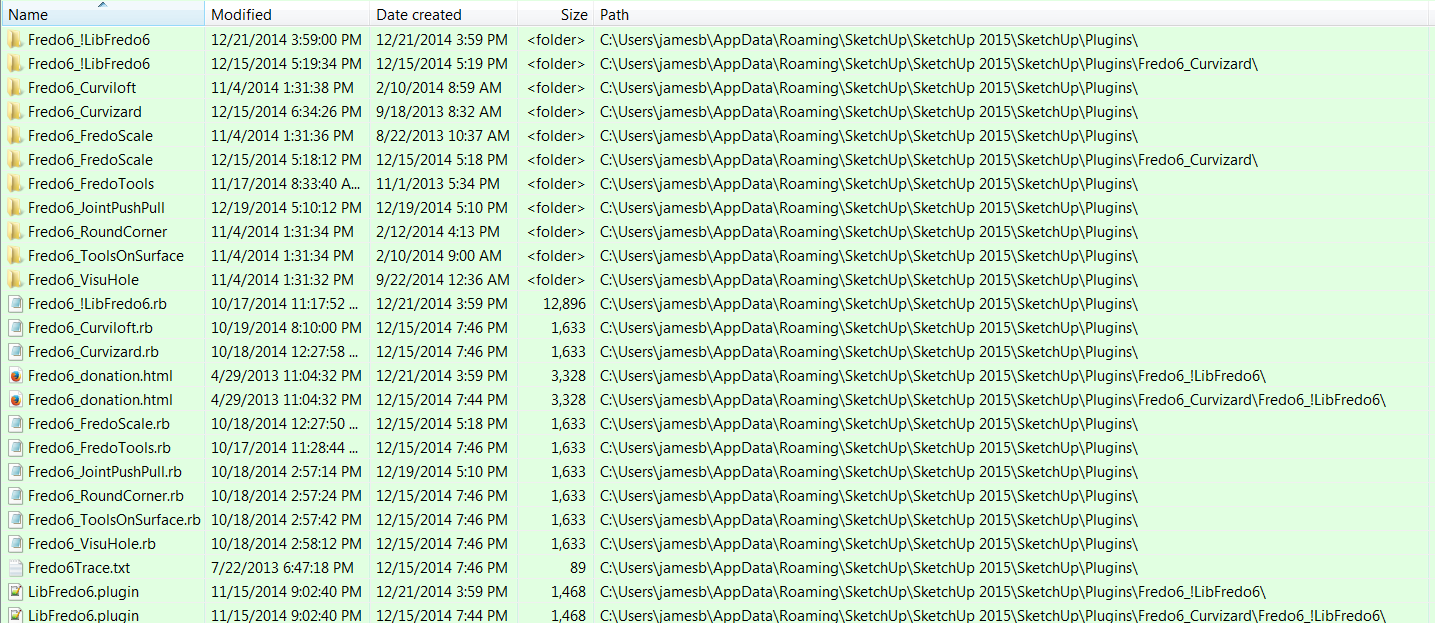
      These are all of the loaded plugins/extensions that have "fredo6" either in the title or within the file:
      fredo6.PNG

      This is an Excel spreadsheet showing all of the loaded plugins/extensions except for Thea and 3dconexxion which are in C:/ProgramData/SketchUp/SketchUp 2015/SketchUp/Plugins folder.
      2015 Plugins.xls

      posted in Plugins
      Bob JamesB
      Bob James
    • RE: [Plugin] SketchUcation Tools 2.6.1

      Thank you, Box

      posted in Plugins
      Bob JamesB
      Bob James
    • RE: [Plugin] SketchUcation Tools 2.6.1

      Whatever happened to version 2.6.2?
      I had it running for a while, but it got deleted in one of my attempts to "clean house"

      posted in Plugins
      Bob JamesB
      Bob James
    • RE: [Plugin Library] LibFredo6 - v15.6c - 10 Dec 25

      Did as instructed and got the same error message so I reinstalled all of your plugins.


      This is the list of all Fredo6 plugins I have installed.
      **
      @tig said:

      **If you have a redundant copy of the old LibTraductor.rb in your Plugins folder, then also remove that [it now comes installed within the main Lib subfolder].

      Note that LibTraductor.rb was reinstalled as a separate ruby as well as within Fredo6_!LibFredo6 as Lib6Traductor
      2014-12-21 Fredo6_!LibFredo6
      2014-12-21 Fredo6_!LibFredo6.rb
      2014-12-21 LibTraductor.rb
      2014-12-19 Fredo6_JointPushPull
      2014-12-19 Fredo6_JointPushPull.rb
      2014-12-15 Fredo6_Curviloft.rb
      2014-12-15 Fredo6_Curvizard.rb
      2014-12-15 Fredo6_FredoScale.rb
      2014-12-15 Fredo6_FredoTools.rb
      2014-12-15 Fredo6_RoundCorner.rb
      2014-12-15 Fredo6_ToolsOnSurface.rb
      2014-12-15 Fredo6_VisuHole.rb
      2014-12-15 Fredo6Trace.txt
      2014-12-15 FredoTraceRoundCorner.txt
      2014-12-15 Fredo6_Curvizard
      2014-12-14 CURVILOFT_Dir_12
      2014-12-14 CURVIZARD_Dir_11
      2014-12-14 FREDOSCALE_Dir_22
      2014-12-14 FREDOTOOLS_Dir_12
      2014-12-14 LIBFREDO6_Dir_48
      2014-12-14 LibFredo6.rb
      2014-11-17 Fredo6_FredoTools
      2014-11-04 Fredo6_Curviloft
      2014-11-04 Fredo6_FredoScale
      2014-11-04 Fredo6_VisuHole
      2014-11-04 Fredo6_RoundCorner
      2014-11-04 Fredo6_ToolsOnSurface\


      I still get this error set:
      Error Loading File Fredo6_!LibFredo6.rb
      Error: #<ArgumentError: invalid byte sequence in UTF-8>
      C:/Users/jamesb/AppData/Roaming/SketchUp/SketchUp 2015/SketchUp/Plugins/Fredo6_!LibFredo6/Lib6Core.rb:702:in match' C:/Users/jamesb/AppData/Roaming/SketchUp/SketchUp 2015/SketchUp/Plugins/Fredo6_!LibFredo6/Lib6Core.rb:702:in block (2 levels) in load_from_config'
      C:/Users/jamesb/AppData/Roaming/SketchUp/SketchUp 2015/SketchUp/Plugins/Fredo6_!LibFredo6/Lib6Core.rb:701:in each' C:/Users/jamesb/AppData/Roaming/SketchUp/SketchUp 2015/SketchUp/Plugins/Fredo6_!LibFredo6/Lib6Core.rb:701:in block in load_from_config'
      C:/Users/jamesb/AppData/Roaming/SketchUp/SketchUp 2015/SketchUp/Plugins/Fredo6_!LibFredo6/Lib6Core.rb:700:in foreach' C:/Users/jamesb/AppData/Roaming/SketchUp/SketchUp 2015/SketchUp/Plugins/Fredo6_!LibFredo6/Lib6Core.rb:700:in load_from_config'
      C:/Users/jamesb/AppData/Roaming/SketchUp/SketchUp 2015/SketchUp/Plugins/Fredo6_!LibFredo6/Lib6Core.rb:1070:in block in load_all_plugins' C:/Users/jamesb/AppData/Roaming/SketchUp/SketchUp 2015/SketchUp/Plugins/Fredo6_!LibFredo6/Lib6Core.rb:1070:in each'
      C:/Users/jamesb/AppData/Roaming/SketchUp/SketchUp 2015/SketchUp/Plugins/Fredo6_!LibFredo6/Lib6Core.rb:1070:in load_all_plugins' C:/Users/jamesb/AppData/Roaming/SketchUp/SketchUp 2015/SketchUp/Plugins/Fredo6_!LibFredo6/Lib6Core.rb:772:in load_from_config'
      C:/Users/jamesb/AppData/Roaming/SketchUp/SketchUp 2015/SketchUp/Plugins/Fredo6_!LibFredo6.rb:188:in startup' C:/Users/jamesb/AppData/Roaming/SketchUp/SketchUp 2015/SketchUp/Plugins/Fredo6_!LibFredo6.rb:335:in module:LibFredo6'
      C:/Users/jamesb/AppData/Roaming/SketchUp/SketchUp 2015/SketchUp/Plugins/Fredo6_!LibFredo6.rb:34:in `<top (required)>'

      posted in Plugins
      Bob JamesB
      Bob James
    • RE: [Plugin Library] LibFredo6 - v15.6c - 10 Dec 25

      @box said:

      Bob, just to be sure, you say you have no other plugin folders but you did have a dropbox one and have been setting up a Cloud one. They may well have an errant copy of LibFredo hiding in them.

      Go to the Sketchucation Plugins Manager, the blue button on the toolbar, and check the dropdown menu at the top. Are there any other folder locations showing there?

      No πŸ˜„
      Well, actually, yes. Spacemouse (3Dconnexion) and Thea Render files are there in C:\ProgramData\SketchUp\SketchUp 2015\SketchUp\Plugins 😎

      posted in Plugins
      Bob JamesB
      Bob James
    • RE: [Plugin] SketchUcation Tools 2.6.1

      I used to have only the plugins that do not run in other than the primary plugins in the primary folder (C:\Users\jamesb\AppData\Roaming\SketchUp\SketchUp 2015\SketchUp\Plugins).
      The rest I had in a Dropbox folder and used !AdditionalPluginFolders.rb.

      At the moment I have all of my plugins in the primary folder as the first step in cleaning up my plugins.

      I would like to go back to the original scheme, but using SketchUcloud in place of Dropbox.

      Also, my bundles are a Hodge-podge mess. How can I delete ALL of my bundles and start over again?

      posted in Plugins
      Bob JamesB
      Bob James
    • RE: [Plugin Library] LibFredo6 - v15.6c - 10 Dec 25

      Do you have the very latest version of LibFredo installed ?
      Yes
      Do you only have it loading from one Plugins folder ??
      I have no additional plugin folders

      Before installing the files you provided, I compared them side by side with those already installed and they appear identical to what I had already installed.
      I saw nothing in LibFredo6.plugin that mentions "UTF-8 without BOM", however the Load Error message says, " invalid byte sequence in UTF-8>" which, obviously, does not add "without BOM". Significant?

      Nevertheless, I put the files you provided into:
      C:\Users\jamesb\AppData\Roaming\SketchUp\SketchUp 2015\SketchUp\Plugins\Fredo6_!LibFredo6

      Upon startup of SU I received the same load errors as before.

      Since Lib6Core does not have line numbers I could not I could not find lines identified in Load Errors.

      Error Loading File Fredo6_!LibFredo6.rb
      Error: #<ArgumentError: invalid byte sequence in UTF-8>
      C:/Users/jamesb/AppData/Roaming/SketchUp/SketchUp 2015/SketchUp/Plugins/Fredo6_!LibFredo6/Lib6Core.rb:702:in match' C:/Users/jamesb/AppData/Roaming/SketchUp/SketchUp 2015/SketchUp/Plugins/Fredo6_!LibFredo6/Lib6Core.rb:702:in block (2 levels) in load_from_config'
      C:/Users/jamesb/AppData/Roaming/SketchUp/SketchUp 2015/SketchUp/Plugins/Fredo6_!LibFredo6/Lib6Core.rb:701:in each' C:/Users/jamesb/AppData/Roaming/SketchUp/SketchUp 2015/SketchUp/Plugins/Fredo6_!LibFredo6/Lib6Core.rb:701:in block in load_from_config'
      C:/Users/jamesb/AppData/Roaming/SketchUp/SketchUp 2015/SketchUp/Plugins/Fredo6_!LibFredo6/Lib6Core.rb:700:in foreach' C:/Users/jamesb/AppData/Roaming/SketchUp/SketchUp 2015/SketchUp/Plugins/Fredo6_!LibFredo6/Lib6Core.rb:700:in load_from_config'
      C:/Users/jamesb/AppData/Roaming/SketchUp/SketchUp 2015/SketchUp/Plugins/Fredo6_!LibFredo6/Lib6Core.rb:1070:in block in load_all_plugins' C:/Users/jamesb/AppData/Roaming/SketchUp/SketchUp 2015/SketchUp/Plugins/Fredo6_!LibFredo6/Lib6Core.rb:1070:in each'
      C:/Users/jamesb/AppData/Roaming/SketchUp/SketchUp 2015/SketchUp/Plugins/Fredo6_!LibFredo6/Lib6Core.rb:1070:in load_all_plugins' C:/Users/jamesb/AppData/Roaming/SketchUp/SketchUp 2015/SketchUp/Plugins/Fredo6_!LibFredo6/Lib6Core.rb:772:in load_from_config'
      C:/Users/jamesb/AppData/Roaming/SketchUp/SketchUp 2015/SketchUp/Plugins/Fredo6_!LibFredo6.rb:188:in startup' C:/Users/jamesb/AppData/Roaming/SketchUp/SketchUp 2015/SketchUp/Plugins/Fredo6_!LibFredo6.rb:335:in module:LibFredo6'
      C:/Users/jamesb/AppData/Roaming/SketchUp/SketchUp 2015/SketchUp/Plugins/Fredo6_!LibFredo6.rb:34:in `<top (required)>'

      posted in Plugins
      Bob JamesB
      Bob James
    • RE: [Plugin Library] LibFredo6 - v15.6c - 10 Dec 25

      I cannot get LibFredo6 to install without receiving errors when opening SU. I've tried System Preferences/Install Extensions , SU Plugin Store and Extension Warehouse. Extension Warehouse shows a big red install button, but the button is not active!

      Error Loading File Fredo6_!LibFredo6.rb
      Error: #<ArgumentError: invalid byte sequence in UTF-8>
      C:/Users/jamesb/AppData/Roaming/SketchUp/SketchUp 2015/SketchUp/Plugins/Fredo6_!LibFredo6/Lib6Core.rb:702:in match' C:/Users/jamesb/AppData/Roaming/SketchUp/SketchUp 2015/SketchUp/Plugins/Fredo6_!LibFredo6/Lib6Core.rb:702:in block (2 levels) in load_from_config'
      C:/Users/jamesb/AppData/Roaming/SketchUp/SketchUp 2015/SketchUp/Plugins/Fredo6_!LibFredo6/Lib6Core.rb:701:in each' C:/Users/jamesb/AppData/Roaming/SketchUp/SketchUp 2015/SketchUp/Plugins/Fredo6_!LibFredo6/Lib6Core.rb:701:in block in load_from_config'
      C:/Users/jamesb/AppData/Roaming/SketchUp/SketchUp 2015/SketchUp/Plugins/Fredo6_!LibFredo6/Lib6Core.rb:700:in foreach' C:/Users/jamesb/AppData/Roaming/SketchUp/SketchUp 2015/SketchUp/Plugins/Fredo6_!LibFredo6/Lib6Core.rb:700:in load_from_config'
      C:/Users/jamesb/AppData/Roaming/SketchUp/SketchUp 2015/SketchUp/Plugins/Fredo6_!LibFredo6/Lib6Core.rb:1070:in block in load_all_plugins' C:/Users/jamesb/AppData/Roaming/SketchUp/SketchUp 2015/SketchUp/Plugins/Fredo6_!LibFredo6/Lib6Core.rb:1070:in each'
      C:/Users/jamesb/AppData/Roaming/SketchUp/SketchUp 2015/SketchUp/Plugins/Fredo6_!LibFredo6/Lib6Core.rb:1070:in load_all_plugins' C:/Users/jamesb/AppData/Roaming/SketchUp/SketchUp 2015/SketchUp/Plugins/Fredo6_!LibFredo6/Lib6Core.rb:772:in load_from_config'
      C:/Users/jamesb/AppData/Roaming/SketchUp/SketchUp 2015/SketchUp/Plugins/Fredo6_!LibFredo6.rb:188:in startup' C:/Users/jamesb/AppData/Roaming/SketchUp/SketchUp 2015/SketchUp/Plugins/Fredo6_!LibFredo6.rb:335:in <module:LibFredo6>'
      C:/Users/jamesb/AppData/Roaming/SketchUp/SketchUp 2015/SketchUp/Plugins/Fredo6_!LibFredo6.rb:34:in `<top (required)>'

      posted in Plugins
      Bob JamesB
      Bob James
    • RE: Getting rid of &quot;herringbone&quot; pattern

      @box said:

      I can cope alright with the Moire, it's that greasy thumbprint on the manual brake handle of the right hand roller mechanism of the eastern stanchion that is driving me nuts.

      You noticed that, too? I didn't want to be picky, but, you're right, it is annoying on an otherwise fairly decent model 🀣

      posted in SketchUp Discussions
      Bob JamesB
      Bob James
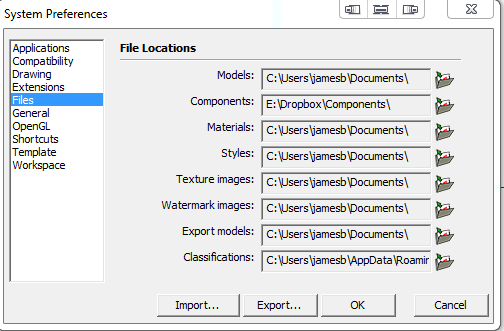
    • [Q] Preferences/File Locations

      What function do the file locations located at Preferences/File Locations perform?

      If I put in a folder other than the default, it is not recognized.

      For example: If I put in "C:\Dropbox\Components", SU does not recognized that location as the source and, instead, lists the default Components. Since I have renamed the Components folder in C:\Program Files\SketchUp\SketchUp 2015 to "Components - Original", where is SU getting the components??

      Files.PNG

      posted in SketchUp Discussions sketchup
      Bob JamesB
      Bob James
    • RE: 3 Things SketchUp Users Need to Know When Using a 3D Mouse

      I have a SuperMouse Pro for my home desktop and another for my work desktop. I have a wired Navigator for my laptop at home and a wireless for my laptop at work.
      Unless under extreme need, I can no longer work in SU without them: it's too slow and inefficient. Once you orbit and zoom at the same time, while simultaneously using a drawing tool, you can never go back to the old way: I was forced to work without one for one day on my last project and it was painful.

      posted in Hardware
      Bob JamesB
      Bob James
    • Symbolic Link Plugin Folder

      I posted this in another Topic, but apparently it got buried so I'm trying again as a separate post.

      To assure that all of my computers are automatically using the same plugins, in addition to using a Dropbox folder identified using Fredo's AdditionalPluginsFolder, I used to use a symbolic link to another Dropbox folder as my Users...AppData...Plugins folder.

      There are some plugs that must be in Users...AppData...Plugins folder to work, most do not, hence the need for two Dropbox folders.

      Now, however, a symbolic link folder in Users...AppData...Plugins is no longer recognized by SU.

      Does anyone know why?

      posted in Plugins
      Bob JamesB
      Bob James
    • RE: SketchUp 2015 plugins location

      To assure that all of my computers are automatically using the same plugins, in addition to using a Dropbox folder identified using Fredo's AdditionalPluginsFolder, I used to use a symbolic link to another Dropbox folder as my Users...AppData...Plugins folder.

      There are some plugs that must be in Users...AppData...Plugins folder to work, most do not, hence the need for two Dropbox folders.

      Now, however, a symbolic link folder in Users...AppData...Plugins is no longer recognized by SU. Does anyone know why?

      posted in Plugins
      Bob JamesB
      Bob James
    • RE: Plugins Not Compatible with SU2015-64bit

      @krisidious said:

      Looks like Smustard Toolbar is not working.

      Both buttons get you to the website, but the 'check my purchases' purchases don't get listed

      posted in Plugins
      Bob JamesB
      Bob James
    • RE: SketchUp 2015 is 64bit

      @bob james said:

      As I mentioned in an earlier post in this thread, Nudge **does **work in SU2015. The version I have is nudge.rb 1.5 dated 2008. To be really sure, I just verified it again.

      πŸ˜’

      posted in SketchUp Discussions
      Bob JamesB
      Bob James
    • RE: SketchUp 2015 is 64bit

      @hellnbak said:

      After much digging I may have found solutions to my problems with 2015 - two of my favorite plugins not working "Model Location" and "Nudge".
      As for Nudge, Smustard has apparently updated the plugin to work with newer SU versions
      [attachment=0:1utbndbo]<!-- ia0 -->2014-11-05_055755.png<!-- ia0 -->[/attachment:1utbndbo]
      although I cannot say for certain that it works with 2015. I purchased the plugin about six hours ago and have yet to receive the email with the download link. I have had good luck with their plugins in the past so I'm hoping for the best.

      As I mentioned in an earlier post in this thread, Nudge **does **work in SU2015. The version I have is nudge.rb 1.5 dated 2008. To be really sure, I just verified it again.

      posted in SketchUp Discussions
      Bob JamesB
      Bob James
    • RE: SketchUp 2015 is 64bit

      @unknownuser said:

      Don't know how I'll live without my beloved and much used Nudge tool

      Why? Works fine for me. You had me really worried until I checked to make sure πŸ˜„

      posted in SketchUp Discussions
      Bob JamesB
      Bob James
    • RE: [Plugin] SketchUcation Tools 2.6.1

      @gΓ‘bor said:

      . This filtering is done by using the names of the .rb files on the local machine.

      What about those in "Additional Folders" in Dropbox?

      posted in Plugins
      Bob JamesB
      Bob James
    • 1
    • 2
    • 16
    • 17
    • 18
    • 19
    • 20
    • 55
    • 56
    • 18 / 56