@jql said:
Apologies accepted if you post it on the Duh thread!
Done
But I have the extra step of entering a "4" 
 Offline
@jql said:
Apologies accepted if you post it on the Duh thread!
Done
But I have the extra step of entering a "4"
@jql said:
Apologies accepted if you post it on the Duh thread!
So here goes my duh:
@bob james said:
This seems so simple that it must already exist, but I could not find it.
For example: I want to make a 4" square post at a specific spot. If I wanted a round post there I would just select the circle tool, place the cursor at the point and drag out (or put a value in the VCB).
I'd like to be able to do that for a square: select tool, place the cursor at the point and drag out (or put a value in the VCB)
I apologize if this already exists
@jql said:
LOL bob you can make your life difficult if you draw a 4 sided circle and explode it.
Or you can make your life painless if you draw a 4 sided polygon without exploding it.
Those two are native tools. Do you forget sketchup also has native tools?
@bob james said:
Duh
(But still think it would be a useful one-click native tool)
Copied everything and ready post but can't find doh/duh thread 
@jql said:
LOL bob you can make your life difficult if you draw a 4 sided circle and explode it.
Or you can make your life painless if you draw a 4 sided polygon without exploding it.
Those two are native tools. Do you forget sketchup also has native tools?
Duh 
(But still think it would be a useful one-click native tool) 
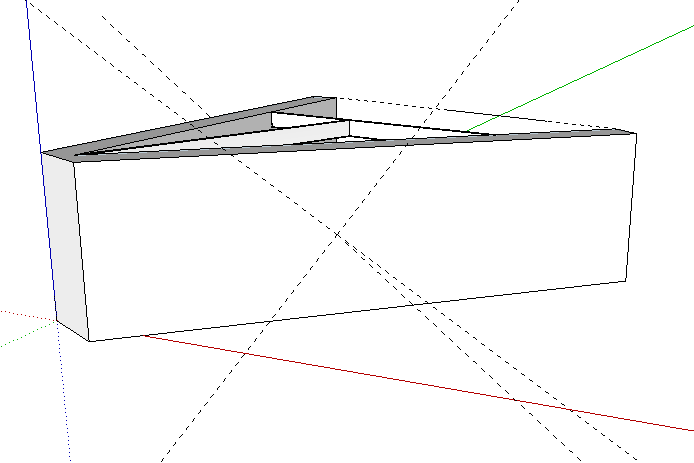
When I apply the normals tool the normal set is rotated. The primary axes are in the standard directions.
This seems so simple that it must already exist, but I could not find it.
For example: I want to make a 4" square post at a specific spot. If I wanted a round post there I would just select the circle tool, place the cursor at the point and drag out (or put a value in the VCB).
I'd like to be able to do that for a square: select tool, place the cursor at the point and drag out (or put a value in the VCB)
I apologize if this already exists
@cadfather said:
Bob, fairly sure you haven't really uninstalled it somehow. try it manually, there are only 2 files: _jhs01_powerbar.rb and the jhs folder. delete them and reinstall
Did that. Three times. Loaded it three ways: Importing rbz, opening the rbz with WinZip and extracting the files, and Plugin Store. Also, only used the standard plugin folder so no duplication in two locations.
Must just be having a bad hair day
Toolbar came up just fine, but it's not the one pictured above. The one that comes up is one long bar with no check boxes.
UPDATE
uninstalled it, then re-installed JHS_PowerBar_2015_v2.0.rbz.
Now I get two sets of icons in one long string. I've taken a picture of the center section of the bar. Now its too long to fit in SU!! There are 44 icons that are bad and 44 that are good. Seems like it's trying to load two sets of icons. The _ICONS folder has 44 of each size (16 and 24).

Thank you for updating it! Once again, a very useful tool.
It's free like a razor is free: buying the components at $4 - $9 each will add up very quickly. 
@unknownuser said:
A DIY package will soon be available for those who want to create there own components and apply the iDrawnics features.
This will make things much more attractive.
In any event, this sure beats 3skeng's hefty yearly "rental" fees for the components.
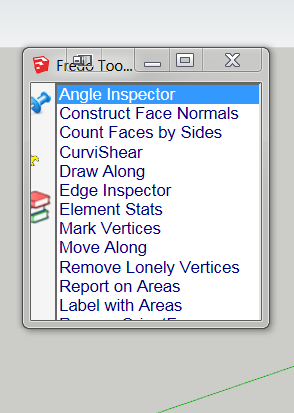
Title says it all: Fredo Tools Launcher window is too small. Arrowing down does not make the list move.
@frederik said:
No-one have told you to shut up and just be happy with things...
I will.
kilgo, shut up and just be happy with things.
Better yet, just quietly go away.
This is one of my most frequently used plugins since Jan Sandstrom (Pixero) first created it in 2009 (and then with CadFather's welcome addition of the toolbar).
I still wish there was some way to choose which one is the one you want to stay fixed
:heart_eyes:
I'm happy to announce to TIG and Fredo that all is well 
I deleted:
'BZ_Dir_17' is Bezierspline
'DOCUMENTATION_Dir' is empty
I'm sure you both are relieved as much as I that this is resolved.
Thank you both for your extra effort and patience. 
@tig said:
Please re-read my post...
I did those things before you sent that message 
I'm working on your suggestions now.
