sketchucation logo sketchucation
    • Login
    1. Home
    2. Bob James
    3. Posts
    Oops, your profile's looking a bit empty! To help us tailor your experience, please fill in key details like your SketchUp version, skill level, operating system, and more. Update and save your info on your profile page today!
    ⚠️ Important | Libfredo 15.6b introduces important bugfixes for Fredo's Extensions Update
    Offline
    • Profile
    • Following 0
    • Followers 0
    • Topics 66
    • Posts 1,110
    • Groups 1

    Posts

    Recent Best Controversial
    • Change "plugin" to "extension" in shortcuts

      Many of my shortcuts don't work and it is because they were created before extensions were added to SU.
      Now I go into preferences/shortcuts, find the action I want, enter the shortcut and get a dialog that basically says "do you want to change from plugin to extension?".

      Somewhere I read of a quick way to change all shortcuts to reference "extension" instead of "plugin", but I can't find it anywhere.

      posted in Plugins
      Bob JamesB
      Bob James
    • RE: Looking for Scene Manager for Layers

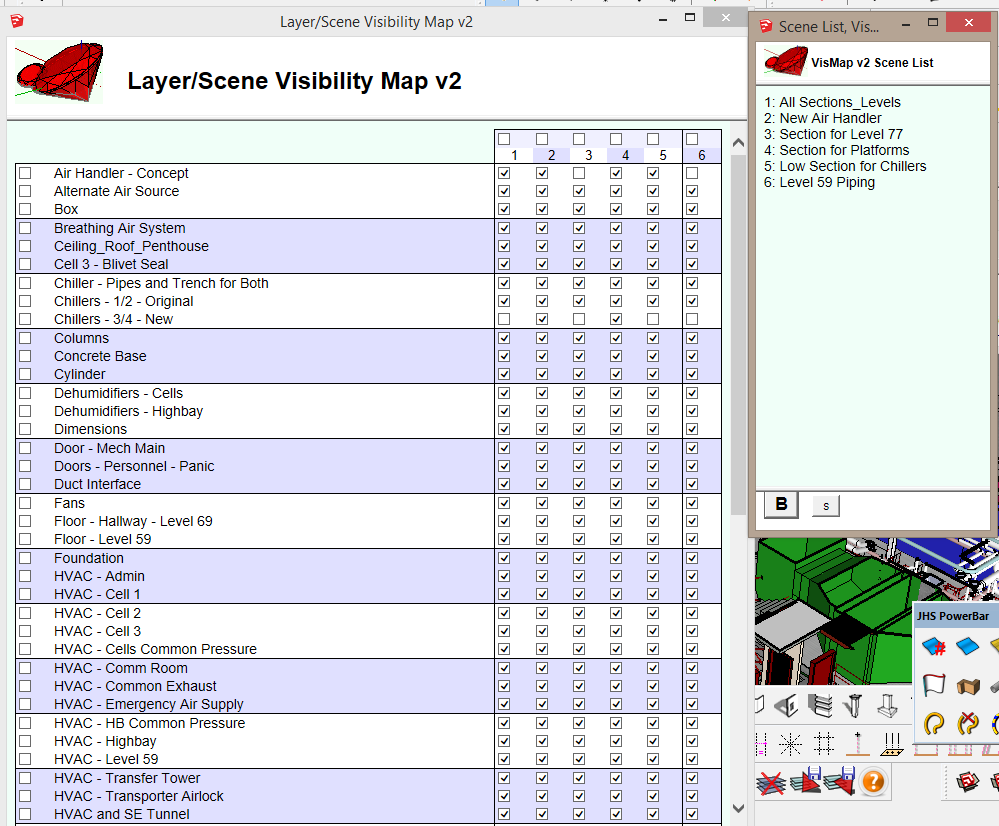
      Layer/Scene Visibility Map v2 (Vismap2)

      VM2.PNG

      posted in Plugins
      Bob JamesB
      Bob James
    • RE: Watching the Sunset

      Great sunset HDR. Where did you buy it?

      posted in Gallery
      Bob JamesB
      Bob James
    • RE: JHS STANDARD 2015

      For us feeble brains, please add reminder to restart SU (like Powerbar)

      This and Powerbar are major advances in getting the displayed icons under control. Just a few dozen more to go πŸ˜†

      posted in Plugins
      Bob JamesB
      Bob James
    • RE: [Plugin][$] Profile Builder 2

      @unknownuser said:

      Will, Bob, draw a centerline, everything on the sides of the centerline is going to spin around and create a circular part. So get rid of the both short ends, just need the smaller section.Ken

      Ken: Thank you for your response. Unfortunately, I don't understand.

      1. I draw a horizontal centerline first and then click on revolve? (that didn't seem to make any difference)
      2. What do you mean by the "short ends"?
      3. What do you mean by the "smaller section"?

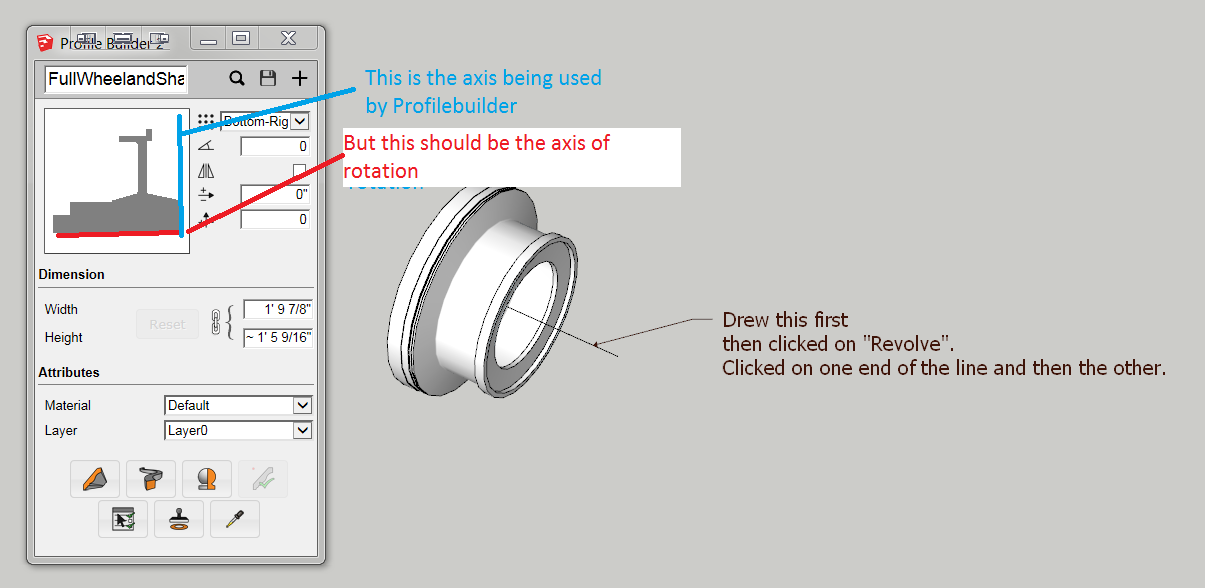
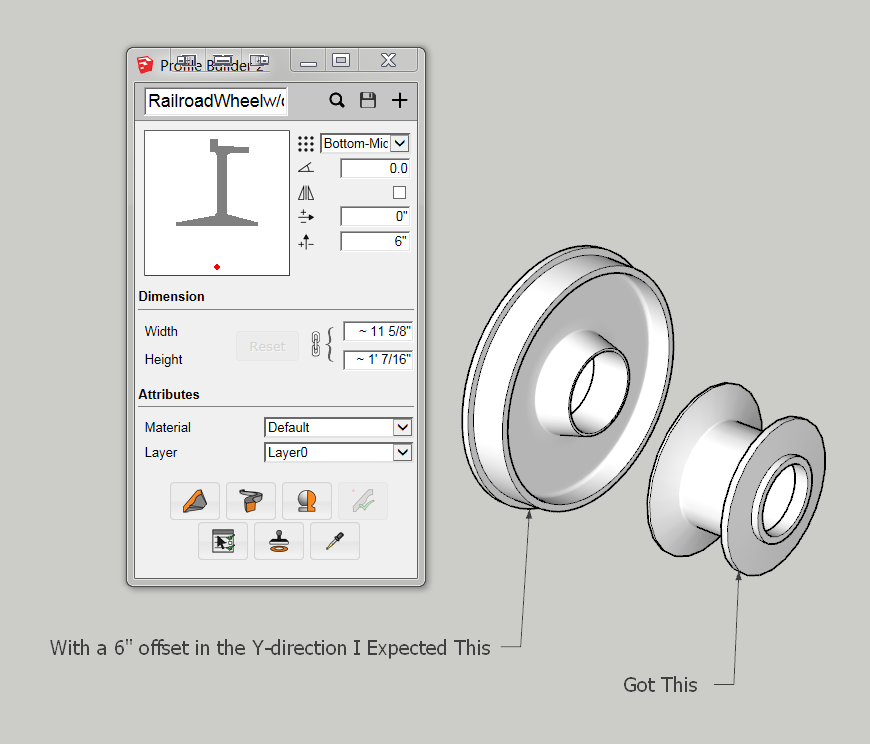
      The complete wheel on the left of the previous post was created in the "normal" way: create a circle and follow that path with the profile (with no offset).

      What is "Offset" supposed to do? I assumed it would offset the profile axis of revolution.

      It makes no difference whether the "Revolve Profile" axis is drawn vertically or horizontally, it still revolves the profile around the axis shown in blue.
      Railroad Wheel 2.PNG

      posted in Plugins
      Bob JamesB
      Bob James
    • RE: [Plugin][$] Profile Builder 2

      I'm experimenting with making a Railroad wheel. What am I doing wrong?

      Railroad Wheel.PNG

      posted in Plugins
      Bob JamesB
      Bob James
    • RE: [Plugin][$] Profile Builder 2

      If you search for Profile Builder 2 or profilebuilder2 on Extension Warehouse you get "Not Found"

      posted in Plugins
      Bob JamesB
      Bob James
    • RE: [Plugin][$] Profile Builder 2

      Decided to go ahead and buy Version 2.2.0.3.
      Gets to the "Install" and hangs up.
      Tried with and without the beta version 2_2_0(1) installed.
      NADA πŸ‘Ž

      posted in Plugins
      Bob JamesB
      Bob James
    • RE: Toolbox A2. Friendly interface for many plugins.

      I could not get anything done in anything close to a profitable schedule without the incredible extensions so generously provide by the members of this forum. But I have the same problem.

      Part of it is due to my often needing only one or two out of a whole string, so the others spend their time cluttering up the screen. The other part is trying to fine the one I know exists, but can't remember where.

      I've solved a fairly significant part of the problem with my P.I. Engineering X-Keys with 60 programmable keys where I can group like-functions together.

      That said, I heartily agree with:

      @dem said:

      I use really lots of plugins, but once I tried to operate them,I often forgot where to find the right tool, among heaps of panels.

      So I truly hope you can work out the politics because it looks like you've created winner of an idea.

      posted in Plugins
      Bob JamesB
      Bob James
    • RE: Assign new layer name quickly?

      Plugin not included 😞

      Also to match the naming convention please change the name to [Plugin] Assign New Layer Name

      Otherwise it looks like a very useful idea πŸ˜„

      posted in Plugins
      Bob JamesB
      Bob James
    • RE: Remind me how to show/hide all toolbars at once?

      @rich o brien said:

      @bob james said:

      @rich o brien said:

      AntonS URL is second one in my previous post

      I was on a phone and I just didn't take the time to click the link.

      Not your fault. My bad: as Box said, I should have included some definition of what the links provided.

      posted in SketchUp Discussions
      Bob JamesB
      Bob James
    • RE: Remind me how to show/hide all toolbars at once?

      @rich o brien said:

      AntonS Windows Settings extension in the PluginStore allows you to hide toolbars, menus, dialogs etc.

      AntonS URL is second one in my previous post

      posted in SketchUp Discussions
      Bob JamesB
      Bob James
    • RE: [Plugin] EP_Fasteners. Creates 3d printable threaded UPDATED

      Does the fact that some of the results have reversed faces have any impact on printing?

      posted in Plugins
      Bob JamesB
      Bob James
    • RE: Remind me how to show/hide all toolbars at once?

      Here's a couple. I've never used either of them so I don't know if this is what you are looking for.
      http://sketchucation.com/forums/viewtopic.php?f=323%26amp;t=42926%26amp;hilit=hide+toolbars
      http://sketchucation.com/forums/viewtopic.php?t=55067#p499835

      posted in SketchUp Discussions
      Bob JamesB
      Bob James
    • RE: 3d Connexion SpaceNavigator Workflow

      @bmike said:

      Does the Space Navigator stall if you move the mouse at the same time as trying to orbit or Zoom with the navigator?

      No. And that's one of the great features.

      posted in SketchUp Discussions
      Bob JamesB
      Bob James
    • RE: Material editor problem

      Same problem on Windows

      posted in Newbie Forum
      Bob JamesB
      Bob James
    • RE: 3d Connexion SpaceNavigator Workflow

      Mike, I sincerely don't know how I did my work in SU before I added 3DCONNEXION devices to all four of my computers (Spacemouse Pro on 2 desktops and wireless Navigators on 2 laptops). The increase in efficiency is enormous. As far as the buttons and menus go, I mainly use just the front, right, and top buttons because I also have a P.J. Engineering X-Keys XK-60 which provides me instant access to up to 120 shortcuts and macros.
      On the few occasions where I have been on a computer without a Spacemouse it felt very awkward and agonizingly slow to get anything done.

      posted in SketchUp Discussions
      Bob JamesB
      Bob James
    • RE: [Plugin] Typical Office Arrangements

      And the plugin is available where? πŸ˜’

      posted in Plugins
      Bob JamesB
      Bob James
    • RE: Flatten and Rename/renumber scenes Plugin for Sketchup 2015

      Why not PM Todd Burch and see if he'll update the Smustard 2007 version?

      posted in Plugins
      Bob JamesB
      Bob James
    • RE: Get layers in layer window to display alphabetically?

      @calypsoart said:

      Duh! I feel like an idiot. That's how files get ordered and so many things. I think I've been looking at this screen for too long. A walk is in order.

      When you recover from your massive "duh" (welcome to the club), Calstock's advice is still very good.

      posted in SketchUp Discussions
      Bob JamesB
      Bob James
    • 1
    • 2
    • 14
    • 15
    • 16
    • 17
    • 18
    • 55
    • 56
    • 16 / 56