Rayscaper New Releases
-
Hey, Rayscaper users!
Another release!
Rayscaper 0.9.50 Beta is available in the SketchUcation store. More fixes and improvements. As always, I recommend upgrading to the latest version.
What Changed?
- Bring back the transparency shadows option for the glass material. This option makes the glass material invisible to
shadow rays, allowing direct light to pass through the glass. This is useful for allowing direct light through glass
in indoor scenes. - Add extra logging to help diagnose failed installations.
- Cyrillic glyph support: The user interface now supports Cyrillic characters.
- Improved pixel filtering: Fixed an issue where edges appeared overly jagged with the default settings.
- Enhanced texture sliders: Scale and translation sliders now have more intuitive ranges.
Help me build the community

If you like Rayscaper, please share your renders (final or work-in-progress, it doesn't matter)! This is motivating and will help me showcase its capabilities to new users.
Happy Rendering!
I'm the developer of Rayscaper: https://rayscaper.com/ - Fast and easy rendering for SketchUp.
- Bring back the transparency shadows option for the glass material. This option makes the glass material invisible to
-
Those renders are lovely!
-
Great!
Thank you! -
@pixelcruncher I DMed you, do you mind checking it please?
-
I notice that your new default HDRI map intensity settings are excellent, almost no adjustments needed, it's a huge improvement
-
@Krass Great to hear that! Still more good stuff coming.
-
How may I share a "carpaint" material pack?
If it is easier to make it in another app and share (online or locally) or use the RS?
How may I set a castum "preview" for the materials? If it is possible to change the "internal" material test scene? -
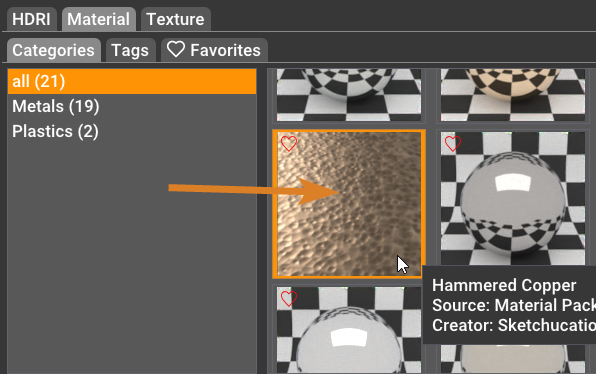
If you go to C:\Users\SomeName\AppData\Roaming\Rayscaper\UserAssets you will find the custom materials you have made zipped.
If you unzipped you will see the preview image. If you change that image and zip it making sure to delete the original zip and name the new one the same you get custom icons.
-
Back from a holiday, but whatever Rich says makes sense

-
hello,
I thought I read above that Rayscaper had become free, exactly I read that there was no longer a limitation on rendering size. Thank you for confirming this. -
Not heard that and frankly it is nonsensical.
Rayscaper is being developed by one very hard working human being in his off work hours.You need to be very careful when using the internet for information, spelling and slight word differences can lead you right up the garden path into the manure pile.
-
To clarify, Rayscaper is commercial software. A license costs $99 or $74.99 for SketchUcation users.
You can use Rayscaper for free, but then it has a watermark over the render. I removed the limitation on rendering size, as I didn't want to spend my energy on crippling the experience in the free version. I still want you to have a great experience, even with the free version, in the hope that that can convince you to support the work and buy a license (which you both did, so thanks for that!). And if you don't want to buy the license, that's cool too.
I'm the developer of Rayscaper: https://rayscaper.com/ - Fast and easy rendering for SketchUp.
-
@pixelcruncher is hard at work crushing bugs and adding quality of life stuff for the next release....
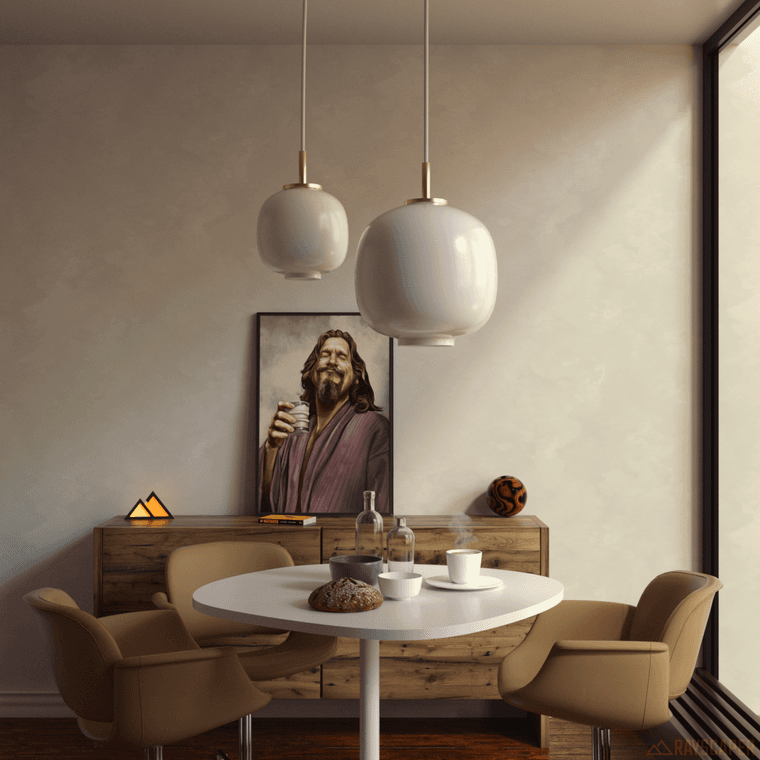
Above was 5000 samples at 2k resolution on a 4080 card with no denoising in 14.5mins
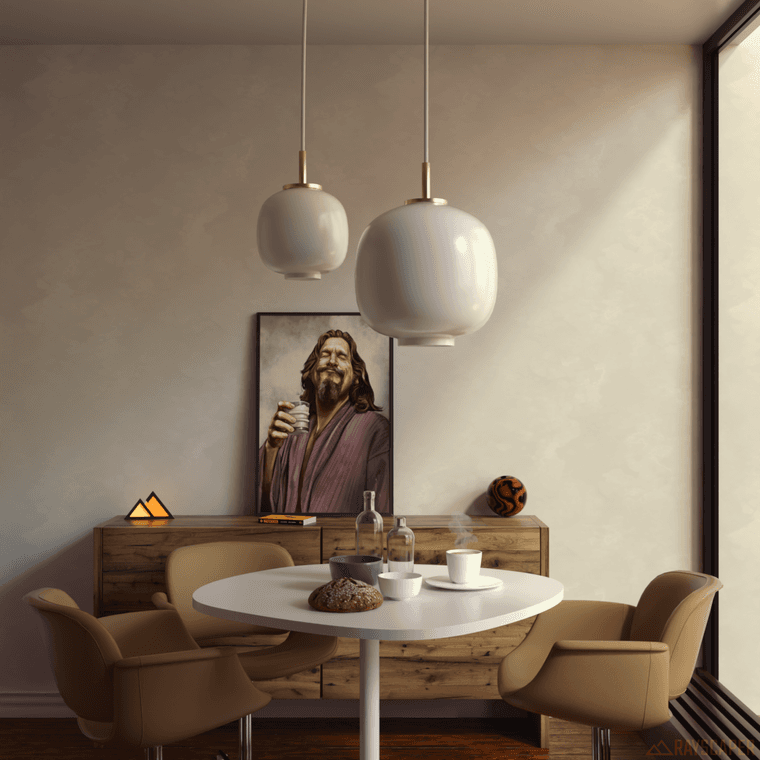
Below was 500 samples at 2k resolution on a 4080 card with denoising in 1.5mins
Download the free D'oh Book for SketchUp 📖
-
I think he is doing a great job tbh. No complaints.
-
The next release is coming soon. I was working on a lot of internal stuff in the engine. In the future, I plan to do more frequent releases, as they give me a tighter feedback cycle and make the process less lonely.
-
Hey, Rayscaper users!
Another release with some bug fixes. Thanks for reporting all those bugs!
Rayscaper 0.9.64 Beta is available in the SketchUcation store. As
always, I recommend upgrading to the latest version.What Changed?
- Fix weird artifacts in the interactive render viewport.
- Fix the upside-down images when saving.
- Add transmission support for the PBR material. This makes it possible to create glass or liquid materials with the PBR material.
- Fix a regression when renaming light components. Rayscaper lights should now correctly use the name of their SketchUp light component again.
- Fix glass rendering, when multiple glass surfaces overlapped, Rayscaper would render them too dark.
- Fix the render timer in the viewport. It will stop counting when the render is paused or finished.
Help Me Build the Community
If you like Rayscaper, please share your renders (final or work-in-progress, it doesn’t matter)! This is motivating
and helps me showcase its capabilities to new users.Follow me on Twitter.
Happy Rendering!
-
Yay! Great update Thomas
-
thank you for the new release.
I noticed two bugs with this release- it does not Support SketchUp material inheritance anymore. Faces, or objects that have the default material painted on them, but the group that they are in have a material, show up as unpainted (with the default material).
- the rendered images have a watermark on the bottom, even though I have a license (and I doublechecked that it is connected)
[as a side note, any idea when you will connect the sketchup pbr materials to the rayscaper material properties, so that I don't need to set up metalness, roughness, etc, twice?]
-
it does not Support SketchUp material inheritance anymore. Faces, or objects that have the default material painted on them, but the group that they are in have a material, show up as unpainted (with the default material).
Okay, that's a bug. It should inherit the material of its parent component or group.
the rendered images have a watermark on the bottom, even though I have a license (and I doublechecked that it is connected)
Also a regression, this was reported by other users as well. I will make an update ASAP.
[as a side note, any idea when you will connect the sketchup pbr materials to the rayscaper material properties, so that I don't need to set up metalness, roughness, etc, twice?]
This is definitely on my list. I don't want to commit to a hard date.
Regards,
Thomas -
thank you very much




Hello! It looks like you're interested in this conversation, but you don't have an account yet.
Getting fed up of having to scroll through the same posts each visit? When you register for an account, you'll always come back to exactly where you were before, and choose to be notified of new replies (either via email, or push notification). You'll also be able to save bookmarks and upvote posts to show your appreciation to other community members.
With your input, this post could be even better 💗
Register Login


Advertisement