Check out Febhouse | New extensions for Shadow Analysis in SketchUp Download
  • [Plugin] CopyAlongCurve 1.0.4 (28 February 2017)

    16
    0 Votes
    16 Posts
    29k Views
    Dave RD
    @Requisher You could learn to do the Ruby coding and add a toolbar. Might be easier to just create a keyboard shortcut for it.
  • problem with libfredo6

    6
    0 Votes
    6 Posts
    272 Views
    TIGT
    @hamsalah As well as the weirdness of you having installed v1 rather than v15 [firstly, please install the latest one !], the SketchUp error message you provided shows a number of problems loading several other extensions as SketchUp starts - including those which ship with SketchUp and should be auto-copied over to your user's Plugins folder as SketchUp first runs. If SketchUp was not installed properly it can result in unexpected issues, often relating to folder/file permissions. You might sometimes muddle through unscathed, but I suspect this is the case here. Luckily it can often be fixed without uninstalling/reinstalling SketchUp or any of your extensions etc. Follow these steps. Close SketchUp. Find the SketchUp installer's exe file - usually found in your Downloads folder [if not download a new copy, or dig out your old one]. Select the exe file's icon, right-click > context-menu > Run as administrator When prompted choose 'Repair' When it's finished restart SketchUp and see if the situation improves. Double-clicking an installer's exe file to 'Run' it is not the same thing, even if your user-account has admin powers.
  • [Plugin] Helix along curve

    100
    0 Votes
    100 Posts
    171k Views
    TIGT
    @Aurora2017SRL This extension [actually a plugin] is well over a decade old ! It's also encrypted in the old RBS format. It's unlikely to get updated. Luckily the toolbar's code is in the editable RB file... Find the file in Plugins, it's named Helix-along-curve-tool-0.9.rb Edit it with a plain text editor [Notepad++ or on MAC bbedit || wrangler ?] Find the line helixD_bar.show and edit it, adding extra text to read helixD_bar.show if helixD_bar.get_last_state.abs == 1 # TB_VISIBLE/NEVER Save the changes and restart SketchUp. Now the toolbar's status will be remembered across sessions - i.e. either visible or off
  • [Plugin] SUClock - v3.1a - 02 Apr 24 - Tracking time in SU

    138
    4
    0 Votes
    138 Posts
    159k Views
    K
    Would be great to add a setting allowing to auto open SU Configuration settings at the start of a new Sketchup project. This way we could make sure we don't forget to turn the timer on. The plugin is great, thank you.
  • Sketchup plugin with AI modeling

    2
    0 Votes
    2 Posts
    158 Views
    TIGT
    You linked to nothing useful on Facebook ! Can you edit this to give a proper link...
  • BZ_toolbar Bézier curve tool

    2
    0 Votes
    2 Posts
    783 Views
    Didier BurD
    https://extensions.sketchup.com/extension/8b58920d-0923-42f8-9c72-e09f2bba125e/bezier-curve-tool
  • Draw on surface

    2
    0 Votes
    2 Posts
    131 Views
    Rich O BrienR
    Tools on Surface
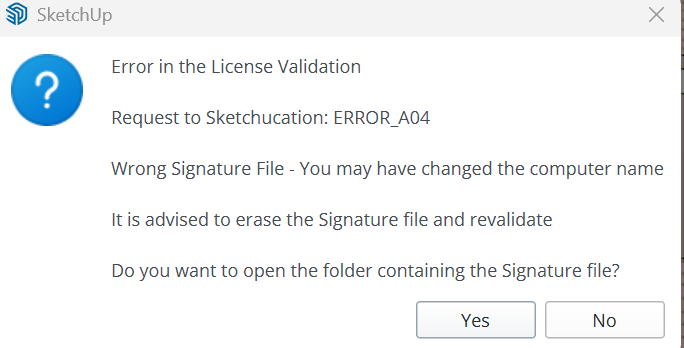
  • SCFLicense Fredo: ERROR_A04

    2
    1
    0 Votes
    2 Posts
    151 Views
    TIGT
    There are a number of posts about related error messages. The licensing system cannot read the license file's details properly. If you have renamed your computer it with cause an issue - but this is often because your windows-computer-name [or sometimes your windows-user-name] contains invalid characters. So perhaps change you computer-name [and perhaps your user-name] to have only ASCII characters and some limited punctuation, delete the license file, as suggested by the error message, then relicense... This should side step the issue... Naming conventions link text see here...
  • [Plugin] Hatchfaces (v1.8 beta) UPDATED 15-Dec-2012

    360
    0 Votes
    360 Posts
    298k Views
    M
    @Rich-O-Brien Thank you very much!
  • [Plugin] s4u Draw Boundary

    5
    0 Votes
    5 Posts
    3k Views
    O
    Sir, I put a comma between them, it was not like that in the example, I will try again, thank you.
  • Can't update my Round Corner Trial

    6
    0 Votes
    6 Posts
    337 Views
    TIGT
    @Dougmcpeek1 When you download any license file you save it onto your computer, put it in a sensible location [like a subfolder in Documents] You do not 'open' it. Once it's on your computer you then need to validate it within SketchUp, under the Tools submenus for that extension. Extension RBZ files can be downloaded from our PluginStore and then installed using the Extensions > Extension Manager dialog's 'install' button. Save it onto your computer, do not try to open it - the install it. You will need to have the latestest SketchUcation toolset installed for the licensing, and additionally it also provides tools like Extensionstore³, which allow you to auto-install selected extensions from a dialog, sidestepping the RBZ download completely, and reminders for available updates, etc. With Fredo6's extensions you will also need his latest LibFredo6 installing - which is a library of helpers. After these installations restart SketchUp to sync everything. Then do the licensing.
  • Delete coplanar edges

    5
    0 Votes
    5 Posts
    6k Views
    M
    From the Extension Warehouse: https://extensions.sketchup.com/extension/046175e5-a87a-4254-9329-1accc37a5e21/clean-up
  • Clothwork 1 seat license

    1
    0 Votes
    1 Posts
    66 Views
    No one has replied
  • 1 Votes
    4 Posts
    380 Views
    K
    @fredo6 said in Bug report/change suggestion - ESC key forces Sketchup to perform UNDO: Fixed in ThruPaint v2.8b, just published. Thanks, have not tested is yet but your prompt response is awesome!
  • ThruPaint 2 bug

    3
    1
    0 Votes
    3 Posts
    456 Views
    M
    @i5963c I am having the same issue, the work around I'm using at the moment is actually using physical color pallets in my scene and eye dropping them to paint onto my models. @fredo6 If you see this and are working to fix please let us Know.
  • DM_Profilebuilder

    4
    0 Votes
    4 Posts
    319 Views
    D
    @danna Dale, from link that Dave gave above ... helped me to get my old version of Profile Builder installed. Still seeking documentation or help files if anyone still has them. Thanks Dave.
  • 0 Votes
    11 Posts
    843 Views
    uwesketchU
    @fredo6 That is a pitty, I was happy with only having LOTT for toolbars. Therefor the menu option in the LOTT popup menu called “Exclude VRay” or “Include VRay” has no function anymore? (could be disabled or removed) [image: 1734165116098-3dac25f0-2673-4f27-8139-1fb51f5f6da3-image.png]
  • [Plugin] Super Drape

    192
    0 Votes
    192 Posts
    384k Views
    A
    @rv1974 LOL ok, I remember it being bug splatty, but it was years since last I used it and I simply was not abble to use it this time. But saying I shouldn´use it is the second part of my question, except I asked suggestions for how to do what I needed, without this plugin. maybe before draping I could smooth the sidewalks until they are a single selection. Then I drape. Then instead of selecting each plant square and change it's color, I do the opposite. Paint the sidewalks another material. Doing that will alow me to select all entities with still the original sidewalk material to properly deal with them all at the time time (vector push pull)
  • ThruPaint free alternatives?

    7
    0 Votes
    7 Posts
    1k Views
    R
    @L-i-am overkill but depends
  • lines2tubes plugin not showing up on tool menu

    Solved
    4
    1
    0 Votes
    4 Posts
    243 Views
    Dave RD
    What are you looking for in the Tools menu? Note what it says in Usage. [image: 1733241195967-screenshot-12_3_2024-9_52_42-am.png] [image: 1733241218641-screenshot-12_3_2024-9_51_57-am.png]

Advertisement