sketchucation logo sketchucation
    • Login
    1. Home
    2. plot-paris
    3. Posts
    Oops, your profile's looking a bit empty! To help us tailor your experience, please fill in key details like your SketchUp version, skill level, operating system, and more. Update and save your info on your profile page today!
    ๐Ÿ”Œ Easy Offset | Offset selected faces in SketchUp in positive and negative offsets. Download
    Offline
    • Profile
    • Following 0
    • Followers 0
    • Topics 67
    • Posts 1,477
    • Groups 1

    Posts

    Recent Best Controversial
    • RE: [Obsolete] Tools On Surface - v1.1

      fredo6 - you are a hero to me! ๐Ÿ˜

      another idea:

      all the "on surface" tools are already existing tools of SketchUp applied to a surface, right?
      and when you succeed in creating all the other tools (tape measure, circle, polygon...) our toolbar gets quite large.

      would it therefore be possible to just have one button in the tool bar (plus a shortcut key to toggle it on and off) that switches the use of SketchUp's native tools to your fabulous on surface tools? thus all my shortcuts would apply to your tools too - I only have to press the "fredo6 button"! ๐Ÿ˜ฒ

      posted in Plugins
      plot-parisP
      plot-paris
    • RE: Are you ready for SketchUp 7 news?

      thanks Lewis for the news.

      a short idea about what you said about styles:

      to make them much more useful (for students ๐Ÿ˜‰ ) coloured faces and especially shadows should be stylized as well - to make a professor truely believe in handdrawn sketches.

      posted in Corner Bar
      plot-parisP
      plot-paris
    • RE: Server problems

      Coen, you now made me really curious about the new main home page... if it is as interesting and entertaining to read as the newsletter, you make me a happy man ๐Ÿ˜

      you know, what should be somewhere on the main home page?

      "Coen's sleep deficit chart" ๐Ÿ˜„

      posted in Corner Bar
      plot-parisP
      plot-paris
    • RE: POLL: Would you attend a SketchUcation 3D Basecamp EU?

      good idea,Coen.

      it is indeed surprising that less than 2% of the SketchUcation members voted yet. ๐Ÿ˜ฎ

      a Global PM may speed up things a bit ๐ŸŽ‰

      posted in Corner Bar
      plot-parisP
      plot-paris
    • RE: SU "Steam Engine"

      I think you should have a look at SketchyPhysics

      Link Preview Image
      Google Code Archive - Long-term storage for Google Code Project Hosting.

      favicon

      (code.google.com)

      haven't really used it yet (only had a short glimpse at it) - but I think with a bit of work you should be able to create the working steam engine

      posted in SketchUp Discussions
      plot-parisP
      plot-paris
    • RE: Are you ready for SketchUp 7 news?

      thank you very much, Coen.

      that magnificent newsletter was really worth waiting for! ๐Ÿ˜

      I have sacrificed some hours sleep to read it through by now. ๐Ÿ˜†

      posted in Corner Bar
      plot-parisP
      plot-paris
    • RE: Are you ready for SketchUp 7 news?

      well, I think every hour of waiting added 5% of anticipation.

      I am at 185% now - that I something even my last girlfriend didn't achieve when she was on vacation for three weeks (and she was quite a feast for the eyes)! ๐Ÿคฃ

      when Coen finally releases the news, a whole bunch of lunatics will have tears of joy in their eyes - all arround the world! ๐Ÿ˜
      that is really something worth waiting for, isn't it?

      to Paul: perhaps we should start writing furious letters to Google, telling them to stop bothering Coen (but we won't do that until we know your theory is right...)

      posted in Corner Bar
      plot-parisP
      plot-paris
    • RE: Global Texture Replace

      or just use the "match colour on screen" or "match colour of object in model" method with the texture to change selected (you gave me that tip once, Gaieus ๐Ÿ˜„ )

      on the other hand - you then still have two different colours (that look alike) ๐Ÿ˜’

      posted in SketchUp Discussions
      plot-parisP
      plot-paris
    • RE: Drape Tool for DTM Roads

      can you post a picture of that enormous terrain when its finished? I am really curious to see what a 75 mb terrain looks like (must be half of Europe...) ๐Ÿ˜„

      posted in SketchUp Discussions
      plot-parisP
      plot-paris
    • RE: Reversed faces

      as far as I know they enable you to determine the inner side or outer side of a shape. just imagine you have a cube. how is the computer supposed to know, what is inside and what is outside?
      some years ago everyone in europe believed earth to be the centre of the world until a smart guy called Kopernikus found some convincing arguments that the sun is much more centered than our small blue planet.
      two sided faces are our arguments to define the orientation of a shape. for basic SketchUp use this is not that important. but if you start rendering a scene it is essential.
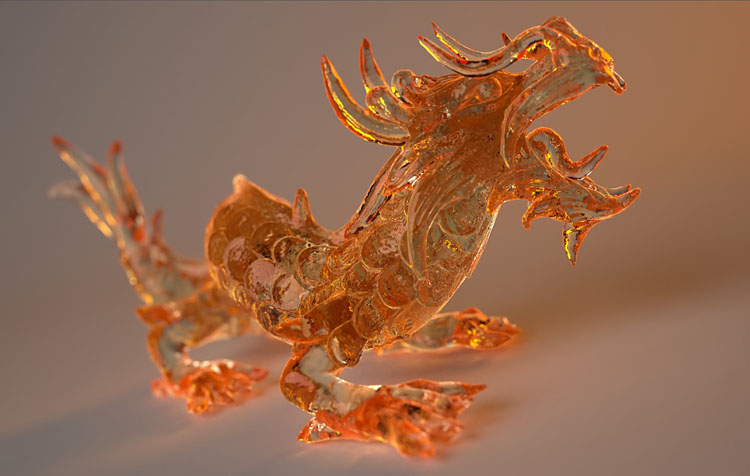
      if you have a glass object for example, light will change its colour depending on the distance it travels through the material

      pure01.jpg
      (picture by http://www.purerender.com)

      therefore the render engine needs to calculate the thickness of the object. and it can only do that if it is told what the inside of the object is and what the outside.

      posted in SketchUp Feature Requests
      plot-parisP
      plot-paris
    • RE: Short wish list

      I have set up a shortcut for expolding grous/components.

      • "G" = make Component
      • "Ctrl+G" = make Group
      • "Shift+G" = explode Group/Component

      it is really great - I use it all the time (increased my working speed by 5%) ๐Ÿ˜„

      but what do you mean with "open a group"? you only need to double click it...

      posted in SketchUp Feature Requests
      plot-parisP
      plot-paris
    • RE: Short wish list

      would be great to have a selection memory function within SketchUp.

      just press the Alt key while using the Selection tool (that one is still free ๐Ÿ˜„ ) to flick trough your last selections. would be really great, because it is indeed anoying to lose complicated selection.

      posted in SketchUp Feature Requests
      plot-parisP
      plot-paris
    • RE: Please select a winner of the SCF logo competition

      JClements, I totally agree with you!

      Lisamc's logo shows what the SCF does - connecting all the SketchUp users in the world, no matter where they are at home...

      posted in Corner Bar
      plot-parisP
      plot-paris
    • RE: Are you ready for SketchUp 7 news?

      you know, I feel a bit like a little child awaiting its birthday. I hope I will be able to fall asleep tonight - this is so exciting ๐ŸŽ‰

      posted in Corner Bar
      plot-parisP
      plot-paris
    • RE: Right-click to "Orbit" & Middle-click to "Pan"

      what a cool thing (middle mouse button + left mouse button = pan)!

      I am honestly considering to change my habits of using a mouse. always having three fingers on the three main buttons may not be too bad...

      by the way: I love the possibility of "smoothly" switching between orbit and pan mode (by pressing Shift or Left Mouse Button) without the need of releasing the Scroll Wheel, so that you can switch between orbiting and paning several times within one movement.

      other programs dont support that and it is sooo cooool!!! ๐Ÿ˜Ž

      posted in SketchUp Discussions
      plot-parisP
      plot-paris
    • RE: Faces between layers

      hi sweetluge,

      did you have switched off the floor layer?

      if yes, I thinkt your line already exists, it is just made invisible. now you are trying to draw another line in the same place (SketchUp doesnt understand that, because it knows there already is a line).

      like the others said: the only way is to build groups/components - which you should use in any case in order to keep a model organised and structured

      posted in SketchUp Discussions
      plot-parisP
      plot-paris
    • Multiplying distances

      Hi everyone,

      just a tiny wish that would be quite handy (and I think no problem at all to integrate into SketchUp).
      if you copy-move (move tool + Ctrl) an object you can type in for example 5* to make the same number of copies in the same spacing.

      I would really much like to be able to type in that 5* when I just move an object (without copying it).
      every now and then I want to move something two or three times of a known distance. because I am to lazy to calculate the entire distance however, I move the object three times instead.
      in that case it would be so wonderful just to move the object the known distance and type in 3* and the displacement is multiplied (same thing with division)

      and the same would be possible with the line tool (just draw a line, type in 3* and the line increases its length) - fabulous! ๐Ÿ˜

      posted in SketchUp Feature Requests sketchup
      plot-parisP
      plot-paris
    • RE: Array along line

      thanks, pathcopy is a nice tool. but I cant select a whole path (always just one curve of it).
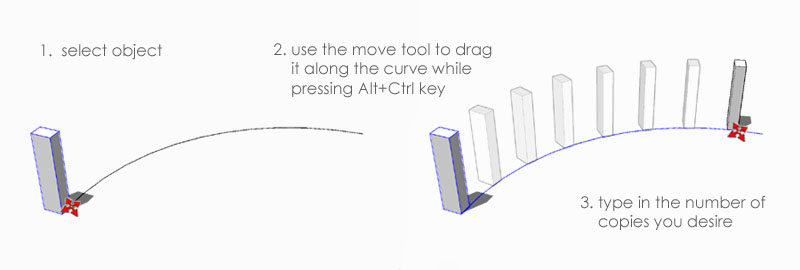
      and I thought about something that is integrated in the move tool (perhaps with a modifier key), like the following proceture:

      copy_along_curve.jpg
      you have to press Alt+Ctrl button only once to activate the funktion (similar to Ctrl for copy mode). thus you are still able to use the shift key for camera navigation.

      I know, I want much - but thats why it is in the wishlist ๐Ÿ˜„

      posted in SketchUp Feature Requests
      plot-parisP
      plot-paris
    • Array along line

      I love SketchUp's array tools (move-copying something, then multiplying it a certain number).
      however, it would be great to have a function like "copy along line".
      if I for example want to create a banister along a curved road (many curves, not just one), it is a huge effort placing all the posts in the same spacing. it surely is no problem at all for SketchUp (there is a wonderfull follow me tool after all ๐Ÿ˜† ). the only difficulty is to figure out a convenient procedure.

      does anyone have a good idea how an easy command could look like (as easy as the array tools)?

      posted in SketchUp Feature Requests sketchup
      plot-parisP
      plot-paris
    • RE: Select by Material?

      can you tell me how to reload a colour? I only know how to edit it.
      ah, yes. and is it possible to exchange one?
      (eg. you have three colours. now you want colour1 to be painted in colour2 - meaning, every face in colour2 will stay that way, but every face in colour1 will be painted in colour2)

      posted in SketchUp Discussions
      plot-parisP
      plot-paris
    • 1
    • 2
    • 69
    • 70
    • 71
    • 72
    • 73
    • 74
    • 71 / 74