sketchucation logo sketchucation
    • Login
    1. Home
    2. plot-paris
    3. Posts
    Oops, your profile's looking a bit empty! To help us tailor your experience, please fill in key details like your SketchUp version, skill level, operating system, and more. Update and save your info on your profile page today!
    ๐Ÿ”Œ Easy Offset | Offset selected faces in SketchUp in positive and negative offsets. Download
    Offline
    • Profile
    • Following 0
    • Followers 0
    • Topics 67
    • Posts 1,477
    • Groups 1

    Posts

    Recent Best Controversial
    • RE: Instancing

      hi Al,

      all your ideas are already possible in sketchup:

      model your high-poly model, group it and put it in a layer called "high_poly" (what else ๐Ÿ˜‰ ).

      then you model a simple version in the same place, group it and put it in a layer called "low_poly".

      now you switch off the "high_poly" layer and save the file.

      if you now are working on another model in SketchUp and insert the just created component, you will automatically get the two layers with the "high_poly" layer set to invisible. - isnt that what you wanted? ๐Ÿ˜„

      or did you mean to automate the process of creating the low_poly version? if yes, that will be quite difficult. because how are you going to choose the level of simplification. just using the bounding box will be too imprecise sometimes (look at the red shape). perhaps you should be able to choose the simplification grade (edges shorter than 10cm will be simplified for example - like in the green shape)
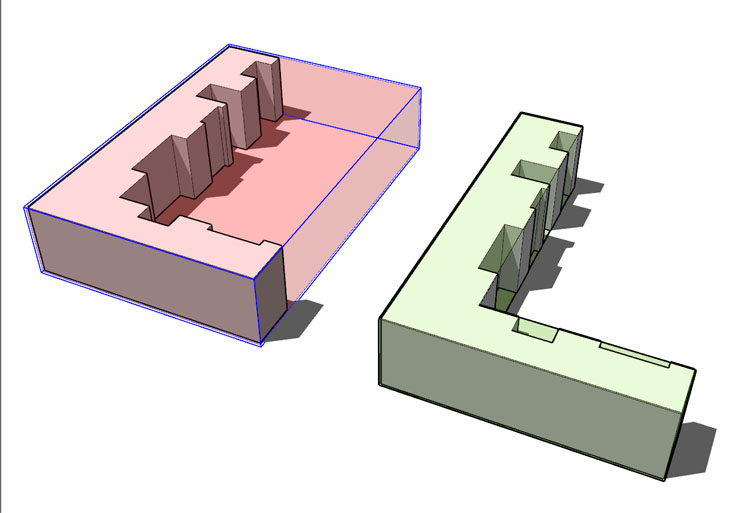
      low_poly.jpg
      however, I think that is a wonderful idea - for you can structure your model with as many layers as you want (moving the components into the different layers) and still be able to swith from low_poly to high_poly, changing the level of tetail within all the components.

      posted in SketchUp Discussions
      plot-parisP
      plot-paris
    • RE: [Plugin] Name Group on Creation

      quite handy.
      but sometimes I dont want to name a group (for example if it is just temporary). I do know nothing about programming. but is it possible to write a ruby, that lets the cursor appear within the group's name in the outliner after creation instead of popping up a new window?

      that would be the perfect solution for me...

      posted in Plugins
      plot-parisP
      plot-paris
    • RE: Computer electronics in Sketchup

      that one is really cool!
      so I dont have to plunder my bank accound after all. I can model the object of desire in half an hour and dive into wonderful daydreams, looking at my new computer (I am afraid though, that after some hours of dreaming I will spend all my money anyway...)

      posted in SketchUp Discussions
      plot-parisP
      plot-paris
    • RE: Catastrophe, me and Bill going dumb

      ah, I see. so blue may not be the ideal colour if you (like me at the moment) work with an old and fairly bad laptop screen - violet and blue are too much alike. ๐Ÿ˜†

      thanks for the info, Alan

      posted in SketchUp Discussions
      plot-parisP
      plot-paris
    • RE: Catastrophe, me and Bill going dumb

      oh, by the way:
      how can I change the selected face's colour? my old laptop at home doesnt show them at all anymore (hope that is not because of his honourable age ๐Ÿ˜‰ ). I vaguely remember having changed that setting (years ago) on another system. but I can't remember where.

      posted in SketchUp Discussions
      plot-parisP
      plot-paris
    • RE: Component manager

      now you made me really curious!

      I use the outliner of course to keep an overview over large models. I am aware of the possibility to group/explode or make component within the outliner. I also know, that you can select a number of entities and hide or lock them.

      but are there some other tricks I do not know yet. now I am eager to find out more (to grasp the true potential of that little inconspicuous window)

      posted in SketchUp Discussions
      plot-parisP
      plot-paris
    • RE: Resize model/entity

      thanks a lot Boofredlay and lapx!

      these are both such cool tricks. I didnt know either of them.
      thats one of the moments, when I know, why I visit this forum every day!!! ๐Ÿ˜

      posted in SketchUp Feature Requests
      plot-parisP
      plot-paris
    • RE: Tiny little things

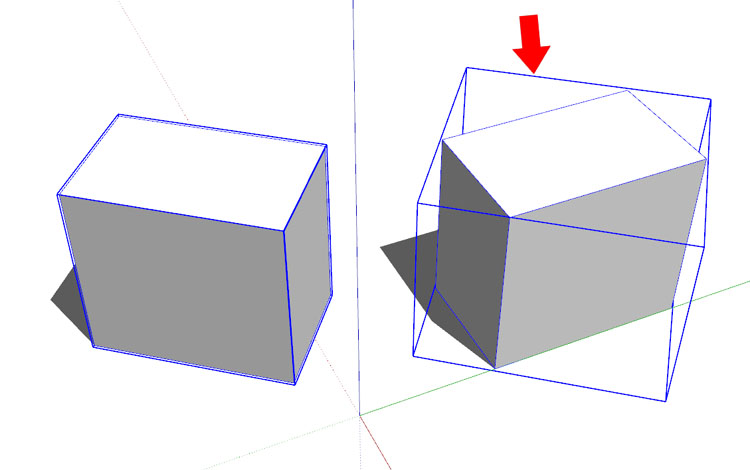
      my definite favourit for SketchUp 7 is, that bounding boxes of groups and components align to newly defined coordinate axes.
      because, if you allign your axes to a different angle, the bounding boxes of new groups/components still follow the original axes. thats why I rather change the sun direction than position the model to its correct compass orientation... ๐Ÿ˜ž

      bounding_box.jpg

      posted in SketchUp Feature Requests
      plot-parisP
      plot-paris
    • RE: Location window disappeared

      thanks a lot Gaieus, that explanes everything.
      in my office we have only a specific number of (serverbased) pro licenses. if all of them are in use, you automatically log in with a degraded license.

      so I dont have to worry about reinstalling SketchUp. and everything will be fine on monday (just have to come early to get one of the pro licenses ๐Ÿ˜‰ )

      posted in SketchUp Discussions
      plot-parisP
      plot-paris
    • Location window disappeared

      Help!!! my location tab in the Model Info Window has disappeared! ๐Ÿ˜ฎ

      I just wanted to specify the right location for my model to do some shadow testings with the survey buildings. but the tab of the location is not there anymore. it should be directly below "File" and above "Statistics" in the Model Info Window.

      did I schange something? is there a possibility to get it back?

      posted in SketchUp Discussions sketchup
      plot-parisP
      plot-paris
    • RE: Component > make not unique

      perhpas that would be a nice feature for SketchUp 7 - that you can replace groups by a component as well (just by right clicking on a component in the component window)

      and just that you dont get confused, because you changed a group into a component every other minute, it would be a fine thing, if the bounding boxes of groups and components were different (at the moment, if you enter a group/component it is just dotted lines. components for example could have chain dotted lined bounding boxes)

      posted in SketchUp Discussions
      plot-parisP
      plot-paris
    • Simplify Tool

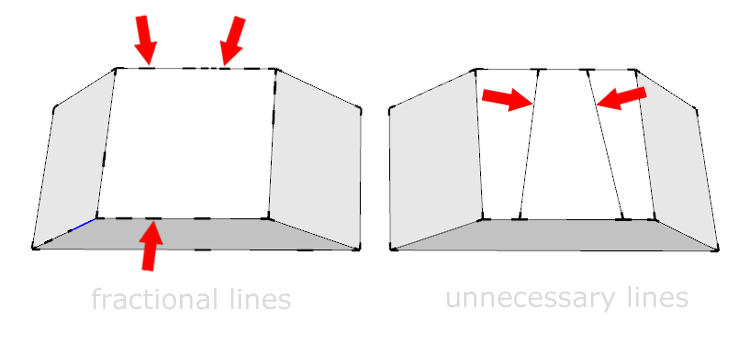
      I am currently sitting on a model (that someone else has done ๐Ÿ˜‰ ) and looking for non continuous lines. after cleaning up a model I always feel better. however, why should one do tedious work, if SketchUp could it do for you in just a second?

      it would be really handy, if you could right klick on selected geometry and choose a "simplify" command, rather like "soften/smooth edges", to ged rid of all unnecessary edge.

      here you should be able to check a mark on "simplify edges" as well as "delete unnecessary lines"

      simplify.jpg
      I think that could be another additional tool to make SketchUp even more powerful.

      posted in SketchUp Feature Requests sketchup
      plot-parisP
      plot-paris
    • RE: Remove material from face?

      but if I just want to delete some of the textures? for example I have a nice textured model and add components (people for instance) which I want to appear in very reduced colours. now I have to delete only those component's colours, not the ones of my model however.

      does the ruby script work here as well (by selecting specific textures) or should I keep my fingers crossed for SketchUp 7 (the universal cure for every problem ๐Ÿ˜‰ )

      posted in SketchUp Discussions
      plot-parisP
      plot-paris
    • RE: Show points/vertices

      what a nice trick, Wo3Dan! ๐Ÿ˜„

      I nerver had the idea using styles to actually check my model for flaws (they were only lovely grafical gimmicks to me).
      turning on edges however shows you every broken line. I just started revising my model all over again - really cool! ๐Ÿ˜

      posted in SketchUp Discussions
      plot-parisP
      plot-paris
    • RE: Remove material from face?

      now you mention it... is there a posibility to delete several textures at once?

      because selecting more than one at once is not possible. and if you import some highly coloured components but want to keep the design simple, it is quite a job deleting all the unwanted textures. ๐Ÿ˜ž

      posted in SketchUp Discussions
      plot-parisP
      plot-paris
    • RE: Remove material from face?

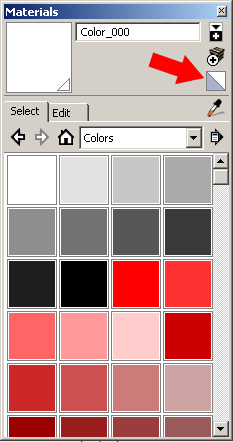
      or you can just use the "set to defaul" as a colour. you can find it at the right hand side of the colour window. just select all geometry of the component, then choose the default

      colour and paint it...color_window.jpg

      posted in SketchUp Discussions
      plot-parisP
      plot-paris
    • RE: Offset improvement

      anglaret, you made me think of nice idea:

      SketchUp often remembers things - like if you move something a certain distance; if you move it again, it will snap to that earlier distance, if you near it.

      wouldn't it be nice if the offset tool remembered the last selection of lines it was used with and highlight them as soon as you hover over one of the lines (the originally selected ones or the newly created ones, depending on where your cursor hovers).

      another really cool thing would be to be able to create repetitive offsets by typing in 3 * for example (or the other way arround: 3 / ), just after creating the offset
      (I thought it was possible. but by trying I just discovered it is not - would be so handy though ๐Ÿ˜† )

      posted in SketchUp Feature Requests
      plot-parisP
      plot-paris
    • RE: An Apparent Face-Intersections View

      but if you think about how long it takes SketchUp to intersect a large model with a lot of polygons - I am afraid it would slow down the program a great deal.

      by the way: how does your geometry change, when you intersect it? is it that you lose some faces or rather that some geometry (round shapes for example) harden (suddenly show a lot of lines)?

      posted in SketchUp Feature Requests
      plot-parisP
      plot-paris
    • RE: Section tool(s) enhancements

      I thin you are right, olenordmandsen.

      currently I only use the section tool to check things in my models. for grafical use (presentation I mean) however it is not really usable - especially because of the visible geometry within cut "walls". that just doesnt look good.

      if SketchUp would display closed geomety in a section as solid object, you needed to be extremely accurate with defining face orientations (what I am always doing anyway - spending huge amounts of time reversing faces, even if it is coloured later on... ๐Ÿ˜‰ )

      posted in SketchUp Feature Requests
      plot-parisP
      plot-paris
    • RE: Missing lines

      sometimes that has something to do with layers. did you get a whole bunch of layers, when you imported?
      if yes, some of them may be hidden. the easiest way to get your model a bit more clearly arranged is to select them all (except layer0) and delete them. SketchUp will ask you, if you want to move the contents to the default layer (layer0). Confirm.

      perhaps that was the only problem...

      posted in SketchUp Discussions
      plot-parisP
      plot-paris
    • 1 / 1