sketchucation logo sketchucation
    • Login
    1. Home
    2. pixelcruncher
    3. Posts
    Oops, your profile's looking a bit empty! To help us tailor your experience, please fill in key details like your SketchUp version, skill level, operating system, and more. Update and save your info on your profile page today!
    πŸ”Œ Smart Spline | Fluid way to handle splines for furniture design and complex structures. Download
    P
    Offline
    • Profile
    • Following 0
    • Followers 2
    • Topics 21
    • Posts 507
    • Groups 3

    Posts

    Recent Best Controversial
    • RE: Rayscaper New Releases

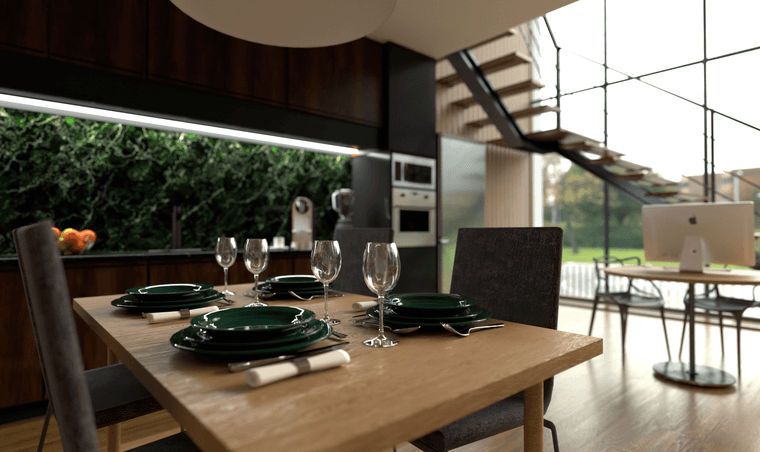
      Nice renders, especially the last one with the dinner plates.Nice use of DOF.
      2d1655d7-56c1-4d29-b78e-c9178c45ac98-image.png

      posted in Extensions & Applications Discussions
      P
      pixelcruncher
    • RE: Rayscaper New Releases

      @Krass I like the result.

      FYI, Rayscaper uses Intel's OpenImageDenoise (link). I think this is the same denoiser that Twilight Render uses in its denoise extension, so you should see comparable results.

      posted in Extensions & Applications Discussions
      P
      pixelcruncher
    • RE: Rayscaper New Releases

      @Krass, those are nice renders!

      By external denoiser, do you mean the one in Rayscaper or something else?
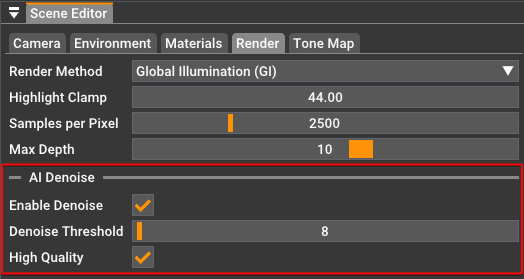
      image.png

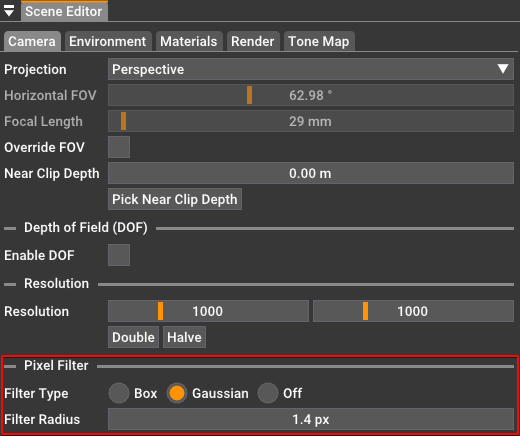
      Pixel filtering can also help to get rid of some of the jagged lines:
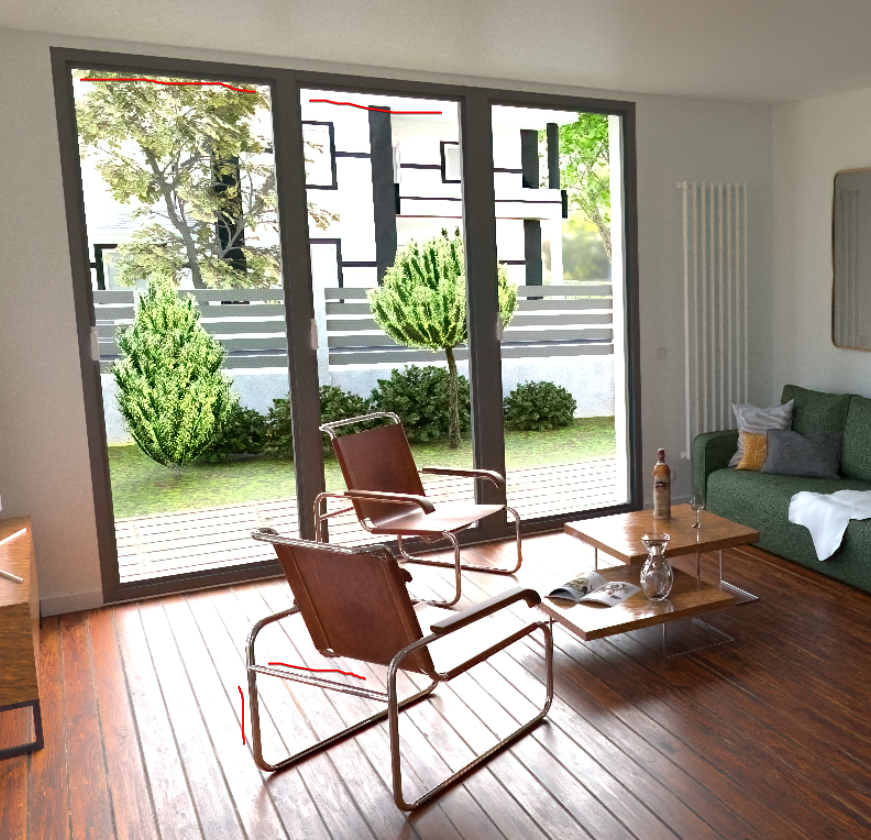
      image.png

      image.png

      Happy Rendering!
      Thomas

      posted in Extensions & Applications Discussions
      P
      pixelcruncher
    • RE: Rayscaper New Releases

      @Krass I appreciate your interest in Rayscaper! Thanks.

      I'm very impressed: I'm familiar with v-ray, D5 render and Twinmotion, but your tool is great for beginners, but of course for pros at a very, very decent price.

      Glad to hear, I hope to build something that is very easy to use at a great price.

      I'm in charge of a discord room on 3D rendering and plan to make tutorials for all those people who aren't into 3D rendering yet.

      Nice! Let me know how I can support you.

      Cheers,
      Thomas

      posted in Extensions & Applications Discussions
      P
      pixelcruncher
    • RE: Philips with Rayscaper

      @alvis said in Philips with Rayscaper:

      Not a bad start. I'm not sure if I like him. Easy to get used to, simple user interface. Several times Sketchup crashed trying to save the result. I need to think!

      @alvis The crashes you saw should be fixed with the latest release... https://community.sketchucation.com/post/1612960

      posted in Gallery
      P
      pixelcruncher
    • RE: Rayscaper New Releases

      Hey, Rayscaper users!

      Another release!

      Rayscaper 0.9.43 Beta is available in the SketchUcation store. More fixes and improvements. As always, I recommend upgrading to the latest version.

      What Changed?

      Improvements

      • Rayscaper now takes Windows monitor scaling into account. On scaled monitors, Rayscaper should display correctly
        without requiring manual user scaling. However, manual scaling is still an option if needed.
      • Use the same light sampling algorithm for CPU and GPU. This would sometimes cause render differences between CPU and
        GPU in complex lighting situations.
      • Generate better tangent vectors for normal mapping. This should improve the quality of normal mapping.
      • Rename the Disney material to PBR material.
      • Drop the thin sheet approximation for the Disney (PBR) material, it's not working correctly currently.
      • Drop the transmission color from the glass material.
      • In the PBR material, rename clearcoat gloss to clearcoat roughness for consistency with other materials.
      • Drop the environment light fake GI mode, it looks too weird to be useful.
      • Drop some render methods that are not that useful except for debugging ("Shading dP/dU", "Shading dP/dV", "Shading
        Incidence", "Shading Normals / No Bump").

      Bug Fixes

      • Fix a crash when double-clicking the save button in the GUI.
      • Fixed the saving of the DPI scale application setting.

      To avoid confusion, switching between CPU and GPU rendering doesn't happen anymore in the render tab but via the settings dialog (Menu > File > Settings).
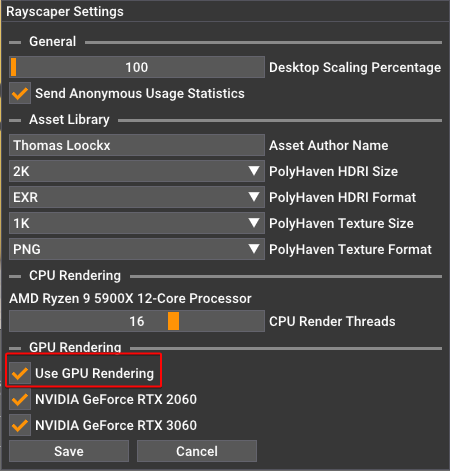
      a9612316-00c2-4731-bc77-493812113d58-image.png

      Help me build the community πŸ‘

      If you like Rayscaper, please share your renders (final or work-in-progress, it doesn't matter)! This is motivating and will help me showcase its capabilities to new users.

      Happy Rendering!

      posted in Extensions & Applications Discussions
      P
      pixelcruncher
    • RE: Post diagnosis.

      For reasons unknown to me, the render then restarts. To reiterate, I have PAUSED the render prior to minimising the render window.

      I will have a look a this then @Mike-Amos - But paused mean paused, it should not restart and unpause itself.

      posted in WIP
      P
      pixelcruncher
    • RE: Post diagnosis.

      Rayscaper only considers the material assigned to the front face and ignores the material on the back face. Incorrectly oriented faces will result in shading issues because Rayscaper uses the normal of the face to determine what's the inside/outside of an object for lighting calculations. This is no different from other rendering software.

      I then attempted to reverse the faces but Sketchup froze, Rayscaper was rendering even while minimised. I checked several times to make sure I got the same thing.

      What do you mean by minimized @Mike-Amos ? When the Rayscaper window is still open, even when minimized on the taskbar, it will continue rendering. You can pause the render, but if you update the geometry (e.g., when flipping a face), the geometry update needs to propagate to Rayscaper, which might be costly. You need to close the window to avoid any overhead caused by Rayscaper.

      posted in WIP
      P
      pixelcruncher
    • RE: Rayscaper bugsplat.

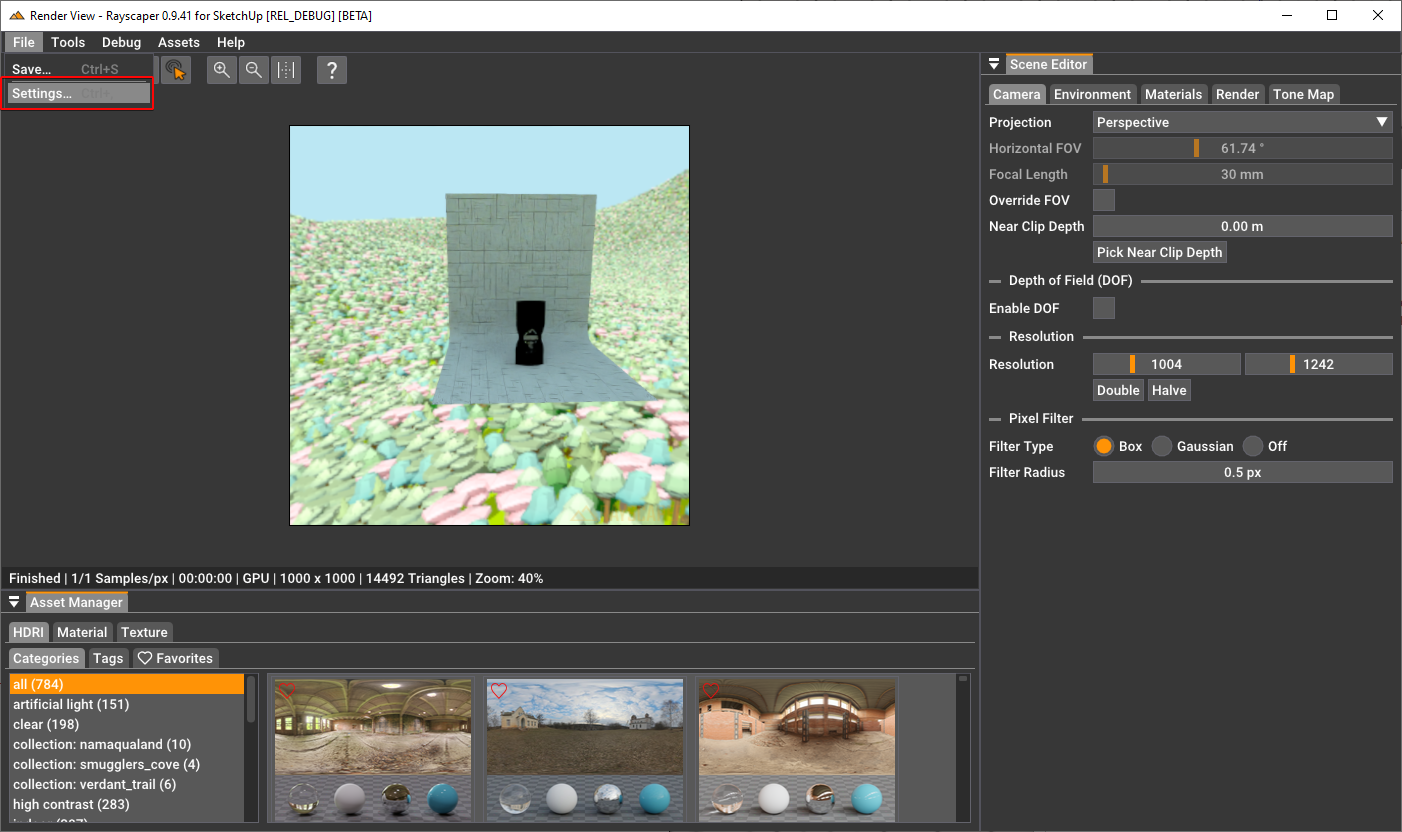
      @Krass Thanks for your interest. Which settings menu are you referring to? The one in Rayscaper.
      f1216d55-1a08-4a83-8103-75e8c5cd09e9-image.png

      posted in WIP
      P
      pixelcruncher
    • RE: Post diagnosis.

      Hey @Mike-Amos

      Are you doing CPU or GPU rendering? When doing CPU rendering, Rayscaper can definitely eat away resources from the rest of the system.

      While altering the ;finish of a material in Rayscaper Sketchup 'froze' again.

      Do you mind sharing this scene, Mike? Adjusting a material can take time, but it should not freeze the entire application.

      OK, something new, when reducing Rayscaper to adjust or check materials etc, NB that this can start Rayscaper on a new render. I always 'stop' the render before minimising Rayscaper. As the load is pretty high this can 'freeze' Sketchup..

      Do you have a way to reproduce this? When there are no changes, there should be no render restart. That feels like a bug.

      Cheers,
      Thomas

      posted in WIP
      P
      pixelcruncher
    • RE: Fireplace room render

      Very nice!

      posted in Gallery
      P
      pixelcruncher
    • RE: Rayscaper render Living room with a cold view.

      Great renders @Mike-Amos - your interiors are getting better and better. You are getting the hang of this Rayscaper thing πŸ™‚

      Modo itself is gone, or will be by the end of 2025 and sales are I think done now. I think they are going in another direction, production etc.

      I completely missed this, but sad to hear 😞

      posted in Gallery
      P
      pixelcruncher
    • RE: Mod Family Room

      Nice render!

      posted in Gallery
      P
      pixelcruncher
    • RE: Rayscaper Render.

      Well done @Mike-Amos !

      posted in Gallery
      P
      pixelcruncher
    • RE: [Plugin] Lightbeans

      Nice resource! I should ask if they want to make them available in Rayscaper.

      posted in Extensions & Applications Discussions
      P
      pixelcruncher
    • RE: Bedroom render Twilight V2.

      Very nice results!

      posted in Gallery
      P
      pixelcruncher
    • RE: Tadao Ando stairs( Render)

      @Rich-O-Brien There's a lovely seaside town called Sidney in BC, Canada. Maybe they referred to that? https://www.sidney.ca/

      posted in Gallery
      P
      pixelcruncher
    • RE: Tadao Ando stairs( Render)

      Love it!

      posted in Gallery
      P
      pixelcruncher
    • RE: Skyscraper in Rayscaper

      Very nice renders! Another set to help me showcase the software.

      posted in Gallery
      P
      pixelcruncher
    • RE: Desired Space (3d Warehouse)

      @Mike-Amos Very nice result! Do you mind if I share the render on X as a showcase?

      Can you mail me the scene? I'm not clear where the second light source is supposed to be? It would be great if you could send me the image with a big circle on it where the missing light source goes.

      Cheers,
      Thomas

      posted in Gallery
      P
      pixelcruncher
    • 1 / 1