sketchucation logo sketchucation
    • Login
    1. Home
    2. ntxdave
    3. Posts
    Oops, your profile's looking a bit empty! To help us tailor your experience, please fill in key details like your SketchUp version, skill level, operating system, and more. Update and save your info on your profile page today!
    Check out Febhouse | New extensions for Shadow Analysis in SketchUp Download
    ntxdaveN Offline
    • Profile
    • Following 1
    • Followers 0
    • Topics 177
    • Posts 2,798
    • Groups 1

    Posts

    Recent Best Controversial
    • RE: View SU files via Web browser

      I have downloaded the trial version of LightUp. Now I have some very basic questions that I could not understand from the documentation.

      I want to take an existing model, not apply any special lighting at this point, and then save/export the model as a .luca file so I can view it in my browser (IE 11) to test how this would work for our show/convention. I can not figure out how to save the model as a .luca file!!!

      I did finally figure out that I could export as a 3D .dae file but that cannot be played in the LightUp Player I downloaded.

      I think there is a possibility for other things but I need a cleaner starting point.

      posted in SketchUp Discussions
      ntxdaveN
      ntxdave
    • RE: View SU files via Web browser

      @adamb said:

      You could use LightUp to export them to the LightUp WebPlayer.

      See an example here: http://www.light-up.co.uk/index.php?t=webplay

      Thanks for the link......this may be a very good alternative to what I want. I think the product info is a little light (no pun intended). If I understand what I was just looking, I can export my SKP files as .luca files and then show them on a web page on my laptop.

      Therefore, I can build the web page any way I like and then click on a link on my web page and display the .luca version of the file in your viewer in an IFrame.

      I would not anticipate using any of the features of your software other than the export to .luca format.

      However, this does present an interesting question that was discussed in another thread. I would like to be able to highlight/zero in on a specific piece of equipment within my model. Any way of accomplishing something like that with LightUp?

      posted in SketchUp Discussions
      ntxdaveN
      ntxdave
    • RE: View SU files via Web browser

      @dan rathbun said:

      Would this be run on an unattended kiosk, where you wish to prevent walk-up users from browsing anywhere else on the computer or running any programs ?

      That is not the plan. Last year we had 2 laptops set up with external touch screen monitors. I put together a web site that was loaded on each machine that had links to PDF files and movies of the various models. I also had 5 slide shows running on the page that cycled through PNG files of all of the equipment in each of out 5 categories of equipment.
      Bottom line is that it was a very controlled environment. This year I wanted to step it up a notch and be able to have everything available in a 3D environment.

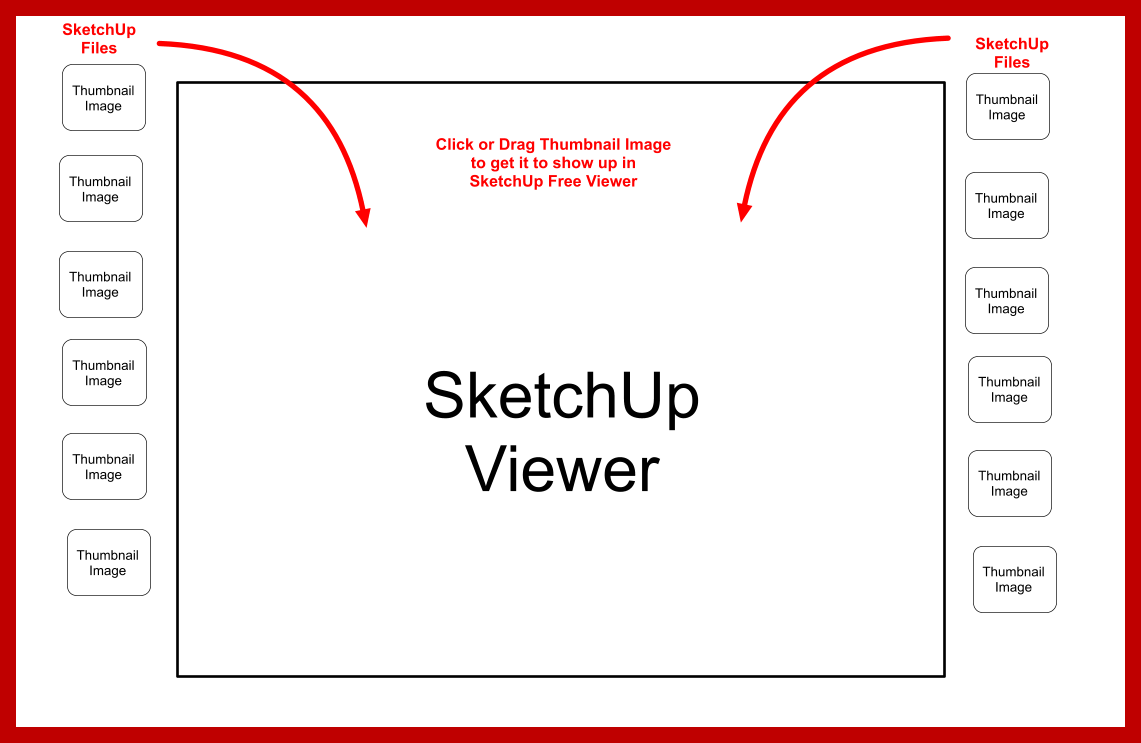
      Pilou, I will look at CL3VER but from what I have seen so far, it kind of misses the mark (I think). Our company builds car washes. There are a number of different types and sizes of car washes. I was wanting to be able to show a number of different layouts. Thus the links on the right side of the page was different layouts. I also wanted to be able to use the scenes in my SKP files (models/layouts). The links on the left side of the page would be to facilitate clicking on different pieces of equipment and display the SU files with the ability to zoom, rotate and etc. But as I said, I will go explore the CL3VER tool. I have several months before the show but do not want to wait to the last minute.

      Aerillius, You alternative may have some potential as well. I thought I saw somewhere in the thread you like to though that you cannot use SU scenes.

      Maybe I just need to adjust my thinking a little. There may be some better alternatives than what I had in mind. I need to find a good viable alternative so I can sell it to management. They like to be the "leader of the pack" and "show off" a little at the show (and I am sure a supporter of that ).

      Keep the suggestions coming, I am sure there is a good "show stopper" out there somewhere.

      posted in SketchUp Discussions
      ntxdaveN
      ntxdave
    • View SU files via Web browser

      I have another crazy idea for presenting our models. We will be participating in a conference where we want to be able to "show our products" in a 3D environment. I have been thinking about a Web page (see attached image) that would present thumbnail views or perhaps a list of models. I would then like to be able to click on a thumbnail or a text list of model names and have the SKP file displayed in the SU Free Viewer (or some equivalent). This might be an over simplification but I hope you get the idea of what I am thinking.

      If you have any idea of how this could be accomplished, I would be interested in your feedback


      SU Web Viewer Page.png

      posted in SketchUp Discussions sketchup
      ntxdaveN
      ntxdave
    • RE: Default Styles

      @dave r said:

      Since you are running the pro version of SketchUp, install it again. You probably still have the downloaded file from when you last downloaded it. Or download it again. It'll renew your Default materials library.

      If you are getting rid of unused styles in your In Model library, don't delete them manually. Use Purge Unused from the Details menu instead. It's easier and faster and safer since you don't get the purge option in the Details menu unless you are looking at the In Model library.

      Thanks for the reply Dave. This was a dumb mistake on my part. I have 2013 installed on another laptop so I just went there and copied them and reinstalled on this machine. I realized what I had done as soon as I did it. I was just trying to make sure I did not have styles in my model that I did not want but forgot to click on the "Model" button before deleting. At least I know I have a backup copy now

      posted in SketchUp Discussions
      ntxdaveN
      ntxdave
    • RE: Default Styles

      @unknownuser said:

      Just reload a free version in a new folder and copy past that you want ?

      I tried downloading and installing SketchUp Maker and got a message that there was another version of the program already installed and I would have to remove it in order to continue.
      I think I have it installed on another laptop so I will try to copy them from there.

      What a silly mistake I made 😳

      posted in SketchUp Discussions
      ntxdaveN
      ntxdave
    • RE: Default Styles

      @unknownuser said:

      Just reload a free version in a new folder and copy past that you want ?

      I assume you mean a free version of SU?

      posted in SketchUp Discussions
      ntxdaveN
      ntxdave
    • Default Styles

      I accidentally deleted all of the Default Styles. I though I was working in my model but discovered I had deleted them from the Default Styles folder. Is there any easy way to restore them?

      posted in SketchUp Discussions sketchup
      ntxdaveN
      ntxdave
    • RE: Scenes question

      @tk0001 said:

      Dave,

      I think the technique I used here would work well for you, as long as the views are relatively close to the camera. The further you pull away, the more the dark edges jumble up the background "unhighlighted" information. The model I'm working on is of a facility that is rather large, so I want to try to dampen the background stuff as much as possible.

      What I really wanted to do was replicate the view SketchUp gives when you double click on a group, but with transparency in the surrounding information. I'm close. Hopefully I can get there.

      Yes, it probably would however, that means all of my groups would have to be duplicated plus there is the camera distance issue. The car wash runs anywhere from 135' to 155' long. Therefore, the lines could be an issue.

      My other point is that everything is centered around presenting in a paper driven environment (which I fully understand since a one of the primary uses is for the builders and etc.). However, today's environment also needs to be a little more multimedia focused as well. As you described about the monitor, we also present our proposed layouts from time to time with touch screen monitors. One of my dreams would be somewhat similar to what you were describing/wanting. It would be really neat if I could bring up one of my models/layouts, double click on a piece of equipment (component/group) and have it highlighted or the rest of the equipment hidden (like double-clicking on a group).

      I have looked at some presentation tools that support 3D models but they do not give me the capability to "cycle through" the various pieces of equipment in my model/layout.

      Guess I am just living in a dream world Wish I was a good enough coder to go off and develop something on my own. πŸ˜’

      posted in SketchUp Discussions
      ntxdaveN
      ntxdave
    • RE: Scenes question

      I love the concept of this. I do models of car washes. I would like to be able to highlight each piece of equipment so we could discuss it with the client. I have built a model that has each piece of equipment on a separate layer. I can then click on one scene at a time and it then reveals that piece of equipment. Thus you can go from the front to the back of the car was revealing one piece of equipment at a time but it would be neat if I could do something like you are suggesting where I have one scene that is the full car wash and then each of the other scenes having just that piece of equipment highlighted.

      I though of creating some "overlays" that are semitransparent on each scene that covered everything but the piece of equipment I wanted to highlight.

      I also built an animated movie that displayed the scenes one at a time, thus making it look like I was "building" the model but with a movie, I can not really pause it at each scene to discuss it. I want a "presentation" that will allow me to navigate through the scenes one at a time. I have actually tried that as a thread on a couple of occasions but got zero responses.

      I never thought of the ability to control the percentage of visibility for a layer but I could see some really interesting usages for that. Think of this whole concept inside of the 3D PDF as well.

      posted in SketchUp Discussions
      ntxdaveN
      ntxdave
    • RE: Remove Plugin

      Sorry for not responding sooner. In this particular case, it turned out that I had to go to the Control Panel and uninstall it as a program. I had sent the message because I could not find the plugin in the Plugins folder and though maybe I was missing something.

      I always appreciate a response.

      posted in Newbie Forum
      ntxdaveN
      ntxdave
    • Remove Plugin

      Silly question: What is the proper way to remove/uninstall a plugin?

      posted in Newbie Forum sketchup
      ntxdaveN
      ntxdave
    • Export as 3D PDF & Layout "player/viewer"

      While there are several plugins for SketchUp that will allow you to create 3D PDFs, I would like for Layout to that that capability as well so that some of the features of Layout could be combined with the model in the 3D PDF file.

      In particular, I would like to see the SketchUp Model section of the tray modified to provide the following capabilities (again, specifically aimed toward the 3D PDF but possibly as additional capabilities for presentations):

      1. Allow the user to select multiple scenes from the SU model
      2. Permit resorting of the scenes if multiple are selected
      3. Determine whether the scenes will be displayed one at a time interactively or used as an animation.
      4. Permit adding the default PDF navigation tools in the 3D PDF file (i.e. next, previous and play buttons and the standard rotate, spin, pan and etc. buttons that show up in the Acrobat reader).

      I would also like to have a stand alone free Layout file viewer/player. That stand alone reader would support the same features as the Acrobat 3D PDF Reader without having to double click the SU Model viewport. Thus Layout would could be used more like PPT or Keynote as a "real" presentation tool without having to have the SketchUp Pro. There are many times when the managers in our company (or clients as well) would like to view the Layout document/presentation but have no need for the full blown SU Pro.

      I could go on with other "presentation oriented" features but at least supporting the exit from Layout to 3D PDF files would be a great first step.

      The Layout "player/view" would be a great second step (IMHO).......

      posted in LayOut Feature Requests layout
      ntxdaveN
      ntxdave
    • RE: Move Thread/Discussion/Post

      @ntxdave said:

      @dave r said:

      Which thread and where do you want it moved?

      Product Proposal/Idea move to Layout Discussions 😞

      Thanks Dave 😍

      Is this something I should be able to do or does it take a special permission?

      posted in Newbie Forum
      ntxdaveN
      ntxdave
    • RE: Move Thread/Discussion/Post

      @dave r said:

      Which thread and where do you want it moved?

      Product Proposal/Idea move to Layout Discussions 😞

      posted in Newbie Forum
      ntxdaveN
      ntxdave
    • Move Thread/Discussion/Post

      I created a topic and would like to move it to a different forum. How can I do that?

      posted in Newbie Forum sketchup
      ntxdaveN
      ntxdave
    • RE: SimLab Composer/SimLab Plugin

      @unknownuser said:

      Maybe some answers here ?

      I downloaded the trial and I am looking at the tutorials. Thanks for the response.

      posted in Newbie Forum
      ntxdaveN
      ntxdave
    • SimLab Composer/SimLab Plugin

      Does anyone have any experience with SimLab Composer that you are willing to share?

      In particular, can you use SU scenes in the animation process. As an example, I have built scenes that show one piece of equipment at a time. I would like to use that sequence of scenes in an animation.

      Can you export the SimLab animation as a Flash file, or some type other than an AVI/MP4 movie?

      Can you use/control the animation in an interactive fashion (i.e. pause/advance) or do you have to play the entire animation sequence?

      posted in Newbie Forum sketchup
      ntxdaveN
      ntxdave
    • RE: Product Proposal/Idea

      Interesting that I have not received any comments. Either

      1. There is no interest in a more sophisticated presentation tool/product that contains a SketcUp model
      2. I did not make it clear that I was wanting feedback/comments before proceeding
      3. I should have put this in another forum
      4. A mixture of the above πŸ˜„
      posted in LayOut Discussions
      ntxdaveN
      ntxdave
    • Product Proposal/Idea

      I have been thinking about putting together some preliminary specs/rough design for a more comprehensive presentation product. I think LayOut is fine as a documentation product but very weak as a presentation product.

      Yes, there are some good presentation products out there (i.e. PowerPoint and Keynote) but they do not allow me to include my SketchUp models and/or animations. I have also seen other products that do a good job of displaying 3D models but again they are a little weak as presentation products, at least from the aspect of being able to stand before an audience and present the company/organization, its objectives/goals, and the products/solutions they are bringing to their audience.

      As an example, you want to tell your audience a little about your company/organization and at some point include your 3D model. In the case of SketchUp (I am not that familiar with the capabilities of other 3D modeling software) I would like to be able to manipulate the model during the presentation. In the case of LayOut, I am required to double-click the model to be able to orbit or pan it or to show scenes one at a time. Not the most professional approach.

      In particular, I think it would be nice to be able to play the scenes automatically (or even better, some subset of the scenes in the model) without having them in a movie file.

      Before I go off and start laying out a more detailed outline or design, I thought I would see if there was any interest. While I would like a full product that allowed the user to have a full 3D experience for all aspects of the presentation, I could also envision a plugin or player that could be used with other products (i.e. PowerPoint or Keynote) that would provide complete control over how the model is presented in the presentation (again, the ability to orbit or pan the model and the ability to take advantage of scenes in a model to provide some level of animation and control over the animation (not just a fixed animation that can not be controlled or manipulated inside the presentation.

      It will be interesting to see what, if any, responses I get. I have a number of ideas "in my head" but have not taken the time to put together a design yet.

      posted in LayOut Discussions layout
      ntxdaveN
      ntxdave
    • 1 / 1