sketchucation logo sketchucation
    • Login
    1. Home
    2. juan974
    3. Topics
    Oops, your profile's looking a bit empty! To help us tailor your experience, please fill in key details like your SketchUp version, skill level, operating system, and more. Update and save your info on your profile page today!
    Sketchucation Tools 5.0.7 | Licensing improvements and bug fixes Learn More
    J Offline
    • Profile
    • Following 1
    • Followers 0
    • Topics 18
    • Posts 99
    • Groups 1

    Topics

    • J

      FREDO6 Animator - data extraction

      Watching Ignoring Scheduled Pinned Locked Moved Developers' Forum animation python threejs animator fredo6
      3
      0 Votes
      3 Posts
      533 Views
      F
      Animation data are stored in the model. All data related to movements, cameras and visual effects refer to objects of the model via a unique ID. The .animator file is simply a backup file, in case something is corrupted in the model. The fromat is a serialization of the working data structures in the plugin. So, not really designed for a clean export. Exporting the animation would first require that you are able to export the container objects (Groups, ComponentInstance), with their transformations.
    • J

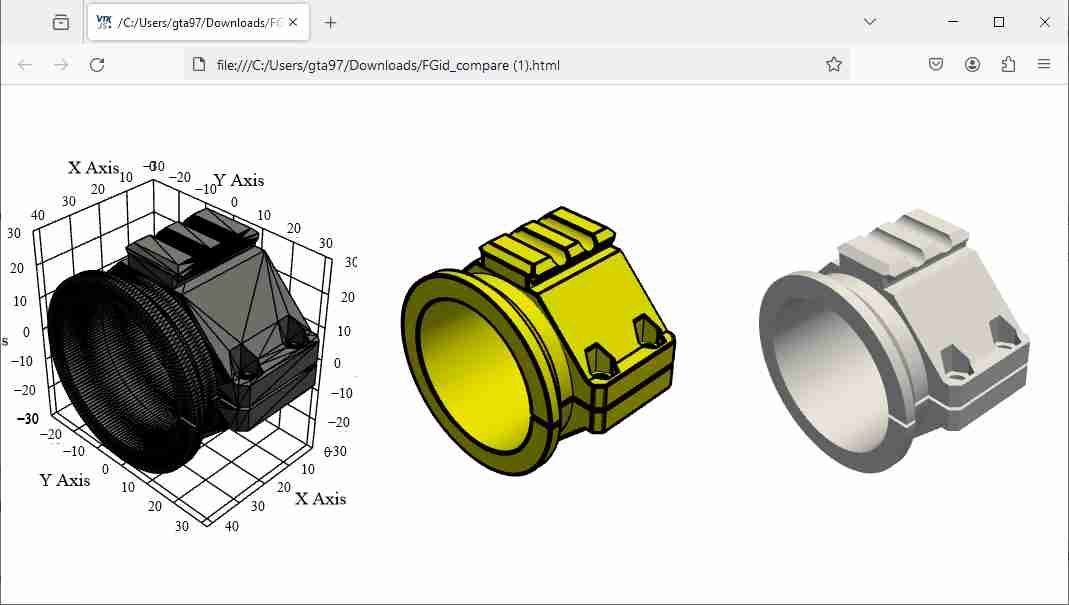
      Compare multiple 3d models

      Watching Ignoring Scheduled Pinned Locked Moved Extensions & Applications Discussions
      1
      1
      0 Votes
      1 Posts
      221 Views
      No one has replied
    • J

      SKP 2 WEBGL

      Watching Ignoring Scheduled Pinned Locked Moved Extensions & Applications Discussions
      13
      0 Votes
      13 Posts
      922 Views
      J
      Hi all, Finally I add the ability to handle stl and glb files : convert to webgl (standalone file) Reagrds, Gilles
    • J

      Export skp 2 pdf 3d

      Watching Ignoring Scheduled Pinned Locked Moved Extensions & Applications Discussions
      5
      0 Votes
      5 Posts
      2k Views
      J
      Hello, New web site merged pdf3d with html and more : http://webgl.tarn.us Regards
    • J

      FaStair - My first plugin

      Watching Ignoring Scheduled Pinned Locked Moved Plugins
      2
      0 Votes
      2 Posts
      520 Views
      P
      Looks great. Thanks.
    • J

      Share your 3D PDF - 3D PDF Gallery ?

      Watching Ignoring Scheduled Pinned Locked Moved Gallery
      11
      0 Votes
      11 Posts
      2k Views
      J
      @bryan k said: Those are good! I would have not thought to use that format and it seems to work well. It's my favorite viewer to share 3d and 4d, but the work can be very long...
    • J

      Pick up 3dPoint in canvas

      Watching Ignoring Scheduled Pinned Locked Moved Plugins
      2
      0 Votes
      2 Posts
      446 Views
      J
      Finaly i achieve the plugin for a straight stair. It's easier and it's a good way to learn ruby. To draw a stair : -install the file FaStair-i_Shape.rbz with the SU extension installator -activate the tool named FaStair-i_Shape in the Plugins / Extension menu -pick the origin of the stair -pick the width -pick the depth -finaly pick the height[image: ye5x_Clipboard01.jpg] et voila[image: bKKh_Clipboard02.jpg] plugin FaStair-_i_Shape Now i'm working on the FaStair-L_shape, it's much more complicated.[image: jfjE_Clipboard03.jpg]
    • J

      Context menu selector filter and smartmodelling

      Watching Ignoring Scheduled Pinned Locked Moved Plugins
      6
      0 Votes
      6 Posts
      800 Views
      J
      Hi driven, I remove the useless files and convert all to utf-8. To make it work i commented line 46 in module egdesTools.rb because of "bad retry" cool plugin
    • J

      Face to cam script for PDF3D

      Watching Ignoring Scheduled Pinned Locked Moved Developers' Forum
      4
      0 Votes
      4 Posts
      1k Views
      J
      finally the problem was tan(alpha)=tan(alpha+180°) here the result...
    • J

      Edge from PNG transparency

      Watching Ignoring Scheduled Pinned Locked Moved Plugins
      3
      0 Votes
      3 Posts
      395 Views
      J
      Thank you TIG
    • J

      Need plugin that erase orbit tool and replace by pan tool

      Watching Ignoring Scheduled Pinned Locked Moved Plugins
      5
      0 Votes
      5 Posts
      595 Views
      D
      I tried using Microsoft IntelliPoint... but it did NOT work. [image: 3r0c_IntelliPoint_SketchUp_Pan.png]
    • J

      Need a plugin

      Watching Ignoring Scheduled Pinned Locked Moved Plugins
      5
      0 Votes
      5 Posts
      692 Views
      J
      edited ... @ Pilou : si tu as une bonne traduction de mes posts je suis preneur ...
    • J

      Need plugin to close curves

      Watching Ignoring Scheduled Pinned Locked Moved Plugins
      3
      0 Votes
      3 Posts
      414 Views
      T
      Edge Tools? http://forums.sketchucation.com/viewtopic.php?f=323&t=24593
    • J

      Request : last used tool

      Watching Ignoring Scheduled Pinned Locked Moved Plugins
      2
      0 Votes
      2 Posts
      2k Views
      J
      already requested here
    • J

      Can we improve ExtrudeEdgebyRails? (add options)

      Watching Ignoring Scheduled Pinned Locked Moved Developers' Forum
      21
      0 Votes
      21 Posts
      2k Views
      D
      hi Tig, just a thought, I and it seems quite a few people use fredo's polyline segmentor before using eebyrails, loft, blend, etc.. so, would it be possible to simply call up that tool from within EER2 if a potential problem is found? john
    • J

      Need plugin like line2tube but ...

      Watching Ignoring Scheduled Pinned Locked Moved Developers' Forum
      16
      0 Votes
      16 Posts
      3k Views
      P
      @unknownuser said: I fixed it because of your very useful comments...
    • J

      [Tutorial] how to copy edges only of an object

      Watching Ignoring Scheduled Pinned Locked Moved SketchUp Tutorials sketchup
      3
      0 Votes
      3 Posts
      3k Views
      TIGT
      I even have some customized right-click context-menu scripts of my own [very short and simple] that Invert-Select, Erase-Coplanar-Edges, De-Select-Edges, De-Select-Faces, Add-Faces-to-Edges etc which are even quicker than using a menu item...
    • J

      How to make augmented reality whit your sketchup model(free)

      Watching Ignoring Scheduled Pinned Locked Moved Extensions & Applications Discussions extensions
      10
      0 Votes
      10 Posts
      3k Views
      J
      You're right, each medium has its advantages, but a medium of dimension n+1 can include the medium of dimension n. it is also true for post processing such as Photoshop and other rendering software, add some lights remember that what you see on the 3D pdf is just an ... jpeg ... I allow your computer to calculate the rendering in different positions and / or animation (or I does not). Each media has its time, one day when we will realize that the paper is so precious that it will end to the museum with the painting etc. ... The trick is to adjust the precision (or the features) of your model to the user. Do you think one day we will see cameras in 3d? in fact it already exists and is based on the technology of augmented reality, see the video I sincerely think that technology evolves too quickly, but we are not, we must be aware, and that is the goal of the tutorial ...

    • 1 / 1