sketchucation logo sketchucation
    • Login
    1. Home
    2. johnsenior1973
    3. Posts
    Oops, your profile's looking a bit empty! To help us tailor your experience, please fill in key details like your SketchUp version, skill level, operating system, and more. Update and save your info on your profile page today!
    ๐Ÿ”Œ Easy Offset | Offset selected faces in SketchUp in positive and negative offsets. Download
    J
    Offline
    • Profile
    • Following 0
    • Followers 0
    • Topics 17
    • Posts 561
    • Groups 1

    Posts

    Recent Best Controversial
    • RE: Do i want to invest my time into learning sketchup?

      @tekkybot said:

      so stick with the free version right?

      Definitely when you start. And from what I've read on here the only advantages of the Pro version are Layout (which no one seems to use anyway because it's too buggy) and exporters for 3ds and obj. If you absolutely need these exporters then you need Pro, but if you don't need them then the free version will be fine for you.

      As far as I know the Pro version doesn't offer any extra modeling capability. I have the free version and haven't even tried the pro trial, so a Pro user would need to confirm that.

      posted in SketchUp Discussions
      J
      johnsenior1973
    • RE: Do i want to invest my time into learning sketchup?

      "Take out the trial."

      Erm, why? The free version is more than capable of doing nearly everything the Pro version can do. As someone who is only asking if SU is worth investing time to learn, they only need the free version. If they learn SU and then find that they do need the exporters then they should think about buying the Pro version, but as someone new I don't see the point in them getting the free trial and messing around with the extra tools that they are going to lose in 8 hours anyway. Far better for them to get proficient in SU and then download the trial. That way they will be able to evaluate the Pro version properly because they aren't learning the the basics during the limited trial time.

      posted in SketchUp Discussions
      J
      johnsenior1973
    • RE: Do i want to invest my time into learning sketchup?

      @tekkybot said:

      is this modeled in sketchup? http://sketchup.google.com/3dwarehouse/details?mid=30b514b24624da4fc1ccec171a275967&prevstart=0

      I'm not an expert, but I'd say that was definitely made in Sketchup.

      It could be that he imported a model and built the Sketchup model on top of it. Kind of tracing it I guess. But I'd say that's a pretty pointless way to go if you are proficient in SU, and he certainly seems to be.

      I'll put it this way. I think there are many people on here who could build the same plane totally in SU and it come out even better than that model.

      If planes like that are what you want to create, I'd definitely say SU is worth learning.

      posted in SketchUp Discussions
      J
      johnsenior1973
    • RE: Barcelona Pavilion

      Before I posted the link was to youtube, that worked. Now the link's to veoh and that doesn't work.

      posted in Gallery
      J
      johnsenior1973
    • RE: Barcelona Pavilion

      Worked fine for me just now.

      posted in Gallery
      J
      johnsenior1973
    • RE: Do i want to invest my time into learning sketchup?

      @tekkybot said:

      @johnsenior1973 said:

      Only you can answer whether you want to invest your time learning Sketchup. Have a look at the Gallery on here. Have a look at the best models on the 3DWarehouse. If you like the images on the gallery and the models on 3DW then yes, learn Sketchup. If you don't like what you see then don't.

      the reason i was asking was BECAUSE of what i saw in the 3d warehouse. i just didn't believe some of those things were modeled entirely in sketchup. i guess they were ๐Ÿ˜ฎ

      A lot of the cars and other vehicles aren't modeled in Sketchup. A lot of them are modeled in other programs and just converted into skp's.

      posted in SketchUp Discussions
      J
      johnsenior1973
    • RE: Do i want to invest my time into learning sketchup?

      Only you can answer whether you want to invest your time learning Sketchup. Have a look at the Gallery on here. Have a look at the best models on the 3DWarehouse. If you like the images on the gallery and the models on 3DW then yes, learn Sketchup. If you don't like what you see then don't.

      IMO Sketchup is a wonderful program. It's a great deal easier to learn than most 3d programs. I'd also say there are far better programs to use for many of the things you list though. A lot depends on your willingness to learn and your budget.

      posted in SketchUp Discussions
      J
      johnsenior1973
    • RE: Are you ready for SketchUp 7 news?

      @jasonh1234 said:

      Most recent thing I've found is:
      http://groups.google.com/group/SketchUp3d/browse_thread/thread/256a4b594562c04f/41aabe6d43f6b29e ๐Ÿ˜ž

      A thread from August 2007 is the most recent thing you've found?

      posted in Corner Bar
      J
      johnsenior1973
    • RE: Anyone up for a speed modellign challenge?

      Remus - You've got your 15 Yes votes. Hurry up and get the contest going before all the paranoid people on here strangle the life out of the contest with their fears of someone cheating. ๐Ÿ˜’

      posted in SketchUp Discussions
      J
      johnsenior1973
    • RE: How to Change Feet to Millimeter?

      I'd say you should open his model, change the measurements to mm, save the model. Close Sketchup. Then open up Sketchup again. Open the saved model, then that should be in mm and fine for you to import your image into.

      posted in Newbie Forum
      J
      johnsenior1973
    • RE: How to Change Feet to Millimeter?

      Do you have a "Untitled" model saved that SU opens to? For example, I don't see the point of Bryce appearing every time SU starts, so I deleted Bryce, then saved the model "Untitled" with nothing in it. Now when Sketchup starts, Bryce doesn't appear.

      If you don't have an Untitled model saved, then SU will probably start with all the default settings - incl feet and inches.

      If you do have an Untitled model, change the settings to mm, then save that empty model. Then when SU opens it should automatcially be with mm settings.

      Hope that helps.

      posted in Newbie Forum
      J
      johnsenior1973
    • RE: [Plugin] Lines to tubes

      Deleting the lines2cyl ruby did sort out the problem.

      posted in Plugins
      J
      johnsenior1973
    • RE: [Plugin] Lines to tubes

      @unknownuser said:

      @unknownuser said:

      I cannot find the Line2Tube ruby at all.

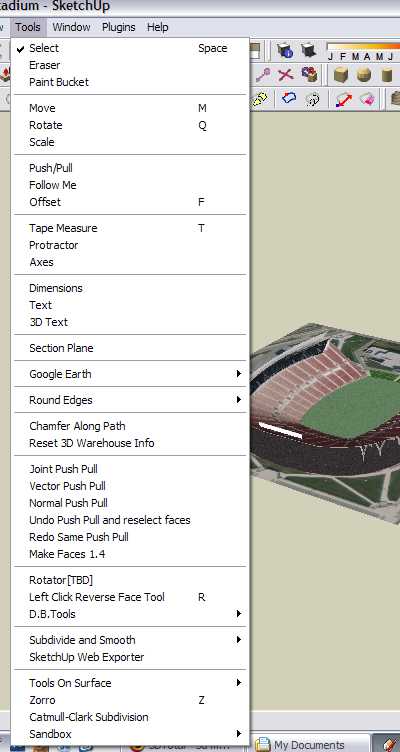
      Menu Tool/ Convert arcs, circles, curves, lines to cylinders


      screenshot.jpg

      posted in Plugins
      J
      johnsenior1973
    • RE: [Plugin] Lines to tubes

      Thanks a lot for this great new plugin.

      One thing though, the PDF says that the tool can be selected in the Tools menu. That wasn't the case for me. It was in the Plugins menu.

      EDIT: I was wrong. I was using the Lines2Cylinders ruby from the Plugins. I cannot find the Line2Tube ruby at all.

      posted in Plugins
      J
      johnsenior1973
    • RE: Anyone up for a speed modellign challenge?

      @jim said:

      @johnsenior1973 said:

      Well that would kill the contest before it even starts.

      Why?

      Just little things. Like lives, jobs, families, time zones etc.

      I'd imagine that a contest like this, on this site, would get around 20 or more entries normally. If it's done in the way you suggest we'd be lucky to get more than a few entries.

      posted in SketchUp Discussions
      J
      johnsenior1973
    • RE: BonZai 3D: a new challenger to SUp?

      301 Moved Permanently

      favicon

      (www.sketchucation.com)

      301 Moved Permanently

      favicon

      (www.sketchucation.com)

      301 Moved Permanently

      favicon

      (www.sketchucation.com)

      posted in Extensions & Applications Discussions
      J
      johnsenior1973
    • RE: Anyone up for a speed modellign challenge?

      @jim said:

      @solo said:

      If I may enquire, how exactly are you planning to conduct a 'speed' modeling competition in an online forum?

      Agree on a time to start....

      Well that would kill the contest before it even starts.

      posted in SketchUp Discussions
      J
      johnsenior1973
    • RE: Anyone up for a speed modellign challenge?

      @solo said:

      If I may enquire, how exactly are you planning to conduct a 'speed' modeling competition in an online forum?

      Just give someone a 15, 30 or 60 minute time limit. Trust in people's honesty to stick within that time limit.

      posted in SketchUp Discussions
      J
      johnsenior1973
    • RE: Soccer Stadium Tutorial?

      I make a lot of stadiums. There are some basic tutorials on youtube.

      What do you need help on? I have over 4,000 stadium pictures on my PC so any pictures you need I might have.

      posted in SketchUp Tutorials
      J
      johnsenior1973
    • RE: "match properties" function in Sketchup

      The match properties ruby is available from Didier Bur's site.

      404 Not Found

      favicon

      (www.crai.archi.fr)

      posted in Developers' Forum
      J
      johnsenior1973
    • 1
    • 2
    • 19
    • 20
    • 21
    • 22
    • 23
    • 28
    • 29
    • 21 / 29