@jo-ke Thanks Jo-Ke
...which were exactly the models that were being offered at exorbitant prices. For this project, which was just for fun, that didn't work out—both in terms of effort and cost.
With this AI Alpha PNG thing, I got where I wanted to go in two minutes 
Oops, your profile's looking a bit empty! To help us tailor your experience, please fill in key details like your SketchUp version, skill level, operating system, and more. Update and save your info on your profile page today!
Check out Febhouse | New extensions for Shadow Analysis in SketchUp Download
 H
Offline
H
Offline
Posts
-
RE: A Backrooms Scene
-
RE: A Backrooms Scene
Thanks, Mike and Rich, for the kind comments.
Yes, indeed, the many small Backrooms-related online fragments from the past few years are now condensed into this new movie—and what’s more (if I understood the news coverage correctly), it’s directed by a 20-year-old man who created most of those earlier posts by himselve! - Respect! by the way—I didn’t have such a suitable "poorly-fed dry tree-root monster" on hand, and the ones available for purchase were too expensive. So I asked CatGPT 5.5 (GPT-Image 2) to generate a cropped PNG from a low-quality YouTube screenshot template — and this AI implementation was outstanding right from the start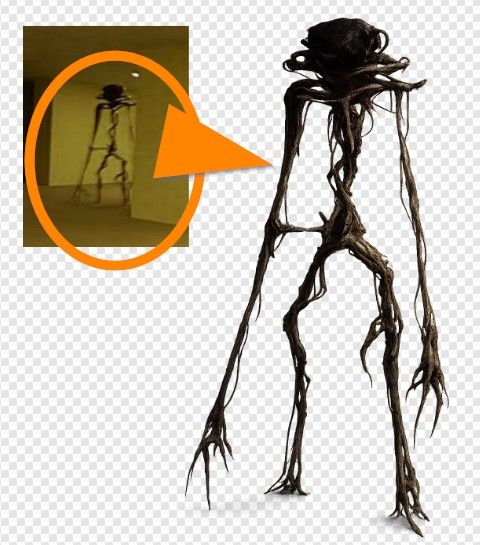
-
RE: A Backrooms Scene
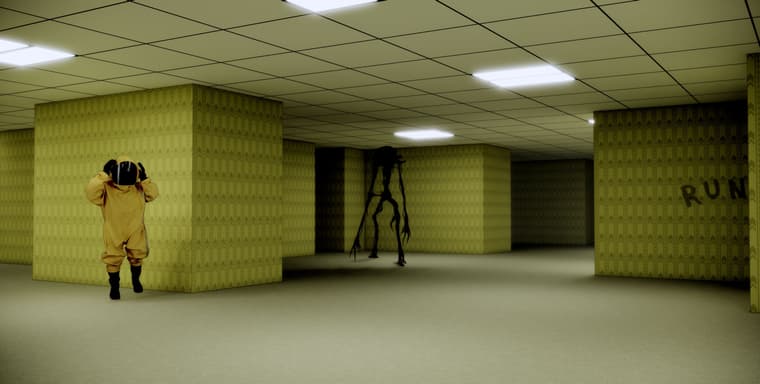
...I didn't expect this Backrooms-Internet-Thing from about six years ago to turn into a movie that's opening here today—so, just for fun, I rendered my old model again and this time I added such a strange tree-root monster
-
RE: I am searching for two plugins
... can someone recommend any "Physics"-Tool like MSPhysics which is working on SkUp2025?
-
SketchUp - the early days
Hi All - I happened to come across this video on YouTube, "Campfire Series - ‘The SketchUp Story’, with Brad Schell” which offers a very in-depth look at the early days of SketchUp (@last software). A time I was actually around for
Even if there’s a chance everyone here already knows about this story or this video—it’s worth mentioning it again.
-
RE: I am searching for two plugins
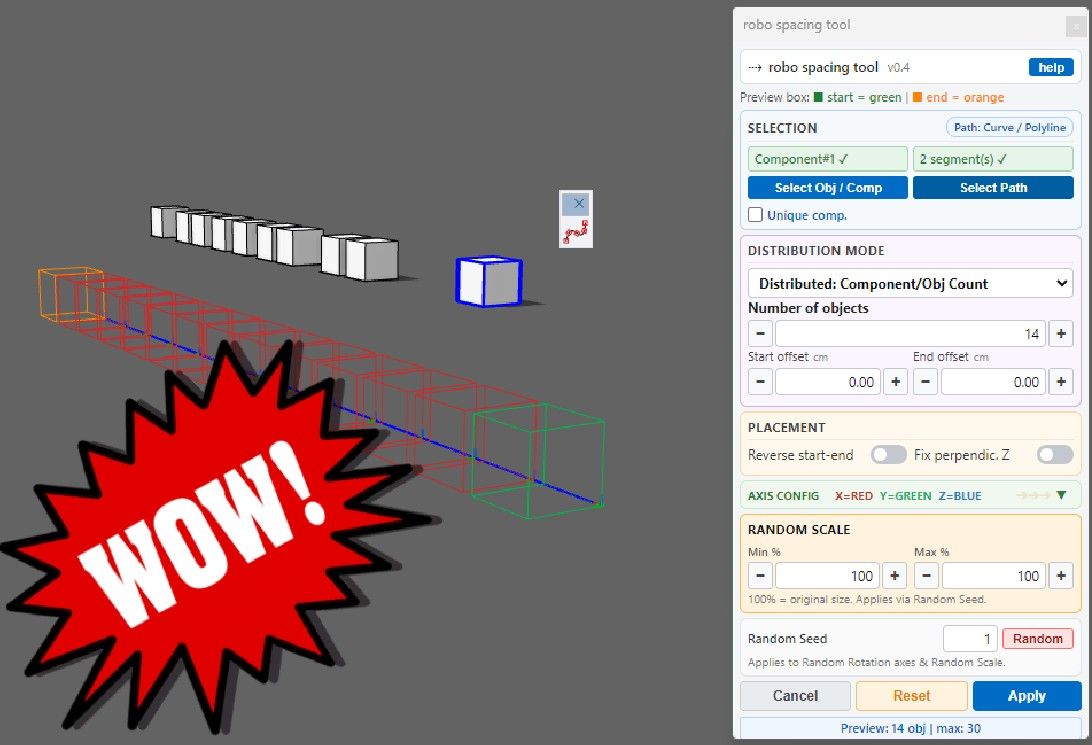
@HornOxx For the first question, try this plugin that distributes components along a path, both in a distributed manner and with spacing. Additionally, you can also rotate and resize the objects during distribution.
---> robo spacing toolWUNDERBAR !!!
An absolutely fantastic recommendation, Alexpacio — and on top of that, a tool I’ve never come across anywhere before. I’m already looking forward to exploring its capabilities beyond the mundane task I’m currently working on.Best!
-
I am searching for two plugins
Hi All - I need recommendations for two plugins.
#1 Is there a tool that can evenly distribute any randomly given number of groups (or components) between the first and last component?
#2 Is there a physics tool (similar to Sketchy Physics) that works with SkUp 2025 or later? -
RE: Movie Software Suggestion/Recommendation
I've zero knowledge of CapCut but are Effects only exposed to paid versions?
 ️
️
...as is the case with many free software versions, CapCut Free comes with a limited range of effects (transitions, text effects, etc.). The features that are only available in the Pro version are clearly marked as such.
Regardless, CapCut Free can rightly be called a full-featured app because everything you need is included.
Personally, I love this because it avoids that unbearable “PowerPoint” urge—so common among many users—to make everything fly, scroll, or dissolve in some silly way! —Here, too, the rule applies: Less is usually more! -
RE: a 60-Minute comiclike Exercise just for Fun.
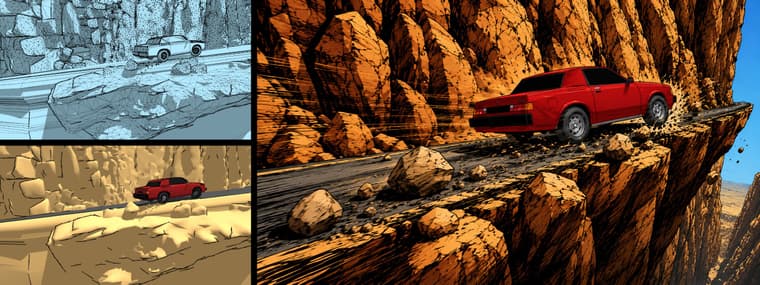
...the completely absurd car rampage through Roadrunner Canyon continues!
(because it's so much fun)
-
RE: Movie Software Suggestion/Recommendation
...I figured as much, since I couldn't reproduce your error message from the previous post.
Less is more, but don't worry—even the free features are still way too extensive
(By the way, if you want animated text, you don't have to use any pre-made text-templates — just use a simple standard text and animate it with keyframes instead.) -
RE: a 60-Minute comiclike Exercise just for Fun.
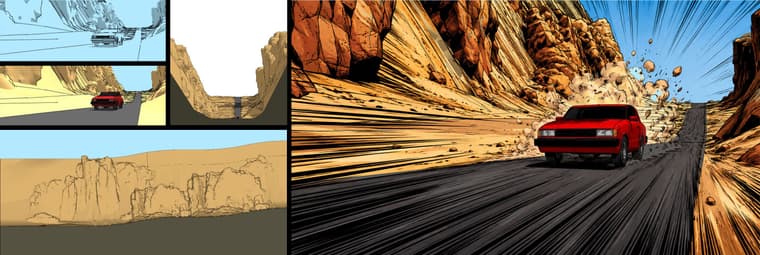
Thanks, Jo-Ke! Yes, that's exactly the look I was going for.
(the rough sketch provided by SkUp itself was extremely helpful for the preparation in GPT 5.5) -
a 60-Minute comiclike Exercise just for Fun.
I created the canyon myself and rendered some sketchy lines. The very simple car model and the rock scaled and distributed within the canyon are taken from the 3D Warehouse.
Afterward, I used ChatGPT-5.5 to render my SkUp image again and intentionally overlaid the AI-result somewhat roughly in Affinity Photo on top of my SkUp-render and I’m happy with this result.
-
RE: Movie Software Suggestion/Recommendation
...I'm back from a little trip.
Congratulations on this successful test video edit. You've really incorporated quite a lot of CapCut tricks into it
-
RE: Movie Software Suggestion/Recommendation
@ntxdave
Too bad—your video is private, so I can't view it. But I'm glad to hear you're making progress. -
RE: Movie Software Suggestion/Recommendation️hi!
Hoping this kind of slideshow is what you had in mind.
Within CapCut I placed two photos one after the other on one track (over(or is it above?) my green background-track). This upper photo-track starts with a “pause” where only the background remains visible. Then comes the first photo, which is scaled and positioned randomly. As soon as it ends, there is another short pause. Now image #2 follows. Here, I’ve even added a fade-in and fade-out effect. Image #2 is also scaled and placed somewhat randomly...
(I’m including the YouTube link “How To Fade In and Fade Out” here)
https://www.youtube.com/watch?v=9qUwKCe846E
By the way: when you add your text track, the individual text elements are edited almost exactly the same way as the other video content you've placed.
As I mentioned earlier, I avoid overly flashy effects—the kind that have always annoyed me, even in PowerPoint
Of course, the photos can also fill the entire screen. If you “lock” this state with a keyframe, then enlarge the photo to x times its original size, and set another keyframe a few seconds later, the finished video will give the impression that you're zooming deep into the image....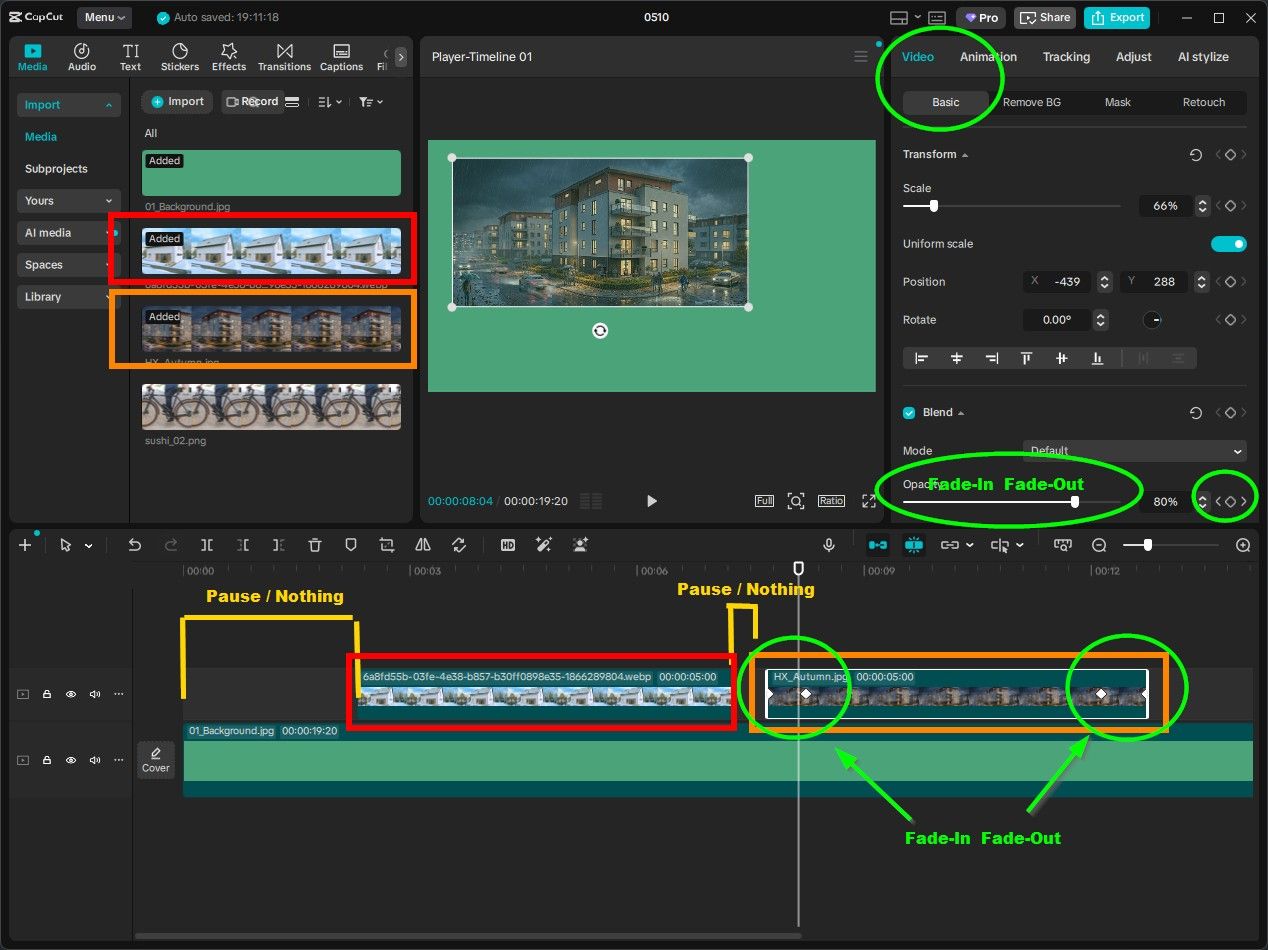
-
RE: Movie Software Suggestion/Recommendation
...so I can understand better—you could send me a screenshot similar to mine, even if it doesn't work exactly as you want it to yet. Maybe also a mock-up screenshot of how it should look later in the video.
If you want to add images (JPGs or similar), they’ll be added by default in full-screen mode, so to speak, and would thus cover your background, which obviously needs to remain visible (?). So you’ll need to scale down your image sequence, similar to the “Cute Robot” in my screenshot...
But before I offer any further blabla I’ll better wait for your screenshots.Yes, that’s right—I live in the Frankfurt area
 Where were you stationed back then?
 -
RE: Movie Software Suggestion/Recommendation
Hi again
️
even though I don't exactly understand what kind of result you're aiming for, maybe these tips will help you:
To create my own custom background, I edit my own HD JPG (1920 x 1080 px). In my example, a simple green JPG created using any image editor. This way, I set my preferred video format for a later export, for example, for a monitor or TV screen. This JPG can be a custom background color or even the family photo from last Christmas. And this background image spans over the entire duration of the video and is located on the lowest video track!
In the video tracks above it, you can play around with your content: You can make text or other image files fly across the screen, or simply fade them in or out at your desired speed, or animate them, or or or... (In my experience, less fiddling around is often better than too much)
Your slideshow in the track editor will probably end up looking something like a staircase that rises diagonally upward to the right
Once you figure out how to create a nice transition or a keyframe animation, capCut is actually pretty simple and straightforward...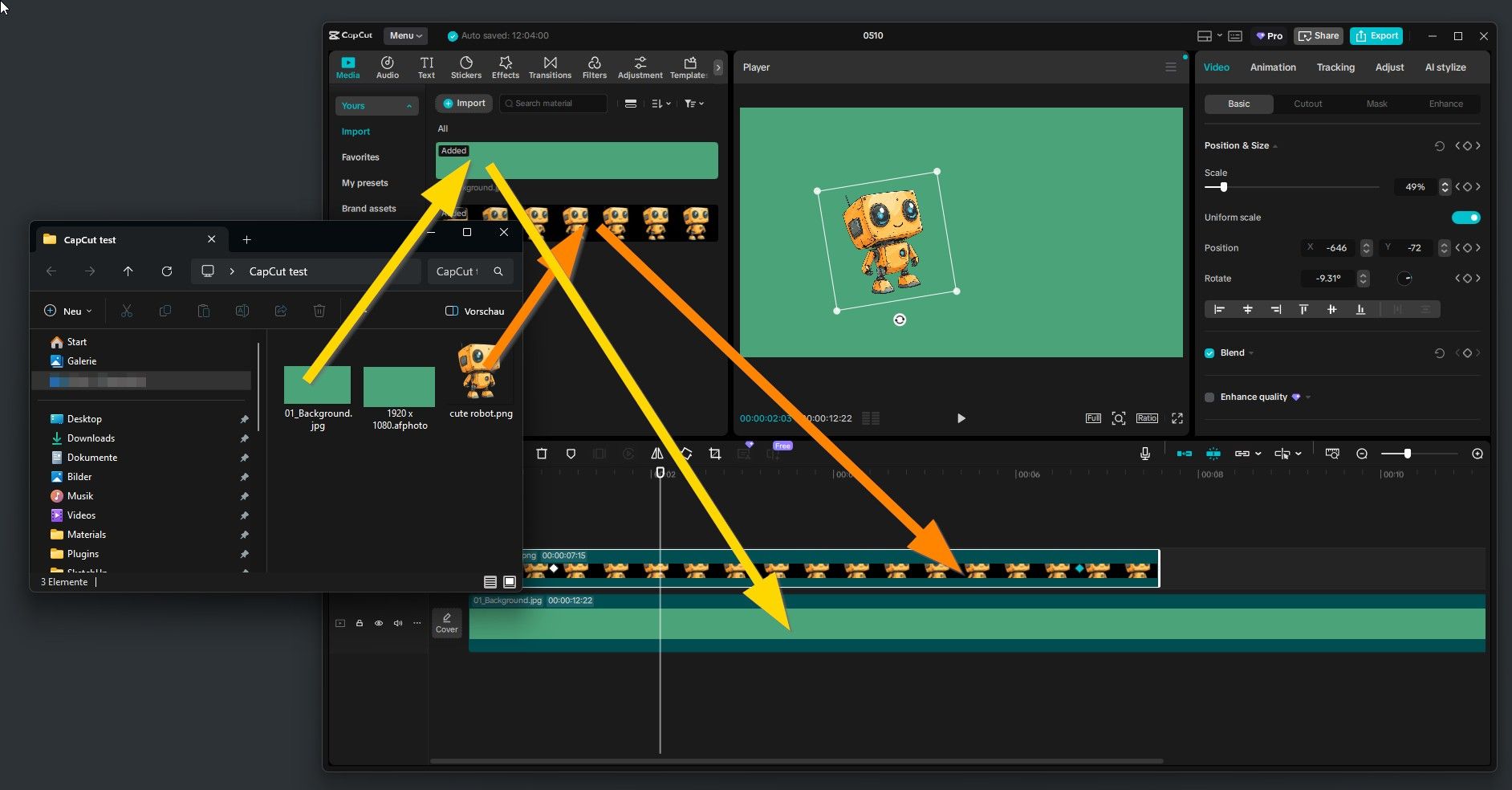
-
RE: Movie Software Suggestion/Recommendation Prima! (I can´t translate "Is there a charge for the desktop version? into something that makes sense in German" ) Aren't you running the program on a computer? Or does that mean “does it cost anything”? Hmmm—my version didn't cost anything.
Animated text: There are various pre-animated text templates available (I never like those things), or you can use a simple standard text, place it, and set a keyframe, then reposition it, even in size or rotation, and set another keyframe. You can do the same with an alpha-channel PNG, for example, an arrow or a red circle...
(before you waste too much time, check YouTube for “CapCut keyframes” or “keyframe animation”).
I look forward to hearing how you're getting along️ -
RE: Movie Software Suggestion/Recommendation
Hi
️
I'm making fast and simple progress with CapCut—it's very simple and straightforward (and there are a lot of help-tuts on Youtube)
It has all the needed features, such as transitions, text, sound, etc., and even keyframe animation...
https://www.capcut.com
 ️ wunderbar !