sketchucation logo sketchucation
    • Login
    1. Home
    2. HornOxx
    3. Posts
    Oops, your profile's looking a bit empty! To help us tailor your experience, please fill in key details like your SketchUp version, skill level, operating system, and more. Update and save your info on your profile page today!
    🔌 Smart Spline | Fluid way to handle splines for furniture design and complex structures. Download
    Offline
    • Profile
    • Following 0
    • Followers 2
    • Topics 101
    • Posts 1,901
    • Groups 2

    Posts

    Recent Best Controversial
    • RE: SketchUp to ArchiCad?

      ArchiCAD to SketchUp - Just for your information.
      Meanwhile, I have received a DWG export from ArchiCAD.

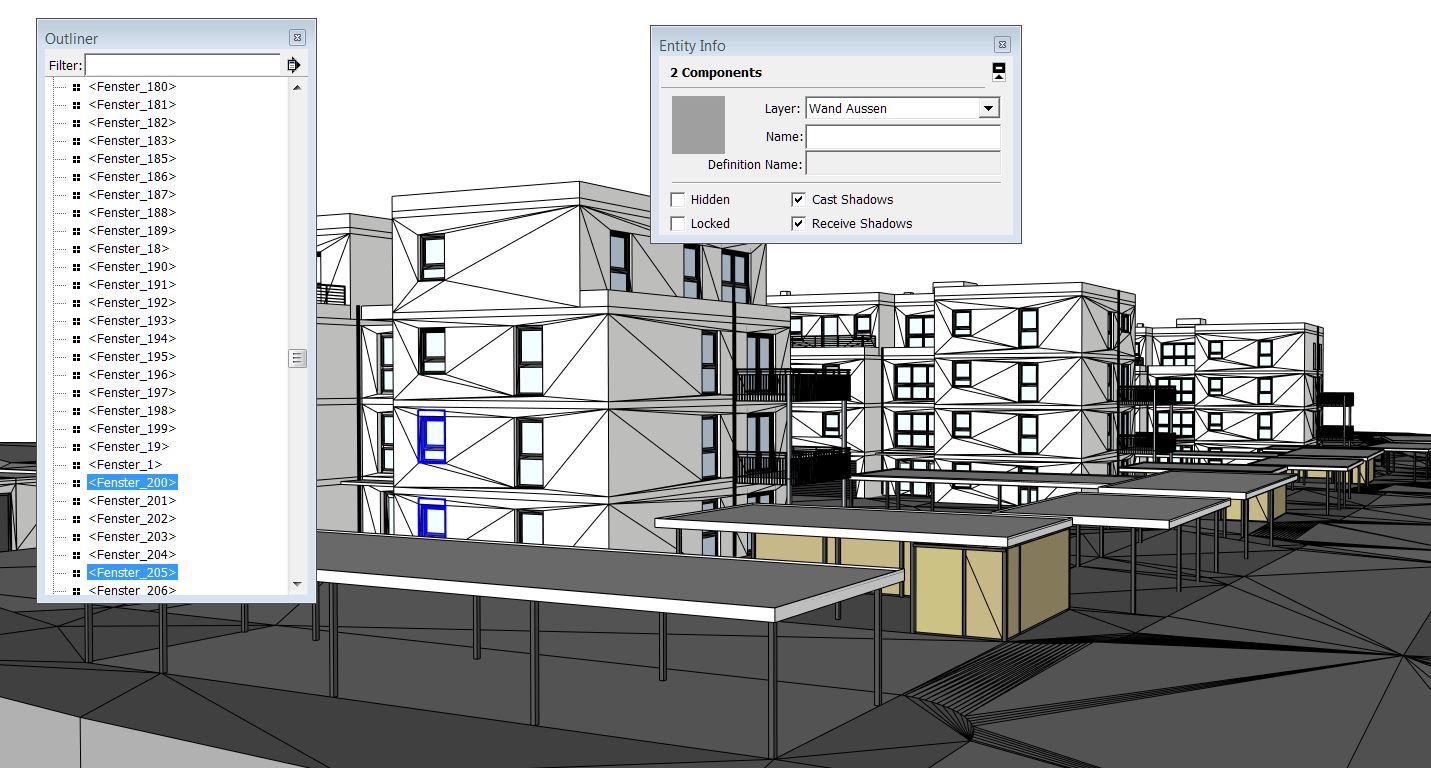
      The first conspicuous behavior is that the exported SKP file sice was about 100 MB, the exported DWG file sice of the same model content was only about 10 MB. For this sice not even DropBox was necessary, that could be sent by email.

      The model groups or model components have been preserved, which made it at least possible to work with this file.
      Unfortunately, almost all surfaces are triangulated, which would mean a huge amount of cleaning.
      (This triangulation effect did not occur in the previous SKP Export)

      Although there are only a few types of windows, which are recognized by SkUp as a component, it brought no advantage, since all (same) components are numbered now - such as Window 01, Window 02, etc.

      Overall - I could work with this file, but I could use it in first place just as a template.


      Screenshot.JPG

      posted in SketchUp Discussions
      HornOxxH
      HornOxx
    • RE: How can I make a screenshot in Word of my model?

      Beside all the hints and tools I would recommend the freeware Greenshot.
      Greenshot has some useful drawing tools, can highlight or pixelize areas etc.
      I use it almost every day...
      In addition to some standard formats, you can save your screenshot in a certain
      Greenshot-format, if you want to continue editing later.

      Link Preview Image

      Greenshot - a free screenshot tool optimized for productivity

      favicon

      (getgreenshot.org)

      posted in Newbie Forum
      HornOxxH
      HornOxx
    • RE: Curved beer glass handle possible???

      "anyone who´d like to share his/her model of beer glass is welcomed:-)"

      that´s a good idea ! (and beer is good as well !!!) 😉
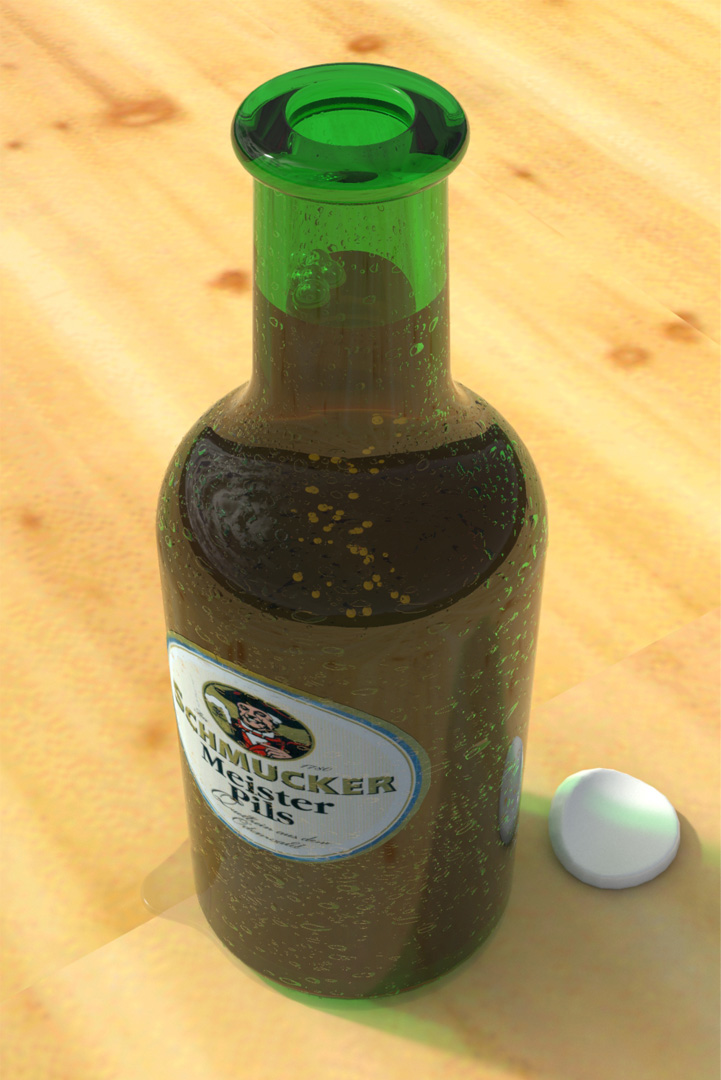
      if your invitation is also valid for a beer bottle, this is my contribution
      (a little render, done last year with Shaderlight)


      B3x.jpg

      posted in Newbie Forum
      HornOxxH
      HornOxx
    • RE: SketchUp 2016 Wishlist

      Hello JQL and John
      the developer of a SU-Render plugins turned my attention to the following.
      He said, that for SkUp - based on a scene - always the height proportion of scene content and viewport height remains constant. This means that only the image width is the variable.
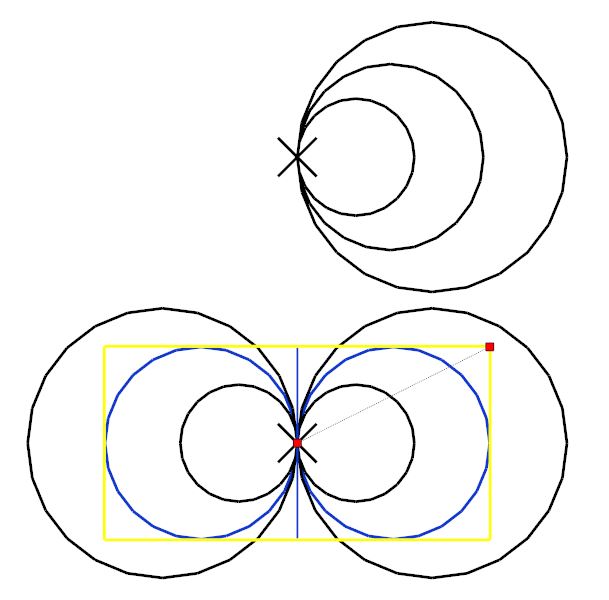
      Within my Render plugins this is a true statement - no matter what resolution I choose, the height proportion remains the same. Fortunately! - Because otherwise we could not produce render series on different computers, which perfectly fit together.

      Now I have repeated this procedure as a 2D export in Skup by using the animation export, because I was able to choose any free resolution settings there. Also Skup exports these 2D images always with the same height proportion As you can see in the little sketch below.
      Although my colleague repeated this procedure on his own computer with other Skup viewport settings, and his export result is the same as mine.

      This result is promising, because it would mean that only a freely selectable height-width resolution should be adjustable within SkUp´s 2D export settings as it is possible in the animation export if you choose JPG for example instead of avi...


      Skizze.jpg

      posted in SketchUp Feature Requests
      HornOxxH
      HornOxx
    • RE: SketchUp 2016 Wishlist

      Perhaps my wish has already been mentioned here (?)

      I want an improved 2D Export - regardless of the width/height-size of my currently used SkUp viewport.
      (As if I would use any render plugin)
      I want that other Skup users with their own viewport sice can export exactly the same file as I do. Interacting with other users would be so much easier ...

      Even if there is a plugin for that, SkUp should be able to do this "out of the box"

      posted in SketchUp Feature Requests
      HornOxxH
      HornOxx
    • RE: Ornithopter...

      after I have recovered from the "30-minute-shock"
      😲
      The insect-like design of your Ornithopter is magnificent!

      posted in Gallery
      HornOxxH
      HornOxx
    • RE: Curved beer glass handle possible???

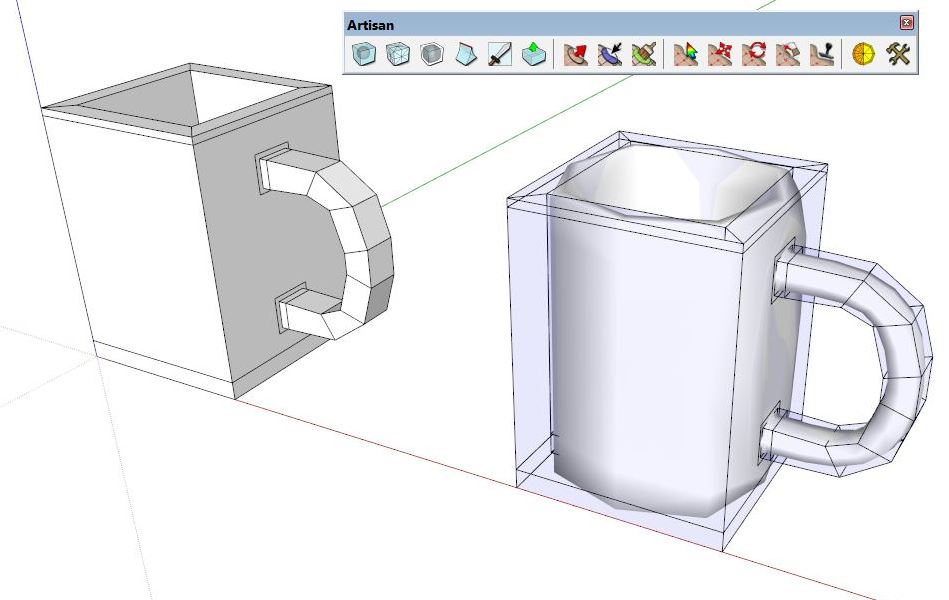
      Here is another way to do such a modeling task by using Artisan
      (I´m showing just a simple fast sketch here)

      Link Preview Image
      Home

      Artisan is a SketchUp extension filled with powerful organic modeling tools. It is perfect for creating: Terrain, Furniture, Characters, and much more!

      favicon

      Artisan (artisan4sketchup.com)


      Artisan.jpg

      posted in Newbie Forum
      HornOxxH
      HornOxx
    • RE: Curved beer glass handle possible???

      Hi
      it´s the Curviloft Plugin

      http://sketchucation.com/pluginstore?listtype=1%26amp;author=0%26amp;category=0%26amp;search=Curviloft%26amp;submit=%3F


      Curviloft.jpg

      posted in Newbie Forum
      HornOxxH
      HornOxx
    • RE: SketchUp to ArchiCad?

      thank you all for your informations and tips.
      There are many dialogues on web about this topic. Many ArchiCad users recommend to use
      the "old" DWG Export for keeping groups and instances. Assuming I will get a DWG export file
      from the architect, I will try that and report here, whether this works with more success...

      posted in SketchUp Discussions
      HornOxxH
      HornOxx
    • RE: SketchUp to ArchiCad?

      Hi japettle

      in the context of this thread, I would like to ask an additional question

      Today I have received a SkUp file, exported from ArchiCad.
      All the geometry and all the layers are transferred perfectly.
      My problem now is, that no instance, group or component is obtained.
      Everything is now a "slurry" of surfaces and lines.
      Is there is no way to export ArchiCad to SKP, and still keeping the groups or instances?
      Since you are using ArchiCAD, I would appreciate any hint...

      Regards

      posted in SketchUp Discussions
      HornOxxH
      HornOxx
    • RE: Synchronizing scene views between machines

      The 2D image export in Skup (Win) is always related to your used width-height ratio of your SkUp viewport - yes, this is very annoying. I also have this problem very often when colleagues work with my files.

      If you render with any external renderer or any render plugin that all doesn´t matter since you're free to set your desired certain aspect ratio.

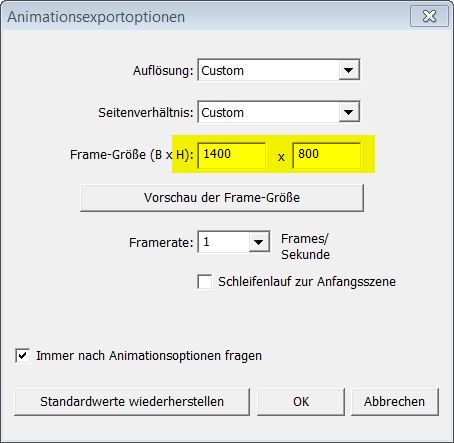
      For exporting single images within SketchUp Pro (Win) you can use the Animation Export. There you are free to set your aspect ratio, regardless of your current Skup viewport sice.
      Within the animation export you choose export "image series" (I don´t know the English naming here) instead of choosing export "animation"... (Unfortunately, this export function does not have the possibility to control antialiasing)

      I hope this evasion helps...

      PS: I do not know how SkUp(Mac) behaves in this matter


      Animationsexportoptionen.jpg

      posted in SketchUp Discussions
      HornOxxH
      HornOxx
    • RE: Iconic chair

      👍
      Somehow you/we always spin around the essential pieces like this one. That's the beautiful reason why exactly these pieces never get lost but always remain close to the surface of our memory.

      Thanks for showing and sharing this one (maybe in skp8?)

      here are some more infos about this chair
      http://www.design-museum.de/en/collection/100-masterpieces/detailseiten/roodblauwe-stoel-rietveld.html

      And the manufacturer CASINA offers some more details, even in 3D
      not only about this furniture
      http://www.cassina.com/en/collection/chairs/635-red-and-blue

      posted in Woodworking
      HornOxxH
      HornOxx
    • RE: Red Bull soapbox racing.

      Hi Mike
      just a thought - could a three wheel concept be a suitable variant for your jet-design?


      seifenkiste 02.jpg

      posted in Gallery
      HornOxxH
      HornOxx
    • RE: Red Bull soapbox racing.

      👍
      a really cool (MIG ?) design!
      If that thing ever goes out to the street, a parachute to slow down after the
      finishline would be a cool gadget

      posted in Gallery
      HornOxxH
      HornOxx
    • RE: Can't See all of DXF File

      Ja! 😆

      posted in SketchUp Discussions
      HornOxxH
      HornOxx
    • RE: Can't See all of DXF File

      @cotty said:

      @beepee said:

      OOps HornOxx, one more issue: I think your conversion may have used inches or some other large unit. These are harmonica reedplates, and the correct unit is millimetres.

      Any chance you could give it to me again in mm?

      Brendan

      You can measure one known length and type in the right length to scale the model with the tape measure tool. (http://help.sketchup.com/de/article/95006 )

      Thanks Cotty, for this reason I have added one unit in the current file

      posted in SketchUp Discussions
      HornOxxH
      HornOxx
    • RE: Can't See all of DXF File

      Sorry, I didn´t even think about dimensioning 😳
      have switched to mm - hopefully it fits now ...


      10 HOLE REEDPLATES1.skp

      posted in SketchUp Discussions
      HornOxxH
      HornOxx
    • RE: Can't See all of DXF File

      Hi Brendan
      I have no idea, why your dxf-import didn´t work correct.
      Anyway, here is your imported dxf-file, saved as Skup 8-file...
      (I hope this file is ok and in the way you expect?)

      Regards


      10 HOLE REEDPLATES.skp

      posted in SketchUp Discussions
      HornOxxH
      HornOxx
    • RE: Simple mirroring

      Hi Jojo9
      using shortcuts also was my choice in the same matter.
      I wanted to use "Alt + x", "Alt + y" and "Alt + z" because I was
      used to these shortcuts by another software I use.
      Forum member Cotty gave me this little help to do so:

      http://sketchucation.com/forums/viewtopic.php?f=10%26amp;t=60763

      posted in Plugins
      HornOxxH
      HornOxx
    • RE: Lake home npr

      Congratulations
      👍
      A fantastic, very detailed and accurate work - thanks for sharing this!
      How did you get this watercolor (aquarell?) look, specifically from the first image, which you have posted here? Is it one of SkUp´s default styles?

      posted in Gallery
      HornOxxH
      HornOxx
    • 1 / 1