So if I use double click and accidentally get a component into the edit mode, there's no way to undo that without having to start over? Actually, what I think I'll start doing is first single click and make sure it's not a component, without going into the edit mode, then double click if it's ok. A bit more trouble and wear and tear on my poor overworked mouse, but that's the price you pay for having so much fun, right?
Oops, your profile's looking a bit empty! To help us tailor your experience, please fill in key details like your SketchUp version, skill level, operating system, and more. Update and save your info on your profile page today!
🚨 Skimp | 25% Off until March 30 Buy Now
 Offline
Posts
-
RE: A Component Problem
-
Thumbnail problems
I've lost my thumbnails, and I don't mean I hit them with a hammer. All of my SKP files no longer have thumbnails. The problem started when I installed SU version 7 on my computer (in addition to version 8, not replacing it) to try to work around a problem with the Zorro plugin. Shortly thereafter some of my thumbnails went away, but only those for models I had downloaded from the warehouse, opened in SU, and then saved (ironically because many warehouse models have no thumbnails unless you do that). The thumbnails for warehouse models that I hadn't yet opened were still fine. Thought the problem might be SU7 co-habitating on my computer, so I uninstalled it. Then ALL of my thumbnails went away.
Another thumbnail question - why is it that sometimes a model downloaded from the warehouse has a huge thumbnail (well, not huge, but it fills up the space), but if you open that model and then save it again, the thumbnail gets smaller (they are sort of like a widescreen version, long and narrow and empty on the top and bottom)? Is there any way to have my model thumbnails fill up the space, to be easier to see? And sometimes the thumbnail has nothing to do with the actual model, how is that done? Thanks in advance.
-
RE: A Component Problem
@dave r said:
@unknownuser said:
If you double click while holding Shift on something that isn't a component/group, you end up selecting and immediately deselecting it.
Actually, when I double click on something it doesn't deselect it, it selects it with a dark blue border around it's edges. I was using that feature to better tell if an object has been selected, it's sometimes difficult to tell, depending on the color. Especially with tiny little parts and pieces. But I take your point. Thanks
-
RE: A Component Problem
Your info on checking the box when making a component solved that problem.
But as to problem of accidentally selecting the wrong object --@dave r said:
If you inadvertently select something you don't want, hold the Shift key and click on it again.
@wo3dan said:
As to unselecting that unfortunately selected component:Holding down [Ctrl] adds to current selection
Holding down [Shift] subtract from/ adds tocurrent selection depending on if an entity is already selectedor not.I'm already holding down the shift key as I make my selections, that's how I select all the faces I want for the component. I double click on each of them, and I know that if I accidentally double click on something I don't want I can just click on it again to deselect it. My problem arises if I accidentally double click on a component, then the whole model gets grayed out except for that component, and nothing that I have tried simply deselects that component and lets me continue from where I was. I have to start over.
@dave r said:
You would make your life easier if you make a component of the related geometry before moving on to draw something else. This will prevent you from missing geometry or accidentally including geometry you don't want included in the component.
@chris fullmer said:
One idea would be to lock the componennts ahead of time. The you could not get into edit mode and ruin your selection set.
I agree, and when I'm creating something that's what I do. But the situation I'm talking about is a model that I've gotten from the warehouse and want to select all parts of the chassis, or engine, or kitchen cabinets, and make it a component so I can drag it out of there and do whatever with it. That's where it gets tricky as far as selecting each face that I need. And of course it does happen with models I created before I discovered the wonderful world of components.
@chris fullmer said:
I generally use the selection window tool
If you mean using the selection tool to drag a window around things to select them all, I use that a lot, but it's useful only if those objects are by themselves, not buried in a model. You get all sorts of strange results if you try that, with other stuff around and behind what you are trying to select. That's why I have to go in and carefully select each part that I want.
Anyhow, thanks for all your help and suggestions. I have another question but I want to start a new topic with it so maybe if somebody else has a question about the same thing they can search for it and maybe get what they need.
This is a fun program. I'm getting gray hair, bleeding ulcers, and have developed several dozen facial tics

-
A Component Problem
Sometimes, after I've gone thru and selected all the parts and pieces of something that I want to make a component, after I've made it a component when I click on it it just selects the face I've clicked on. I cannot select it as a component. But it is listed as a component, and when I make a copy of it from the components list it comes out as a component. Kinda frustrating, as sometimes it takes a while to carefully select everything within a model that I want to save as a component. Hopes this makes sense.
A second component question - I'm sure this has happened to everyone at some time or another, you're going thru carefully double clicking the faces for a component, when you accidentally double click on something that's already a component, or group, and then you have to go back and start all over again. Is there some sort of magic key, or command, or spell, that will let you undo that and continue from before you made the bad clicks? Probably not, but I've asked about things before that I assumed couldn't be done, only to find out it can! -
Using more than one version of SU
How do you use more than one version of SU on the same computer? More importantly, is it possible to open an object created in version 8 with version 7?
-
RE: Zorro crashing
I found a copy of version 7 on my computer, installed it but had major problems with being able to load a version 8 model in version 7. Would always load it in version 8, even if I specified version 7 as the program I wanted to open it with. Noticed your comment about putting it in a separate folder so just uninstalled version 7 and will give that a try. Boy this program is fun

-
RE: Copying object gives weird texture
Actually I thought that might happen, thought maybe it would be different if they were by themselves instead of part of the entire model. Oh well, I know now to watch out for it, and hopefully deselecting the objects before I paste them will continue to work around the glitch. Thanks for your help.
-
RE: Copying object gives weird texture
Sure. They're not very good, I'm just learning. Hope I attached it ok.
-
RE: Copying object gives weird texture
Just tried something - it seems if I deselect the objects after I copy them, before I paste them, it doesn't happen. Man this is one quirky program. Guess that just adds to it's appeal. Maybe, sorta. Kinda.

-
RE: Copying object gives weird texture
Seems like if it was going to screw up something it would be the copy, not the original.
-
RE: Copying object gives weird texture
Yes, it also shows up in monochrome. Nothing I do gets rid of it, and it's really worrying me.
-
RE: Zorro crashing
So if I downloaded an earlier version of SU it might work better? What version should I try, and can I have two different versions running on the same computer, and if so where would I find an earlier version? How's that for a bunch of questions? Jeez, that's another question
-
Copying object gives weird texture
Sometimes when I copy an object and paste it to second SU program, the pasted object looks fine, but the original that I copied it from takes on a strange diamond pattern as shown. Am I doing something wrong, any way to avoid this? It's kinda hard to see so I've attached before and after photos (the seats are what I copied)
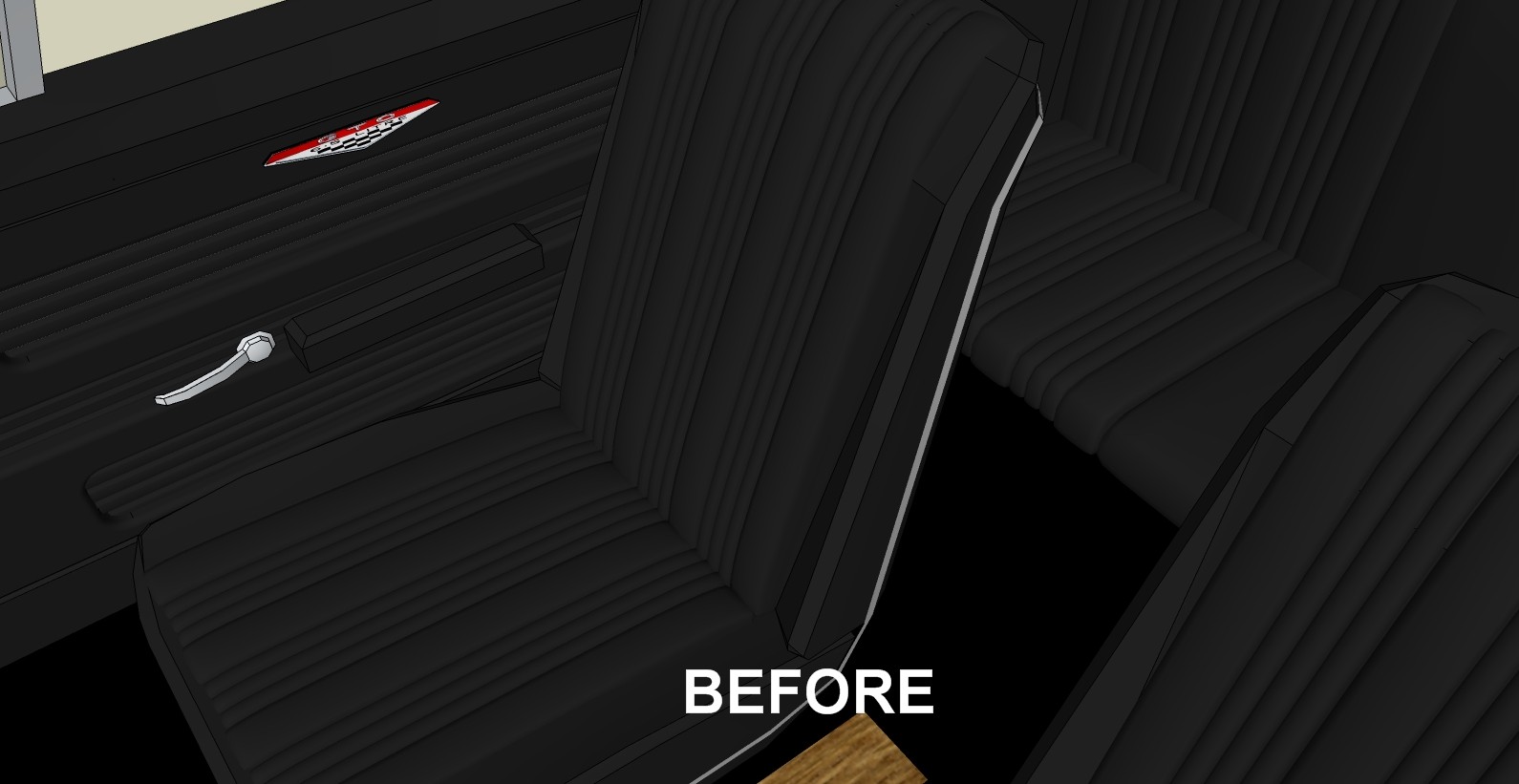
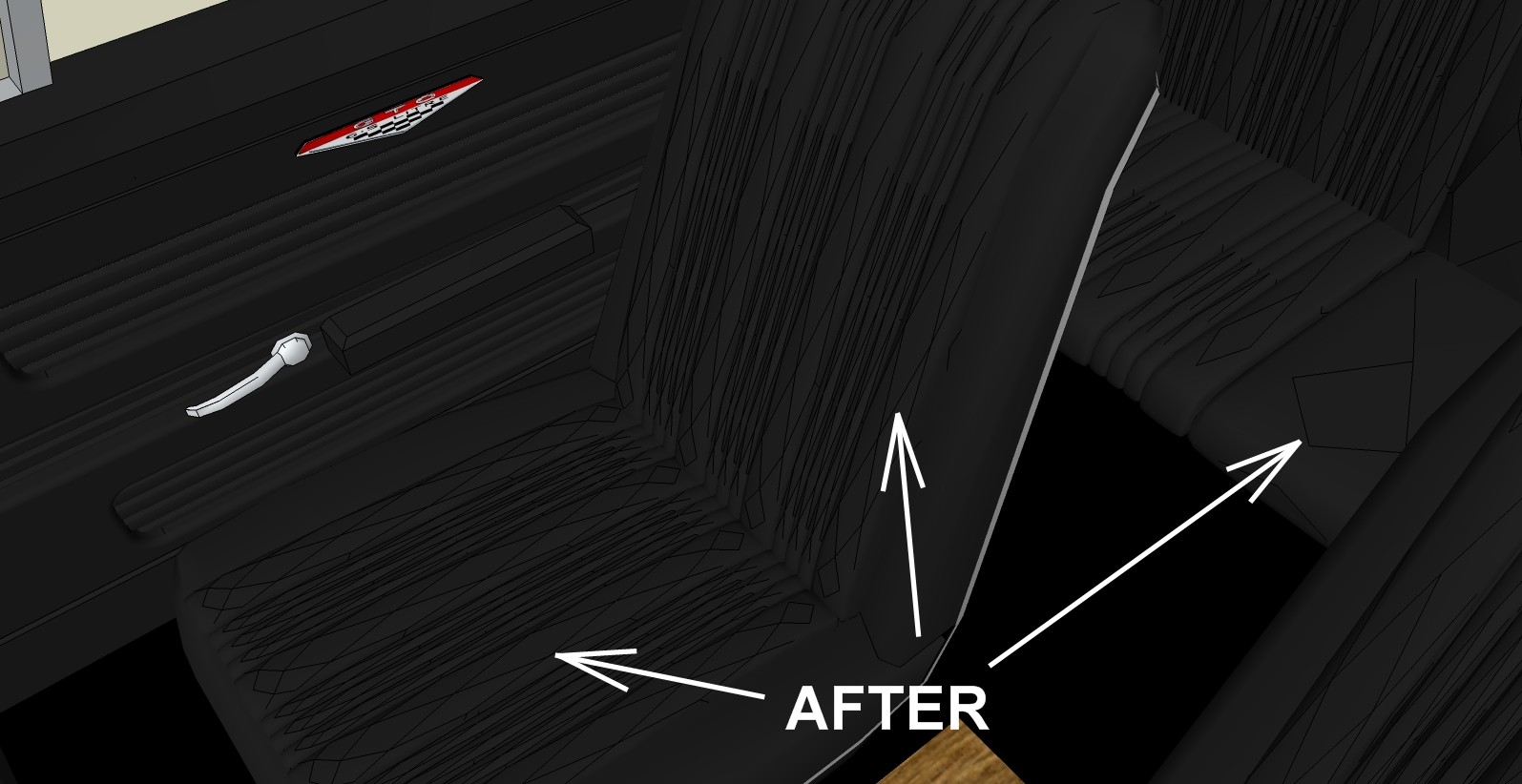
-
Zorro crashing
Has anyone come up with a solution to Zorro causing SU to crash? It's such a handy tool when it works, absolutely fantastic, but it constantly crashes the program, it's driving me nuts. I've read everything I can find here in the forums and people have talked about it crashing a lot but I couldn't find any mention of a solution to the problem. I've also tried the equivalent tool in Subdivide and Smooth, same results. Any help or suggestions to at least minimize the problem would be greatly appreciated.
-
RE: Limiting file size
Allow me to demonstrate my ignorance - when "purging" was mentioned earlier, I assumed it just meant to go thru your model and physically delete all the stuff you no longer need. I did not know that it was also a menu item under Windows Also, I do not know what you mean by applying a material to an edge, or why that would make a difference. I've only been using SU for about three weeks, and the amount of stuff I don't know seems to be increasing instead of decreasing. Another Michigan winter is settling in and I am determined to use the coming miserable months and the books I recently bought to learn the things I need to in order to eventually create the type and quality of models that I have in mind. It certainly won't interfere with my life, I don't have one
. -
RE: Limiting file size
OK, did as you suggested, and lo and behold, a couple of wood textures I had added to the dash were PNG instead of JPG. I generally like to work with the PNG format because it's not lossy like JPG. Anyhow, of course they were much larger than they would have been had they been converted to JPG first. Even tho I had deleted them from my model, they were still in the "in model" materials folder. Lesson learned, and I really appreciate all your help. Crisis averted, and I can now sleep at night
-
RE: Limiting file size
Well the files are too big to attach here. I had saved probably 7 different versions after the "big jump", didn't notice the increase in file size, and no reason to suspect such a thing might happen. Anyhow, I have spent the past several hours copying and pasting all the changes I had made since it jumped in size onto the last version that was "normal",and now have a complete up-to-date version. And when I saved it, the file size was back to normal, so it doesn't seem like any changes I had made were responsible, since all those changes are incorporated into the new model. My obsession with saving, saving, saving paid off big time, and now I know to keep a close eye on the file size each time I do save a new version. Still, it would be so nice to know just what the heck did happen, it's gonna bug me forever.
-
RE: Limiting file size
There was no need to purge - the only difference between the two was a couple of minor changes to the dash. How can that cause a jump of almost 500 percent in file size?
-
RE: Pasting to a position
Thanks Jeff . Wish I had asked this question a long time ago, would have saved me a bunch of work.