This dynamic open/close door is to be used with 100mm thick walls. I am trying to make the door glue to the wall at the same time cutting hole. The doorframe should stick out 11mm on each side of the wallthickness.
Anybody want to have a go on it?
Oops, your profile's looking a bit empty! To help us tailor your experience, please fill in key details like your SketchUp version, skill level, operating system, and more. Update and save your info on your profile page today!
Check out Febhouse | New extensions for Shadow Analysis in SketchUp Download
 E
Offline
E
Offline
Posts
-
Dynamic Door Cut Hole
-
RE: Dynamic Window -multiple animations
@daredevil said:
@unknownuser said:
Anyone dare the challenge?
DC challenge ? I'm here !!

If I have some time to spend on it, I will try next days...Did you have more info about this kind of window ? I think there is a rail to connect the top end of the window to the fixed frame, but not in your model...
Yes, -you are right Didier, I just did not model it

Attached is an updated version with the track hinge
The window should be correctly placed in the horizontal position now, -but out of place in the two other positions.
See photo
If you look close you can imagine the L-fitting and track marked on this photo.
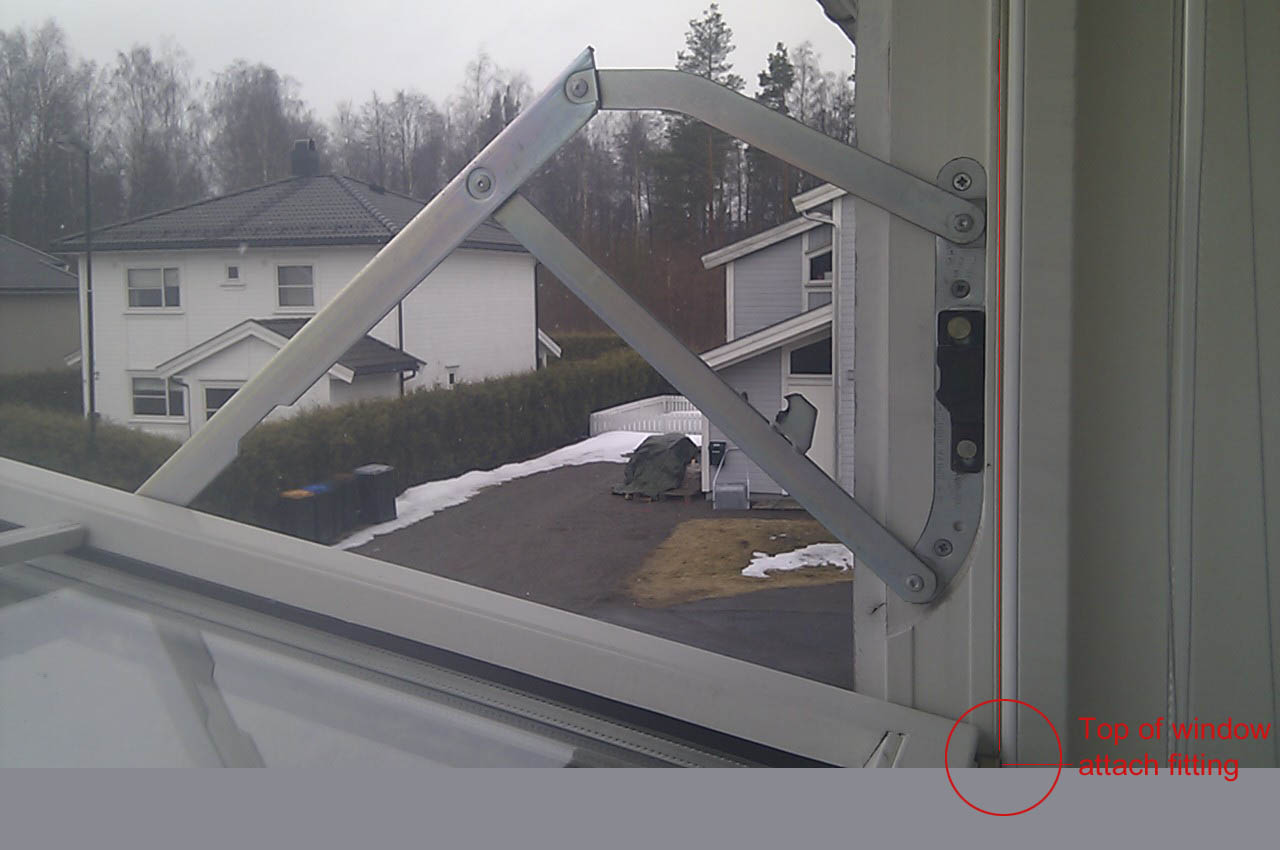
-
RE: Dynamic Window -multiple animations
This is an upgraded version of the dynamic H(Housewife) Window.
This window includes the complicated hinge which I am trying to work with the animation.
The window is in right position when closed + horizontal. Problem is to position the different parts of multiple hinge joints to match the open window + make it work with the animation.Anyone dare the challenge?
-
RE: Dynamic Window -multiple animations
..Dooh! Just found out I forgot to set the line "Z =Position"
-
Dynamic Window -multiple animations
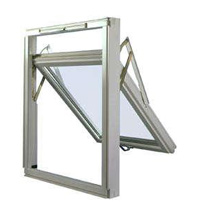
This window opens when clicked on, -but what I am trying to do is that the opening frame also slides down in position while opening like the one on picture(mechanics not present)
Any help appreciated.
-
RE: DC component structure
Hi Jim,
Thank you for a very nice Christmas gift!
Been struggeling with this for a while now. ..I was close but missed on this part; =Parent!HevSenk+67.64Thank you again and have a Merry Christmas to you and your family.
Merry Christmas also to all followers in this thread!!
@jim said:
You will have better luck working outside-in, or top-down.
Put the onClick animation at the highest logical level, and pass the animation attribute down to any components that need it.
Attributes can only be "seen" by direct parents or children, so if you have more levels of components that need access to the animation attribute, you need to reference the attribute at each level.
` Top-Level Component
- OnClick(animate("anim", 0, 100)
- anim: 0
Child-Component
- anim: =Parent!anim
Child-of-Child-Component
- anim: =Parent!anim`
-
Animate Parent-Child connection
I was sure I had found out how to make my table model raise and lower with subcomponents placed inside a parent component. I found This example showing multiple animations:
http://sketchup.google.com/3dwarehouse/details?mid=18a830a5e0c446edb2dd3120ca5e0662&prevstart=0
Tried to set up my model same way but it wont work..?
Can anybody help me? I have been trying to solve this for a very long time now..
http://sketchucation.com/forums/viewtopic.php?f=289&t=48436
-
RE: DC component structure
Still need help with this one. Please!!
@unknownuser said:
I have made this table consisting of two main parts which is the basic frame and the tabletop.
How can I make an relation between the upper frame which is dynamic adjustable and the tabletop without putting the tabletop inside the basic frame component?
The tabletop should follow the height adjustment of the frame but still as separated components as they are parts of a assembly with individual part names and Item numbers.
What I am trying is to make a component of the complete table 200 new name/part number consisting the two other components inside.
I also wonder if it is possible to make the crank rotate as the table elevates up/down?
Table model
http://www.epix.no/uploads/Dynamic%20Components/Table_200_Combination1_With_Crank.skp -
DC component structure
I have made this table consisting of two main parts which is the basic frame and the tabletop.
How can I make an relation between the upper frame which is dynamic adjustable and the tabletop without putting the tabletop inside the basic frame component?
The tabletop should follow the height adjustment of the frame but still as separated components as they are parts of a assembly with individual part names and Item numbers.
What I am trying is to make a component of the complete table 200 new name/part number consisting the two other components inside.
I also wonder if it is possible to make the crank rotate as the table elevates up/down?Table model
http://www.epix.no/uploads/Dynamic%20Components/Table_200_Combination1_With_Crank.skp -
RE: The "Duh!" thread (aka the Doh! thread)
Just discovered the System settings> Open GL > Use hardware acceleration. Suddenly Sketchup looks sharp and smooth to work with. How can I have missed this before?
-
RE: Gizmo and Wii Remote for SketchUp navigation!
Has anybody tried the Gyration Air Mouse Elite for presentations with SketchUp?
-
RE: DC with elevation and tilt
@jim said:
Here's one way. I had to animate an attribute in the parent component from the child component. Then the attribute can be used by both movements.
(I broke the dialog, but the "Finger" tool works to animate.)
Thank you Jim.
-
DC with elevation and tilt
Having problem with this DC trying to make a menu for Height and tilt option.
What I want it to do is that when you click on the side bracket you can adjust height, -and when you click on the footrest plate you can adjust tilt.
Preferably this would also be choices in the menu.Can anybody help me with this?

I also have a question about editing the image in the component option menu . If I start modelling from blueprints model lying on the ground it will be viewed from lying position even if it was standing on ground when making the option menu..?. (..this is another model I made)
Is there a way to change/update the image?http://www.epix.no/uploads/Dynamic%20Components/12599Footrace.skp
-
RE: Problems Login in 3D warehouse
You are the BEST! Saved my day! Thank you very much
@gaieus said:
In your web browser (not SketchUp),
- Go to Google Dashboard ( where you manage your Google Account)
- On the right, second from the top, there is a link "edit personal information" click on that
- The top-most item is "nickname" field. Fill it in with a nickname you want to use.
- Click "save" at the bottom.
- Go to the 3D Warehouse and try to sign in. Your nickname should appear there.
- Go back to SketchUp and log in to your Google Account from there (third button from the left at the bottom).
-
Problems Login in 3D warehouse
I have problems uploading models to the 3D warehouse. When logging in to the Google account within SketchUp and click on "Allow access", - a SketchUp window pops up saying;
"Sign-in error. Before using this 3D Warehouse service, you must choose an account nickname."
As far as I know I already have a nickname in my g mail account.. or where/how do I find this?
Please help!
-
Fixed material size
I made a DC perforated metal panel were I want to switch between material choices/colors. Problem is that i want the texture map (stacking Png w/alpha)to be fixed so the holes are placed right without making bigger unique textures. I tried to adjust the UV´s before making the DC but it still does not map right.
Is this possible.Model attached
http://www.epix.no/uploads/Dynamic%20Components/P-Panel.skp -
RE: Editing LayOut templates
Don´t bother, -found out. The layer was locked in the layer menu toolbox.
-
Editing LayOut templates
Some templates have text and place for logo. How can I edit this text or erase it to make new text, place logo without standard text showing?
-
RE: Need help
Thank you again DD. It works fine now

I learned a lot from this. I am testing to make a menu system. I guess there will be problems if I wanted to implement another choice of depth of shelves and endwalls(Stige) into this model due to the holes..? -
RE: Need help
@unknownuser said:
Here a solution (not THE only solution
 ).
).
The end must be an unique element positioned at (Copies+1)ModuleXLength.
The cross must be outside of the module and the number of copies must be the half of the Module copies and positioned at 2copy*ModuleXLength. You can also let the cross in the module and define the visibility on odd number of module copy.Thank you DD
Looks fine except I want the right end on row to be rotated 180 degrees with end cap on top. The cross seems out of dimension and when I try to modify to original strange things happen...??
Tried to copy your solution without sucsess. Must have missed something.