If you import things from the warehouse you import all the foibles of the model, that can mean several unused or hidden tags/layers. So how you got all the tags is unknown to me. But it is the reason we often recommend that you open downloaded things in a separate file and clean them up before adding them to your model. Cleaning them up can include removing tags you don't want. Along with all sorts of possible junk and bad modelling.
Oops, your profile's looking a bit empty! To help us tailor your experience, please fill in key details like your SketchUp version, skill level, operating system, and more. Update and save your info on your profile page today!
Urasik Extensions | Lots of new extensions to check out Learn More
 Offline
Posts
-
RE: Can't Import Or Paste Components
-
RE: Can't Import Or Paste Components
They never went anywhere, a rose by any other name...
-
RE: Can't Import Or Paste Components
Tags were called layers, they behave the same, just a different name.
Only assign a tag to groups or components or dimensions etc, never to raw geometry. -
RE: Can't Import Or Paste Components
You have the relevant people tags turned off.
-
RE: Can't Import Or Paste Components
Can you attach the model so we can check it to rule it out.
-
RE: Arrow keys to move objects?
I wonder if anything has changed in the intervening 14 years since that post was made.
-
RE: About Sketchup Free and Sketchup G
There isn't a specific forum for web versions, so ask what you need and people will answer.
-
RE: About Sketchup Free and Sketchup G
Yes, the ipad looks quite different and works very differently, mostly due to the touch screen and pencil.
Basically it's all about the user interface, unfortunately it just means needing to learn the new ones.
Most desktop users never get fully comfortable with the web version, but if you only learn the web version it all works fine. It's a case of us oldies not liking change while the young and restless want the new improved version every few days. -
RE: Legacy Classic losing access to a number of features
@jga said:
he noted that in future I'll be unable to transfer over my current 2021 perpetual license to another PC.
I doubt this would be the case. He is a reseller after all and may want to sell you something.
Don't hold me to this but, generally if you have the correct license information and have removed the license from the old machine, you can install and license on a new machine, provided you haven't installed a newer version on that machine. (licensing a newer version would effectively lock the old version to its current machine so that you couldn't sell your old license after upgrading.)
-
RE: About Sketchup Free and Sketchup G
What makes you think it has no copy/paste in place?
See this.
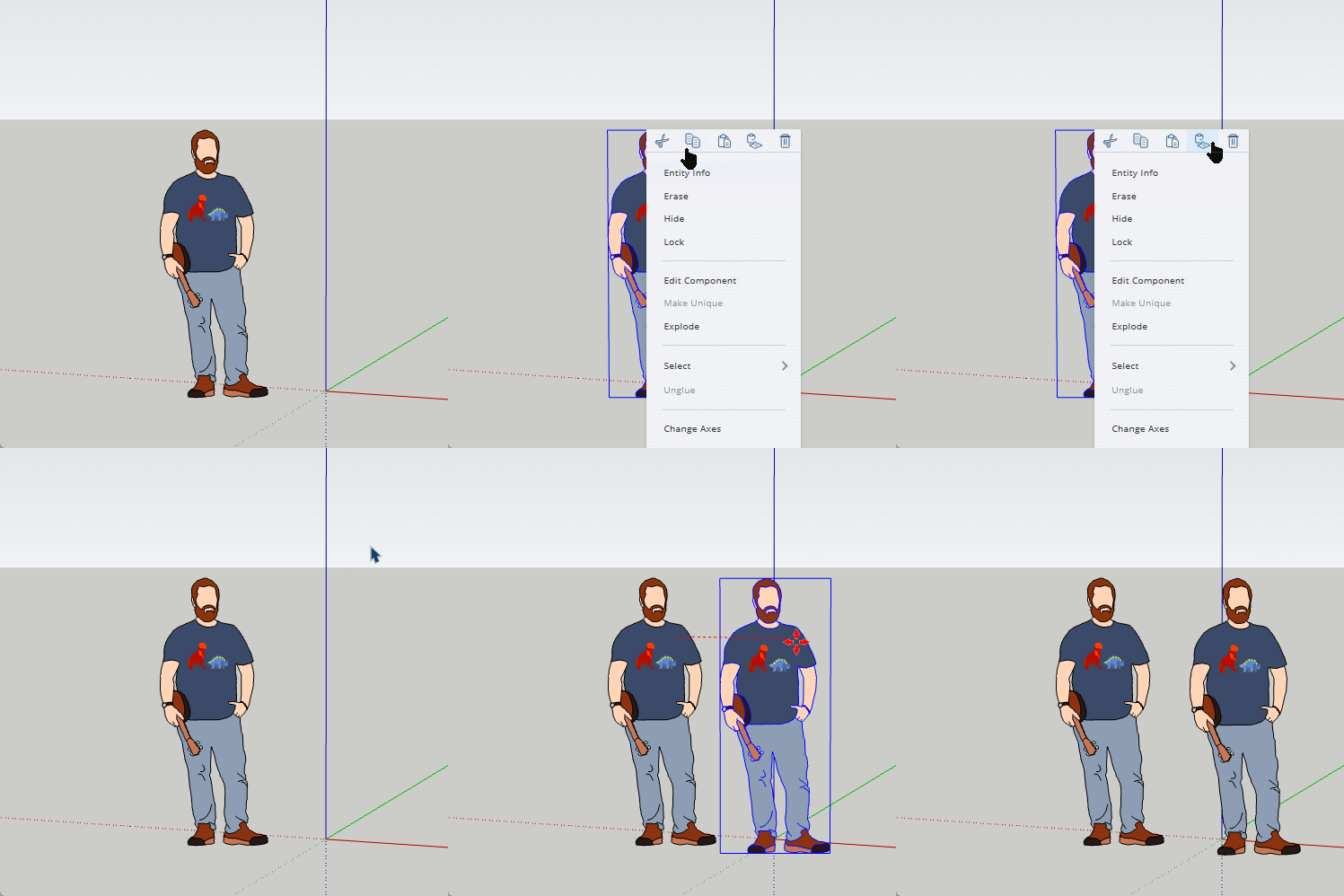
There is quite a difference between the Free and Go versions. Go has outliner, style editing, material editing, extra export tools and so on. These are just the things that spring to mind.
The main difference between any of the web versions and any of the desktop versions is the layout of the user interface. I can't say I enjoy the web interface, but generally everything is there to be found. The top icon on the left toolbar is a very useful search function, click that and start typing something you are looking for and it will start to popular with relevant tools.
Currently none of the web versions support 3rd party extensions.
If you buy the pro package you get the web versions included, but buying the web version won't get you the pro version.
There is no Pro Web version as such. There is Free, which will have a watermark (the easiest clue to it being free) or Go which is the upgraded version with extra tools. If you click on the outliner icon on the right toolbar and it opens without asking you to upgrade then you are using Go. If it still asks you to upgrade you haven't managed to get the browser to understand you have the paid version. Often fixed with just signing out and back in. Sometimes more problematic.What is it that the Ipad has that others don't?
-
RE: Graphics Question
This might be a good reason to get familiar with your Ipad.
-
RE: SubD Question
@rich o brien said:
Ask all your SUbD questions here in this topic
How about you move the thread to the SUbD section of the forum.
-
RE: Grooves running upwards
Like Rich I'm not sure what you want as such, this is another guess.
The taper is 2cm long and it is 2cm from the end.
This requires you to understand how to use the cardinal points, something well worth learning about.
Note.The centre line I put in before flattening the curve is like a safety valve, without it the geometry can go a bit nuts, but can be removed when done. And drawing the edge over the end of the taper is just a lazy way to unsoften the edge at that point.
-
RE: Extension for shadow gaps?
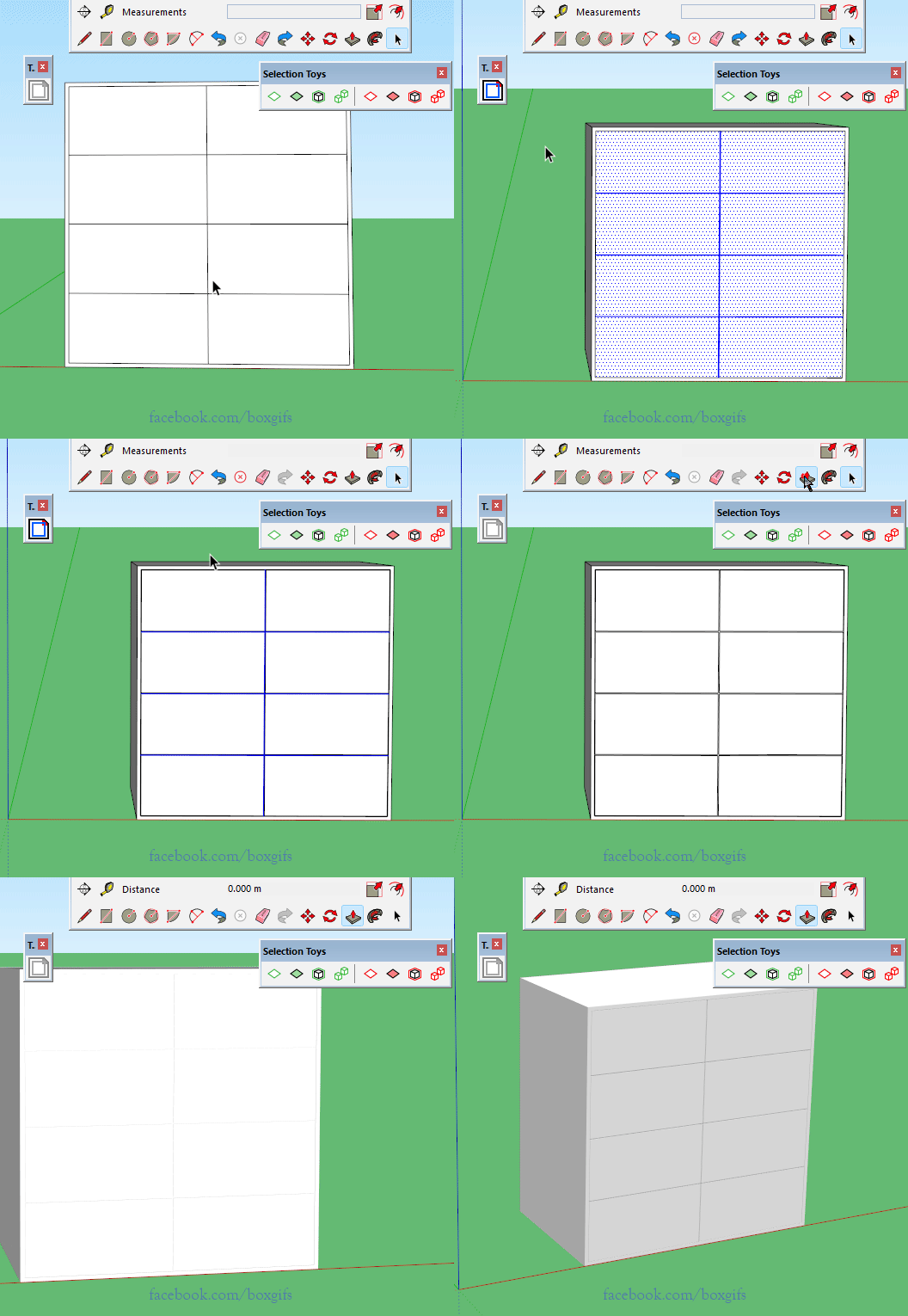
Personally I would use Tigs smart offset, then deselect faces from Thomthoms selection toys, allowing the edges to be deleted and then pushpull.
-
RE: MSPhysics tests and questions
A small hint, I suspect nobody has bothered to reply or read your posts due to your spam style user name. I only came here by accident.
Like most things in life there is 'Unique' and there is 'wtf'. try being unique.