Glad we got it sorted. 
Oops, your profile's looking a bit empty! To help us tailor your experience, please fill in key details like your SketchUp version, skill level, operating system, and more. Update and save your info on your profile page today!
⚠️ Important | Libfredo 15.6b introduces important bugfixes for Fredo's Extensions Update
A
Offline
Posts
-
RE: How to reset the component browser
"Bricks & Cladding" is part of the materials / textures and can be found by clicking on the Paint Bucket icon or from the top menu bar click Window then Material.
-
RE: How to reset the component browser
Your image shows the default libraries, what have you lost?
- The house takes you to the components in the model
- The down arrow will give you access to 1., the library you have in your image, favourites and recent collections.
- The right arrow let's you navigate to a specific folder amongst other options.
-
RE: How to reset the component browser
Click on the little house icon or the down arrow to the left of the search window or the arrow to the right of the magnifying glass. All three give you local navigation options depending on what you are looking for.
-
RE: Fredo's Check Plugins for Update
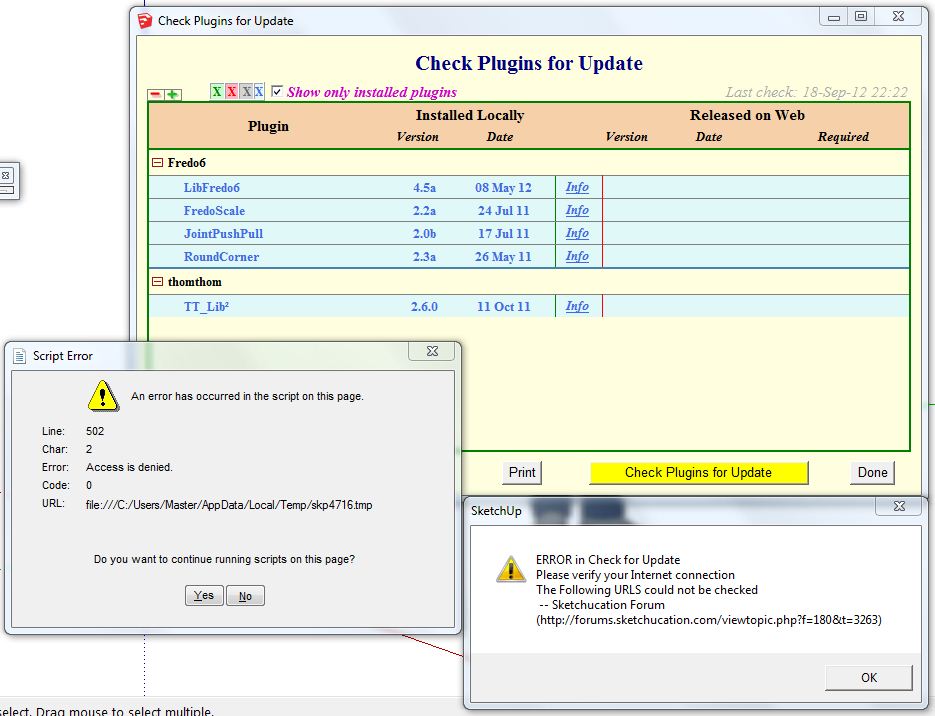
Excuse the piggy back Peter but it may be related. I keep getting an error in Win7 (SU v8 Pro) because the check internet link address fails which means I get the update window everytime I launch SU as well. This started around the time the forum changed.
Do I need to download something?
-
RE: SU 9 Wishlist
@desertraven said:
Would you rather have it stay the shitty tool it is with huge a potential just because some minor glitches can't be taken care of?
Looks like you wasted your money buying the pro version...

With regards to its huge potential, have you read the DUH thread? What that demonstrates is even with a simple interface there are tips and tricks which can dramatically simplify the drawing process even for experienced users. People are becoming increasingly lazy, they expect the computer to do everything for them with one click because they can't be bothered to learn to use the basic tools. Result is we end up with a screen full of buttons, which inevitably becomes counter productive as you try to find the right one and then remember the usage process.
Yes SU can improve but it needs to be the core functionallity and bug fixing rather than adding an overload of toolbars for the creatively challenged. True arcs would be prime example of a step forward and it could be done without adding a new tool.

-
RE: Section cuts vs. planes
"Display section planes" does just that and allows you to edit their position and status. "Display section cuts" will carry out the "active" cut, if you turn it off the whole model is displayed. Easy really one is settings the other is the tool.
-
RE: Offset edges
You can pick separate but continuous coplanar edges and offset them with the offset tool. I do this when creating door frames.
-
RE: Saved SU file not udating in Layout
I'm on PC so best guess here... You might need to update your scene to record some of your changes. Have you selected the scene in SU to make sure it shows what you want?
Could you have saved the file to a new location or file name by accident? It could have been caused when the computer was catching some ZZZZ's
The other file references look like broken links or pasted views. If they are supposed to be properly linked then you might need to find the relink button. As the screen is different to the PC I can't help there.
-
RE: Dimension extension lines
Sounds like you are doing it wrong. If you pulled out your dimension line far enough when you edit as Nik described you should see three grips at each end of the dimension, one is for the text line the second offsets the extensions from the point you are measuring and the third is connected to the measured point. I think you need to edit point two?
-
RE: Save scene without changing camera
As Csaba has said it's a bit of an art as the scenes are very flexible. The opposite approach to Csaba's solution would be to create a new scene that just records the camera position. You can use this to get back to the view you had before editing/hiding your lines. Once you have got back then right-click on the original scene and update it.
I'm assuming if what you want to hide is lines they are not listed in the Outliner. This would potentially be an easier way to hide groups & components before updating your scene.
-
RE: A brand new home for SketchUcation
Still getting used to the new layout, but the thing that is really bugging me is the banners and menu items at the "top" of the page actually fill over 2/3rds of my screen. Any chance they can be consolidated; I don't remember the old forum wasting that much real estate.
-
RE: New 'Special Interest' Group called BIM
I still think BIM is the most poorly defined acronym ever to be released on the construction industry but as it seems to be the buzzword of the decade and no doubt Trimble SU will be going there it would make sense to have a BIM sub-forum at least while it defines itself.
I would also be looking to read and learn from it.
-
RE: Adding Custom Aligned View to Standard Views
@unknownuser said:
Had those three rectangular cubes been dimensioned via use of the section tool, they would be accurate to their 2d displacement.
Have you tried that Nik? I just tried with v8 on PC and still get the same 3D dimensions rather than the 2D cut plane dimensions

-
RE: The "Duh!" thread (aka the Doh! thread)
@pbacot said:
I can make a new layer via the Entities window simply by assigning the selected entity by typing a new layer name.
Not on the PC you can't.
-
RE: Windows 8 compatability Question
I read somewhere that there is a version of Win8 that isn't "windows". RT I think, you may want to watch for that as it was being tartgetted at mobile devices.
-
RE: How to extrude from angle to plane?
By the sounds of it you should first of all make the legs either groups or a component. It isn't to clear what your geometry looks like but I would create the rail independently as another group, then move it up to the right location, if you make the rail so it is longer than the gap between the legs you can then open the group for editing and "intersect with model". This will allow you to trim the surplus off the rail. Job done?
-
RE: LO DWG-export to ACAD, need help please
I have a copy of the free viewer Autodesk DWG Trueview 2010 on my system so I can have a quick check of the DWG files before sending or to respond to queries. Sorry I don't have a link.
-
RE: Is anyone following the Apple v Samsung battle?
The bigger they are the harder they fall... I'd keep a close eye on the share price if you hold any.
http://www.bbc.co.uk/news/technology-19557497
It does raise the question have Apple lost their innovation skills?
I also wonder where Apple stand if others refuse to supply or licence their own innovations to Apple because of their arrogance?
They might even have backed themselves into a corner with their "Look & Feel" protectionism which others will turn on them... 7" screen anyone?
