sketchucation logo sketchucation
    • Login
    1. Home
    2. ArCAD-UK
    3. Posts
    Oops, your profile's looking a bit empty! To help us tailor your experience, please fill in key details like your SketchUp version, skill level, operating system, and more. Update and save your info on your profile page today!
    โš ๏ธ Important | Libfredo 15.6b introduces important bugfixes for Fredo's Extensions Update
    A
    Offline
    • Profile
    • Following 0
    • Followers 0
    • Topics 25
    • Posts 459
    • Groups 1

    Posts

    Recent Best Controversial
    • RE: Magic wand

      Thanks Tig, just needed a little lateral thinking. ๐Ÿ‘

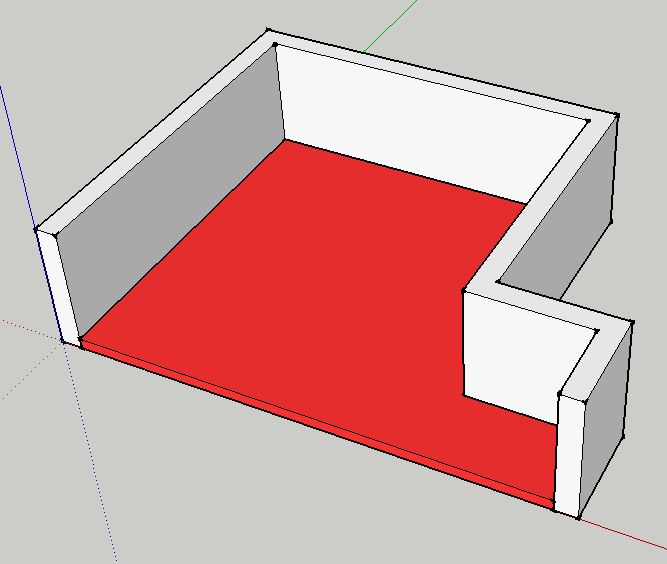
      The workflow I was using was to create the walls with dline.rb, which obviously doesn't create the floor slab, I was then telling myself I needed to trace the room boundary. ๐Ÿ˜ณ Using what you have suggested it is easy enough to open the wall group, redraw one of the inner edges of the wall to create the face that forms the floor. Select the face WITHOUT the boundary edges and edit>cut. If you select the face AND boundaries the edit>cut will destroy the original geometry. Close the wall group and then paste in place to create the floor which can then be pushpulled, grouped & layered as required. โ˜€

      posted in SketchUp Discussions
      A
      ArCAD-UK
    • Magic wand

      Is there a quick method or possibly a plugin that is capable of creating a (floor) group like the red slab in the attachment from the surrounding grouped boundary (wall) objects with ideally a single click?

      This layout is fairly simple, but the solution may also have to cope with door openings into other rooms.


      Capture.JPG

      posted in SketchUp Discussions sketchup
      A
      ArCAD-UK
    • RE: Freelancers...

      @solo said:

      Itโ€™s unusually quiet on the job front for me and just wanted to enquire from any freelancers out there if yโ€™all are in the same boat?

      It's a big boat Solo! Banks aren't lending, so client's aren't spending. The money-go-round needs lubricating.

      posted in Corner Bar
      A
      ArCAD-UK
    • RE: Can't open a hole in the wall

      If you slowly push through the wall you should get a tool tip that says "on face" when you get to the other side of the wall (if you can see into the opening), at which point release the mouse. Alternatively if you know the wall thickness (accurately) you can enter that in the VCB to create the opening.

      Tip: To create more openings in the same wall, hovver the pushpull tool over the required opening area so it highlights then double click - instant hole ๐Ÿ˜ฎ

      posted in SketchUp Discussions
      A
      ArCAD-UK
    • RE: Resized my model - texture problems with scale? SU8

      @nickdk. Easy once you know! A tip that may help with what you are doing is to use the push pull tool for resizing. If you apply a texture and then use the pushpull tool the texture scale will be retained.

      @Gaieus. Thanks, thats another menu item I didn't understand clarified! I would add though that using "Scale Definition" will impact the textures on all the other matching components. So it may fix the texture on one scaled definition but mess up all the others. The obvious solution is to select the component, right click and select "Make unique", which creates a new component, then apply "Scale definition".

      posted in SketchUp Discussions
      A
      ArCAD-UK
    • RE: Resized my model - texture problems with scale? SU8

      When you apply a scale the value is retained by the group until you explode it. This had me confused for a while until I realised what was happening. If you explode a group the selection of faces etc are retained so you can immediately regroup without the scale problem. It will get messy if you have deep nested groups though.

      It would be better if groups were scale neutral & only components were scale sensitive from my perspective.

      posted in SketchUp Discussions
      A
      ArCAD-UK
    • RE: Show Me Your SketchUp

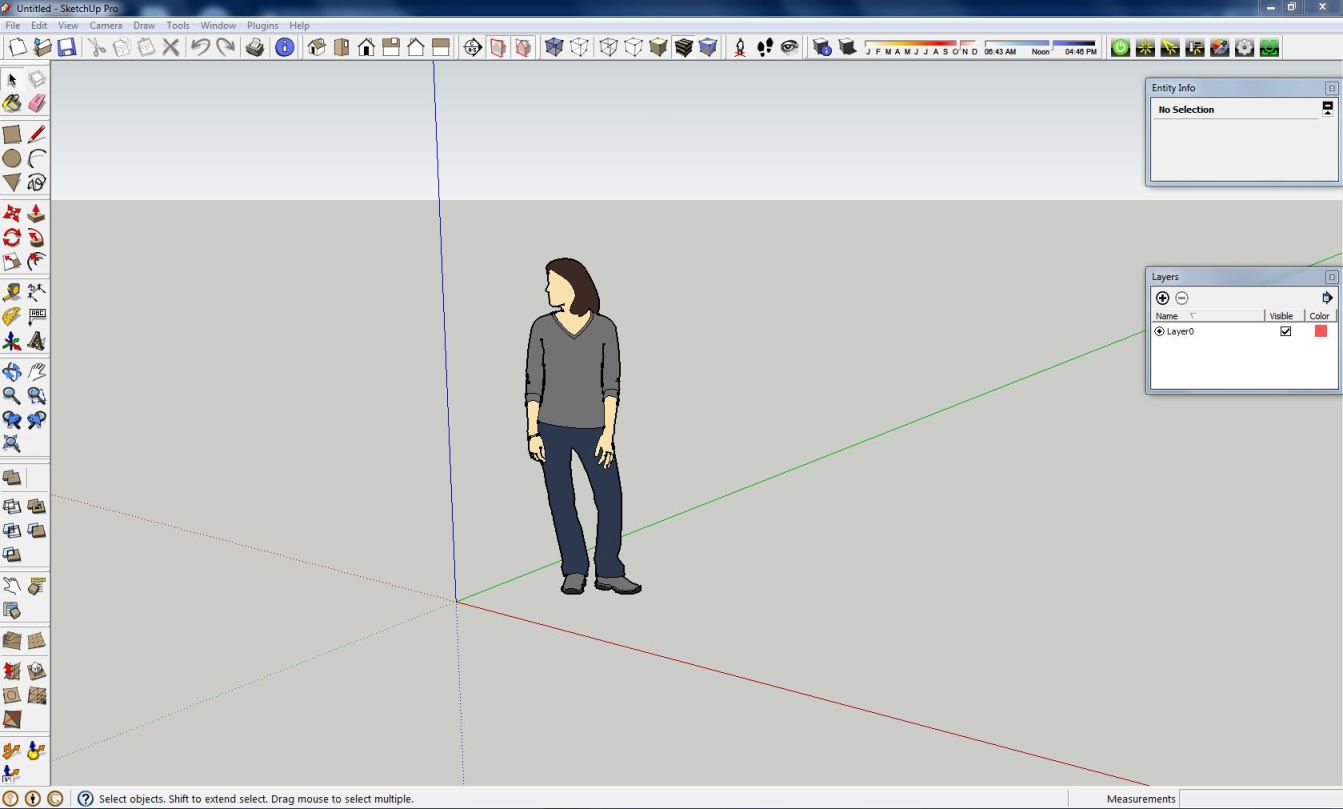
      I love the simplicity of the SU toolset and like to focus on getting the best out it by not having a cluttered workspace. Had that on previous softs. I also run very few plugins...


      Capture.JPG

      posted in SketchUp Discussions
      A
      ArCAD-UK
    • RE: World War III?

      Well "The Rapture" failed, better go cull some people to keep the population down... just make sure there's something left for the survivors to live on!

      posted in Corner Bar
      A
      ArCAD-UK
    • RE: Using Scenes in Layout

      I don't have a problem, if I did I'd have retained my ArchiCAD subscription. This thread started as a question of working methods, but it has evolved into what I hope are constructive suggestions for the future partnership of SU & LO.

      I appreciate your responses but we clearly have different backgrounds and agendas for what we "expect" from the software. โ˜€

      posted in LayOut Discussions
      A
      ArCAD-UK
    • RE: Using Scenes in Layout

      Hi Dave, I respect your position as Global Moderator, but to be honest I feel I'm banging my head on a brick wall here.

      The point was that by selecting three scene tabs I can achieve the required views and maintain what is displayed simply, without having to manage 45 different scenes. e.g. click St1, La3 and Vw2 and you have a shaded sketch elevation, then click on St3, La2 and Vw5 and you have a clean section. If I change the layers in the model, I've only got at worst three scenes to update.

      I think I'm done with this thread unless anyone else wants to make a constructive suggestion. Hopefully the developers understand my point and can see some way to get LO working on the same principle because I think this could be easily implemented by adding custom views and layer combinations in SU and making them accessible in LO viewports the same as the Style setting.

      posted in LayOut Discussions
      A
      ArCAD-UK
    • RE: Solid Tools

      Just played with this and my findings don't match yours William. From what I see the results always end up on the current layer?

      posted in SketchUp Feature Requests
      A
      ArCAD-UK
    • RE: Batch export named PDFs from layout

      Was just thinking this myself. I like exporting as a "book", but there are times when having separate pages is definitely an advantage for document distribution to specific trades that don't need the full set of plans.

      The present method of exporting twelve pages one at a time is a bit tedious having to restart the export process for each page.

      posted in LayOut Discussions
      A
      ArCAD-UK
    • RE: Using Scenes in Layout

      Thank you for the plugin link but that depends if the change turns more layer off than on as to whether it is useful.

      I've added a simple attachment that shows how different scenes can be combined for style (st), layer (La) and view (Vw) in eleven scenes which could effectively service 45 different views in LO. That should at least minimise the scene tabs in SU.

      Following on from jhauswirth's comments, in LO3 I think the only way to make this work safely for now is to manually update & check viewports when the model is changed. (Need to check this works!)

      Please don't try to analyse the SU model with why do you need three styles etc, the point is that it is possible to combine scenes to arrive at a consistent view quickly, and until we get layer combinations as a selection directly linked to LO this is a workaround for me at least.


      SceneCombo.skp

      posted in LayOut Discussions
      A
      ArCAD-UK
    • RE: Using Scenes in Layout

      Ever have that feeling your paying for the beta version? IMHO I think the link between SU and LO is badly implemented hence the suggestion it needs to grow up ...and start working like Pro software.

      It's not the number of scenes Dave, it's the time spent updating them due to something minor like adding a new layer, as in all probability you will not want the new layer visible in each of the existing scenes. As I indicated above, in architecture the displayed information will vary between for the same view and therefore if you have to save each one as a scene the numbers can be almost exponential e.g. 2 styles x 4 layer combos x 6 views = 48 Scenes if you change just one of the layer combos that means you have at least 6 views to update, or possibly 48 if you add a new layer that affects all views!

      Imagine how much easier it would be in LO if you could simply import your model and with three selections (style, layer, view) have your scene established.

      posted in LayOut Discussions
      A
      ArCAD-UK
    • RE: Using Scenes in Layout

      @jhauswirth said:

      Short answer, I would not recommend using a Scene in LO that doesn't snapshot all the Scene's properties.
      So basically what you are saying is LO still has a lot of growing up to do? Considering LO is marketed under the "Pro" banner it feels far from it.

      Your response is also only half correct. I can certainly mess up my layers, but the camera location & cuts seem to remain intact!?

      It's not the thought of having 32 scenes to click on that is the problem, it's the prospect of adding/changing one layer in SU and having to update the affected 32 scenes to suit the change. Layer combinations should be an option, with LO modified to directly read the combination from SU. In fact when you look at the LO import settings this sort of looks where things are or should be going as we already have a badly implemented link to styles, standard views which could include custom views with cuts, and scenes which could link to layer combinations.

      Anyway thank you for your input, now we know the limitations I'm sure there will be a workaround while we wait for LO4.

      Just for background I've used CAD for 26 years, had SU since V2 and recently abandoned ArchiCAD in the hope that some of @Last's original passion & programming will eventually appear in LO.

      posted in LayOut Discussions
      A
      ArCAD-UK
    • RE: Using Scenes in Layout

      @dave r said:

      FWIW, I rarely find need to untick any of the boxes for the parameters to be saved when I modify scenes. I make only the desired changes to the scene and update.

      Normally I'd agree, but I have a complex mezzanine building which requires eight different plan sections for the levels to display correctly, which then need to display a variety of different layer combinations for structure, opening components, fittings, fire plan etc you get the idea? Now I only need to save the plan section and one copy of each of the layer combo's, which means in the example above I can show everything in LO with 12 scenes rather than 32!

      posted in LayOut Discussions
      A
      ArCAD-UK
    • RE: Using Scenes in Layout

      Thanks Dave that follows my findings and it would appear LO plays the same game so you can use aspects of a scene such as only saving layers to partly modify an established view in LO. I'm hoping this is what the development team was planning because it will be quite useful now I've got my head round the idea. I was just a little nervous of taking advantage of what feels like an undocumented "loophole".

      posted in LayOut Discussions
      A
      ArCAD-UK
    • RE: Using Scenes in Layout

      Well it seems to work, but I'm thinking it's more good luck than good management. I read a post which I can't find that suggest using this arrangement in S.U. but I don't know if they followed through to Layout. It would help cut down on the number of scenes I require!

      posted in LayOut Discussions
      A
      ArCAD-UK
    • Using Scenes in Layout

      Can someone help me understand what happens when you change a scene for a viewport in layout that only records some of the scene settings e.g. if I have a scene(s) that stores camera & active section planes and then select a different scene which only stores layers and a third with just style settings, does the viewport in layout merge the settings as they are selected or is it not that straighforward?

      posted in LayOut Discussions layout
      A
      ArCAD-UK
    • RE: Best Antivirus? (AVG won't install)

      For a small fee* I use Symantec Norton 360, covers 3 PC's and keeps everything running smooth, Temporary file & Registry clean up and backup. Seems to work quite happily in the background without the performance loss I've had with some AV. ๐Ÿ‘

      *Relative to the cost & downtime sorting out a virus or malware

      posted in Corner Bar
      A
      ArCAD-UK
    • 1
    • 2
    • 19
    • 20
    • 21
    • 22
    • 23
    • 22 / 23