sketchucation logo sketchucation
    • Login
    1. Home
    2. andybot
    3. Posts
    Oops, your profile's looking a bit empty! To help us tailor your experience, please fill in key details like your SketchUp version, skill level, operating system, and more. Update and save your info on your profile page today!
    ⚠️ Important | Libfredo 15.6b introduces important bugfixes for Fredo's Extensions Update
    Offline
    • Profile
    • Following 0
    • Followers 0
    • Topics 28
    • Posts 1,833
    • Groups 1

    Posts

    Recent Best Controversial
    • RE: Sketchup V-Ray Building Light Cache issue

      @jamesmentzos said:

      So. I tried rendering again with no furnishings. After hours of waiting for the light cache to build (not even getting to the halfway point), I gave up and put a simple gray material in place of the wood floor.
      Upon rendering, i noticed there was some strange unkown map on it! View attached "FLOOR".
      [attachment=2:3g282xvx]<!-- ia2 -->FLOOR.jpg<!-- ia2 -->[/attachment:3g282xvx]

      I also noticed, when i moved to another level, this map seemed to be all over my model for some reason! See attached "FLOOR TEST" and "CEILING TEST".
      [attachment=1:3g282xvx]<!-- ia1 -->FLOOR TEST.jpg<!-- ia1 -->[/attachment:3g282xvx]
      [attachment=0:3g282xvx]<!-- ia0 -->CEILING TEST.jpg<!-- ia0 -->[/attachment:3g282xvx]

      This is quite odd, when I looked at said materials, I couldn't find this tile/shingle map anywhere!

      James,

      Check what material you have applied to the whole model. There is a bug in vray for SU that the bump mapping or displacement mapping will propagate to the entire contents of a group or component (all the subgroups, and faces, etc.) even if you have a different material applied. Try applying the default material to all your main groups/ components and apply materials directly to faces or sub-groups.

      Also - if you have a material with a bump/disp map, but you remove the diffuse texture, vray will still render the map, but with no control over UV mapping. Make sure if you make a plain material from one that had a texture, don't forget to remove the bump or disp map.

      Andy

      posted in V-Ray
      andybotA
      andybot
    • RE: Join Pipes Smoothly?

      @krisidious said:

      Andybot, that did work, but each vert had to be welding 1 at a time. again pretty time consuming.

      I selected all the vertices and used "merge close vertices" with a distance of 0.3 Much quicker than if you do it individually. πŸ˜„

      It deletes some faces in the back though, but generate faces fixed that pretty easily. Also need to remove inner faces (There's a plugin for that πŸ˜„ )

      posted in Plugins
      andybotA
      andybot
    • RE: Join Pipes Smoothly?

      Just thinking - you could use vertex tools to merge close vertices. That may work to clean up the breaks at each bend in one shot.

      Edit: looked at the model - that works only for the smaller bends. For the perpendicular intersections, not much help there.


      rollbar2.skp

      posted in Plugins
      andybotA
      andybot
    • RE: Depth of field

      @filipebonito said:

      hello,

      i would like to know if there is a way to save the camera focus point for each scene so when render multiple scenes using depth of field, each frame has the correct focus point?

      i tried to update each scene with different focus points, in RT render the focus points are saved, but when i use the final render, the focus points don't move...

      what can i do?

      thanks
      filipe bonito

      Alas, no. Camera settings do not change between scenes. I think that is a highly requested feature for the next version.

      currently you need to change it manually between renders.

      posted in V-Ray
      andybotA
      andybot
    • RE: VRAY RT render engine issue

      Not sure why. In this case probably the best thing to do is load default options and start from scratch. Change only the options you need (env., camera, output, etc.) and don't mess with RT settings. It should work right out of the box.

      posted in V-Ray
      andybotA
      andybot
    • RE: VRAY RT render engine issue

      change your RT mode to "RT CPU" GPU is not currently fully supported

      posted in V-Ray
      andybotA
      andybot
    • RE: Windows 10

      I finally read through the free upgrade information. Now that I've accepted it, I'm curious if win10 Home will have the same network capabilities as win8.1
      There was an issue back when win vista came out (I forget the details now) that limited how many computers could access shared network folders, or something like that. I am always leery with each windows upgrade that something is going to be taken away, or limited, or some such intentional hobbling that then becomes available only in the "pro" version.

      posted in Corner Bar
      andybotA
      andybot
    • RE: Modelling curbs for rendering... texturing? Geometry?

      @pbacot said:

      I've used a texture with the divisions. Thrupaint did mapping OK. Don't know why it wouldn't work, given the geometry is easy to make regular with quads.

      +1 for Thrupaint! If it's quads, you can also use Qaudface Tools to map the UV coords.

      posted in SketchUp Discussions
      andybotA
      andybot
    • RE: EXTREME HELP NEEDED!! PLEASE!! CPU/Vray 2.0 low performance!

      that's weird, not sure what it could be. Did you try contacting support? Are you on any kind of network? If wireless - there may be some connection problems.

      Sorry no, GPU can't be used to help speed up the render. Only thing that can help speed things up with vfs 2.0 is distributed rendering on multiple machines.

      posted in V-Ray
      andybotA
      andybot
    • RE: EXTREME HELP NEEDED!! PLEASE!! CPU/Vray 2.0 low performance!

      If you are trying to use RT with GPU, don't. It is not fully functional. If you need RT, use the CPU mode.
      If you are doing regular render, at what point in the render does it get stuck? Light Cache? Some more details would help.

      posted in V-Ray
      andybotA
      andybot
    • RE: Vray is loosing links to some texture files

      Check in the vray material editor to see if you have an absolute path to the texture (for example Z:/vray-assets/textures/billboard1.png). You may need to re-link your texture if you are on a new computer network.

      posted in V-Ray
      andybotA
      andybot
    • RE: Why does my color change when adding emissive layer?

      I think you just need to keep reducing the multiplier on the emmissive layer. It also helps to change the emmissive color to lower saturation and make it a darker value.

      posted in V-Ray
      andybotA
      andybot
    • RE: Why does my color change when adding emissive layer?

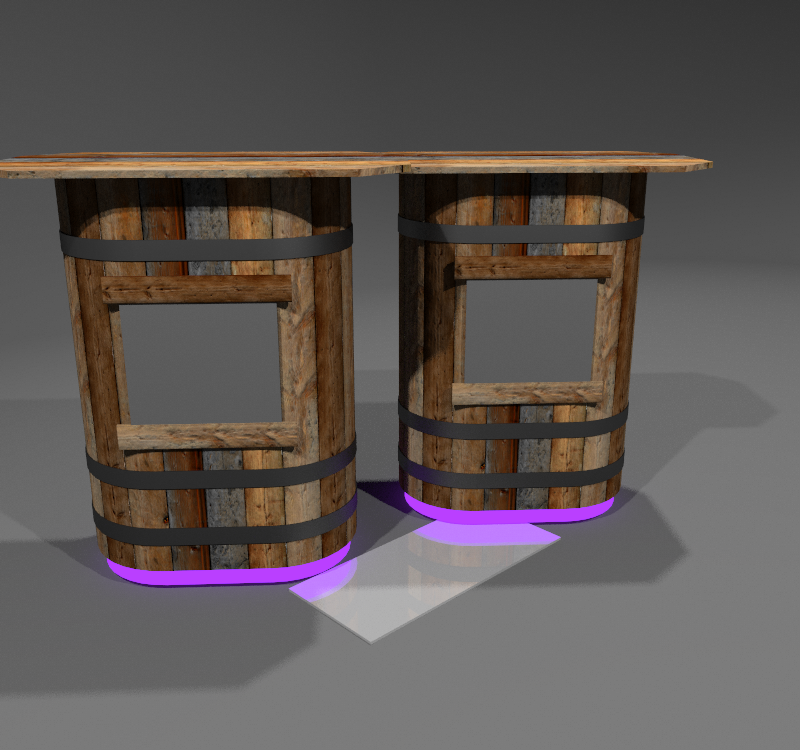
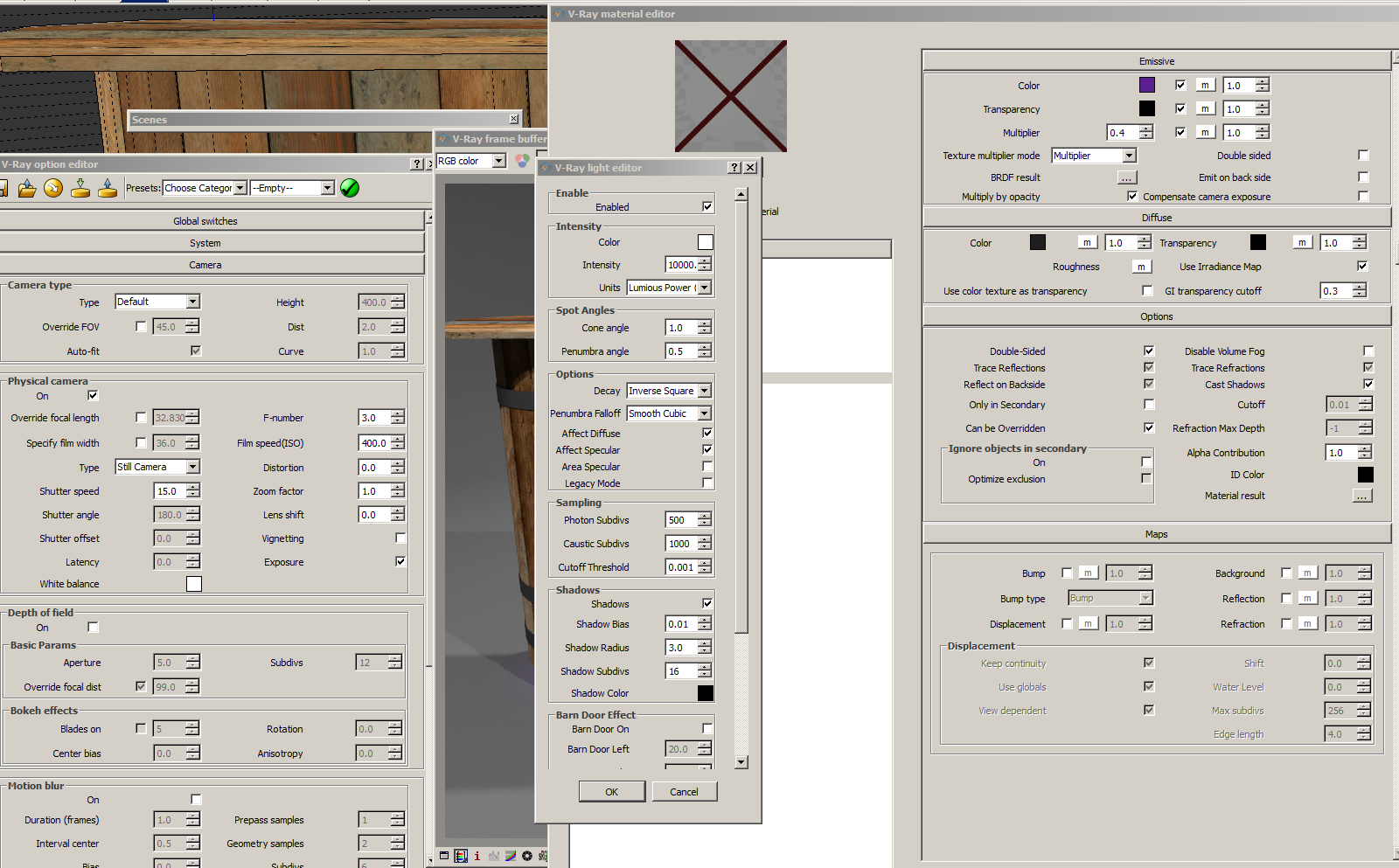
      I took a stab at some settings since I am working on a similar sort of setup (spotlights on an object) and looked at what values would work for the lighting and material. Here is what I've got.


      barrel-stand5_emmi.png


      2015-07-02_160246.png

      posted in V-Ray
      andybotA
      andybot
    • RE: Why does my color change when adding emissive layer?

      sorry - I don't usually use scalar for my units. I typically use luminous power. For the camera settings I gave you, you can use 10000 for the spotlight power. Then for a purple emmissive material, you can use an intensity of about 0.5 The brighter the intensity, the more pink it will look. May need to set the shutter slower, like 15

      Also, try adding a radius of 3.0 to your spotlight for softer shadows, and increase the subdivs for the spotlights to something like 16 or 24.

      Hope that helps.

      posted in V-Ray
      andybotA
      andybot
    • RE: Why does my color change when adding emissive layer?

      Yes, yes they would. The physical camera settings are the default for a brightly lit outdoor scene. Try changing the camera settings to shutter speed 30, f number 4.0, and film speed 400. That's just a quick guess, but you can adjust those values as needed to get the right amount of exposure in the scene.

      posted in V-Ray
      andybotA
      andybot
    • RE: Why does my color change when adding emissive layer?

      oh - I'd change the decay and falloff to Inverse Square & Smooth Cubic, respectively. Is physical camera turned on or off?

      posted in V-Ray
      andybotA
      andybot
    • RE: Why does my color change when adding emissive layer?

      you could try lowering your other lighting values (and adjusting the scene exposure) to where a 1x multiplier shows up for your emmmissive material. 40x seems like a really high amount for an emmissive material value.
      I find emmissive works best with a value around 1.0 or lower.

      posted in V-Ray
      andybotA
      andybot
    • RE: Sketchup - vray - rt render - gpu problem

      @filipebonito said:

      thanks, but can you confirm that it works? (just because i just get a black screen with gpu or cuda...)

      change to CPU option and try it πŸ˜„

      (sometimes it helps to reset the options to default if some settings are screwed up, and then start over changing one thing at a time.)

      posted in V-Ray
      andybotA
      andybot
    • RE: Sketchup - vray - rt render - gpu problem

      @filipebonito said:

      @andybot said:

      Right now, it's best to use CPU for the RT rendering.

      why do you say that?

      because it more or less works. I use the CPU based RT all the time for when I'm setting up my render. There's a few minor issues like translucency doesn't work properly, but overall I find it quite useful. Like others said, the GPU based RT is not functional in this version of vray.

      posted in V-Ray
      andybotA
      andybot
    • RE: Sketchup - vray - rt render - gpu problem

      @filipebonito said:

      @roland joseph said:

      The nvidia quadro k2200 is not going to be very productive. It doesn't have the horse power for GPU rendering.

      well that's really all i got...

      i just need to quickly render a small window in real time, i guess it would be better than use the CPU

      Right now, it's best to use CPU for the RT rendering.

      posted in V-Ray
      andybotA
      andybot
    • 1
    • 2
    • 11
    • 12
    • 13
    • 14
    • 15
    • 91
    • 92
    • 13 / 92