sketchucation logo sketchucation
    • Login
    1. Home
    2. alpro
    3. Posts
    Oops, your profile's looking a bit empty! To help us tailor your experience, please fill in key details like your SketchUp version, skill level, operating system, and more. Update and save your info on your profile page today!
    🚨 Skimp | 25% Off until March 30 Buy Now
    A
    Offline
    • Profile
    • Following 0
    • Followers 0
    • Topics 54
    • Posts 512
    • Groups 1

    Posts

    Recent Best Controversial
    • RE: A New User Intro

      Welcome Chris, you've come to the right place, this forum is a great resource, it has helped me tremendously over the last year and half. Here's a few links to you tube videos for cad and Sketchup:
      http://www.youtube.com/watch?v=MtqJh-DUG30
      http://www.youtube.com/watch?v=FsnT8KN8xIM
      http://www.youtube.com/watch?v=UtE8q9RAl-M
      And some useful plugins when using cad with Sketchup:
      http://www.smustard.com/script/DeleteShortLines
      http://www.smustard.com/script/ExtendCloseLines

      Mike
      posted in Newbie Forum
      A
      alpro
    • RE: RPTrees and vRay

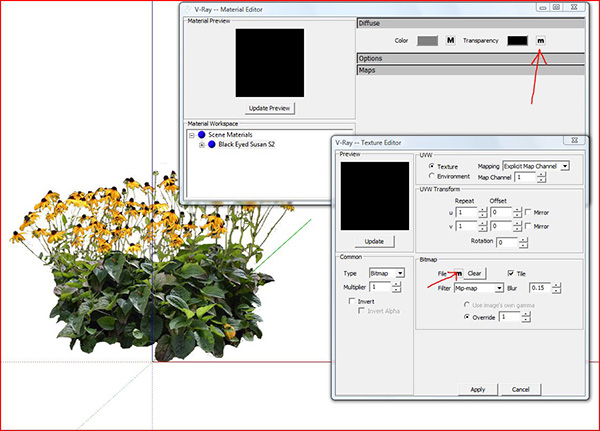
      Here you go, hope you can make it out with just a pic.

      Mike


      load alpha.JPG

      posted in Extensions & Applications Discussions
      A
      alpro
    • RE: What is hot this year (for prizes)

      I like the idea of a rendering software license, also the drawing tablet. And I'd like to add a big HD monitor or how about a Nivida graphic card that supports Cuda.

      Mike

      posted in Corner Bar
      A
      alpro
    • RE: Sketchup Web Exporter

      You can do this in photoshop using actions. Open one of your images, record your action where you do the select by color, delete background, save as png, save your action. Put all the images you want to do this to in one folder. In photoshop, file>automate>batch, load your action, pick the folder of images, and a destination folder for your png, let potoshop do all the work.

      Mike

      posted in SketchUp Discussions
      A
      alpro
    • RE: Vray for SU animation

      Yes you can render an animation in Vray, though it will be a series of still images that you have to use another program like Virtual Dub, Windows Movie Maker, etc. to create the animation. Make sure batch render and animation are both checked, pick your fps. Then just render the Ir map and save it, load the Ir map and render, don't forget to save the rendered images to a file.

      Mike

      posted in V-Ray
      A
      alpro
    • RE: Season Ineriors

      I'm no interior designer or any kind of expert but I "feel" more fall in #2 and more summery in #3

      posted in Gallery
      A
      alpro
    • RE: WMV to MOV?

      Dave, alittle late but this might come in handy and free, http://www.giveawayoftheday.com/convertvid-holiday/

      Mike

      posted in Corner Bar
      A
      alpro
    • RE: [Plugin] Extrude Edges by Rails

      Thanks TIG, I'm sure that this is gonna be one of my most used rubies. Awesome work.

      Mike

      posted in Plugins
      A
      alpro
    • RE: Two new works.

      I second that. Your photoshop skills are amazing, I was blown away by some of the pics on your site.

      Mike

      posted in Gallery
      A
      alpro
    • RE: QTVR

      Try to render as an animation just the irradiance map and save to a file, then rerender your scenes, loading the irradiance map that you saved, also make sure that vignetting is unchecked.

      Mike

      posted in V-Ray
      A
      alpro
    • RE: Podium 2 Beta 1

      Sepo, yes I did get to finally download the beta thanks to Dave at support. But still can't connect to the download page or supodium, wonder if its related to the problem Edson and some other users have sometimes connecting even though I thought I read that it was just users from Brazil that were having that problem. Either way, thanks to Dave and I'm gonna give V2 a tryout today.

      Mike

      posted in Extensions & Applications Discussions
      A
      alpro
    • RE: Podium 2 Beta 1

      Sepo, will do. Really fustrating, waiting so long for V2 and still can't get my hnds on it. I don't think its on my end cause I don't have a problem connecting anywhere else. Thanks.


      Capture.JPG

      posted in Extensions & Applications Discussions
      A
      alpro
    • RE: Podium 2 Beta 1

      For whatever reason I can't connect to that site to download the beta, it just keeps timing out. Don't have a problem connecting anywhere else. Is it possible that so many people are downloading the beta?

      Mike

      posted in Extensions & Applications Discussions
      A
      alpro
    • RE: How are the Smokers here getting on?

      Rich, thats hilarious, sounds like an old Abbot and Costello bit. I quit smoking for 10 years, then one evening last year, while enjoying some drinks with a few of the guys, I bummed a smoked, really missed having a smoke with a beer, and ended up back to a pack a day. Figure I'll try to kick the habit again in the new year. Last time I quit, I did it cold turkey, really didn't seem that hard, though I really missed it with coffee, beer, and after meals. Also weirdly, if I was watching a good old movie and a character lit up, I got the craving. It took longer to lose the 15 lbs I gained than to actually quit smoking.

      Mike

      posted in Corner Bar
      A
      alpro
    • RE: Menu Options Keeps Graying Out!

      thomthom, you've had this happen in v6? This never, not once happened to me in v6. And I don't think my workflow has changed to where I'm right clicking alot more but this happens quite a bit to me in v7. Really fustrating to the point I may just go back to v6, its a real drag to be getting into a model and flowing along, then bam, not be able to do anything and have to restart Su. Can't believe more people aren't complaining about this, maybe it doesn't happen as often to some people?

      Mike

      posted in SketchUp Bug Reporting
      A
      alpro
    • RE: Model this: 3D Connexion Space explorer

      Great job Ely and Adam!!, niether one of you guys mentioned how much time you got into it, just curious cause I started but after about an hour and half with nothing acceptable, I said thats enough. Again all I can say is hats off to you guys.

      Mike

      posted in Gallery
      A
      alpro
    • RE: Menu Options Keeps Graying Out!

      Don't think its a menu issue, I just finally upgraded last week and decided to keep my menus and toolbars as clean as possible and have only five plugins that I use most often installed. The grayed out options happen quite a bit and I can't seem to find any pattern that triggers it but sometimes if I go to edit and select all and then click in empty space to deselect, the menu items come back, sometimes I have to save the model and restart SU. I really like the improvments that have been made but this problem seems to cancel them out as it puts a real kink into a workflow, yeah I can handle bigger models now, make textures unique, automatically update changes to textures, etc., but does all that really enhance workflow if I have to keep restarting SU? I hope this gets fixed quickly.

      Mike

      posted in SketchUp Bug Reporting
      A
      alpro
    • RE: Do you use large or small icons on your toolbars?

      Thanks thomthom

      posted in SketchUp Discussions
      A
      alpro
    • RE: What is Style Builder?

      Sketchup is the only 3D software that I've used where you can actually grasp the basic tools in 15 mins, that's what makes it such a killer app. I have other software that I've used over the years and still can't get past some of the basic stuff, people spend years mastering complicated software. I think SU is the quickest way to meet a deadline and lots of ways to output the results, just take a look in the gallery.

      Mike

      posted in SketchUp Discussions
      A
      alpro
    • RE: Do you use large or small icons on your toolbars?

      I was one of the votes that didn't know you could do this, exactly where are the settings to change this?With all the useful plugins of late, I'm quickly running out of screen real estate.

      Mike

      posted in SketchUp Discussions
      A
      alpro
    • 1
    • 2
    • 11
    • 12
    • 13
    • 14
    • 15
    • 25
    • 26
    • 13 / 26