sketchucation logo sketchucation
    • 登入
    Oops, your profile's looking a bit empty! To help us tailor your experience, please fill in key details like your SketchUp version, skill level, operating system, and more. Update and save your info on your profile page today!
    🔌 Smart Spline | Fluid way to handle splines for furniture design and complex structures. Download

    Rayscaper New Releases

    已排程 已置頂 已鎖定 已移動 Extensions & Applications Discussions
    rayscaperrender
    407 貼文 11 Posters 40.4k 瀏覽 12 Watching
    正在載入更多貼文
    • 從舊到新
    • 從新到舊
    • 最多點贊
    回覆
    • 在新貼文中回覆
    登入後回覆
    此主題已被刪除。只有擁有主題管理權限的使用者可以查看。
    • P 離線
      pixelcruncher Extension Creator @Krass
      最後由 編輯

      @Krass Fantastic, a good showcase for Rayscaper!

      I hope you don't mind, but I shared them on my X account.

      0fd825be-dc64-4973-b238-131659f15c63-image.png

      Link Preview Image

      favicon

      X (formerly Twitter) (x.com)

      Regards,
      Thomas

      I'm the developer of Rayscaper: https://rayscaper.com/ - Fast and easy rendering for SketchUp.

      1 條回覆 最後回覆 回覆 引用 0
      • KrassK 離線
        Krass
        最後由 編輯

        With pleasure.
        Yes, @Mike-Amos, I also check "transparent shadows" on Pixel cruncher's advice. But I do indeed go up to 35,000 SPP with a 2K resolution. I don't activate denoiser, and if your graphics card is sufficient, it's still fast. Probably 20 or 30 minutes of rendering time.

        Krass

        1 條回覆 最後回覆 回覆 引用 0
        • P 離線
          pixelcruncher Extension Creator
          最後由 編輯

          Yes, @Mike-Amos, I also check "transparent shadows" on Pixel cruncher's advice. But I do indeed go up to 35,000 SPP with a 2K resolution. I don't activate denoiser, and if your graphics card is sufficient, it's still fast. Probably 20 or 30 minutes of rendering time.

          @Krass - I'm not sure if you've already noticed, but the denoiser is no longer destructive. You can disable/enable it in the viewport without having to restart the render. So you can actually check if the image looks good without having to go all the way to 35,000 samples/px:
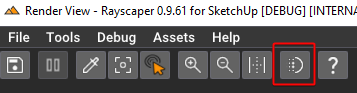
          image.png

          I'm the developer of Rayscaper: https://rayscaper.com/ - Fast and easy rendering for SketchUp.

          1 條回覆 最後回覆 回覆 引用 1
          • P 離線
            pixelcruncher Extension Creator
            最後由 編輯

            Hey, Rayscaper users!

            A quick hotfix release. More good things are coming later, but this solves some immediate issues that users reported.

            Rayscaper 0.9.62 Beta is available in the SketchUcation store. I recommend upgrading to the latest version.

            What Changed?

            • Make sure there's no watermark for licensed users.
            • Fix the render time counter in the viewport.
            • Fix a crash happening occasionally when updating geometry.

            Help Me Build the Community 👍

            If you like Rayscaper, please share your renders (final or work-in-progress, it doesn’t matter)! This is motivating
            and helps me showcase its capabilities to new users.

            Follow me on X.

            Happy Rendering!

            I'm the developer of Rayscaper: https://rayscaper.com/ - Fast and easy rendering for SketchUp.

            N 1 條回覆 最後回覆 回覆 引用 0
            • N 離線
              nickchun @pixelcruncher
              最後由 編輯

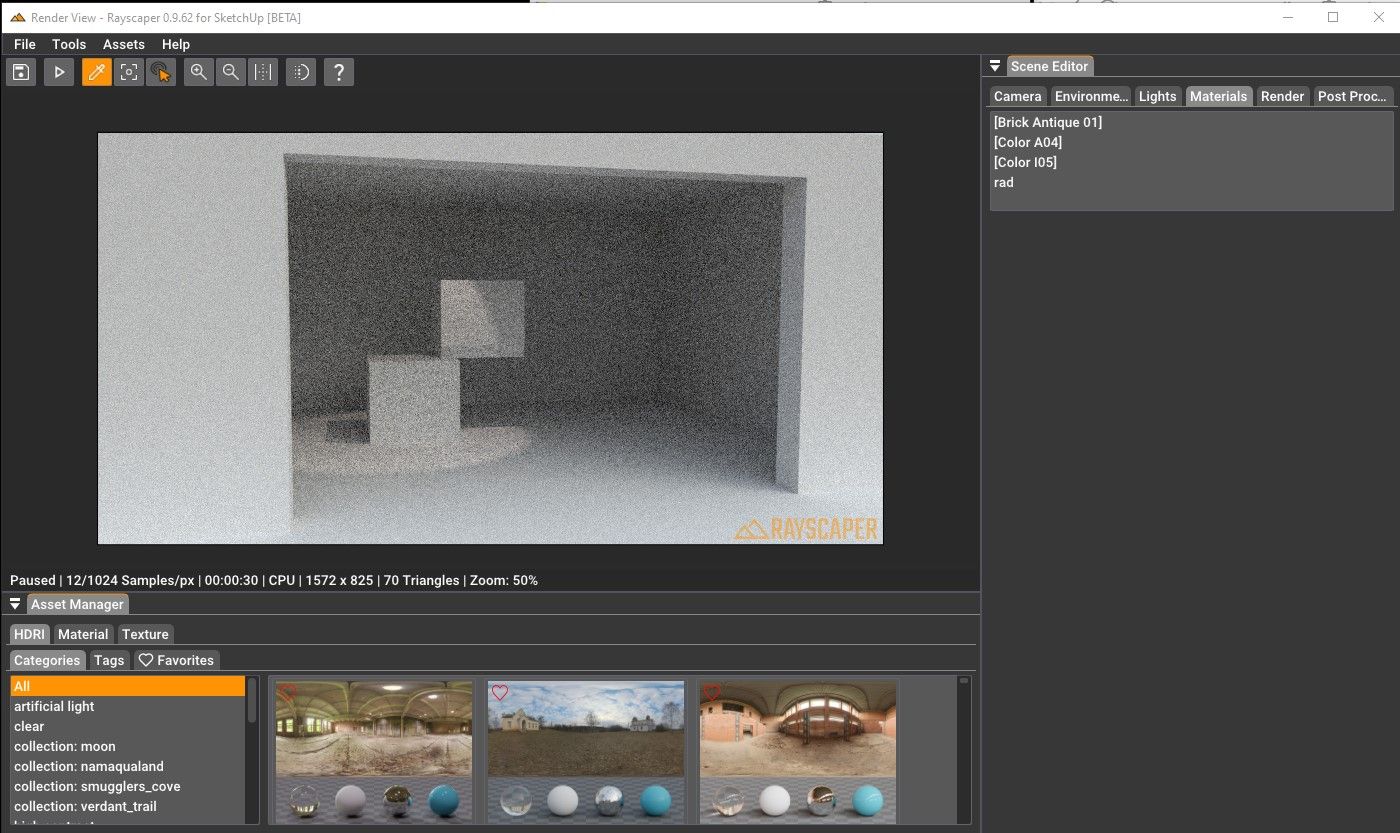
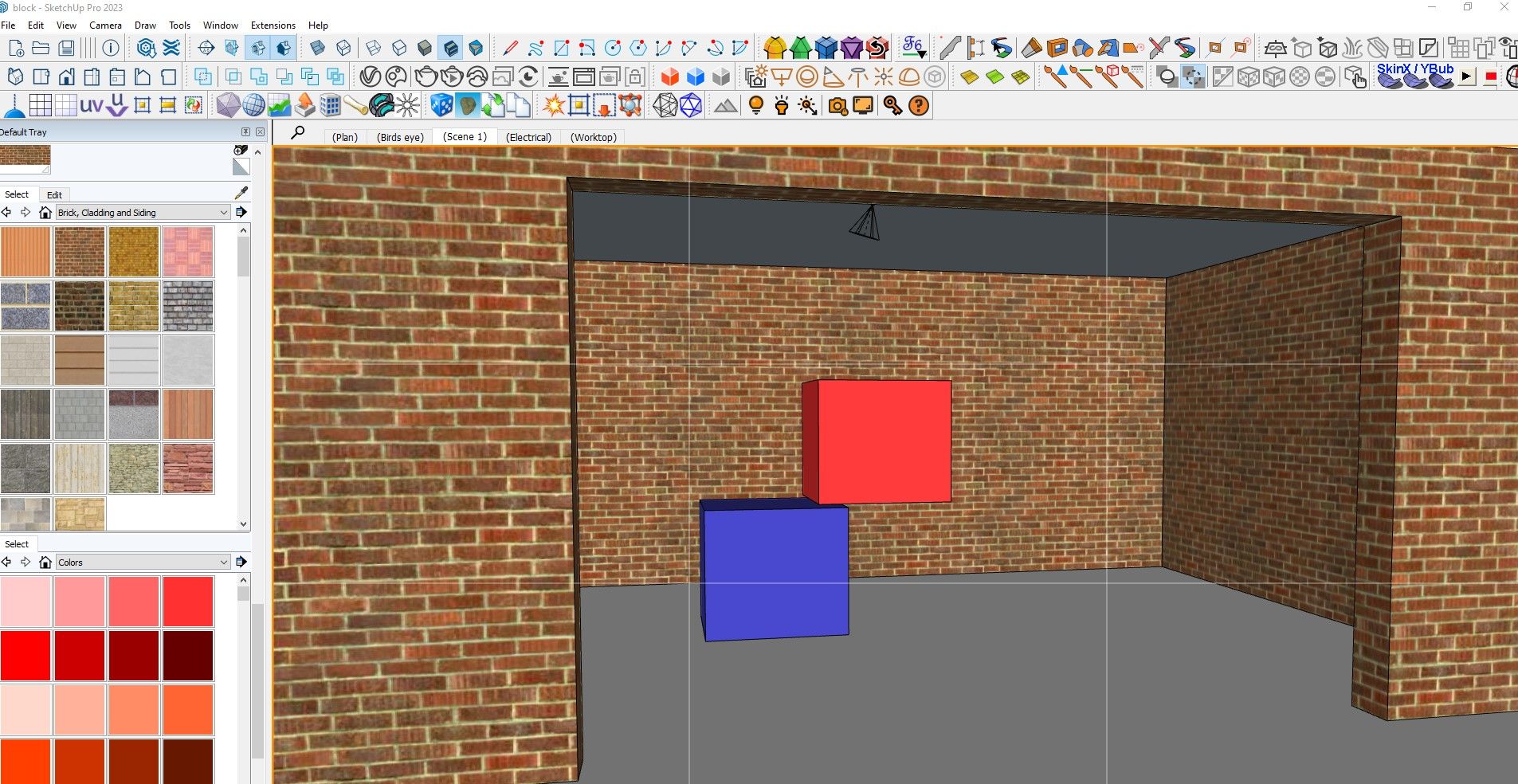
              @pixelcruncher I've just downloaded the latest version but now cannot get any materials to show up at all. Using the colour picker tool doesn't highlight any material in particular. Everything else seems to work, just no textures on renders..no colour.jpg textures.jpg

              block.skp

              P 1 條回覆 最後回覆 回覆 引用 0
              • KrassK 離線
                Krass
                最後由 編輯

                I did the same. I am now on 0.9.62 and no problem

                Krass

                P 1 條回覆 最後回覆 回覆 引用 0
                • P 離線
                  pixelcruncher Extension Creator @nickchun
                  最後由 編輯

                  @nickchun Sorry about that!

                  Are the materials directly assigned to the faces, or are they assigned to the component/group? If you assign a material to a component/group, then they are not applied to the face. That's a regression reported by @sashapepperspray last week, but I haven't addressed it yet with this release.

                  Can you confirm that this is the problem, i.e., that the problem is fixed by directly assigning materials to the faces? You can use Fredo's Thrupaint to make it easier: https://sketchucation.com/plugin/2561-thrupaint.

                  If that doesn't help, there's something seriously botched in this release, and I will investigate further. Anybody else seeing this?

                  Thanks,
                  Thomas

                  I'm the developer of Rayscaper: https://rayscaper.com/ - Fast and easy rendering for SketchUp.

                  N 1 條回覆 最後回覆 回覆 引用 0
                  • P 離線
                    pixelcruncher Extension Creator @Krass
                    最後由 編輯

                    @Krass said in Rayscaper New Releases:

                    I did the same. I am now on 0.9.62 and no problem

                    Not following @Krass - To which post was this a reply?

                    Cheers,
                    Thomas

                    I'm the developer of Rayscaper: https://rayscaper.com/ - Fast and easy rendering for SketchUp.

                    1 條回覆 最後回覆 回覆 引用 0
                    • N 離線
                      nickchun @pixelcruncher
                      最後由 編輯

                      @pixelcruncher Yes that was it, with the faces painted it works. 👍

                      P 1 條回覆 最後回覆 回覆 引用 1
                      • P 離線
                        pixelcruncher Extension Creator @nickchun
                        最後由 編輯

                        @nickchun Great! I plan to fix that bug soon.

                        I'm the developer of Rayscaper: https://rayscaper.com/ - Fast and easy rendering for SketchUp.

                        N 1 條回覆 最後回覆 回覆 引用 0
                        • N 離線
                          nickchun @pixelcruncher
                          最後由 編輯

                          @pixelcruncher Just found another strange one. Objects that are hidden or under non visible tags, are showing up in the render.

                          P 1 條回覆 最後回覆 回覆 引用 0
                          • P 離線
                            pixelcruncher Extension Creator @nickchun
                            最後由 編輯

                            @nickchun

                            Do you have an example scene, or can you send me a screen capture? I can't reproduce it here, but maybe you have a different setup:

                            tags_bug.mp4

                            Thanks for your help!
                            Thomas

                            I'm the developer of Rayscaper: https://rayscaper.com/ - Fast and easy rendering for SketchUp.

                            N 1 條回覆 最後回覆 回覆 引用 0
                            • KrassK 離線
                              Krass @pixelcruncher
                              最後由 編輯

                              @pixelcruncher thanks, do tyou have any tip to fix this lights name/numbe issue? (which I spoke about above)

                              Krass

                              1 條回覆 最後回覆 回覆 引用 0
                              • P 離線
                                pixelcruncher Extension Creator
                                最後由 編輯

                                @Krass - The only way right now is to rename the light component in SketchUp itself. I will add the option to name the lights in Rayscaper. And have something to multi-edit the lights. @Rich-O-Brien complained about this as well.

                                I'm the developer of Rayscaper: https://rayscaper.com/ - Fast and easy rendering for SketchUp.

                                1 條回覆 最後回覆 回覆 引用 0
                                • KrassK 離線
                                  Krass
                                  最後由 編輯

                                  yes, but for now if I rename RS lights components, they all shut down

                                  Krass

                                  P 1 條回覆 最後回覆 回覆 引用 0
                                  • P 離線
                                    pixelcruncher Extension Creator @Krass
                                    最後由 編輯

                                    @Krass said in Rayscaper New Releases:

                                    yes, but for now if I rename RS lights components, they all shut down

                                    Sorry about that; I just noticed there's a bug here, and the renaming of lights is now broken. I already have a fix and will make a new release very soon.

                                    Cheers,
                                    Thomas

                                    I'm the developer of Rayscaper: https://rayscaper.com/ - Fast and easy rendering for SketchUp.

                                    1 條回覆 最後回覆 回覆 引用 0
                                    • KrassK 離線
                                      Krass
                                      最後由 編輯

                                      great! thanks

                                      Krass

                                      1 條回覆 最後回覆 回覆 引用 0
                                      • N 離線
                                        nickchun @pixelcruncher
                                        最後由 編輯

                                        @pixelcruncher I've been trying to recreate it in a simple scene but it keeps crashing. I actually think its largely down to to PC I'm using- I have to run SU2023 and Vray 6 instead ofc2025 and Vray7 because its under spec.

                                        P 1 條回覆 最後回覆 回覆 引用 0
                                        • P 離線
                                          pixelcruncher Extension Creator @nickchun
                                          最後由 編輯

                                          @nickchun, can you send me the log file immediately after it crashed? That would help me debug the issue. You can find the log file under C:\Users\YourUserName\AppData\Roaming\Rayscaper, the file is called SUEX_Rayscaper.log.

                                          It should not crash because your PC is not beefy enough.

                                          Thanks!
                                          Thomas

                                          [1] https://rayscaper.com/getting-help/report-a-bug/

                                          I'm the developer of Rayscaper: https://rayscaper.com/ - Fast and easy rendering for SketchUp.

                                          P 1 條回覆 最後回覆 回覆 引用 0
                                          • P 離線
                                            pixelcruncher Extension Creator @pixelcruncher
                                            最後由 編輯

                                            @nickchun can you also mail me the file for which it keeps crashing? thomas@rayscaper.com.

                                            Thanks!

                                            I'm the developer of Rayscaper: https://rayscaper.com/ - Fast and easy rendering for SketchUp.

                                            1 條回覆 最後回覆 回覆 引用 0
                                            • 1
                                            • 2
                                            • 6
                                            • 7
                                            • 8
                                            • 9
                                            • 10
                                            • 20
                                            • 21
                                            • 8 / 21
                                            • 第一個貼文
                                              最後的貼文
                                            Buy SketchPlus
                                            Buy SUbD
                                            Buy WrapR
                                            Buy eBook
                                            Buy Modelur
                                            Buy Vertex Tools
                                            Buy SketchCuisine
                                            Buy FormFonts

                                            Advertisement