sketchucation logo sketchucation
    • Conectarse
    Oops, your profile's looking a bit empty! To help us tailor your experience, please fill in key details like your SketchUp version, skill level, operating system, and more. Update and save your info on your profile page today!
    🔌 Smart Spline | Fluid way to handle splines for furniture design and complex structures. Download

    [Plugin][$] ThruPaint - v2.8d - 13 May 25


    Programado Fijo Cerrado Movido Plugins
    187 Mensajes 53 Posters 34.0k Visitas 53 Watching
    Cargando más mensajes
    • Más antiguo a más nuevo
    • Más nuevo a más antiguo
    • Mayor número de Votos
    Responder
    • Responder como tema
    Accede para responder
    Este tema ha sido borrado. Solo los usuarios que tengan privilegios de administración de temas pueden verlo.
    • fredo6F Desconectado
      fredo6
      Última edición por

      This is due to a feature part of ThruPaint: when the native Bucket tool is active and you call it again (say typing B and then B) you start ThruPaint.

      With ThruPaint v2.1b (just published), it is now an option, and the default is that it is not enabled.

      Thanks to confirm this is now OK with Thea.

      1 Respuesta Última respuesta Responder Citar 0
      • fredo6F Desconectado
        fredo6
        Última edición por

        NEW RELEASE: ThruPaint v2.1b - 07 Oct 22

        ThruPaint 2.1b fixes an issue whereby ThruPaint would launch when you invoke the PaintBucket tool and the PaintBucket tool is already active. This is now an option, with default value false.


        Home Page of ThruPaint for information and Download.

        Main post of this thread.

        1 Respuesta Última respuesta Responder Citar 0
        • Gus RG Desconectado
          Gus R
          Última edición por

          Thanks for the update Fredo. It's all back to normal again. Perfect timing.

          www.instagram.com/gusrobatto/

          www.facebook.com/gusrobatto

          www.flickr.com/photos/gusrobatto

          1 Respuesta Última respuesta Responder Citar 0
          • TIGT Desconectado
            TIG Moderator
            Última edición por

            @unknownuser said:

            Error: #<NameError: uninitialized class variable @@time_unique in Traductor::ChromiumWdlg>
            c:/users/tig/appdata/roaming/sketchup/sketchup 2022/sketchup/plugins/fredo6_!libfredo6/lib6chromiumwdlg.rbe:76:in unique_number' c:/users/tig/appdata/roaming/sketchup/sketchup 2022/sketchup/plugins/fredo6_!libfredo6/body_lib6chromiumwdlg.rbe:1377:in create_dialog'
            c:/users/tig/appdata/roaming/sketchup/sketchup 2022/sketchup/plugins/fredo6_!libfredo6/body_lib6chromiumwdlg.rbe:1442:in show' c:/users/tig/appdata/roaming/sketchup/sketchup 2022/sketchup/plugins/fredo6_!libfredo6/lib6config.rbe:308:in visual_edition'
            c:/users/tig/appdata/roaming/sketchup/sketchup 2022/sketchup/plugins/fredo6_!libfredo6/lib6plugin.rbe:434:in invoke_default_parameter_dialog' c:/users/tig/appdata/roaming/sketchup/sketchup 2022/sketchup/plugins/fredo6_!libfredo6/lib6plugin.rbe:423:in block in populate_support_menu'
            c:/users/tig/appdata/roaming/sketchup/sketchup 2022/sketchup/plugins/fredo6_!libfredo6/lib6traductor.rbe:1385:in `block in add_command'

            Latest ThruPaint and LibFredo, restarted SketchUp...
            Default settings fails with this error...
            Running Paint face takes a while to load and produces the following error - although it seems to work [after a fashion]

            @unknownuser said:

            c:/users/tig/appdata/roaming/sketchup/sketchup 2022/sketchup/plugins/fredo6_thrupaint/thrupainttool.rbe:515:in paint_mode_change' c:/users/tig/appdata/roaming/sketchup/sketchup 2022/sketchup/plugins/fredo6_thrupaint/bootstrap_thrupaint.rbe:393:in execute_direct'
            c:/users/tig/appdata/roaming/sketchup/sketchup 2022/sketchup/plugins/fredo6_thrupaint/bootstrap_thrupaint.rbe:79:in action__mapping' c:/users/tig/appdata/roaming/sketchup/sketchup 2022/sketchup/plugins/fredo6_!libfredo6/lib6plugin.rbe:143:in call'
            c:/users/tig/appdata/roaming/sketchup/sketchup 2022/sketchup/plugins/fredo6_!libfredo6/lib6plugin.rbe:143:in launch_action' c:/users/tig/appdata/roaming/sketchup/sketchup 2022/sketchup/plugins/fredo6_!libfredo6/lib6plugin.rbe:240:in launch_action'
            c:/users/tig/appdata/roaming/sketchup/sketchup 2022/sketchup/plugins/fredo6_thrupaint/bootstrap_thrupaint.rbe:69:in launch_action' c:/users/tig/appdata/roaming/sketchup/sketchup 2022/sketchup/plugins/fredo6_thrupaint/bootstrap_thrupaint.rbe:145:in block in startup'
            c:/users/tig/appdata/roaming/sketchup/sketchup 2022/sketchup/plugins/fredo6_!libfredo6/lib6plugin.rbe:1464:in command_invoke' c:/users/tig/appdata/roaming/sketchup/sketchup 2022/sketchup/plugins/fredo6_!libfredo6/lib6plugin.rbe:1444:in block (2 levels) in build_config_commands'
            c:/users/tig/appdata/roaming/sketchup/sketchup 2022/sketchup/plugins/fredo6_!libfredo6/lib6traductor.rbe:1385:in `block in add_command'

            TIG

            1 Respuesta Última respuesta Responder Citar 0
            • fredo6F Desconectado
              fredo6
              Última edición por

              TIG,

              What is error message for the second error (paint_mode_change) (It's not in your trace)

              1 Respuesta Última respuesta Responder Citar 0
              • TIGT Desconectado
                TIG Moderator
                Última edición por

                The error's start is...

                @unknownuser said:

                Error: #<NameError: uninitialized class variable @@time_unique in Traductor::ChromiumWdlg>
                c:/users/tig/appdata/roaming/sketchup/sketchup 2022/sketchup/plugins/fredo6_!libfredo6/lib6chromiumwdlg.rbe:76:in unique_number' c:/users/tig/appdata/roaming/sketchup/sketchup 2022/sketchup/plugins/fredo6_!libfredo6/body_lib6chromiumwdlg.rbe:1377:in create_dialog'
                c:/users/tig/appdata/roaming/sketchup/sketchup 2022/sketchup/plugins/fredo6_!libfredo6/body_lib6chromiumwdlg.rbe:1442:in show' c:/users/tig/appdata/roaming/sketchup/sketchup 2022/sketchup/plugins/fredo6_thrupaint/thrupaintmaindialog.rbe:366:in dialog_invoke'
                c:/users/tig/appdata/roaming/sketchup/sketchup 2022/sketchup/plugins/fredo6_thrupaint/thrupainttool.rbe:515:in `paint_mode_change'
                ...

                TIG

                1 Respuesta Última respuesta Responder Citar 0
                • fredo6F Desconectado
                  fredo6
                  Última edición por

                  @tig said:

                  The error's start is...

                  Did you migrate to LibFredo6 v13.4a?

                  1 Respuesta Última respuesta Responder Citar 0
                  • TIGT Desconectado
                    TIG Moderator
                    Última edición por

                    Yes, I have the latest version of LibFredo installed, and I have restarted SketchUp...

                    TIG

                    1 Respuesta Última respuesta Responder Citar 0
                    • L Desconectado
                      L i am
                      Última edición por

                      I find it beyond belief that others such as Fredo can improve an aspect of Sketchup when trimble makes such feble attempts at "upgrades" without integrating such improvements that others offer 😮 😕 ❗ 😠

                      1 Respuesta Última respuesta Responder Citar 0
                      • Gus RG Desconectado
                        Gus R
                        Última edición por

                        How do I activate the manipulation gizmo? The scale, rotate, and translate tool I'm trying to learn a million different things on my end.

                        www.instagram.com/gusrobatto/

                        www.facebook.com/gusrobatto

                        www.flickr.com/photos/gusrobatto

                        1 Respuesta Última respuesta Responder Citar 0
                        • Gus RG Desconectado
                          Gus R
                          Última edición por

                          @gus r said:

                          How do I activate the manipulation gizmo? The scale, rotate, and translate tool I'm trying to learn a million different things on my end.

                          Edit: never mind, I got it to work same as always.

                          OK, I'm still having a hard time with this.

                          www.instagram.com/gusrobatto/

                          www.facebook.com/gusrobatto

                          www.flickr.com/photos/gusrobatto

                          1 Respuesta Última respuesta Responder Citar 0
                          • Rich O BrienR Desconectado
                            Rich O Brien Moderator
                            Última edición por

                            Press Enter or Left click...

                            https://i.imgur.com/PPwnWXv.png

                            ...on a surface with a material...

                            https://i.imgur.com/akFRjiN.png


                            gr-tp.gif

                            Download the free D'oh Book for SketchUp 📖

                            1 Respuesta Última respuesta Responder Citar 0
                            • Gus RG Desconectado
                              Gus R
                              Última edición por

                              Rich,

                              Thanks! I went back and tried again after I posted this and it came back.

                              I'll paint with Thrupaint and then when I left click it just keeps repainting. Seems like hitting "enter" works great. Don't know what's happening on my end. And now the left click is working easily again. 😲

                              Anyway, I found this useful video from SketchupEssentials: "ALL of Fredo6's SketchUp Extensions EXPLAINED!"

                              www.instagram.com/gusrobatto/

                              www.facebook.com/gusrobatto

                              www.flickr.com/photos/gusrobatto

                              1 Respuesta Última respuesta Responder Citar 0
                              • R Desconectado
                                rv1974
                                Última edición por

                                1. Its impossible to sample (alt click) material outsidethe context when using Thrupaint inside a component. Could it be fixed?
                                2. Are there plans to add material editing like size, transparensy, HSL etc insideTrupaint?
                                  Unfortunately without it the standard Paint tool can't be abandoned.
                                1 Respuesta Última respuesta Responder Citar 0
                                • alexpacio2013A Desconectado
                                  alexpacio2013
                                  Última edición por

                                  I can't install True Paint on my computer, why? I attach errors and list of installed Fredo6 plugins.
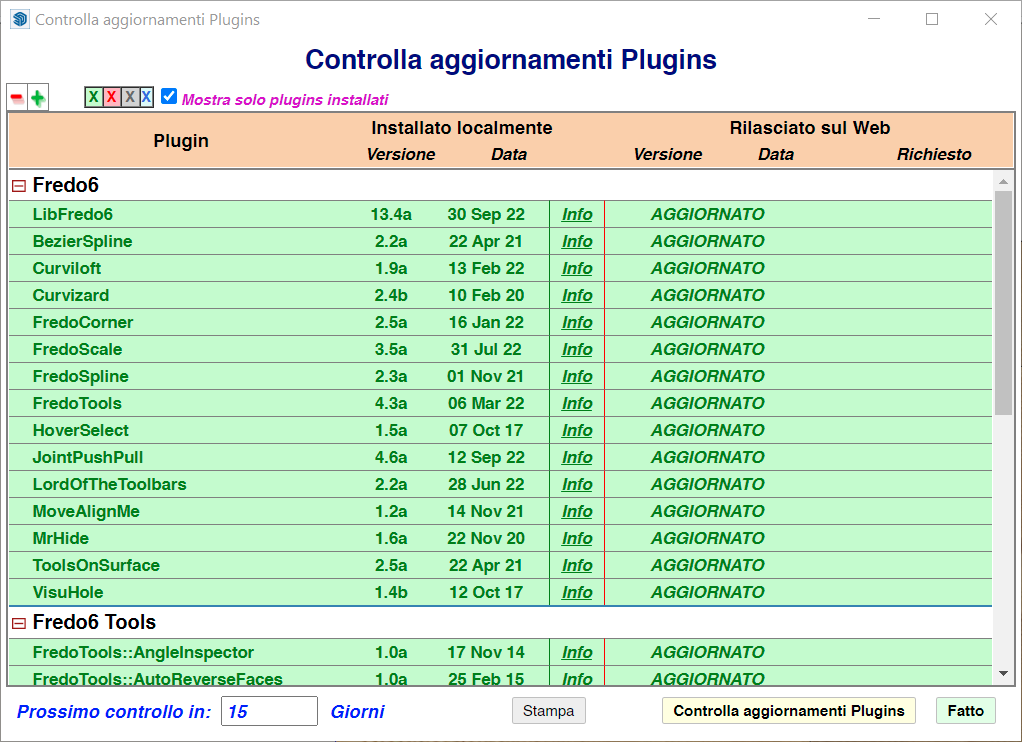
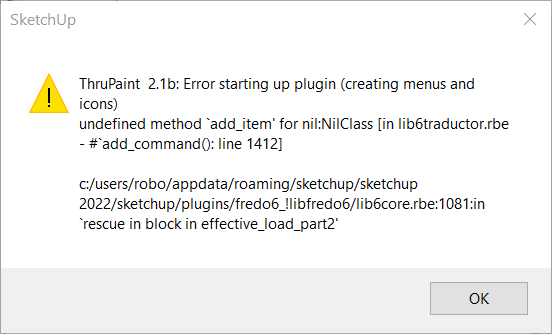
                                  SketchUp_6kvwMmi9Ld.png


                                  SketchUp_WM0egmCKYI.png

                                  1 Respuesta Última respuesta Responder Citar 0
                                  • M Desconectado
                                    markcavey
                                    Última edición por

                                    Not sure why i'm now getting this error
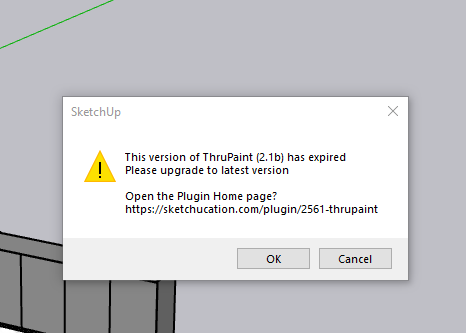

                                    ThruPaint.PNG

                                    1 Respuesta Última respuesta Responder Citar 0
                                    • M Desconectado
                                      Martuszka001
                                      Última edición por

                                      Hi! I have a problem with the new version of ThruPaint. It doesn't work.
                                      I updated LibFredo6 to v13.4a, Sketchucation ExtensionStore to v4.2.9 and still shows me that "the version of ThruPaint v2.1b has expired. Please upgrade to the latest version."
                                      Whan can I do with that?
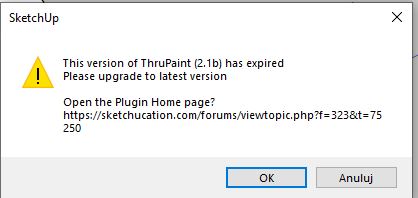

                                      Thrupaint.JPG

                                      1 Respuesta Última respuesta Responder Citar 0
                                      • N Desconectado
                                        NadinA2022
                                        Última edición por

                                        I can`t start the plagin from today 31.10.2022. It asks to upgrade? but its up to date.
                                        Whats the problem may be and How fix it. Thanks.
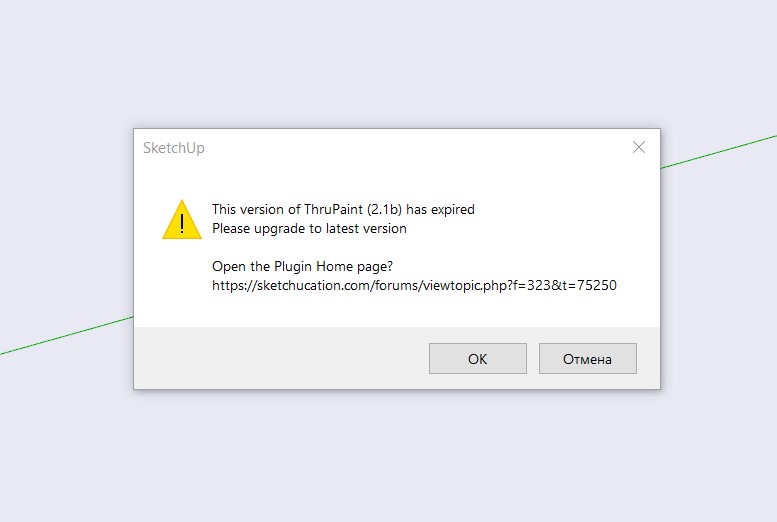

                                        Снимок экрана 2022-10-31 125309.jpg

                                        1 Respuesta Última respuesta Responder Citar 0
                                        • fredo6F Desconectado
                                          fredo6
                                          Última edición por

                                          NEW RELEASE: ThruPaint v2.2a - 31 Oct 22

                                          ThruPaint 2.2a is for extension of validity.


                                          Home Page of ThruPaint for information and Download.

                                          Main post of this thread.

                                          1 Respuesta Última respuesta Responder Citar 0
                                          • G Desconectado
                                            Grey24601
                                            Última edición por

                                            Hi Fredo,

                                            I love this tool and couldn't work without it. However, it takes a very long time to load the materials. Is there a way to speed it up or revert back to the old way using the Sketchup selected material?


                                            1 Respuesta Última respuesta Responder Citar 0
                                            • 1
                                            • 2
                                            • 3
                                            • 4
                                            • 5
                                            • 9
                                            • 10
                                            • 2 / 10
                                            • First post
                                              Last post
                                            Buy SketchPlus
                                            Buy SUbD
                                            Buy WrapR
                                            Buy eBook
                                            Buy Modelur
                                            Buy Vertex Tools
                                            Buy SketchCuisine
                                            Buy FormFonts

                                            Advertisement