sketchucation logo sketchucation
    • 登入
    Oops, your profile's looking a bit empty! To help us tailor your experience, please fill in key details like your SketchUp version, skill level, operating system, and more. Update and save your info on your profile page today!
    🔌 Smart Spline | Fluid way to handle splines for furniture design and complex structures. Download

    [Plugin][$] JointPushPull Interactive - v4.9a - 02 Apr 25


    已排程 已置頂 已鎖定 已移動 Plugins
    619 貼文 156 Posters 656.4k 瀏覽 155 Watching
    正在載入更多貼文
    • 從舊到新
    • 從新到舊
    • 最多點贊
    回覆
    • 在新貼文中回覆
    登入後回覆
    此主題已被刪除。只有擁有主題管理權限的使用者可以查看。
    • R 離線
      rv1974
      最後由 編輯

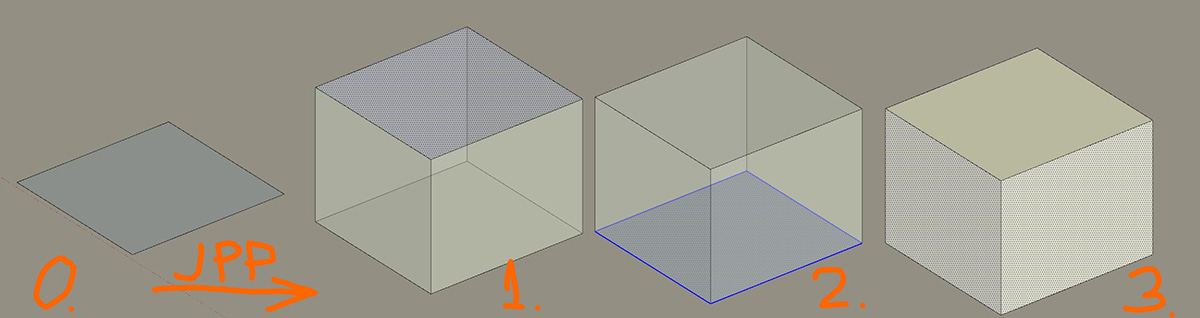
      Say you have state 0, then run JPP and immediately after execution (on exit) you'd have (wishful thinking) 3 states.
      The goal is ability to group selection and assign diffrent material or make some geniuos manipulations (independently).

      Capture.JPG

      1 條回覆 最後回覆 回覆 引用 0
      • fredo6F 離線
        fredo6
        最後由 編輯

        OK. I get what you want to get.
        Doable indeed, but this is another option in a GUI which some consider already 'bloated'!!

        Currently, JPP keeps the selection on the faces which have been selected.

        1 條回覆 最後回覆 回覆 引用 0
        • R 離線
          rv1974
          最後由 編輯

          @fredo6 said:

          ...Currently, JPP keeps the selection on the faces which have been selected.

          OK. Could you please change this setting it to the offsetones? It would solve all my request without UI bloating. You see, I can Cnrl+C initial faces before JPP execution, and then just paste original faces after JPP is done. This simple hack restores original selection.

          1 條回覆 最後回覆 回覆 引用 0
          • fredo6F 離線
            fredo6
            最後由 編輯

            @rv1974 said:

            OK. Could you please change this setting it to the offsetones? It would solve all my request without UI bloating. You see, I can Cnrl+C initial faces before JPP execution, and then just paste original faces after JPP is done. This simple hack restores original selection.

            The native SketchUp Push Pull does the following

            • if and only if a face is pre-selected before launching the PP tool...
            • ...its offset fasce is hard-selected when you finished the push pull.
              This means that if you wish to push-pull another face right after within the same Push-Pull session, you have to press Escape to deselect.

            Is this behavior you want to reproduce with JPP?

            1 條回覆 最後回覆 回覆 引用 0
            • R 離線
              rv1974
              最後由 編輯

              This is the way I imagine:

              1. Preselect
              2. Run JPP
              3. Hit Enter to exit
              4. Offset faces stay selected

              It's very similar to the principle described in Pilou gifs here:
              http://sketchucation.com/forums/viewtopic.php?f=323&t=1523&start=30
              but in our case we deal with faces, not lines
              P.S. By 'offset faces' I mean case #1 (see my picture above ^^^)

              1 條回覆 最後回覆 回覆 引用 0
              • fredo6F 離線
                fredo6
                最後由 編輯

                @rv1974

                Can you have a look at JPP v4.4c.

                It selects the offset faces of preselected faces (if any) at exit. This assumes indeed that you perform only one Push Pull operation and then exit.

                Fredo

                1 條回覆 最後回覆 回覆 引用 0
                • R 離線
                  rv1974
                  最後由 編輯

                  Tested right now. Works perfectly, many many thanks! I'll post tomorrow some micro explanation how distribute materials in conjunction with JPP.

                  1 條回覆 最後回覆 回覆 引用 0
                  • fredo6F 離線
                    fredo6
                    最後由 編輯

                    @rv1974 said:

                    Tested right now. Works perfectly, many many thanks!

                    Or take v4.4d...

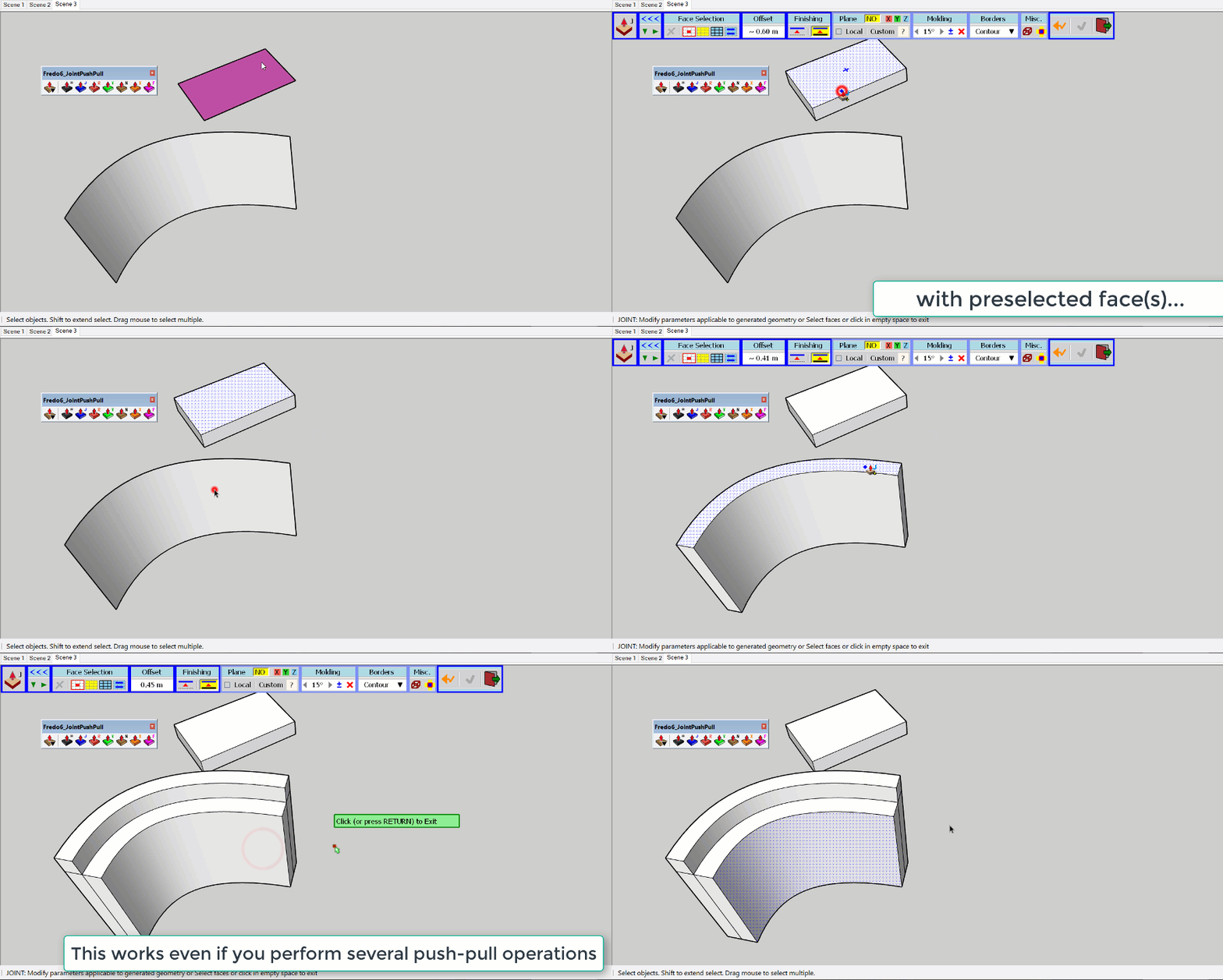
                    I made it work even if you perform several push pull operations within the same JPP session.

                    JPP - Preserve preselection.gif

                    1 條回覆 最後回覆 回覆 引用 0
                    • fredo6F 離線
                      fredo6
                      最後由 編輯

                      NEW RELEASE: JointPushPull Interactive v4.4d - 20 Feb 19

                      JointPushPull Interactive 4.4d select the offset faces of pre-selected faces at exit. See post just above.

                      JointPushPull 4.4b requires LibFredo6 8.7m or above


                      See plugin home page of JointPushPull for Download of JointPushPull.

                      Main Post of the JointPushPull thread on this forum

                      Fredo

                      1 條回覆 最後回覆 回覆 引用 0
                      • R 離線
                        rv1974
                        最後由 編輯

                        Fredo, when FollowPushPull is used on chamfer face, is there way to get somehow an exact 'chamfer 0' state?

                        1 條回覆 最後回覆 回覆 引用 0
                        • S 離線
                          SpookyChick1013
                          最後由 編輯

                          Massively useful plugins as always Fredo. Had the following error found when attempting round pushpull. Here's the log dump.

                          Thanks in advance!

                          Date: 19-Mar-19 09:41:55
                          An error occurred in Round Push Pull
                          Error in generation of the geometry

                          undefined method `collect' for nil:NilClass

                          jointpushpull4geometry.rbe: 1450 -- geometry_rounding_mesh
                          jointpushpull4geometry.rbe: 1283 -- block in geometry_create_roundings
                          jointpushpull4geometry.rbe: 1282 -- each
                          jointpushpull4geometry.rbe: 1282 -- geometry_create_roundings
                          jointpushpull4geometry.rbe: 267 -- geometry_robot_prepare_mesh
                          jointpushpull4geometry.rbe: 211 -- robot_call_action
                          jointpushpull4geometry.rbe: 182 -- geometry_robot_exec
                          jointpushpull4geometry.rbe: 165 -- geometry_robot
                          jointpushpull4geometry.rbe: 80 -- block in geometry_execute
                          lib6operation.rbe: 365 -- call
                          lib6operation.rbe: 365 -- step_geometry
                          lib6operation.rbe: 413 -- start_execution
                          jointpushpull4geometry.rbe: 80 -- geometry_execute
                          jointpushpull4tool.rbe: 1034 -- go_preview_or_geom
                          jointpushpull4tool.rbe: 812 -- dragging_stop

                          https://kuromatsudriveyards.com

                          Fo-su to tomo ni aran koto o...

                          1 條回覆 最後回覆 回覆 引用 0
                          • fredo6F 離線
                            fredo6
                            最後由 編輯

                            @spookychick1013 said:

                            Massively useful plugins as always Fredo. Had the following error found when attempting round pushpull. Here's the log dump.

                            You don't seem to have the latest version of JPP (it should be v4.4d).

                            Could you update it and advise. Thanks.

                            Fredo

                            1 條回覆 最後回覆 回覆 引用 0
                            • S 離線
                              SpookyChick1013
                              最後由 編輯

                              What? Wooops! You're right. I try to keep things updated, but somehow that one slipped past me.

                              I'll let you know once I've had a chance to test things. Thanks Fredo!

                              Update"Installed teh new version, made sure everything was updated, no conflicting versions, and presto, the same error.

                              @unknownuser said:

                              %(#40BFFF)[Date: 22-Mar-19 11:54:25
                              An error occurred in Round Push Pull
                              Error in generation of the geometry

                              undefined method `collect' for nil:NilClass

                              jointpushpullgeometry.rbe: 1529 -- geometry_rounding_mesh
                              jointpushpullgeometry.rbe: 1362 -- block in geometry_create_roundings
                              jointpushpullgeometry.rbe: 1361 -- each
                              jointpushpullgeometry.rbe: 1361 -- geometry_create_roundings
                              jointpushpullgeometry.rbe: 269 -- geometry_robot_prepare_mesh
                              jointpushpullgeometry.rbe: 212 -- robot_call_action
                              jointpushpullgeometry.rbe: 183 -- geometry_robot_exec
                              jointpushpullgeometry.rbe: 166 -- geometry_robot
                              jointpushpullgeometry.rbe: 81 -- block in geometry_execute
                              lib6operation.rbe: 365 -- call
                              lib6operation.rbe: 365 -- step_geometry
                              lib6operation.rbe: 413 -- start_execution
                              jointpushpullgeometry.rbe: 81 -- geometry_execute
                              jointpushpulltool.rbe: 1119 -- go_preview_or_geom
                              jointpushpulltool.rbe: 845 -- dragging_stop]

                              It happens whether I use the VCB or not. What I'm trying to do is Round PushPull the faces highlighted in the enclosed sreeen snip
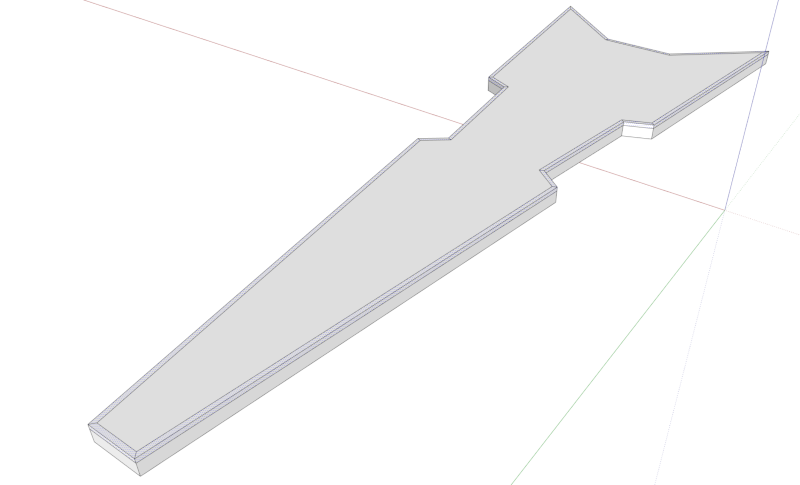
                              Model snip.PNG
                              If you need the model, let me know where to send it and I will do so.

                              Cathryn

                              https://kuromatsudriveyards.com

                              Fo-su to tomo ni aran koto o...

                              1 條回覆 最後回覆 回覆 引用 0
                              • H 離線
                                HeyJujube
                                最後由 編輯

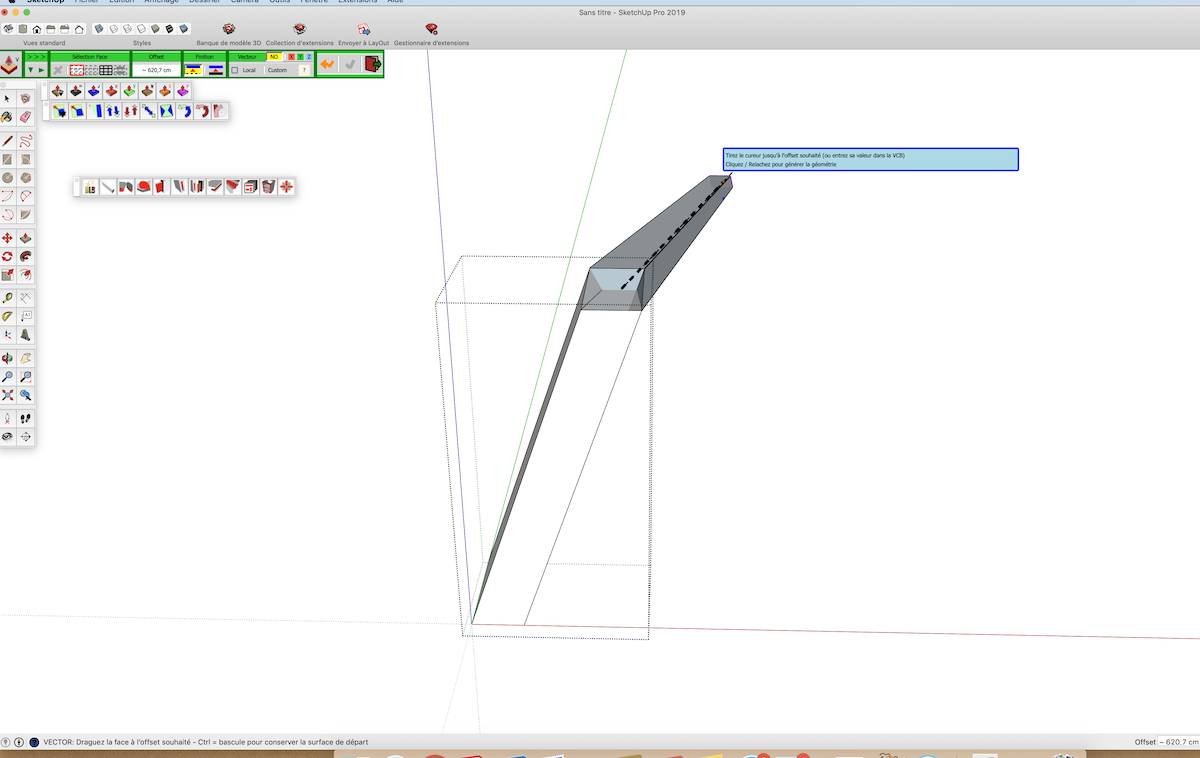
                                J'ai de gros problèmes avec ce plugin (mode vecteur) sous SketchUp Pro 2019 (Mac 10.14). Problème connu ?
                                Merci

                                Capture d’écran 2019-04-05 à 11.30.28.png

                                1 條回覆 最後回覆 回覆 引用 0
                                • fredo6F 離線
                                  fredo6
                                  最後由 編輯

                                  @heyjujube said:

                                  J'ai de gros problèmes avec ce plugin (mode vecteur) sous SketchUp Pro 2019 (Mac 10.14). Problème connu ?
                                  Merci

                                  Difficile de juger sans le modele. Et, franchement, l'image ne me permet de savoir de quoi il s'agit.

                                  Fredo

                                  1 條回覆 最後回覆 回覆 引用 0
                                  • H 離線
                                    HeyJujube
                                    最後由 編輯

                                    N'importe quel modèle, ici une simple colonne inclinée pour l'exemple.
                                    La face part dans tous les sens, se déforme, "explose".
                                    J'ai toujours utilisé le plugin, mais récemment passage à SU 2019 sous Mac.
                                    Merci

                                    1 條回覆 最後回覆 回覆 引用 0
                                    • fredo6F 離線
                                      fredo6
                                      最後由 編輯

                                      @heyjujube said:

                                      N'importe quel modèle, ici une simple colonne inclinée pour l'exemple.
                                      La face part dans tous les sens, se déforme, "explose".
                                      J'ai toujours utilisé le plugin, mais récemment passage à SU 2019 sous Mac.
                                      Merci

                                      it looks like the Vector direction is on the plane of the face.
                                      Could you either lock an axis direction with the arrows, or find a proper direction and lock it (Shift).

                                      1 條回覆 最後回覆 回覆 引用 0
                                      • T 離線
                                        theVonZipper
                                        最後由 編輯

                                        Thanks Fredo for the fantastic plugins. I use 'Divide faces' often and of course Joint Push Pull. Just wondering, is there a way for Push Pull Interactive to inherit layers from the faces they are affecting as the Classic version did?

                                        1 條回覆 最後回覆 回覆 引用 0
                                        • Dave RD 離線
                                          Dave R
                                          最後由 編輯

                                          Faces and edges should always be created on and remain on Layer 0. See Controlling Visibility with Layers.

                                          Etaoin Shrdlu

                                          %

                                          (THERE'S NO PLACE LIKE)

                                          G28 X0.0 Y0.0 Z0.0

                                          M30

                                          %

                                          1 條回覆 最後回覆 回覆 引用 0
                                          • E 離線
                                            Einstein
                                            最後由 編輯

                                            Hi!

                                            I have an idea for a small feature upgrade.
                                            Actually, two ideas ^^

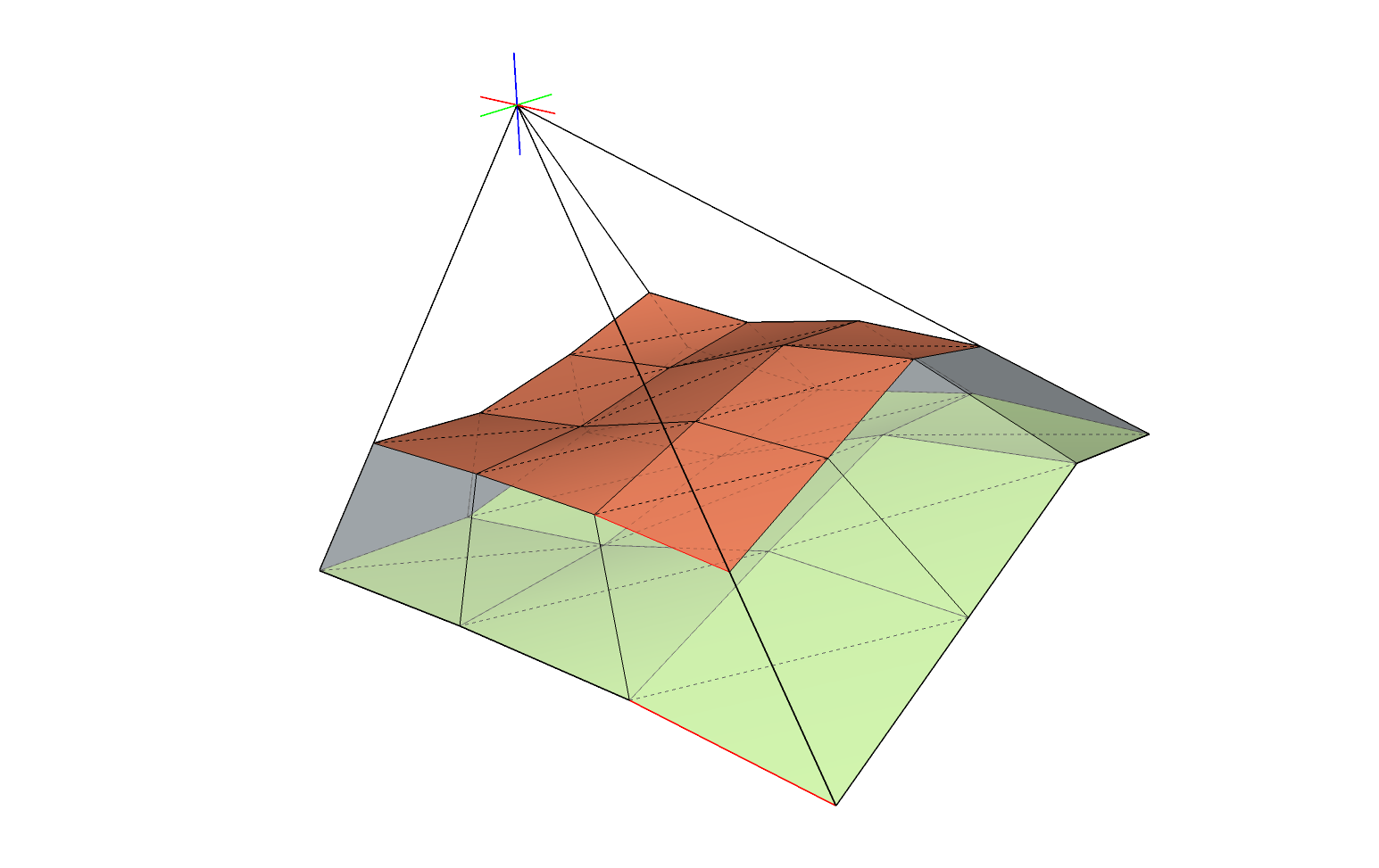
                                            1. Possibility to apply positive + negative offset in one go, so you can thicken a surface on both sides immediately

                                            2. Extrude faces to point, like in Rhino. It would be almost analogic operation to scaling about a point which can be performed via ThomThom's Rotate and Scale. However, you'd then have to manually connect border edges of source and result meshes. Rhino has a tool which does everything in one step. I attach an illustration for it.

                                            What do you think about it?

                                            extrude about point - request.png

                                            1 條回覆 最後回覆 回覆 引用 0
                                            • 1
                                            • 2
                                            • 13
                                            • 14
                                            • 15
                                            • 16
                                            • 17
                                            • 30
                                            • 31
                                            • 15 / 31
                                            • 第一個貼文
                                              最後的貼文
                                            Buy SketchPlus
                                            Buy SUbD
                                            Buy WrapR
                                            Buy eBook
                                            Buy Modelur
                                            Buy Vertex Tools
                                            Buy SketchCuisine
                                            Buy FormFonts

                                            Advertisement