sketchucation logo sketchucation
    • 登入
    Oops, your profile's looking a bit empty! To help us tailor your experience, please fill in key details like your SketchUp version, skill level, operating system, and more. Update and save your info on your profile page today!
    🔌 Smart Spline | Fluid way to handle splines for furniture design and complex structures. Download

    [Plugin][$] TopoShaper - v2.7b - 30 Jan 26


    已排程 已置頂 已鎖定 已移動 Plugins
    456 貼文 144 Posters 715.2k 瀏覽 143 Watching
    正在載入更多貼文
    • 從舊到新
    • 從新到舊
    • 最多點贊
    回覆
    • 在新貼文中回覆
    登入後回覆
    此主題已被刪除。只有擁有主題管理權限的使用者可以查看。
    • array81A 離線
      array81
      最後由 編輯

      After created a terrain, is there a way to show the "grid" on it? I see only the surface but would be nice to see the points of the grid for editing.

      1 條回覆 最後回覆 回覆 引用 0
      • fredo6F 離線
        fredo6
        最後由 編輯

        Are you generating the terrain

        • from Isocontours
        • or from a point cloud ?

        And what is exactly the "grid" you mention. Is it the 'flat' horizontal grid used for projection ?

        Fredo

        1 條回覆 最後回覆 回覆 引用 0
        • S 離線
          smhbrv
          最後由 編輯

          Hi everyone.
          I am an architect in Turkey.
          I model my terrain but I dont put my road in my terrain.
          It gives an error. (Unable to triangulate road surface. Try using smaller max road Segment Lenght.)

          I try lots of times but it gives same error.

          http://1.1m.yt/z6LbBUo.jpg

          Please look at attachment. Pls help me.


          My project

          1 條回覆 最後回覆 回覆 引用 0
          • S 離線
            smhbrv
            最後由 編輯

            @smhbrv said:

            Hi everyone.
            I am an architect in Turkey.
            I model my terrain but I dont put my road in my terrain.
            It gives an error. (Unable to triangulate road surface. Try using smaller max road Segment Lenght.)

            I try lots of times but it gives same error.

            http://1.1m.yt/z6LbBUo.jpg

            Please look at attachment. Pls help me.

            Who can help me ?

            1 條回覆 最後回覆 回覆 引用 0
            • pilouP 離線
              pilou
              最後由 編輯

              Why not use the SandBox / Project ?

              sand_box.jpg

              Frenchy Pilou
              Is beautiful that please without concept!
              My Little site :)

              1 條回覆 最後回覆 回覆 引用 0
              • C 離線
                cyclefanatic
                最後由 編輯

                Hello Fredo: I just started using Toposhaper. It works fine, but the dialog box text is so small I can hardly see the text. Is there a way to adjust the text size? I am using an iMac with Retina display.

                Thank you for all your contributions...
                Jim S

                1 條回覆 最後回覆 回覆 引用 0
                • fredo6F 離線
                  fredo6
                  最後由 編輯

                  NEW RELEASE: TopoShaper v1.3a - 17 Jan 17

                  This is a minor release with SU2017 certification

                  See main post of this thread for Download.

                  Fredo

                  1 條回覆 最後回覆 回覆 引用 0
                  • D 離線
                    dvdstwrt
                    最後由 編輯

                    I am having trouble installing the toposhaper extension in SUMaker2017 and get the following after restarting SU. Any suggestions would be appreciated

                    1 條回覆 最後回覆 回覆 引用 0
                    • TIGT 離線
                      TIG Moderator
                      最後由 編輯

                      @dvdstwrt said:

                      I am having trouble installing the toposhaper extension in SUMaker2017 and get the following after restarting SU. Any suggestions would be appreciated
                      You seem to have missed off the error message ?
                      Have you also installed the needed LibFredo?
                      Also check that both Extensions are activated and restart SketchUp to ensure any changes/additions are fully integrated...

                      TIG

                      1 條回覆 最後回覆 回覆 引用 0
                      • E 離線
                        Einstein
                        最後由 編輯

                        Fredo, your plugins are mindblowing!

                        1 條回覆 最後回覆 回覆 引用 0
                        • john2J 離線
                          john2
                          最後由 編輯

                          Every time I start sketchup I am receiving the following pop up.
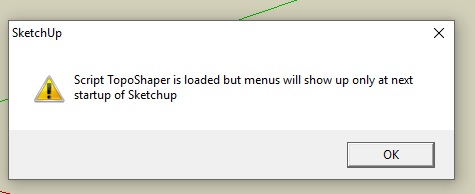
                          topo shaper.jpg

                          All my fredo plugins are updated. I checked it with the feature of fredo tools itself.

                          What should I do to resolve this issue?

                          Sketchup Make 2017 (64-bit), Vray 4.0 , Windows 10 – 64 bit, corei7-8750H, 16GB RAM, Nvidia GeForce GTX 1050Ti 4GB

                          1 條回覆 最後回覆 回覆 引用 0
                          • TIGT 離線
                            TIG Moderator
                            最後由 編輯

                            Have you also installed the very latest LibFredo ?

                            TIG

                            1 條回覆 最後回覆 回覆 引用 0
                            • john2J 離線
                              john2
                              最後由 編輯

                              @tig said:

                              Have you also installed the very latest LibFredo ?

                              Yes

                              Sketchup Make 2017 (64-bit), Vray 4.0 , Windows 10 – 64 bit, corei7-8750H, 16GB RAM, Nvidia GeForce GTX 1050Ti 4GB

                              1 條回覆 最後回覆 回覆 引用 0
                              • pilouP 離線
                                pilou
                                最後由 編輯

                                Have you re-launched SketchUp ?

                                Frenchy Pilou
                                Is beautiful that please without concept!
                                My Little site :)

                                1 條回覆 最後回覆 回覆 引用 0
                                • john2J 離線
                                  john2
                                  最後由 編輯

                                  @pilou said:

                                  Have you re-launched SketchUp ?

                                  Yes. Every time I start sketchup, I am getting this dialogue box.

                                  Sketchup Make 2017 (64-bit), Vray 4.0 , Windows 10 – 64 bit, corei7-8750H, 16GB RAM, Nvidia GeForce GTX 1050Ti 4GB

                                  1 條回覆 最後回覆 回覆 引用 0
                                  • TIGT 離線
                                    TIG Moderator
                                    最後由 編輯

                                    Is the LibFredo activated in the Extension Manager dialog ?

                                    TIG

                                    1 條回覆 最後回覆 回覆 引用 0
                                    • john2J 離線
                                      john2
                                      最後由 編輯

                                      @tig said:

                                      Is the LibFredo activated in the Extension Manager dialog ?

                                      I am using Sketchup 2016 version. The libfredo is activated and I see a tick mark right next to its name in the list which I accessed by going to System preferences>extensions

                                      Sketchup Make 2017 (64-bit), Vray 4.0 , Windows 10 – 64 bit, corei7-8750H, 16GB RAM, Nvidia GeForce GTX 1050Ti 4GB

                                      1 條回覆 最後回覆 回覆 引用 0
                                      • fredo6F 離線
                                        fredo6
                                        最後由 編輯

                                        I think the best would be to have a snapshot of your Sketchup Plugins Directory. It looks like there is an old LibFredo6 somewhere.

                                        Fredo

                                        1 條回覆 最後回覆 回覆 引用 0
                                        • fredo6F 離線
                                          fredo6
                                          最後由 編輯

                                          WARNING: Potential issues in TopoShaper (IsoContour) with LibFredo6 7.7d.

                                          I will publish a fix in LibFredo6 v7.7e as soon as the Extension Ware House site works again.

                                          Fredo

                                          1 條回覆 最後回覆 回覆 引用 0
                                          • H 離線
                                            hiryfi
                                            最後由 編輯

                                            Greetings,

                                            I am a extreme beginner with SU and am trying to use toposhaper to generate a topo of a piece of land I recently purchased. Reading, researching, and a lot of trial and error!

                                            I am using previous survey data and septic design plans to do this. I have a .txt file with 144 points of xyz data. I imported that into SU with point gadget in a .csv file and have all the points imported. My problem is getting toposhaper to accept the points. I either get a I have tried to install toposhaper with libfredo6_v7.7e prior multiple times with no luck. I could not find the auto-installer and have installed via the extension manager. I'm sure I am screwing something up, just can't pinpoint what I am doing wrong. Any tips are much appreciated. I will continue to search through the libfredo post as well. I have attached my data and some screen shots of the messages I am generating. I see others have had similar issues so I'm sure its some user issue on my end.

                                            I am using SU Make 2017, Windows 7

                                            Thanks,

                                            hiryfi


                                            Lot 19S Topo 7.25.15 (1).txt


                                            pdf given from data, firm would not give .dwg due to liability.


                                            LibFredo6Trace_17_1506099534865.txt

                                            SU17
                                            Very Green

                                            1 條回覆 最後回覆 回覆 引用 0
                                            • 1
                                            • 2
                                            • 19
                                            • 20
                                            • 21
                                            • 22
                                            • 23
                                            • 22 / 23
                                            • 第一個貼文
                                              最後的貼文
                                            Buy SketchPlus
                                            Buy SUbD
                                            Buy WrapR
                                            Buy eBook
                                            Buy Modelur
                                            Buy Vertex Tools
                                            Buy SketchCuisine
                                            Buy FormFonts

                                            Advertisement