sketchucation logo sketchucation
    • 登入
    Oops, your profile's looking a bit empty! To help us tailor your experience, please fill in key details like your SketchUp version, skill level, operating system, and more. Update and save your info on your profile page today!
    🔌 Smart Spline | Fluid way to handle splines for furniture design and complex structures. Download

    [Plugin] FredoTools::ThruPaint - v1.3a - 20 Oct 16

    已排程 已置頂 已鎖定 已移動 Plugins
    331 貼文 102 Posters 537.7k 瀏覽 102 Watching
    正在載入更多貼文
    • 從舊到新
    • 從新到舊
    • 最多點贊
    回覆
    • 在新貼文中回覆
    登入後回覆
    此主題已被刪除。只有擁有主題管理權限的使用者可以查看。
    • M 離線
      moghamdi
      最後由 編輯

      Thank you Fredo for this nice Plugin.

      I have a problem

      I have a Mac 10.6.8 and I cannot transform the texture. I tried all 3 ways you mentioned but they did not work.

      1 條回覆 最後回覆 回覆 引用 0
      • fredo6F 離線
        fredo6
        最後由 編輯

        @moghamdi said:

        Thank you Fredo for this nice Plugin.

        I have a problem

        I have a Mac 10.6.8 and I cannot transform the texture. I tried all 3 ways you mentioned but they did not work.

        Could you open the Ruby console and see if something is displayed.
        It seems that the Arrows don't work on all Mac, but the VCB and Visual Editor should normally function correctly.

        Thanks

        Fredo

        1 條回覆 最後回覆 回覆 引用 0
        • fredo6F 離線
          fredo6
          最後由 編輯

          @oxer said:

          This is the result in the Ruby Console:
          [attachment=0:23qhhc8q]<!-- ia0 -->Ruby Console.jpg<!-- ia0 -->[/attachment:23qhhc8q]

          Oxer,

          Thanks. Interesting to see that the value may be different depending on the Mac versions (on the Mac I have access to, VK_DOWN = 63233

          Anyway, ThruPaint only use the symbolic constant value VK_DOWN and therefore should not be impacted by the internal value of the Arrows constants.

          It seems also that several Mac users don't have any problem with the Arrows on Mac.

          Just in case, could you type in the Ruby Console Traductor.new_check_key(VK_DOWN, 0, 0).

          Also, when you try to exercise transformation by arrows on texture, could you leave the Ruby console open to see if an error message is displayed. Also, make sure that the focus is on the Sketchup window when typing the arrows.

          Thanks

          Fredo

          1 條回覆 最後回覆 回覆 引用 0
          • TIGT 線上
            TIG Moderator
            最後由 編輯

            In my scripts that use arrows keys I use this

            if RUBY_PLATFORM=~/mswin32/ ### PC
              KALXMINUS = 37          # Arrow Left Key 
              KARXPLUS  = 39          # Arrow Right Key 
              KAUYPLUS  = 38          # Arrow Up Key 
              KADYMINUS = 40          # Arrow Down Key 
              KSHIFT    = 16          # Shift Key 
            else### MAC
              KALXMINUS = 63234       # Arrow Left Key 
              KARXPLUS  = 63235       # Arrow Right Key 
              KAUYPLUS  = 63232       # Arrow Up Key 
              KADYMINUS = 63233       # Arrow Down Key 
              KSHIFT    = 131072      # Shift Key 
            end#if
            

            and then test key-down events etc against these 'constants'

            TIG

            1 條回覆 最後回覆 回覆 引用 0
            • thomthomT 離線
              thomthom
              最後由 編輯

              @tig said:

              In my scripts that use arrows keys I use this

              if RUBY_PLATFORM=~/mswin32/ ### PC
              >   KALXMINUS = 37          # Arrow Left Key 
              >   KARXPLUS  = 39          # Arrow Right Key 
              >   KAUYPLUS  = 38          # Arrow Up Key 
              >   KADYMINUS = 40          # Arrow Down Key 
              >   KSHIFT    = 16          # Shift Key 
              > else### MAC
              >   KALXMINUS = 63234       # Arrow Left Key 
              >   KARXPLUS  = 63235       # Arrow Right Key 
              >   KAUYPLUS  = 63232       # Arrow Up Key 
              >   KADYMINUS = 63233       # Arrow Down Key 
              >   KSHIFT    = 131072      # Shift Key 
              > end#if
              

              and then test key-down events etc against these 'constants'

              Why don't you use the built in constants? They should be reflecting the correct value based on the current OS. When you do it manually you have to keep updating it....
              ❓

              Thomas Thomassen — SketchUp Monkey & Coding addict
              List of my plugins and link to the CookieWare fund

              1 條回覆 最後回覆 回覆 引用 0
              • fredo6F 離線
                fredo6
                最後由 編輯

                @Thomthom: I agree with you and my scripts do use the built-in constants for Arrow (and Shift, Ctrl). This is why I don't understand why it does not work. I was just wondering why the VK_constants for Oxer where in the range 123-126 whereas on the Mac I can have access to there are in the range of 63232... One possibility is that another script redefines the constants VK_.... because as far as I know, there is only a single Mac release of Sketchup, and therefore of the Ruby API (unless the Ruby API check itself the version of Mac OS).

                @TIG: the values you show are correct for the Mac, as far as I knew them.

                Fredo

                1 條回覆 最後回覆 回覆 引用 0
                • thomthomT 離線
                  thomthom
                  最後由 編輯

                  @unknownuser said:

                  because as far as I know, there is only a single Mac release of Sketchup, and therefore of the Ruby API

                  I assumed that SketchUp got the key code values from the system when it initialized the Ruby interpreter and abstracted them into these system-safe constants...

                  Thomas Thomassen — SketchUp Monkey & Coding addict
                  List of my plugins and link to the CookieWare fund

                  1 條回覆 最後回覆 回覆 引用 0
                  • R 離線
                    redog
                    最後由 編輯

                    for me u are a genius in sketchup you can now manage the textures in an intelligent way. thanks fridoooooo. grazie 😍 👍 👍 😍

                    1 條回覆 最後回覆 回覆 引用 0
                    • M 離線
                      moghamdi
                      最後由 編輯

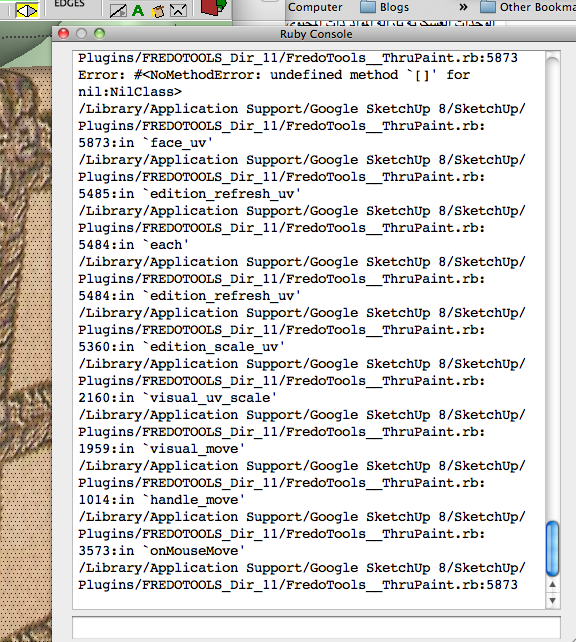
                      This is the result in the Ruby Console:
                      I have Sketchup 8 Pro

                      Ruby.png

                      1 條回覆 最後回覆 回覆 引用 0
                      • fredo6F 離線
                        fredo6
                        最後由 編輯

                        NEW RELEASE: ThruPaint v1.2a - 08 May 12

                        This update fixes some bugs and introduces 2 functional evolutions

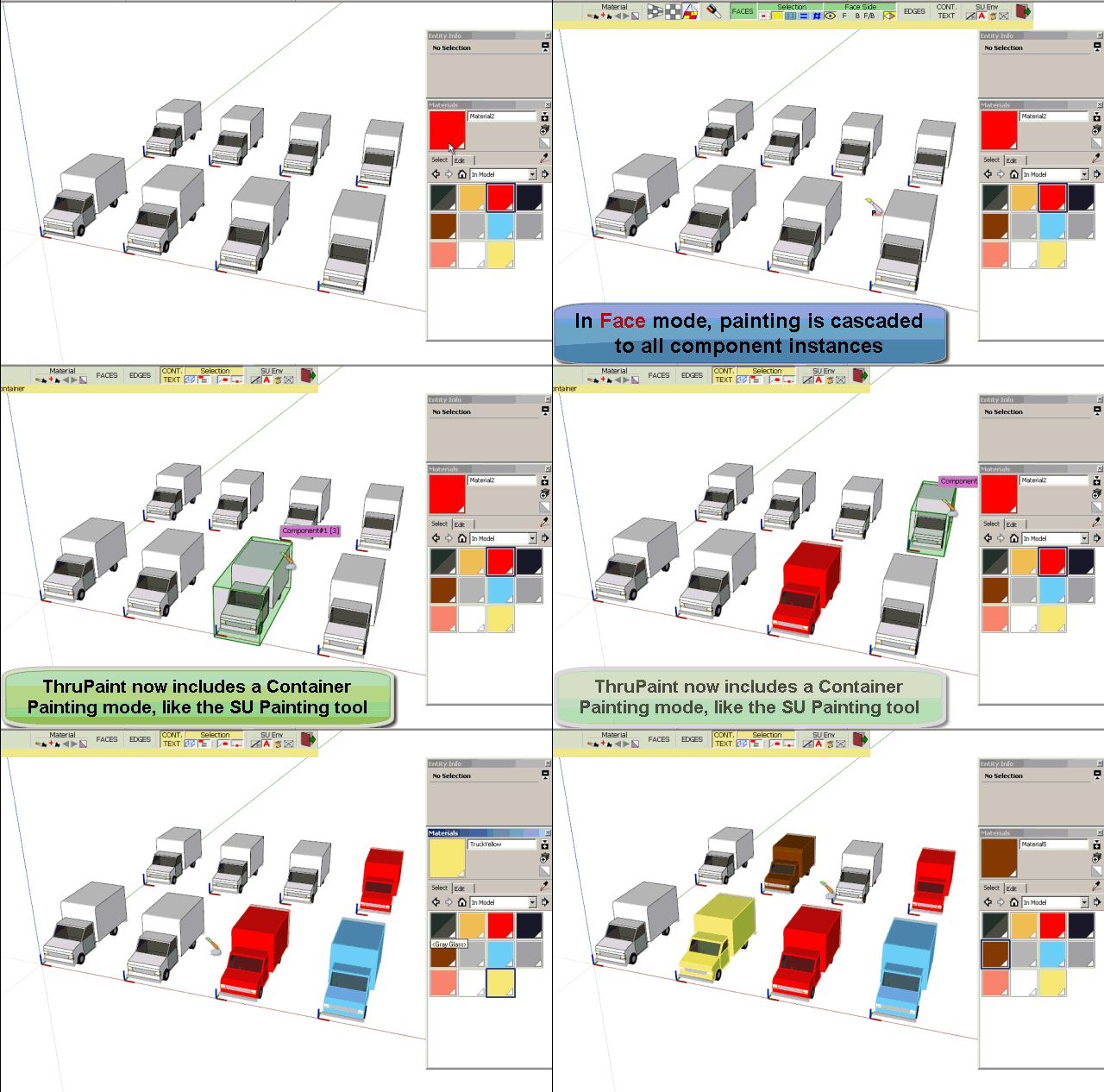
                        1) Painting of components / groups, text labels and dimensions
                        This is a new option in the palette, very similar to the native SU Paint tool. Originally, ThruPaint was painting faces within the boundaries of containers. There are however cases where you wish to assign a material to the component or group itself. This material becomes then the default material for the faces of the component
                        ThruPaint Container mode.gif

                        2) Modifier for Sampler
                        If you press Shift key, the cursor changes to sampling instead of painting. In the native SU Paint tool, this feature is covered by the Alt key (on Windows), but this is not possible in Ruby.

                        See main post of this thread for more information on ThruPaint.

                        See main post of FredoTools thread for download of FredoTools, which includes the ThruPaint script.

                        Fredo

                        1 條回覆 最後回覆 回覆 引用 0
                        • fredo6F 離線
                          fredo6
                          最後由 編輯

                          NEW RELEASE: ThruPaint v1.0n - 21 Apr 12

                          This update introduces 2 functional evolutions

                          1) Painting of a preselection of faces or edges
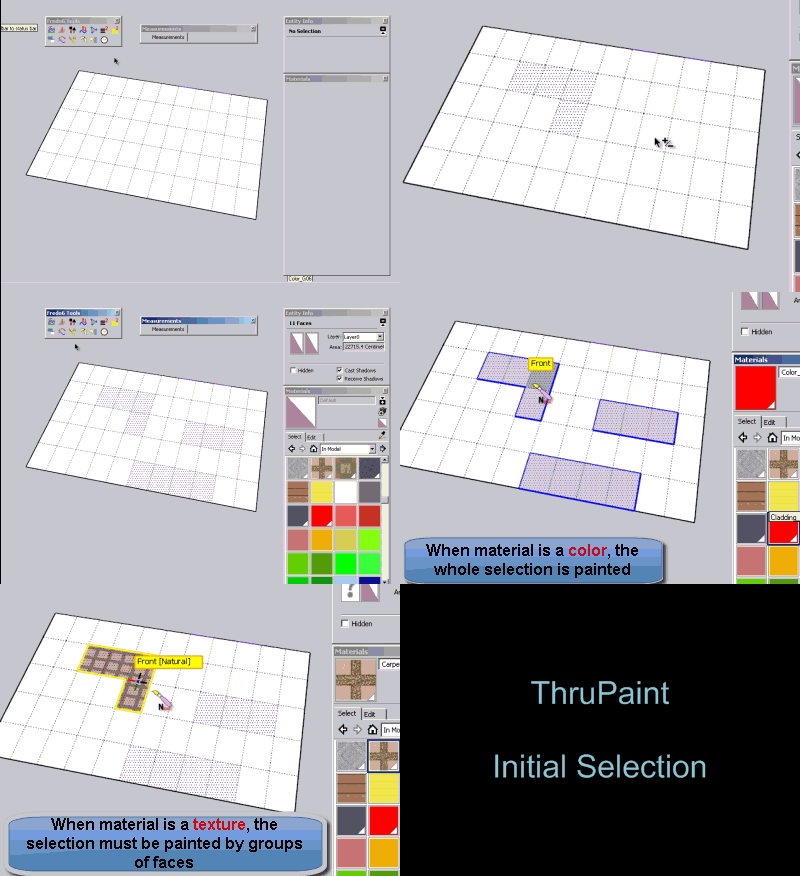
                          If you select faces or edges before launching ThruPaint, the painted faces or edges will be those of the preselection whenever you mouse over them (regardless of the face selection settings in the palette).

                          • When the material is a color or for edge painting, the painting applies to the whole pre-selection
                          • When the material is a texture, you have to paint by groups of faces in the preselection
                            ThruPaint Initial Selection.gif

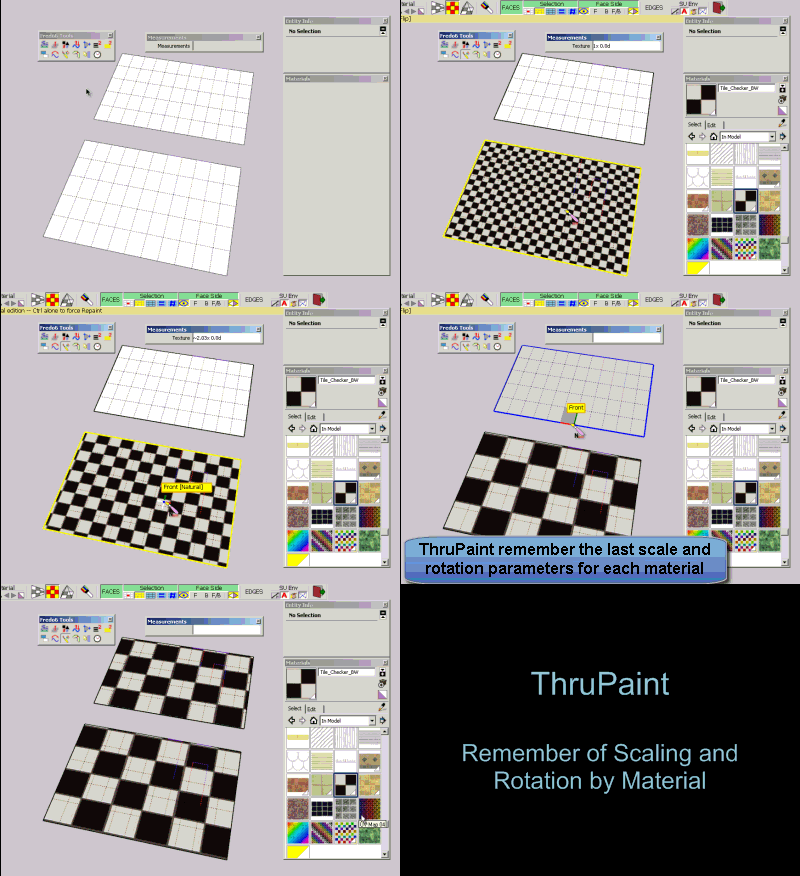
                          2) Remembering of last scaling and rotation factors by material.
                          This is inspired from a request by Pherim

                          If you apply a textured material to a face and then scale it and/or rotate it, the scaling and rotation factors will be remembered the next time you apply this material.
                          Likewise, the sampling of material within the model also copy the scaling and rotation factors.
                          ThruPaint Keep Transfo.gif

                          See main post of this thread for more information on ThruPaint.

                          See main post of FredoTools thread for download of FredoTools, which includes the script.

                          Fredo

                          1 條回覆 最後回覆 回覆 引用 0
                          • T 離線
                            tomislavm
                            最後由 編輯

                            Thank You.

                            1 條回覆 最後回覆 回覆 引用 0
                            • N 離線
                              numerobis
                              最後由 編輯

                              Really a fantastic plugin! I have to say it again! Thanks a lot!

                              But i have noticed a problem with exporting textured object for rendering, maxwell in my case...
                              The problem is that the exporter writes a seperated material and texture for each face! So with a complex gepmetry this results in thousands of textures and materials.

                              My question is now, is it possible to avoid this behavior? I'm painting as QuadMesh.
                              Or is this problem maxwell related? I noticed the same thing when i use photomatch for texturing.

                              Can anyone say how this works with vray?

                              edit: ok, problem solved... disabling texture distortions in maxwell uv export options did it. I thought this would result in distorted mapping but for now it works.

                              Thanks again for this incredible tool, Fredo!!!
                              Trimble should buy this from you as standart mapping method! 😎

                              1 條回覆 最後回覆 回覆 引用 0
                              • S 離線
                                shri
                                最後由 編輯

                                many many thanks for your great tool.. 👍

                                1 條回覆 最後回覆 回覆 引用 0
                                • majidM 離線
                                  majid
                                  最後由 編輯

                                  unique genius Fredeo!!!!! many many thank you, this is greaaat

                                  My inspiring A, B, Sketches book: https://sketchucation.com/shop/books/intermediate/2612-alphabet-inspired-sketches--inspiring-drills-for-architects--3d-artists-and-designers-

                                  1 條回覆 最後回覆 回覆 引用 0
                                  • pietervP 離線
                                    pieterv
                                    最後由 編輯

                                    Hey Fredo,

                                    Thanks a lot for the great plugin! You are a hero.

                                    I have a slight problem tho. I used your plugin and in sketchup it looks like this
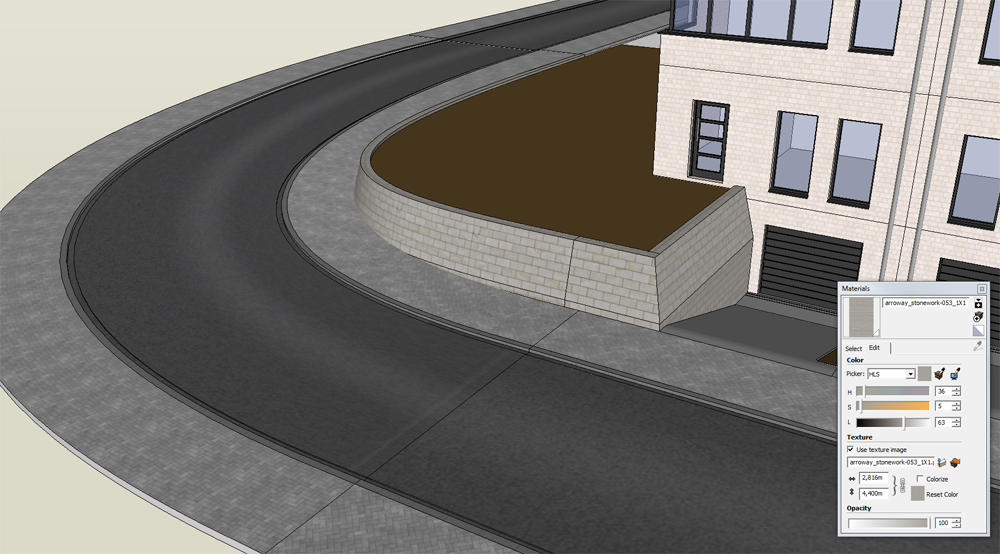
                                    http://www.citypixels.be/wp-content/uploads/2012/10/sketchup-thrupaint-01.png

                                    but when I render it in Maxwell Render it looks like this:
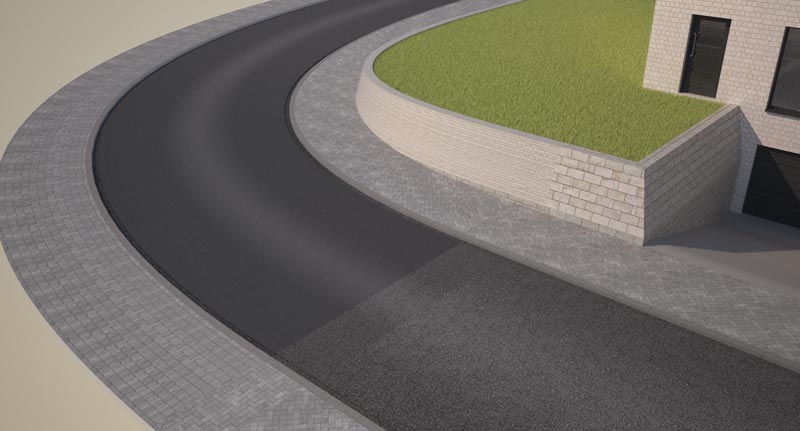
                                    http://www.citypixels.be/wp-content/uploads/2012/10/simpel-huis-render-017.jpg

                                    The yellow stones in the little wall have become much smaller and the middle part of the street has become darker. Do you have an idea what the problem could be?

                                    Thanks!

                                    Pieter

                                    This is my website:
                                    Citypixels - 3d Visualisatie Architectuur

                                    1 條回覆 最後回覆 回覆 引用 0
                                    • TIGT 線上
                                      TIG Moderator
                                      最後由 編輯

                                      Check if the two surfaces have the material applied in a different way.
                                      I suspect that one has the material applied to the face itself while the other has the material applied to the 'container' [group/component-instance] - check this by using 'Entity Info' and selecting the actual faces in each case - the 'mapping' cannot persist into exported formats when applied to a container rather than the face itself... Of course it might be a Maxwell issue with it mis-handing the UVmapping ?

                                      TIG

                                      1 條回覆 最後回覆 回覆 引用 0
                                      • thomthomT 離線
                                        thomthom
                                        最後由 編輯

                                        Contact Maxwell support - as this is their render engine that doesn't properly process the UV mapping.

                                        Thomas Thomassen — SketchUp Monkey & Coding addict
                                        List of my plugins and link to the CookieWare fund

                                        1 條回覆 最後回覆 回覆 引用 0
                                        • pietervP 離線
                                          pieterv
                                          最後由 編輯

                                          I have checked, and the two materials are axactly the same. I have the free version of Maxwell Render, so I'll repost this under "extensions & applications". Thanks for answering!

                                          This is my website:
                                          Citypixels - 3d Visualisatie Architectuur

                                          1 條回覆 最後回覆 回覆 引用 0
                                          • thomthomT 離線
                                            thomthom
                                            最後由 編輯

                                            I'd still recommend you contact Maxwell - as this would then be something that presumably affects all users. Reporting issues to the developers is important - otherwise it'll never get fixed.


                                            Thomas Thomassen — SketchUp Monkey & Coding addict
                                            List of my plugins and link to the CookieWare fund

                                            1 條回覆 最後回覆 回覆 引用 0
                                            • 1
                                            • 2
                                            • 13
                                            • 14
                                            • 15
                                            • 16
                                            • 17
                                            • 17 / 17
                                            • 第一個貼文
                                              最後的貼文
                                            Buy SketchPlus
                                            Buy SUbD
                                            Buy WrapR
                                            Buy eBook
                                            Buy Modelur
                                            Buy Vertex Tools
                                            Buy SketchCuisine
                                            Buy FormFonts

                                            Advertisement


