sketchucation logo sketchucation
    • 登入
    Oops, your profile's looking a bit empty! To help us tailor your experience, please fill in key details like your SketchUp version, skill level, operating system, and more. Update and save your info on your profile page today!
    🔌 Easy Offset | Offset selected faces in SketchUp in positive and negative offsets. Download

    [Plugin] SketchUV - now free

    已排程 已置頂 已鎖定 已移動 Plugins
    176 貼文 62 Posters 148.3k 瀏覽 62 Watching
    正在載入更多貼文
    • 從舊到新
    • 從新到舊
    • 最多點贊
    回覆
    • 在新貼文中回覆
    登入後回覆
    此主題已被刪除。只有擁有主題管理權限的使用者可以查看。
    • Rich O BrienR 離線
      Rich O Brien Moderator
      最後由 編輯

      That look about right to me.

      Tri's and poles are hard for any mapping method.

      Download the free D'oh Book for SketchUp 📖

      1 條回覆 最後回覆 回覆 引用 0
      • ToboboT 離線
        Tobobo
        最後由 編輯

        @rich o brien said:

        That look about right to me.

        Tri's and poles are hard for any mapping method.

        I'm not so fussed about Antarctica but Greenland isn't quite all there.

        Toby

        Philippians 4:13

        I can do everything through him who gives me strength.

        1 條回覆 最後回覆 回覆 引用 0
        • Rich O BrienR 離線
          Rich O Brien Moderator
          最後由 編輯

          this might be better....

          PicPick-005.png

          ....but it'll pinch at poles...

          PicPick-006.png

          Download the free D'oh Book for SketchUp 📖

          1 條回覆 最後回覆 回覆 引用 0
          • ToboboT 離線
            Tobobo
            最後由 編輯

            That does look better Rich, as always with this sort of thing the client wants it to be triangular faces. 😒

            Toby

            Philippians 4:13

            I can do everything through him who gives me strength.

            1 條回覆 最後回覆 回覆 引用 0
            • Rich O BrienR 離線
              Rich O Brien Moderator
              最後由 編輯

              You can have tris but that shape is hard to resolve

              Download the free D'oh Book for SketchUp 📖

              1 條回覆 最後回覆 回覆 引用 0
              • ToboboT 離線
                Tobobo
                最後由 編輯

                @rich o brien said:

                You can have tris but that shape is hard to resolve

                Ok thanks Rich 😄 , I will try and sort it

                Toby

                Philippians 4:13

                I can do everything through him who gives me strength.

                1 條回覆 最後回覆 回覆 引用 0
                • FrederikF 離線
                  Frederik
                  最後由 編輯

                  Not sure if you can use this, but that paper globe model is available for free at model+model... 😉

                  I downloaded the OBJ and imported it to SketchUp and got this result...
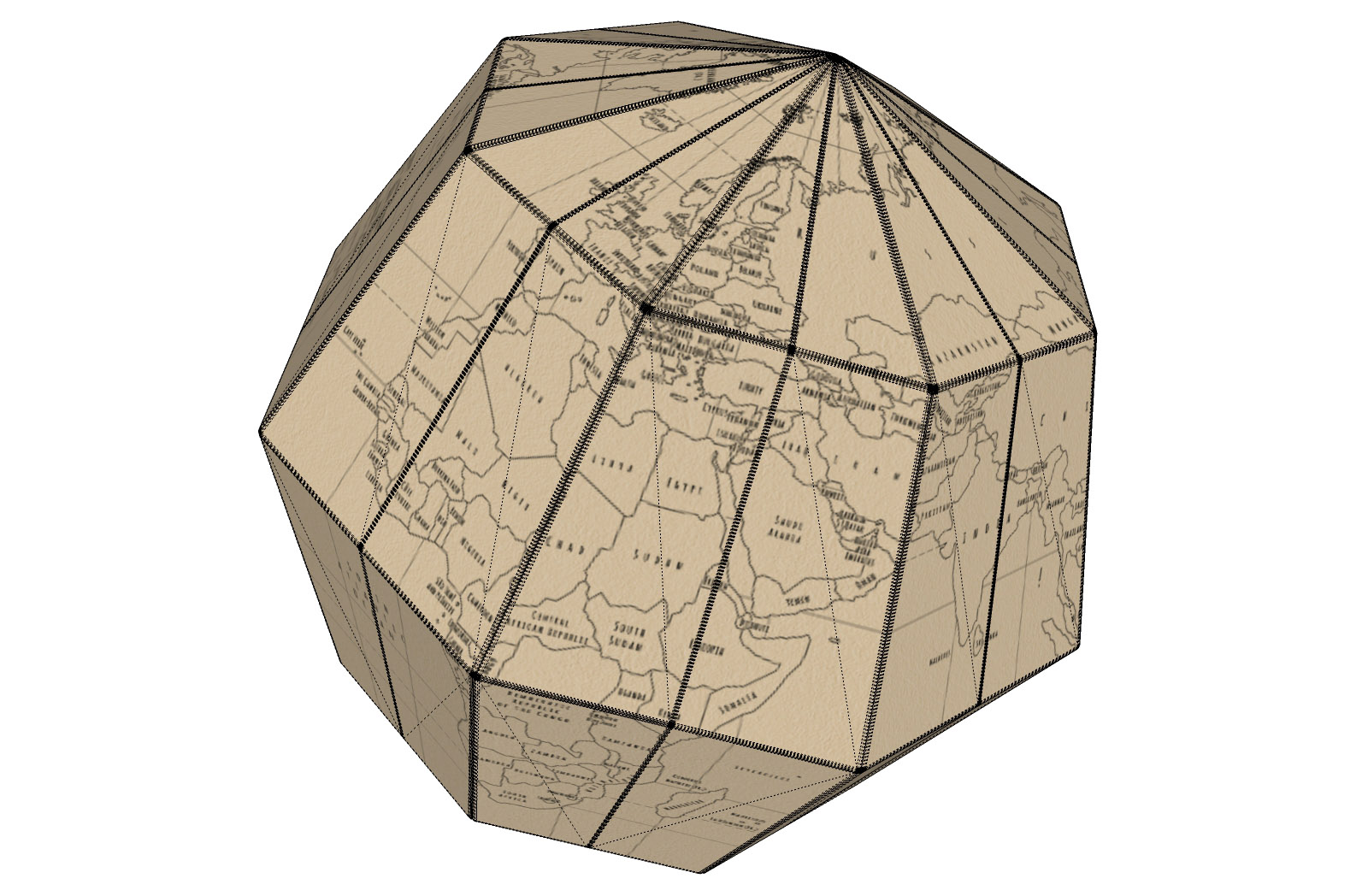

                  Geografia-paper-globe.jpg

                  Cheers
                  Kim Frederik

                  1 條回覆 最後回覆 回覆 引用 0
                  • Rich O BrienR 離線
                    Rich O Brien Moderator
                    最後由 編輯

                    A hipoly lo poly version.

                    Download the free D'oh Book for SketchUp 📖

                    1 條回覆 最後回覆 回覆 引用 0
                    • FrederikF 離線
                      Frederik
                      最後由 編輯

                      It even looks great when rendered... 😄


                      Geografia-paper-globe_Thea-render.jpg

                      Cheers
                      Kim Frederik

                      1 條回覆 最後回覆 回覆 引用 0
                      • FrederikF 離線
                        Frederik
                        最後由 編輯

                        My pleasure... 😄

                        Cheers
                        Kim Frederik

                        1 條回覆 最後回覆 回覆 引用 0
                        • J 離線
                          jamenloh
                          最後由 編輯

                          Hey man, thanks for the plugin ! It solves so many problems we are facing ! I just downloaded it to try , am facing an issue with your plug in.

                          I've followed the tutorial by clicking the surface , the iconbar , align the angles and select the context menu planar surface - but it doesn't apply the UV map ... it just applis my last texture.

                          Have tried it many times to no avail.

                          Any idea what happened ?

                          1 條回覆 最後回覆 回覆 引用 0
                          • ToboboT 離線
                            Tobobo
                            最後由 編輯

                            @frederik said:

                            It even looks great when rendered... 😄

                            That's great 😄

                            Thanks mate!

                            Toby

                            Philippians 4:13

                            I can do everything through him who gives me strength.

                            1 條回覆 最後回覆 回覆 引用 0
                            • Z 離線
                              Zacchia
                              最後由 編輯

                              Many thanks for this nice plugin!!

                              1 條回覆 最後回覆 回覆 引用 0
                              • romboutR 離線
                                rombout
                                最後由 編輯

                                I got a question. Ive read somewhere when import a obj mesh which gets triangulated at normal size (for me metric) better use a smaller import size. Im using meter in blender and than import it as inch into SU, cm still gives triangles and mm cuts holes.

                                what scale do i need to use to set it back to meter. Im searching google but im not sure what keywords i need to use. Im non english person so bit harder for correct translation.

                                Doing my own tests i came around 39.35% when i use the scale tool in SU, im still a bit off. Anyone here who knows the exact scale method

                                1 條回覆 最後回覆 回覆 引用 0
                                • romboutR 離線
                                  rombout
                                  最後由 編輯

                                  After checking again and using a simple cube i found that 39.37% scale is exact. I could also use the tape measure ofcourse, i totally forgot about that function. Measuring the down scaled part and than simply typing the exact number.

                                  Now i wonder why the scale is such awkward number, any know familiar with this 😄

                                  1 條回覆 最後回覆 回覆 引用 0
                                  • Z 離線
                                    Zacchia
                                    最後由 編輯

                                    This is because 1 m is about 39.37 inches I think...

                                    1 條回覆 最後回覆 回覆 引用 0
                                    • A 離線
                                      AcesHigh
                                      最後由 編輯

                                      I suppose this is not the place... or maybe it is... but I followed the Roadkill SketchUV road mapping tutorial and it didn´t work at all.

                                      The problem was that my road had a more complex triangulation and when I started pulling the border vertexes arond at RoadKill, Roadkill did not know how to deal with the vertexes in the middle of the road... it resulted in a bad mess, specially when I would pull the right vertexes to the right side of the map... there were triangles jumping all over the place inside Roadkill 😕

                                      1 條回覆 最後回覆 回覆 引用 0
                                      • D 離線
                                        dacastror
                                        最後由 編輯

                                        mistakes like this are appearing on the console

                                        Error: #<NameError: uninitialized constant DM_SketchUV::DM_UVTool::Set>

                                        I'm using Sketchup 2015. When you use version 1.0 works fine, but there are flaws in version 1.0.1

                                        1 條回覆 最後回覆 回覆 引用 0
                                        • W 離線
                                          Whaat
                                          最後由 編輯

                                          @dacastror said:

                                          mistakes like this are appearing on the console

                                          Error: #<NameError: uninitialized constant DM_SketchUV::DM_UVTool::Set>

                                          I'm using Sketchup 2015. When you use version 1.0 works fine, but there are flaws in version 1.0.1

                                          Thanks for the report - I'll look into it. Are you sure you have the latest version installed?

                                          SketchUp Plugins for Professionals

                                          1 條回覆 最後回覆 回覆 引用 0
                                          • BSquared18B 離線
                                            BSquared18
                                            最後由 編輯

                                            **Hello Dale,

                                            I started a thread titled "Need Help Using SketchUV for UV mapping" at:

                                            http://sketchucation.com/forums/viewtopic.php?f=80%26amp;t=63227%26amp;p=578909#p578909

                                            In short, I am trying to UV-map the texture from a .png file to a SketchUp 3D model of an aircraft instrument panel. The details are in the above-mentioned thread.

                                            I've gone through the steps listed in your tutorials, except that instead of applying a texture from SU's Paint Bucket palette, I have tried to import it using SU's Import Texture feature.

                                            But after applying it and trying to export it using Marginal's SU2XP plugin, I do not get the desired effect.

                                            Do you have any suggestions?

                                            Thank you,
                                            Bill**

                                            1 條回覆 最後回覆 回覆 引用 0
                                            • 1
                                            • 2
                                            • 5
                                            • 6
                                            • 7
                                            • 8
                                            • 9
                                            • 8 / 9
                                            • 第一個貼文
                                              最後的貼文
                                            Buy SketchPlus
                                            Buy SUbD
                                            Buy WrapR
                                            Buy eBook
                                            Buy Modelur
                                            Buy Vertex Tools
                                            Buy SketchCuisine
                                            Buy FormFonts

                                            Advertisement