sketchucation logo sketchucation
    • 登入
    Oops, your profile's looking a bit empty! To help us tailor your experience, please fill in key details like your SketchUp version, skill level, operating system, and more. Update and save your info on your profile page today!
    🔌 Smart Spline | Fluid way to handle splines for furniture design and complex structures. Download

    [Plugin] CameraKeyMaker 1.0 (Update 2011-04-09)

    已排程 已置頂 已鎖定 已移動 Plugins
    118 貼文 53 Posters 143.8k 瀏覽 53 Watching
    正在載入更多貼文
    • 從舊到新
    • 從新到舊
    • 最多點贊
    回覆
    • 在新貼文中回覆
    登入後回覆
    此主題已被刪除。只有擁有主題管理權限的使用者可以查看。
    • jcohen71J 離線
      jcohen71
      最後由 編輯

      I tried to use CameraKeyMaker on a Mac running Sketchup 8, but ran in to the same problem others have mentioned: I cannot seem to find an equivilant key combination to Alt-Q used on Windows, and so I can't place any camera keys. (neither Opt-Q or Ctrl-Q work for me)

      If there's a simple fix for this I'd love to hear about it, otherwise I'll eagerly wait for the next version. This seems like a great tool that we could use on many projects.

      Best Regards,

      Joshua Cohen
      Fat Pencil Studio
      +1.503.465.4533
      info@fatpencilstudio.com

      1 條回覆 最後回覆 回覆 引用 0
      • D 離線
        driven
        最後由 編輯

        @jcohen71 said:

        If there's a simple fix for this I'd love to hear about it,

        in camera_key_maker.rb
        I changed line 387 to read

        if key == 81 and $preview == false
        

        I then did a search and replace for the word Alt and replaced it with Shift,

        so Shift+ Q works on my mac...

        learn from the mistakes of others, you may not live long enough to make them all yourself...

        1 條回覆 最後回覆 回覆 引用 0
        • TIGT 離線
          TIG Moderator
          最後由 編輯

          I do not know this tool in any detail... but in passing... I see that there are $ global variables like '$preview' these are dangerous - especially if they have simplistic names [like 'preview'] as other authors might have used them [ill-advisedly] too, as globals works across all scripts in that session - better to use '@preview' as an instance variable, or '@@preview' as a class variable, to hold your data specifically for your own tool so such potential clashes are avoided... 🤓

          TIG

          1 條回覆 最後回覆 回覆 引用 0
          • M 離線
            macgile
            最後由 編輯

            @tig said:

            I do not know this tool in any detail... but in passing... I see that there are $ global variables like '$preview' these are dangerous - especially if they have simplistic names [like 'preview'] as other authors might have used them [ill-advisedly] too, as globals works across all scripts in that session - better to use '@preview' as an instance variable, or '@@preview' as a class variable, to hold your data specifically for your own tool so such potential clashes are avoided... 🤓

            Yes TIG

            when I developed this plugin I had only one months experience the ruby language and API sketchup.
            certainly you will find other errors of this type in the source, but I perfecting every day.
            in the next release several beginner mistakes are corrected but it will remain.

            best regard 😄

            1 條回覆 最後回覆 回覆 引用 0
            • V 離線
              vtrdo
              最後由 編輯

              hi guys

              i have here a bit strange behavior of the plug ..

              I have set up simple fly-around with 10 camera Keys - previews look perfect , smooth and going exactly as we want... ... camera follows busier curve ...till this moment everything is nice and easy

              problems are: ➡
              1/after i press the ENTER even if i change the number for Frames between each key I always get 19 scenes .. is this correct?
              2/ ❗ bigger one scenes which were produced change the Field of View and positions now it is in position is same as the key ...

              What can i do to get result same as Preview ... or do i have to set up properly the Keys and forget what the preview is showing??

              many thanks!!!!

              1 條回覆 最後回覆 回覆 引用 0
              • majidM 離線
                majid
                最後由 編輯

                😞 I can't run it at all!!!! any conflict with other plugs?
                where I must seek it? plugin menu? tools menu?
                how can I activate it's toolbar (ui) please?


                edit: thanks ... wow this is wonderful, thank you, I was seeking it in false place. 👍 👍
                I just wondering how can I edit the path?

                My inspiring A, B, Sketches book: https://sketchucation.com/shop/books/intermediate/2612-alphabet-inspired-sketches--inspiring-drills-for-architects--3d-artists-and-designers-

                1 條回覆 最後回覆 回覆 引用 0
                • T 離線
                  theVonZipper
                  最後由 編輯

                  Trying out CameraKeyMaker on a winXP. Doesn't behave like the video tutorial. (BTW, is there supposed to be audio with that video?)
                  Although Alt-Q does add a key frame, I cannot use the orbit tool to reposition the camera. The CameraKeyMaker feedback onscreen disappears & as far as I can tell the script ends.
                  What is available is a dotted sphere to mark position. I clicked on that & circled a cube. Hitting enter did send the key frames to scenes. But the scenes created this way do not orbit the cube.
                  Is there a new version available yet? (The version I am trying out does not iclude the 1.0 designation anywhere in its name or files).

                  If I could get it to work it would be a great feature.
                  Thanks,
                  -=Zip

                  1 條回覆 最後回覆 回覆 引用 0
                  • simon le bonS 離線
                    simon le bon
                    最後由 編輯

                    Hi macgile,

                    I'm using/learning your tool since few days. After a hard start, I now begin to tame it pretty well. I understand now how I can manage the bezier camera path. It is a cool tool 👍 😄 and the exported animations are nicely fluid 👍 👍
                    I begin to see some requests to ask for.
                    But the main thing I'm confronted in is a problem of angle of camera.

                    I just have finished a complex camera path with a complex model and have launched CameraMaker scenes maker. I realize something I hadn't noticed in my trainings: is that animation uses a fixed camera angle of 30° !! This is too short!
                    Standard angle in sketchup is 35° , I for my part have made the all camera path with a wider angle of 50°. Now my animation is to much cropped. 😒

                    I have tried to update the scenes one by one (the firsts of my 69 scenes!) with this 50° angle but it seems that some geometry don't display satisfactorily.

                    Do you think it is possible to do something ? or it is a big update of the code!

                    Cheers,
                    Simon.

                    1 條回覆 最後回覆 回覆 引用 0
                    • TIGT 離線
                      TIG Moderator
                      最後由 編輯

                      Perhaps the line
                      @camera = @view.camera
                      could be followed by
                      @camera.fov = 50.0
                      or whatever fov-angle you'd like ?

                      TIG

                      1 條回覆 最後回覆 回覆 引用 0
                      • simon le bonS 離線
                        simon le bon
                        最後由 編輯

                        Hi Tig, 😄

                        Thanks for the advice. I shall try this tomorrow.

                            • simon
                        1 條回覆 最後回覆 回覆 引用 0
                        • simon le bonS 離線
                          simon le bon
                          最後由 編輯

                          Hi TIG,

                          I've just tried what you were recommending

                          @tig said:

                          Perhaps the line
                          @camera = @view.camera
                          could be followed by
                          @camera.fov = 50.0
                          or whatever fov-angle you'd like ?

                          Resulting to this change, the camera is set to 50° as soon as I activate CameraKeyMaker tool . But when my Alt+Q camera shots are done and I clic "Enter" to call the SET UP SCENES and "OK" , created scenes are still cropped back to camera 30°.
                          I have made a search on "30°" into the ruby txt, but the specified string was not found. 😞

                          Do you have any other idea?

                          😕 simon

                          1 條回覆 最後回覆 回覆 引用 0
                          • TIGT 離線
                            TIG Moderator
                            最後由 編輯

                            The screen size [width/height etc] is set in code later on - perhaps this is cropping the image ?
                            I don't use this tool so I am winging it here 😕

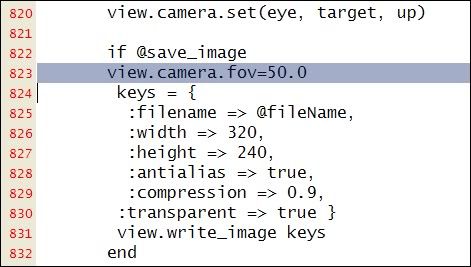
                            view.camera.set(eye, target, up)
                            if @save_image
                                    keys = {
                                     ;filename => @fileName,
                                     ;width => 320,
                                     ;height => 240,
                                     ;antialias => true,
                                     ;compression => 0.9,
                                    ;transparent => true }
                                    view.write_image keys
                                   end
                            

                            have you tried changing those ?
                            Trying changing the width/height proportions...

                            Also perhaps add view.camera.fov=50.0 before 'keys' ???
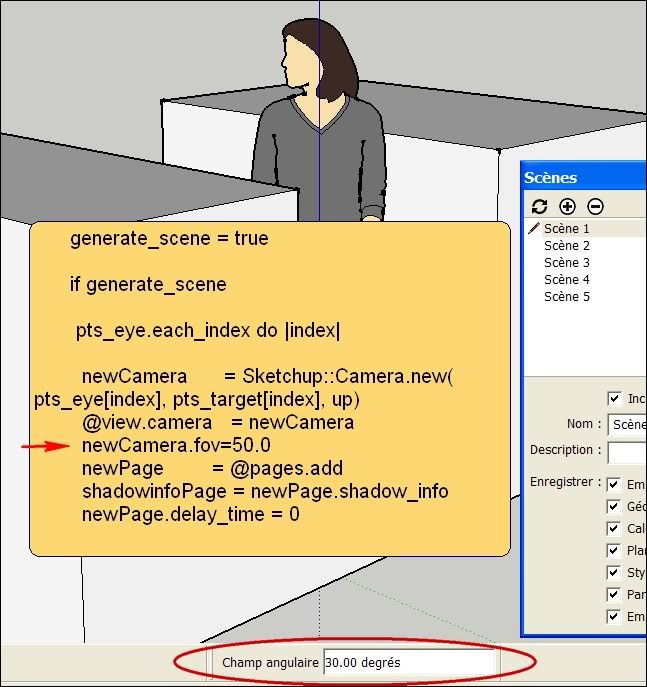
                            Also ' newCamera' is set perhaps you need to set newCamera.fov=50.0 too ?

                            TIG

                            1 條回覆 最後回覆 回覆 引用 0
                            • simon le bonS 離線
                              simon le bon
                              最後由 編輯

                              Hi TIG,

                              "crop" is probably a wrong word I have used. I tell this way to express that the 30° telephoto produces like a zooming into the field. (oups my english 😳 )

                              @tig said:

                              try changing those
                              Also perhaps add view.camera.fov=50.0 before 'keys' ???
                              Also ' newCamera' is set perhaps you need to set newCamera.fov=50.0 too ?

                              They both don't change the 30° scenes output

                              first try:
                              http://i274.photobucket.com/albums/jj245/Spendauballet/SketchUp/2012-01-08_220506.jpg

                              second try:

                              http://i274.photobucket.com/albums/jj245/Spendauballet/SketchUp/2012-01-08_215157.jpg

                              I believe in the second one because:

                                   generate_scene = true
                              
                                    if generate_scene
                              

                              is the place where I'm searching to change the camera opening field. Is the way I have add the line is good?

                              😕 s

                              1 條回覆 最後回覆 回覆 引用 0
                              • D 離線
                                driven
                                最後由 編輯

                                hi,

                                Your output image dims ratio is 1.333, if the window isn't a same ratio it causes problems on mac's...

                                or you could try running Martin's camera Stats, might show you what's happening.http://forums.sketchucation.com/viewtopic.php?t=27835

                                john

                                learn from the mistakes of others, you may not live long enough to make them all yourself...

                                1 條回覆 最後回覆 回覆 引用 0
                                • simon le bonS 離線
                                  simon le bon
                                  最後由 編輯

                                  Hi John,

                                  Thank you for your cent.

                                  Y
                                  @unknownuser said:

                                  our output image dims ratio is 1.333, if the window isn't a same ratio it causes problems on mac's...

                                  I have tried a 16/9 format (ratio: 1.66 ) but I don't notice any different result ❓

                                   if @save_image
                                          keys = {
                                           ;filename => @fileName,
                                           ;width => 1000,
                                           ;height => 602,
                                  

                                  I have downloaded and used [Plugin] Camera Stats by MartinRinehart : it confirms my fields of view

                                  Cheers,
                                  simon

                                  PS: I just have sent a PM to macgile . wait and see. 😒

                                  1 條回覆 最後回覆 回覆 引用 0
                                  • R 離線
                                    RichardU
                                    最後由 編輯

                                    I see there is a preview recently posted on YouTube for version 2.0 of this tool.

                                    1 條回覆 最後回覆 回覆 引用 0
                                    • N 離線
                                      numerobis
                                      最後由 編輯

                                      Great plugin! very nice! 😎
                                      but... any news on this fov problem?!? with a camera always jumping to 30° fov it's pretty useless for me... 😢

                                      1 條回覆 最後回覆 回覆 引用 0
                                      • PixeroP 離線
                                        Pixero
                                        最後由 編輯

                                        @richardu said:

                                        I see there is a preview recently posted on YouTube for version 2.0 of this tool.

                                        Can you post a link? I can´t find it.

                                        1 條回覆 最後回覆 回覆 引用 0
                                        • R 離線
                                          RichardU
                                          最後由 編輯

                                          @pixero said:

                                          Can you post a link? I can´t find it.

                                          1 條回覆 最後回覆 回覆 引用 0
                                          • N 離線
                                            numerobis
                                            最後由 編輯

                                            1 條回覆 最後回覆 回覆 引用 0
                                            • 1
                                            • 2
                                            • 3
                                            • 4
                                            • 5
                                            • 6
                                            • 6 / 6
                                            • 第一個貼文
                                              最後的貼文
                                            Buy SketchPlus
                                            Buy SUbD
                                            Buy WrapR
                                            Buy eBook
                                            Buy Modelur
                                            Buy Vertex Tools
                                            Buy SketchCuisine
                                            Buy FormFonts

                                            Advertisement