sketchucation logo sketchucation
    • 登入
    Oops, your profile's looking a bit empty! To help us tailor your experience, please fill in key details like your SketchUp version, skill level, operating system, and more. Update and save your info on your profile page today!
    🔌 Smart Spline | Fluid way to handle splines for furniture design and complex structures. Download

    Keyboard Shortcuts

    已排程 已置頂 已鎖定 已移動 SketchUp Discussions
    sketchup
    45 貼文 16 Posters 9.6k 瀏覽 16 Watching
    正在載入更多貼文
    • 從舊到新
    • 從新到舊
    • 最多點贊
    回覆
    • 在新貼文中回覆
    登入後回覆
    此主題已被刪除。只有擁有主題管理權限的使用者可以查看。
    • EarthMoverE 離線
      EarthMover
      最後由 編輯

      Very cool to see others shortcuts. A few I think I will adapt into my workflow. All seem very logic. This should also be a good thread to give new users a good idea for setting up their own shortcuts.

      A few other I use all the time but forgot to add are -

      Shift + V - Paste in place
      Shift + H - Hide selection
      Alt + H = Unhide selection
      H = Show hidden geometry.

      I think my most invaluable one is changing Z from the zoom tool to View last camera position. This is especially useful in an interior or when getting stuck in a wall. I just tap Z and I'm back where I was.

      3D Artist at Clearstory 3D Imaging
      Guide Tool at Winning With Sketchup
      Content Creator at Skapeup

      1 條回覆 最後回覆 回覆 引用 0
      • thomthomT 離線
        thomthom
        最後由 編輯

        I actually like and use the Zoom tool, it provides finer control than the mousewheel when I need it.

        Thomas Thomassen — SketchUp Monkey & Coding addict
        List of my plugins and link to the CookieWare fund

        1 條回覆 最後回覆 回覆 引用 0
        • GaieusG 離線
          Gaieus
          最後由 編輯

          Zooming AND setting the FOV (with the Shift key).

          Gai...

          1 條回覆 最後回覆 回覆 引用 0
          • Rich O BrienR 離線
            Rich O Brien Moderator
            最後由 編輯

            W = Weld
            X = Explode
            H = Hidden Geometry
            O = Offset
            F = Follow Me
            Shift + G = Group
            EEby..... = 1/2/3/4/5/6/7/8/9
            CTRL + S = Fredoscale
            V = Vertex Tools
            Shift + O = Offset on Surface
            Shift + L = Line on Surface
            Shift + A = Arc on Surface
            Shift + C = Circle on Surface
            Shift + E = Erase on Surface

            Download the free D'oh Book for SketchUp 📖

            1 條回覆 最後回覆 回覆 引用 0
            • jeff hammondJ 離線
              jeff hammond
              最後由 編輯

              I use all of the defaults (just became used to them over the years even if some aren't very logical.)
              The self assigned ones are:

              X - Xray
              Shift X - Back edges
              W - weld
              Shift A- arc:center + 2pts
              Shift H- hidden geometry
              Shift V - paste in place
              Shift B - B spline
              U - follow me
              J - jpp
              Shift S - fredoscale
              Shift space - select curve
              Shift R - 3pt rectangle
              Shift Z - zoom extents
              V - protractor

              dotdotdot

              1 條回覆 最後回覆 回覆 引用 0
              • jeff hammondJ 離線
                jeff hammond
                最後由 編輯

                [edit]
                I made a [req] a while ago that I still think would be great.

                Basically, I'd have a key or two [say #1 & 2] that I could assign to various tools depending on the project at hand.

                Maybe I need to use fredostretch a lot for the day. I'd select stretch then maybe shift-1 and 1 would now be assigned to stretch. The next day I might need lathe quite a bit so I select the lathe tool then shift-1 and 1 is now lathe. And so on and so forth.

                For some odd reason, it's just too big of an ordeal for me to do this via prefs so I just keep going to the icons. If this hot key idea were possible, I'm pretty sure I'd have shortcuts to lesser used functions much more often. (you know, the functions that you use once a month but when you do use them, you might use them 50 times)

                dotdotdot

                1 條回覆 最後回覆 回覆 引用 0
                • Wo3DanW 離線
                  Wo3Dan
                  最後由 編輯

                  @unknownuser said:

                  [edit]
                  ..... Basically, I'd have a key or two [say #1 & 2] that I could assign to various tools depending on the project at hand.
                  .......If this hot key idea were possible, I'm pretty sure I'd have shortcuts to lesser used functions much more often. (you know, the functions that you use once a month but when you do use them, you might use them 50 times)

                  Hi Jeff,
                  (not the perfect solution but) can't you do that with different shortcuts#1.dat to shortcuts#n.dat files. Depending on what you are planning for the day you import the appropriate *.dat file.
                  I'm not sure whether you need to restart SU again or wheter it is implemented instantly. But at least you could import a whole bunch of "project depending" shortcuts at once.
                  Once again, it's not perfect but it's worth a try.

                  1 條回覆 最後回覆 回覆 引用 0
                  • J 離線
                    jaceguay
                    最後由 編輯

                    I´ve made some shortcuts like Blender. Most shortcuts are positioned for stationary left hand in the keyboard. 😄

                    g = Move
                    v = Line
                    x = Delete
                    z = Section Plane
                    t = X-Ray
                    u = Unhide selected
                    h = Hide
                    f = Orbit
                    d = Pan
                    s = Zoom
                    a = Select none
                    r = Rotate
                    e = Eraser
                    w = Reverse face
                    q = Rectangle
                    Shift+F = Push-Pull
                    Shift+D = Tape measure Tool
                    Shift+A = Arc
                    Shift+E = Zoom extend
                    Shift+R = Zoom window
                    Shift+T = Fade rest of the model
                    Shift+Y = Fade similar components
                    Shift+W = Look arround
                    Ctrl+F = Folow me
                    Ctrl+R = Offset
                    Ctrl+D = Scale

                    1 條回覆 最後回覆 回覆 引用 0
                    • J 離線
                      Jim
                      最後由 編輯

                      @wo3dan said:

                      can't you do that with different shortcuts#1.dat to shortcuts#n.dat files. Depending on what you are planning for the day you import the appropriate *.dat file.

                      Nice idea Gerrit - it never occurred to me. I was thinking shortcut sets could be done using Windows registry hacks, similar to this.

                      Hi

                      1 條回覆 最後回覆 回覆 引用 0
                      • jeff hammondJ 離線
                        jeff hammond
                        最後由 編輯

                        hey Gerrit

                        on mac, this is possible via the .plist files as i keep these synced between 3 computers along with my plugin folder.
                        i do that so everything remains consistent but if i felt so inclined, i could have fully different sets of shortcuts that i could load relatively easily depending on the task..

                        that said, for the 1-2 variable hot keys, i think it would probably just be easier to assign them the normal way (but workflow wise, if it's not possible to script the hotkey idea, i guess i'll stick to using the toolbars/menus)

                        dotdotdot

                        1 條回覆 最後回覆 回覆 引用 0
                        • pyrolunaP 離線
                          pyroluna
                          最後由 編輯

                          I have just a few shortcuts, but I use them A Lot.

                          F = Follow me
                          D = Offset
                          ` or Ctrl+F = Edit\item\zoom extents

                          1 條回覆 最後回覆 回覆 引用 0
                          • DavidBoulderD 離線
                            DavidBoulder
                            最後由 編輯

                            Here is my shortcut set for OpenStudio Plugin. I'm all about grouping common tools together vs. tryign to match the letter of the tool. (Selection tools together, modification tools together, view/camera tools, tools to create new objects)
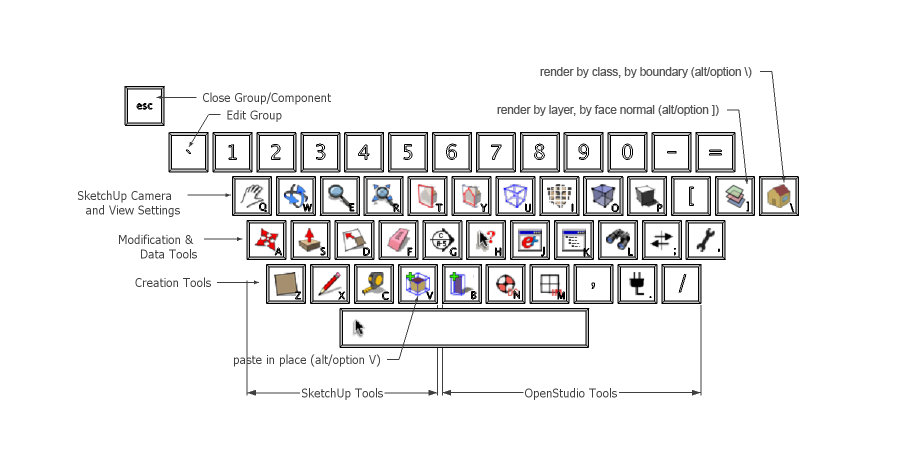
                            OpenStudio-shortcuts.png

                            --

                            David Goldwasser
                            OpenStudio Developer
                            National Renewable Energy Laboratory

                            1 條回覆 最後回覆 回覆 引用 0
                            • PixeroP 離線
                              Pixero
                              最後由 編輯

                              I have:

                              Q = select
                              W = move (alt+W = JSMoveTool)
                              E = rotate
                              R = scale
                              T = tape
                              U = arc
                              O = offset
                              P = pushpull
                              A = zoom extents
                              S = zoom selected
                              G = group
                              J = rotated rectangle
                              K = rectangle
                              L = line
                              Ö = Left Click Reverse Face Tool (scrtool.rb)

                              1 條回覆 最後回覆 回覆 引用 0
                              • jeff hammondJ 離線
                                jeff hammond
                                最後由 編輯

                                Jan - really? no space bar Select?
                                that's probably my favorite shortcut key to use 😄

                                ..........

                                not a keyboard shortcut but something else i have set up which is pretty sweet..

                                i have the thumb mouse button set to regular orbit and the middle mouse button set to option/orbit which disables the gravity weighted navigation (ctrl/orbit on windows?)

                                dotdotdot

                                1 條回覆 最後回覆 回覆 引用 0
                                • jeff hammondJ 離線
                                  jeff hammond
                                  最後由 編輯

                                  here's a new one i've been testing out and i really think it's going to stick.. try it out

                                  (currently using N as that's become my test key for shortcuts but i'll think i'll assign it to an actual key shortly)

                                  Window/Show Dialogs (which will toggle with Hide Dialogs)

                                  reason.. i usually have the following windows stacked & collapsed on my screen and i open/close them as needed:
                                  entity info -- soften/smooth -- scenes -- shadows -- styles
                                  (and this will work with many of the other window dialogs as well)

                                  with this shortcut, i now leave all of the dialogs expanded down the right side of my screen then toggle the windows on/off via the keyboard which is a lot better than opening/closing with the mouse.. further, this allows for a wider drawing window.

                                  dotdotdot

                                  1 條回覆 最後回覆 回覆 引用 0
                                  • Chris FullmerC 離線
                                    Chris Fullmer
                                    最後由 編輯

                                    I normally have that assigned to F-12. Its a good shortcut to keep around in my opinion.

                                    Lately you've been tan, suspicious for the winter.
                                    All my Plugins I've written

                                    1 條回覆 最後回覆 回覆 引用 0
                                    • A 離線
                                      Arx
                                      最後由 編輯

                                      Space - Select
                                      Shift + Space - Move
                                      Ctrl + Space - Rotate
                                      Alt + Space - PushPull
                                      ~ - Get Dimensions Plugin
                                      Shift + ~ - Model Info
                                      Alt + Z - Tape Mesure
                                      Shift + Z - Rectangle Tool
                                      H - Hide Rest of Model

                                      That way the most frequently used tools are all under my left hand, so I don't even have to look at the keyboard to use them.

                                      1 條回覆 最後回覆 回覆 引用 0
                                      • Dave RD 離線
                                        Dave R
                                        最後由 編輯

                                        DavidBoulder's image of his key assignments makes me think it would be nice to have a keyboard with the various tool icons instead of letters.

                                        Etaoin Shrdlu

                                        %

                                        (THERE'S NO PLACE LIKE)

                                        G28 X0.0 Y0.0 Z0.0

                                        M30

                                        %

                                        1 條回覆 最後回覆 回覆 引用 0
                                        • thomthomT 離線
                                          thomthom
                                          最後由 編輯

                                          @dave r said:

                                          DavidBoulder's image of his key assignments makes me think it would be nice to have a keyboard with the various tool icons instead of letters.

                                          If you have a few greens to spare...
                                          http://www.artlebedev.com/everything/optimus/
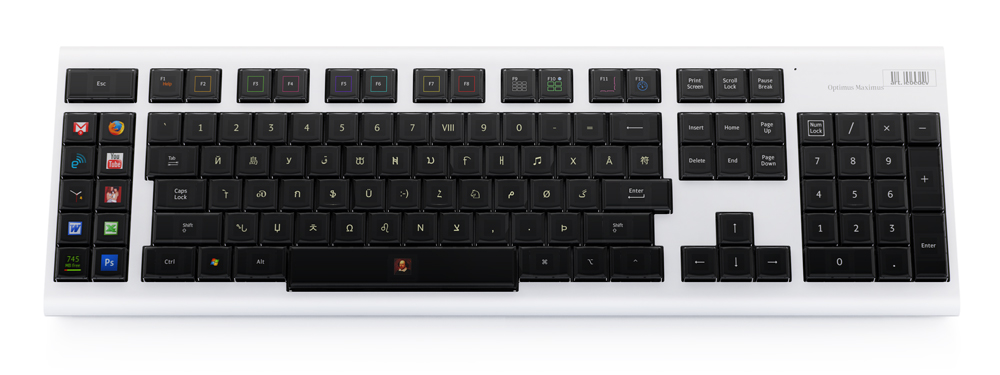
                                          http://img.artlebedev.com/everything/optimus/optimus_maximus_01w.jpg

                                          If you go to the Demo page you can see a layout for Photoshop.
                                          http://www.artlebedev.com/everything/optimus/demo/

                                          Thomas Thomassen — SketchUp Monkey & Coding addict
                                          List of my plugins and link to the CookieWare fund

                                          1 條回覆 最後回覆 回覆 引用 0
                                          • thomthomT 離線
                                            thomthom
                                            最後由 編輯

                                            301 Moved Permanently

                                            favicon

                                            (www.artlebedev.com)

                                            http://img.artlebedev.com/everything/optimus-tactus/optitact-color.jpg

                                            http://img.artlebedev.com/everything/optimus-tactus/optitact-side.jpg

                                            Apparently it will be cheaper than the Optimus because it doesn't have a screen per key.

                                            Thomas Thomassen — SketchUp Monkey & Coding addict
                                            List of my plugins and link to the CookieWare fund

                                            1 條回覆 最後回覆 回覆 引用 0
                                            • 1
                                            • 2
                                            • 3
                                            • 3 / 3
                                            • 第一個貼文
                                              最後的貼文
                                            Buy SketchPlus
                                            Buy SUbD
                                            Buy WrapR
                                            Buy eBook
                                            Buy Modelur
                                            Buy Vertex Tools
                                            Buy SketchCuisine
                                            Buy FormFonts

                                            Advertisement