sketchucation logo sketchucation
    • 登入
    Oops, your profile's looking a bit empty! To help us tailor your experience, please fill in key details like your SketchUp version, skill level, operating system, and more. Update and save your info on your profile page today!
    🔌 Smart Spline | Fluid way to handle splines for furniture design and complex structures. Download

    [Plugin] FreeDXF Importer

    已排程 已置頂 已鎖定 已移動 Plugins
    148 貼文 41 Posters 185.1k 瀏覽 41 Watching
    正在載入更多貼文
    • 從舊到新
    • 從新到舊
    • 最多點贊
    回覆
    • 在新貼文中回覆
    登入後回覆
    此主題已被刪除。只有擁有主題管理權限的使用者可以查看。
    • B 離線
      blackcat1313
      最後由 編輯

      Hi -

      I am having trouble getting the plugin to run. I'm on a Mac running OSX 10.6.8 and Sketchup 8.0. I downloaded the latest version v0.57 and put the .rbz file in my plugin folder. There are lots of other plugins there, though no others of type rbz.

      When I start Sketchup, there is no FreeDXF Importer item in the Plugins menu. I am probably missing something really simple -- I'm a pretty new Sketchup user. Any help is much appreciated! Thanks!

      Bill
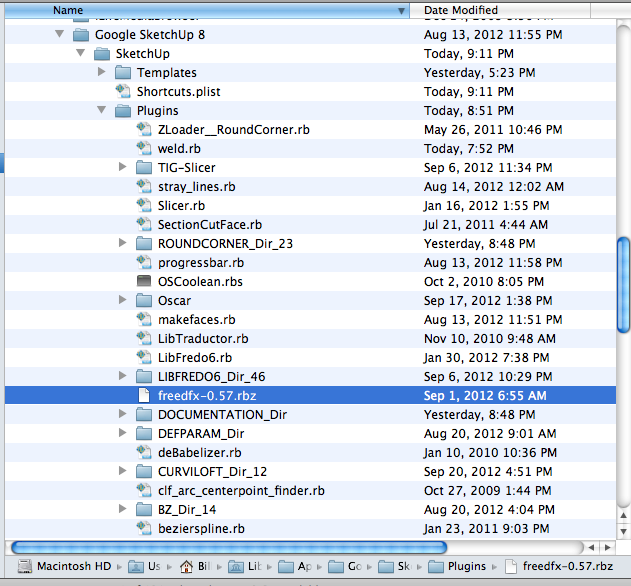
      

      Plugin folder.png

      1 條回覆 最後回覆 回覆 引用 0
      • pbacotP 離線
        pbacot
        最後由 編輯

        Hi! try this:

        http://support.google.com/sketchup/bin/answer.py?hl=en&answer=38583

        MacOSX MojaveSketchUp Pro v19 Twilight v2 Thea v3 PowerCADD

        1 條回覆 最後回覆 回覆 引用 0
        • B 離線
          blackcat1313
          最後由 編輯

          @pbacot said:

          Hi! try this:

          http://support.google.com/sketchup/bin/answer.py?hl=en&answer=38583

          Doh - thanks for that, it's all working now!

          Bill

          1 條回覆 最後回覆 回覆 引用 0
          • BraikenridgeB 離線
            Braikenridge
            最後由 編輯

            I have sketchup 8.0 free and have put this .rbz ruby into the plugins folder but its not appearing when I load sketchup. Incidentally, nowhere does it let you unzip it either? Am I missing something? i'm trying to import a vector file from scan2cad

            kind regards

            1 條回覆 最後回覆 回覆 引用 0
            • thomthomT 離線
              thomthom
              最後由 編輯

              @braikenridge said:

              I have sketchup 8.0 free and have put this .rbz ruby into the plugins folder but its not appearing when I load sketchup. Incidentally, nowhere does it let you unzip it either? Am I missing something? i'm trying to import a vector file from scan2cad

              To use RBZ packages you need to install them using the Install Extension feature in SketchUp: http://www.thomthom.net/thoughts/2012/01/installing-plugins-for-google-sketchup/#the-easy-way-8211-rbz-packages

              Thomas Thomassen — SketchUp Monkey & Coding addict
              List of my plugins and link to the CookieWare fund

              1 條回覆 最後回覆 回覆 引用 0
              • J 離線
                Jim
                最後由 編輯

                I bumped the version to 0.7.1. For v0.7.0 I must have uploaded the wrong file. If your version says anything other than v0.7.1 then please update.

                Thanks.

                Hi

                1 條回覆 最後回覆 回覆 引用 0
                • S 離線
                  srknytgn
                  最後由 編輯

                  import in cm or mm would be nice, thanks.

                  1 條回覆 最後回覆 回覆 引用 0
                  • J 離線
                    Jim
                    最後由 編輯

                    @srknytgn said:

                    import in cm or mm would be nice, thanks.

                    I agree, and I am working on it.

                    Hi

                    1 條回覆 最後回覆 回覆 引用 0
                    • TIGT 離線
                      TIG Moderator
                      最後由 編輯

                      @jim said:

                      @srknytgn said:

                      import in cm or mm would be nice, thanks.

                      I agree, and I am working on it.
                      💭 Rather than recode any stuff in the 'data-processing' could you have an opening dialog to just ask the user to choose the input 'units'?
                      Then after the import is done [inside its own 'container' [definition]], you can simply apply an XYZ scaling transformation to the container's entities, based at the ORIGIN.
                      A simple lookup list of 'scaling_factors' based on inches to feet/m/cm/mm is all that is needed to make a single 'transform_entities' ?
                      You could also ask for the 'Keep-CAD-Origin?', or NOT. If not, then the entities can be transformed [translated] by the vector from their bounds.min back to the ORIGIN - i.e. the instance's insertion-point...

                      TIG

                      1 條回覆 最後回覆 回覆 引用 0
                      • J 離線
                        Jim
                        最後由 編輯

                        Just updated to v 0.8.0 with a dialog for selecting the import units.
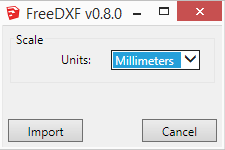
                        2014-03-24_200018.png

                        Hi

                        1 條回覆 最後回覆 回覆 引用 0
                        • S 離線
                          srknytgn
                          最後由 編輯

                          hey jim,

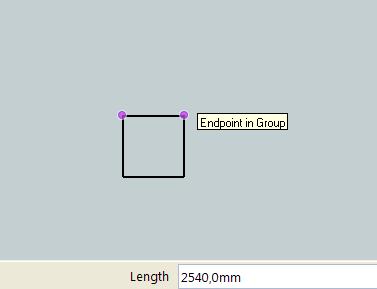
                          i'm trying to import a dxf file but it comes in scaled to inches.
                          as an example i tried to import 1000x1000 square with a unitless autocad setting dxf and it came to sketchup 2540 x 2540 mm. i've choosen mm when the pop up displayed.

                          do you think something was wrong?


                          dxf_import.JPG


                          dxf_import.dxf

                          1 條回覆 最後回覆 回覆 引用 0
                          • TIGT 離線
                            TIG Moderator
                            最後由 編輯

                            1000 'units' read from a DXF file are taken as 1000 inches.
                            When you 'scale' it 'to mm' the 1000" --> 25400mm NOT the displayed 2540mm ?
                            BUT looking into your DXF file... the box's edges are actually 100 'units' long! NOT 1000, so therefore it ought to produce 2540mm when 'scaled' as you showed ??

                            If your DXF says something is 100 'units' long [taken as 100" as SketchUp's base-units are inches] and you tell it to scale it to 'mm' - then logically you will get something 2540mm long [which is 100" !]

                            If you want to get it to assume the 100 'units' is actually 100mm then the scaling needs to be NOT 'TO mm' but 'FROM mm'.
                            The scaling factor would then be:

                            100.mm / 100.inch

                            which is actually 1/25.4

                            So 100 'units' --> 100" - which is then rescaled to be the smaller 'mm' dimension of exactly 100mm [100 / 25.4 = ~4" (3.93700787401574803") in base-units ]

                            TIG

                            1 條回覆 最後回覆 回覆 引用 0
                            • S 離線
                              srknytgn
                              最後由 編輯

                              I don't understand why should i scale imported drawing. I have nothing to do with inches, want to import like SU Pro. My base SU file always in cm or mm unit and always draw in Autocad unitless.

                              Finally my su file's unit is cm and I draw a 100 x 100 square in Autocad and I want to see it in SU as 100 x 100 cm. Is it possible with that plugin or not?

                              1 條回覆 最後回覆 回覆 引用 0
                              • TIGT 離線
                                TIG Moderator
                                最後由 編輯

                                This importer always takes the DXF length of 100 as 100".
                                Jim's latest update is intended to allow you to 'scale' the input to whatever units you desire.
                                So if you choose "to-mm" then it currently applies a scaling factor to make 100 into 2540mm
                                My point was that it should take 1/25.4 as the scaling factor 'from-mm' and therefore you'd get 100mm as your result.
                                I'm sure Jim will address this shortly... 😕

                                TIG

                                1 條回覆 最後回覆 回覆 引用 0
                                • J 離線
                                  Jim
                                  最後由 編輯

                                  @srknytgn said:

                                  hey jim,

                                  i'm trying to import a dxf file but it comes in scaled to inches.
                                  as an example i tried to import 1000x1000 square with a unitless autocad setting dxf and it came to sketchup 2540 x 2540 mm. i've choosen mm when the pop up displayed.

                                  do you think something was wrong?

                                  Yes I botched the importer scale. It is now fixed and version 0.8.1 is available in the Plugin Store.

                                  Hi

                                  1 條回覆 最後回覆 回覆 引用 0
                                  • S 離線
                                    srknytgn
                                    最後由 編輯

                                    Hey Jim, please don't mention it : )
                                    But the same problem is here, I've attached the screenshot.
                                    I've also tried clean install, but no way.
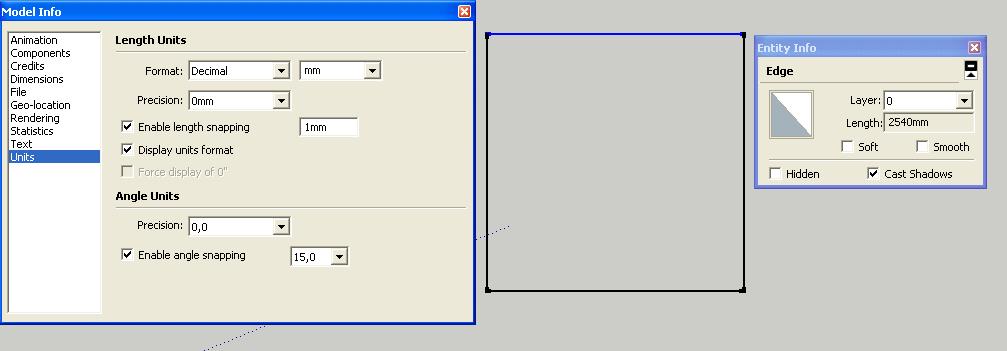

                                    100x100_square.dxf


                                    dxf_imp.JPG

                                    1 條回覆 最後回覆 回覆 引用 0
                                    • J 離線
                                      Jim
                                      最後由 編輯

                                      I found it - this had to do with updating the options from the UI rather than incorrect scaling factors. Check for version 0.8.2 soon.

                                      Hi

                                      1 條回覆 最後回覆 回覆 引用 0
                                      • S 離線
                                        srknytgn
                                        最後由 編輯

                                        😍
                                        thanks Jim!

                                        1 條回覆 最後回覆 回覆 引用 0
                                        • R 離線
                                          rungek
                                          最後由 編輯

                                          Just today loaded and tried with Make 2014 on Win 7 x64. Does not work!
                                          Removed

                                          1 條回覆 最後回覆 回覆 引用 0
                                          • BoxB 離線
                                            Box
                                            最後由 編輯

                                            Then you must be doing something wrong, but as you've given no information about how it hasn't worked for you nobody can help.


                                            1 條回覆 最後回覆 回覆 引用 0
                                            • 1
                                            • 2
                                            • 3
                                            • 4
                                            • 5
                                            • 6
                                            • 7
                                            • 8
                                            • 4 / 8
                                            • 第一個貼文
                                              最後的貼文
                                            Buy SketchPlus
                                            Buy SUbD
                                            Buy WrapR
                                            Buy eBook
                                            Buy Modelur
                                            Buy Vertex Tools
                                            Buy SketchCuisine
                                            Buy FormFonts

                                            Advertisement