[Plugin] FreeDXF Importer
-
Updated to version 0.9.0 with support for SPLINE entities thanks to rsa.
Splines are added to the model as Bezier curve objects, and are editable through the right-click menu.
Update available through the SketchUcation Plugin Store.
-
THANK YOU SO MUCH!! I HAVEN'T BEEN ABLE TO FIND A PLUGIN THAT WORKS SINCE SKETCHUP 2015 REMOVED DXF SUPPORT FOR THE FREE VERSION. THANK YOU!!!!!!!

-
Does version 0.9.0 work with SketchUp 2015 free version? I'm currently using v0.8.2 with SketchUp 2014 (works great, thanks!)
-
@wootton said:
Does version 0.9.0 work with SketchUp 2015 free version? I'm currently using v0.8.2 with SketchUp 2014 (works great, thanks!)
Yeah, 0.9.0 works on 2015 Make.
-
Hi All,
Can anyone please assist. I am working on a MAC, (OS X 10.8.5), I have Sketchup Make 2014 installed, and I have installed the FreeDXF v0.11.1
I am trying to import the attached .dxf file. (which is an export from a GIS program). The file opens easily in CAD lt2011 as well as in vector programs such as Illustrator.
When I first attempted to import the file nothing happened in sketchp. With the ruby console open I get the following error:
Error: #<Errno::ENOENT: No such file or directory - /volumes/projects/x training/buildinglines_saveas.dxf>
/Users/abbijoustra/Library/Application Support/SketchUp 2014/SketchUp/Plugins/jf-FreeDXF/dxf2ruby.rb:54:ininitialize' /Users/abbijoustra/Library/Application Support/SketchUp 2014/SketchUp/Plugins/jf-FreeDXF/dxf2ruby.rb:54:inopen'
/Users/abbijoustra/Library/Application Support/SketchUp 2014/SketchUp/Plugins/jf-FreeDXF/dxf2ruby.rb:54:inparse' /Users/abbijoustra/Library/Application Support/SketchUp 2014/SketchUp/Plugins/jf-FreeDXF/freedxf.rb:252:inimport'
/Users/abbijoustra/Library/Application Support/SketchUp 2014/SketchUp/Plugins/jf-FreeDXF/freedxf.rb:219:indo_import' /Users/abbijoustra/Library/Application Support/SketchUp 2014/SketchUp/Plugins/jf-FreeDXF/freedxf.rb:112:inblock in do_options'
/Users/abbijoustra/Library/Application Support/SketchUp 2014/SketchUp/Plugins/jf-FreeDXF/SKUI/events.rb:82:incall' /Users/abbijoustra/Library/Application Support/SketchUp 2014/SketchUp/Plugins/jf-FreeDXF/SKUI/events.rb:82:inblock in trigger_event'
/Users/abbijoustra/Library/Application Support/SketchUp 2014/SketchUp/Plugins/jf-FreeDXF/SKUI/events.rb:78:ineach' /Users/abbijoustra/Library/Application Support/SketchUp 2014/SketchUp/Plugins/jf-FreeDXF/SKUI/events.rb:78:intrigger_event'
/Users/abbijoustra/Library/Application Support/SketchUp 2014/SketchUp/Plugins/jf-FreeDXF/SKUI/window.rb:357:inevent_control_callback' /Users/abbijoustra/Library/Application Support/SketchUp 2014/SketchUp/Plugins/jf-FreeDXF/SKUI/window.rb:311:incallback_handler'
/Users/abbijoustra/Library/Application Support/SketchUp 2014/SketchUp/Plugins/jf-FreeDXF/SKUI/window.rb:269:inblock in add_callback' -e:1:incall'Can anyone help?
Many thanks!
-
Is your filesystem set to case-sensitive?
Either way, try version 0.11.2 I just uploaded to the PluginStore.
-
@abbis said:
...
Error: #<Errno::ENOENT: No such file or directory - /volumes/projects/x training/buildinglines_saveas.dxf>...copy the file to your Desktop rather than using a mounted volume...
also, do you have TeighaFileConverter.app installed?
Jim, the new versions working well on my mac...
john
-
Thank you for verifying, John.
-
Ah!
Thank you very much John! The mounted volume seems to have been the issue. I can import the file fine now. Thanks Jim, I will install the 0.11.2 and give that a try shortly.
-
First of all, thanks a lot for your plugin, Jim.
Just a query about the Teihga converter.
The dwg import option doesn't work (with SKU 2015 Make and latest FreeDXF v.0.11.2).
The Teigha has been installed in the default folder, and works fine. However, in SKU when I try to import a dwg file, that format is not available in the dialog box (only the "Cad files" option for dxf files), as if the plugin doesn't grab the converter.Does anyone solved the same issue?
Many thanks in advance for your help.
-
are you importing from the Extensions or File menu item ?
john -
@driven said:
are you importing from the Extensions or File menu item ?
johnthrough the Extensions (the dwg format is not available in FreeDXF Importer plugin)
I looked into the Ruby file "teigha.rb". Is it required an additional file or library called "fileutils"? If so, that file is missing inside "jf-freedxf" folder.
require "fileutils"

module JF
  module FreeDXF
    module Teigha

      # Teigha Command Line Format is;
      #   Quoted Input Folder
      #   Quoted Output Folder
      #   Output_version {"ACAD9","ACAD10","ACAD12", "ACAD13","ACAD14", "ACAD2000","ACAD2004", "ACAD2007","ACAD2010"}
      #   Output File type {"DWG","DXF","DXB"}
      #   Recurse Input Folder {"0","1"}
      #   Audit each file {"0","1"}
      #   [optional] Input file filter (default;"*.DWG;*.DXF") (Use File.basename(filename))

       if Sketchup.platform == ;platform_win
          EXE = "C;/Program Files (x86)/ODA/Teigha File Converter 4.01.0/TeighaFileConverter.exe"
       else
          EXE = "/Applications/TeighaFileConverter.app/Contents/MacOS/TeighaFileConverter"
       end
In my WIN 8.1 Pro, the Teigha sofware is installed in the default folder too:
C;/Program Files (x86)/ODA/Teigha File Converter 4.01.0/TeighaFileConverter.exeCheers!
-
I have some update!
-
@mgate said:
through the Extensions (the dwg format is not available in FreeDXF Importer plugin)[
You can select a .dwg or a .dxf file and it should import...
@unknownuser said:
it required an additional file or library called "fileutils"? If so, that file is missing inside "jf-freedxf" folder.
that's in the SU Ruby folder, so it's already available from there...
have you tried it with 'Ruby Console' open to see if there are any error messages?
the other thing to try is doing the conversion directly in TeighaFileConverter, if it fails there you may get a reason given...
john
-
Actually, I don't think
fileutilsis needed. I think I was going to use some methods in fileutils to search for the Teigha converter on the disk drive, but haven't got back to it.You can remove or comment out the line.
-
neither working if commented out the "fileutils" line.
I have a folder with two files in dxf and dwg formats:
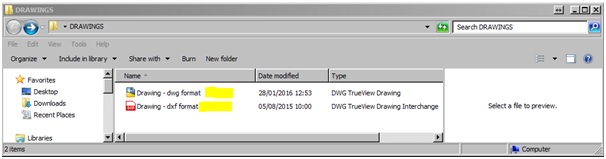
Once opened the "FreeDXF v.0.11.2" pop-up window, there is only the dxf file (the dwg file is not available):
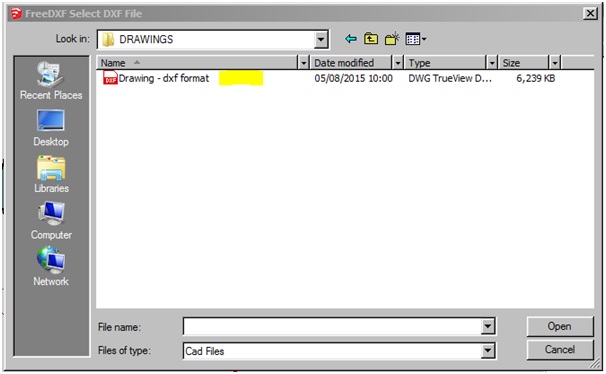
Is there a problem with "extra extensions"?
def self.select_file(extra_extensions = "")
      title     = 'FreeDXF Select DXF File'
      directory = nil
      # filename  = 'DXF|*.dxf|DWG|*.dwg||'
      filenames = "Cad Files|*.dxf" + extra_extensions + "||"
      file_path = UI.openpanel(title, directory, filenames)
      if file_path.nil?
        return nil
      else
        file_path.tr!('\\', '/')
        @last_selected_file = file_path
        return file_path
      end
    end

    def self.main
       puts "\nFreeDXF debugging ON." if $JFDEBUG
       extra_extensions = Teigha.available? ? ";*.dwg" ; ""
       file_path = select_file(extra_extensions)
       return if file_path.nil?
       #file_path.downcase!
       if file_path.end_with?(".dwg")
          Teigha.dialog()
          file_path = Teigha.convert(file_path)
          if file_path.nil?
             puts "dxf file was not created."
             return
          end
       end
Any idea how to solve?
Another way is to convert dwg files manually with TeighaFileConverter, and then use FreeDXF plugin in SKU.
Sorry to snoop around your codes
-
This appears to be due to a difference between SketchUp 15 and SketchUp 16
UI.openpanelbehavior.As a short-term work-around, can you try to enter a
*then press ENTER in the filename dropdown to force all files to be listed? -
Hello Jim
A couple of days ago I posted a request for a plugin that would import measurements directly from a 3D Laser "Leica Disto S910 " in order to draw direct on site.http://sketchucation.com/forums/viewtopic.php?f=323%26amp;t=64830%26amp;p=594596#p594596
Could your plugin be developed to do the Job ?
Thanks for your response
Uli -
Nice plugin, works much better than the SketchupPro import. However, there's a few things I've noticed:
• It does not respect blocks' scaling / orientation properly: blocks that were mirrored in the original DXF sometimes end up in strange positions (this does not happen with the other import).
• Perhaps related to the last issue, sometimes I saw blocks that had the proper orientation but had ellipse elements that were rotated in 90 or 180 degrees.
• Layer colors? Why doesn't it keep the DXF layer colors the way the sketchup-included DXF importer does? Currently I work around this by importing it with one (to get the layer colors) and then delete all the geometry/components and reimport with yours, would be awesome to not have to do this.
• It would be nice if the import also preserved layer visibility, or have a toggle to choose on import. Currently it sets all the layers to visible.
• Another toggle to merge DXF layer 0 to sketchup's Layer0 would be handy too.
• Is it possible for it to keep polylines? I don't know if it's a DXF limitation or Sketchup or what. Polylines would be a godsend!
I'm on SketchUp 2016 and macOS 10.11.6 in case that's relevant...
-
@kuu said:
Nice plugin, works much better than the SketchupPro import. However, there's a few things I've noticed: ...
Hi Kuu, thanks for the feedback.
It does not respect blocks' scaling / orientation properly: blocks that were mirrored in the original DXF sometimes end up in strange positions (this does not happen with the other import).
Could you provide a minimal .dxf example file, and example result?
Perhaps related to the last issue, sometimes I saw blocks that had the proper orientation but had ellipse elements that were rotated in 90 or 180 degrees.
Maybe related, maybe not - ellipses have proven difficult to crack but it's been awhile since I've had a look at it. Again, a minimal sample file demonstrating an incorrect ellipse would be helpful.
Layer colors? Visibility?
I wrote this long before SketchUp had support for setting layer colors. Now it does. Can have a look.




Advertisement