sketchucation logo sketchucation
    • Login
    Oops, your profile's looking a bit empty! To help us tailor your experience, please fill in key details like your SketchUp version, skill level, operating system, and more. Update and save your info on your profile page today!
    🚨 Skimp | 25% Off until March 30 Buy Now

    [Plugin Library] LibFredo6 - v15.9a - 25 Mar 26


    Scheduled Pinned Locked Moved Plugins
    2.2k Posts 577 Posters 4.3m Views 579 Watching
    Loading More Posts
    • Oldest to Newest
    • Newest to Oldest
    • Most Votes
    Reply
    • Reply as topic
    Log in to reply
    This topic has been deleted. Only users with topic management privileges can see it.
    • G Offline
      GavinG
      last edited by

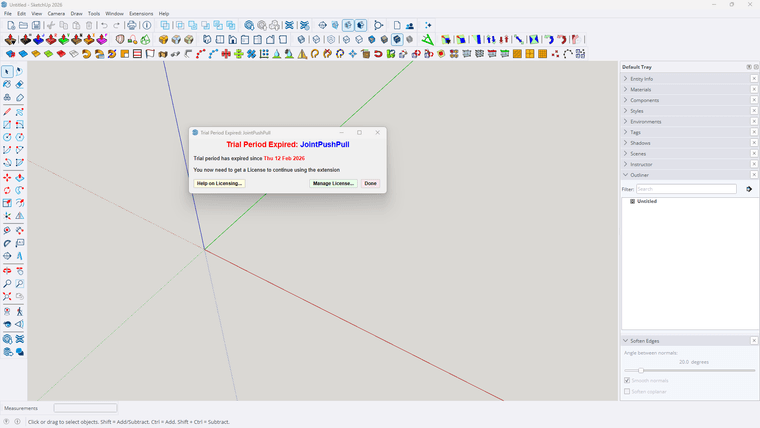
      I have recently upgraded to sketchup 2026 and my laptop to windows 11. Up till today my Fredo^ plugins have been working fine, until today. I have the prepetual licences for all the plugins, and when I want to use them I get a window saying - TRIAL PERIOD EXPIRED etc etc. I have removed all the files from my PC, and reinstalled Fredo^ and all the plugins from my licence profile on Sketchucation. I have restarted sketchup and still receive the same notification. What must i do next please. Can admin assist?
      Screenshot 2026-02-15 155403.png

      Dave RD R 2 Replies Last reply Reply Quote 0
      • Dave RD Offline
        Dave R @GavinG
        last edited by

        @GavinG do you have the latest version of the Sketchucation Extension Store installed?

        Etaoin Shrdlu

        %

        (THERE'S NO PLACE LIKE)

        G28 X0.0 Y0.0 Z0.0

        M30

        %

        1 Reply Last reply Reply Quote 0
        • G Offline
          GavinG
          last edited by

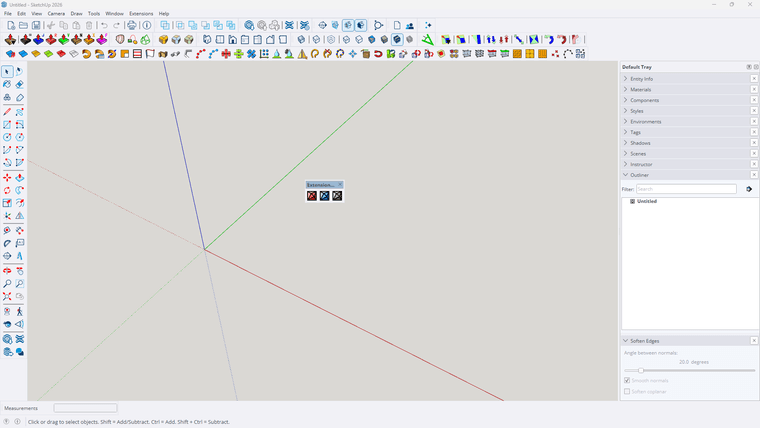
          I think so, I have 3 new icons on my ribbon ( see attached). This is where I get directed when looking for Sketchucation Extension Store

          1 Reply Last reply Reply Quote 0
          • G Offline
            GavinG
            last edited by

            Screenshot 2026-02-15 172330.png

            1 Reply Last reply Reply Quote 0
            • fredo6F Offline
              fredo6
              last edited by

              First, when you have a problem of license, do not try to reinstall. Just check you have the latest versions.

              Also, if you get the message of expiration, try first to revalidate the license. It won't count for a new seat.

              Does it work in your case?

              G 1 Reply Last reply Reply Quote 0
              • fredo6F Offline
                fredo6
                last edited by fredo6

                NEW RELEASE: LibFredo6 v15.8e - 15 Feb 26

                LibFredo6 15.8e is a maintenance release. It includes changes related to:

                • Bug Fixing
                • Future compatibility

                Requirements: SU2017 and above

                See plugin home page of LibFredo6 for Download of LibFredo6.

                Main Post of the LibFredo6 thread

                ntxdaveN 1 Reply Last reply Reply Quote 0
                • ntxdaveN Offline
                  ntxdave @fredo6
                  last edited by

                  @fredo6 Is there any place where we can find out what the bug fixes are?

                  Press F1...thank me later

                  1 Reply Last reply Reply Quote 0
                  • ntxdaveN Offline
                    ntxdave
                    last edited by ntxdave

                    I did a quick test on an old Animator file and it looks like we now can use perspective and generate a video.

                    Press F1...thank me later

                    ntxdaveN 1 Reply Last reply Reply Quote 0
                    • G Offline
                      GavinG @fredo6
                      last edited by

                      @fredo6 - I have tried to uninstall and reinstall, no luck, I have just installed the plugin as indicated below in the next reply, still nothing working. I still get the TRIAL PRERIOD EXPIRED window

                      fredo6F 1 Reply Last reply Reply Quote 0
                      • fredo6F Offline
                        fredo6 @GavinG
                        last edited by

                        @GavinG
                        When you get the expiration message, did you try to click on the button 'Manage License' and revalidate the license (using the file you received by email when you purchased the license)?

                        If you do not have the license file, you can retrieve it and download it at https://sketchucation.com/webshop/my-licences.php. Just sign in.

                        1 Reply Last reply Reply Quote 0
                        • ntxdaveN Offline
                          ntxdave @ntxdave
                          last edited by

                          said in [Plugin Library] LibFredo6 - v15.8e - 15 Feb 26:

                          I did a quick test on an old Animator file and it looks like we now can use perspective and generate a video.

                          Well, I also tried to generate a video with the Animator file that has both perspective and parallel and the generation stopped when it switched from parallel to perspective. So, if the file has all scenes with the camera set the same way (either perspective or parallel) it works fine but having both options in the same file will not generate the video.

                          Just thought I would pass this along but maybe you already knew that.

                          Press F1...thank me later

                          1 Reply Last reply Reply Quote 0
                          • R Offline
                            roxanmusni Newcomers @GavinG
                            last edited by

                            @GavinG this is also my problem now. Can someone help me fix this?

                            Rich O BrienR 1 Reply Last reply Reply Quote 0
                            • Rich O BrienR Offline
                              Rich O Brien Moderator @roxanmusni
                              last edited by

                              @roxanmusni said in [Plugin Library] LibFredo6 - v15.8e - 15 Feb 26:

                              @GavinG this is also my problem now. Can someone help me fix this?

                              If you have a license and experience issues please update extensions to recent releases

                              Download the free D'oh Book for SketchUp πŸ“–

                              1 Reply Last reply Reply Quote 0
                              • P Offline
                                polosan
                                last edited by

                                is it still available for skp 2021?

                                fredo6F 1 Reply Last reply Reply Quote 0
                                • fredo6F Offline
                                  fredo6 @polosan
                                  last edited by

                                  @polosan said in [Plugin Library] LibFredo6 - v15.8e - 15 Feb 26:

                                  is it still available for skp 2021?

                                  yes.

                                  1 Reply Last reply Reply Quote 0
                                  • TIGT Offline
                                    TIG Moderator
                                    last edited by

                                    The current LibFredo6 works with all recent versions of Sketchup.
                                    There is also a legacy version in the PluginStore for older versions - i.e. <= v2016

                                    TIG

                                    1 Reply Last reply Reply Quote 0
                                    • R Offline
                                      rmsnmz
                                      last edited by

                                      today, all of a sudden, my Fredo plug ins stop working with error messages saying that a subfolder was missing. I reinstalled them all but now the Fredo library is failing to install. I tried uninstalling and installing again several times but same issue each time. These is the error log:

                                      Extension Errors Report
                                      SketchUp: 26.0.429
                                      OS: Windows 11
                                      Ruby: 3.2.2

                                      Extension: Fredo6 LibFredo6 (15.8e - 15 Feb 26)
                                      Error: NoMethodError (undefined method split' for ["Animator"]:Array) c:/users/msonmez/appdata/roaming/sketchup/sketchup 2026/sketchup/plugins/fredo6_!libfredo6/lib6core.rbe:942:in block in super_flatten'
                                      c:/users/msonmez/appdata/roaming/sketchup/sketchup 2026/sketchup/plugins/fredo6_!libfredo6/lib6core.rbe:942:in each' c:/users/msonmez/appdata/roaming/sketchup/sketchup 2026/sketchup/plugins/fredo6_!libfredo6/lib6core.rbe:942:in super_flatten'
                                      c:/users/msonmez/appdata/roaming/sketchup/sketchup 2026/sketchup/plugins/fredo6_!libfredo6/lib6core.rbe:865:in load_from_config' c:/users/msonmez/appdata/roaming/sketchup/sketchup 2026/sketchup/plugins/fredo6_!libfredo6/lib6core.rbe:1261:in block in load_all_plugins'
                                      c:/users/msonmez/appdata/roaming/sketchup/sketchup 2026/sketchup/plugins/fredo6_!libfredo6/lib6core.rbe:1261:in each' c:/users/msonmez/appdata/roaming/sketchup/sketchup 2026/sketchup/plugins/fredo6_!libfredo6/lib6core.rbe:1261:in load_all_plugins'
                                      c:/users/msonmez/appdata/roaming/sketchup/sketchup 2026/sketchup/plugins/fredo6_!libfredo6/top_libfredo6.rbe:331:in startup' C:/Users/MSonmez/AppData/Roaming/SketchUp/SketchUp 2026/SketchUp/Plugins/Fredo6_!LibFredo6.rb:68:in process'
                                      C:/Users/MSonmez/AppData/Roaming/SketchUp/SketchUp 2026/SketchUp/Plugins/Fredo6_!LibFredo6.rb:76:in <module:LibFredo6_Loader>' C:/Users/MSonmez/AppData/Roaming/SketchUp/SketchUp 2026/SketchUp/Plugins/Fredo6_!LibFredo6.rb:30:in <top (required)>'
                                      <internal:C:/Program Files/SketchUp/SketchUp 2026/SketchUp/Tools/RubyStdLib/rubygems/core_ext/kernel_require.rb>:85:in require' <internal:C:/Program Files/SketchUp/SketchUp 2026/SketchUp/Tools/RubyStdLib/rubygems/core_ext/kernel_require.rb>:85:in require'
                                      C:/ProgramData/SketchUp/SketchUp 2026/SketchUp/Plugins/ROB_Axyz.rb:52:in <module:Fredo6>' C:/ProgramData/SketchUp/SketchUp 2026/SketchUp/Plugins/ROB_Axyz.rb:28:in <top (required)>'

                                      1 Reply Last reply Reply Quote 0
                                      • R Offline
                                        rmsnmz
                                        last edited by

                                        anyone is experiencing similar issues? Anyway to fix it?

                                        1 Reply Last reply Reply Quote 0
                                        • fredo6F Offline
                                          fredo6
                                          last edited by

                                          1. What is the message about the subfolder missing? I don't see it

                                          2. Which plugins of mine do you have installed?

                                          3. If you can start Sketchup with LibFredo6, could you invoke the menu Window > LibFredo6 Settings > Fredo6 Plugins Information for Sketchucation Support... and send me the output text which is displayed in the Ruby console.

                                          Thanks

                                          1 Reply Last reply Reply Quote 0
                                          • R Offline
                                            rmsnmz
                                            last edited by

                                            I probably have all your extensions but only a few shows up now because of the library is failing to install. As for the "sub folder" missing error message, that was the first error message i received and I basically reinstalled all extensions after that. Now, i dont get that message but just the message above regarding the fredo library part. Here is what i see in the Fredo6 Plugins Information for Sketchucation Support:

                                            Fredo6 Plugins Information on 2026-03-16 16:38:02 -0700

                                            • Platform: x64-mswin64_140 - Ruby: 3.2.2
                                            • Sketchup: 26.0.429
                                            • LibFredo6: v15.8e
                                            • LibFredo6 Binary loaded
                                            • Sketchucation ExtensionStore: 5.0.6
                                            • SCFLicense: v7.1a - 74
                                            • Fredo6 Plugins
                                            • SCFLicense directory present

                                              Signature File: 2026-03-04 15:47:33 -0800
                                              Curviloft: 2026-03-11 09:53:17 -0700
                                              FredoScale: 2026-03-11 09:56:25 -0700

                                            1 Reply Last reply Reply Quote 0

                                            Hello! It looks like you're interested in this conversation, but you don't have an account yet.

                                            Getting fed up of having to scroll through the same posts each visit? When you register for an account, you'll always come back to exactly where you were before, and choose to be notified of new replies (either via email, or push notification). You'll also be able to save bookmarks and upvote posts to show your appreciation to other community members.

                                            With your input, this post could be even better πŸ’—

                                            Register Login
                                            • 1
                                            • 2
                                            • 5
                                            • 6
                                            • 7
                                            • 8
                                            • 9
                                            • 110
                                            • 111
                                            • 7 / 111
                                            • First post
                                              Last post
                                            Buy SketchPlus
                                            Buy SUbD
                                            Buy WrapR
                                            Buy eBook
                                            Buy Modelur
                                            Buy Vertex Tools
                                            Buy SketchCuisine
                                            Buy FormFonts

                                            Advertisement