sketchucation logo sketchucation
    • 登入
    Oops, your profile's looking a bit empty! To help us tailor your experience, please fill in key details like your SketchUp version, skill level, operating system, and more. Update and save your info on your profile page today!
    🔌 Smart Spline | Fluid way to handle splines for furniture design and complex structures. Download

    The "Duh!" thread (aka the Doh! thread)

    已排程 已置頂 已鎖定 已移動 SketchUp Discussions
    sketchup
    696 貼文 135 Posters 316.5k 瀏覽 135 Watching
    正在載入更多貼文
    • 從舊到新
    • 從新到舊
    • 最多點贊
    回覆
    • 在新貼文中回覆
    登入後回覆
    此主題已被刪除。只有擁有主題管理權限的使用者可以查看。
    • pilouP 離線
      pilou
      最後由 編輯

      ...and when you Press the SpaceBar that stop it vigorously! 💚

      http://www.freebiker.net/FichesPratiques/Freinage_problemes/problemes_freinage.jpg

      Frenchy Pilou
      Is beautiful that please without concept!
      My Little site :)

      1 條回覆 最後回覆 回覆 引用 0
      • porch_unpluggedP 離線
        porch_unplugged
        最後由 編輯

        @gaieus said:

        That's a "designed feature": Suspending the gravity setting

        ugh, i think i just made myself travel sick trying that out.

        1 條回覆 最後回覆 回覆 引用 0
        • porch_unpluggedP 離線
          porch_unplugged
          最後由 編輯

          if you are trying to draw something small and the clipping plane is getting in the way, change to parallel projection view.

          1 條回覆 最後回覆 回覆 引用 0
          • thomthomT 離線
            thomthom
            最後由 編輯

            I often find I get clipping issues more quickly with parallel view...

            Thomas Thomassen — SketchUp Monkey & Coding addict
            List of my plugins and link to the CookieWare fund

            1 條回覆 最後回覆 回覆 引用 0
            • brodieB 離線
              brodie
              最後由 編輯

              I'm on board with the parallel projection. I find that when you initially change to PP you'll get some bad clipping, but if you select your geometry and then zoom extents the clipping goes away and you can zoom in as much as you want.

              -Brodie

              steelblue http://www.steelbluellc.com

              1 條回覆 最後回覆 回覆 引用 0
              • V 離線
                valerostudio
                最後由 編輯

                Left, Right, Up arrows lock the Red Green Blue Axis when using move! How did it take me 7 years to figure this one out!

                1 條回覆 最後回覆 回覆 引用 0
                • gillesG 離線
                  gilles
                  最後由 編輯

                  Seven years!

                  You should read the manual, just in case. 😄

                  http://support.google.com/sketchup/bin/answer.py?hl=en&answer=94862&topic=2458142&ctx=topic

                  " c'est curieux chez les marins ce besoin de faire des phrases "

                  1 條回覆 最後回覆 回覆 引用 0
                  • V 離線
                    valerostudio
                    最後由 編輯

                    There's a manual? 😉

                    1 條回覆 最後回覆 回覆 引用 0
                    • Wo3DanW 離線
                      Wo3Dan
                      最後由 編輯

                      @gilles said:

                      Seven years!

                      You should read the manual, just in case. 😄

                      http://support.google.com/sketchup/bin/answer.py?hl=en&answer=94862&topic=2458142&ctx=topic

                      Useful reading but here it lacks the information about how to use to rotate a group or component accurately according to the current drawing axes system with angle input.
                      Also I couldn't find anything about moving vertices. And even more, while doing so, how to lock moving a vertex to its own edge's direction. (=hover over the edge first, press [Shift], only then move the vertex)

                      1 條回覆 最後回覆 回覆 引用 0
                      • cottyC 離線
                        cotty
                        最後由 編輯

                        @wo3dan said:

                        ...lock moving a vertex to its own edge's direction. (=hover over the edge first, press [Shift], only then move the vertex)

                        New one for me, thank you!

                        my SketchUp gallery

                        1 條回覆 最後回覆 回覆 引用 0
                        • gillesG 離線
                          gilles
                          最後由 編輯

                          Yes nobody is perfect.

                          " c'est curieux chez les marins ce besoin de faire des phrases "

                          1 條回覆 最後回覆 回覆 引用 0
                          • gillesG 離線
                            gilles
                            最後由 編輯

                            @unknownuser said:

                            Also I couldn't find anything about moving vertices. And even more, while doing so, how to lock moving a vertex to its own edge's direction. (=hover over the edge first, press [Shift], only then move the vertex)

                            This one is new for me!
                            Well seven years to learn this too. 😳

                            " c'est curieux chez les marins ce besoin de faire des phrases "

                            1 條回覆 最後回覆 回覆 引用 0
                            • Wo3DanW 離線
                              Wo3Dan
                              最後由 編輯

                              @gilles said:

                              Yes nobody is perfect.

                              How true.
                              Fact is, I learned it (lock vertex to edge) from someone else, .....from Anssi.
                              And this was also after having used SU for several years. (Doh for me at that time)

                              1 條回覆 最後回覆 回覆 引用 0
                              • GaieusG 離線
                                Gaieus
                                最後由 編輯

                                @valerostudio said:

                                Left, Right, Up arrows lock the Red Green Blue Axis when using move! How did it take me 7 years to figure this one out!

                                And not only the Move tool but the line tool, too (just in case you needed it) 😉

                                And yes, I only discovered it about a year ago or so? 😆

                                Gai...

                                1 條回覆 最後回覆 回覆 引用 0
                                • broomstickB 離線
                                  broomstick
                                  最後由 編輯

                                  @wo3dan said:

                                  And even more, while doing so, how to lock moving a vertex to its own edge's direction. (=hover over the edge first, press [Shift], only then move the vertex)

                                  There's always something new to learn..

                                  1 條回覆 最後回覆 回覆 引用 0
                                  • pilouP 離線
                                    pilou
                                    最後由 編輯

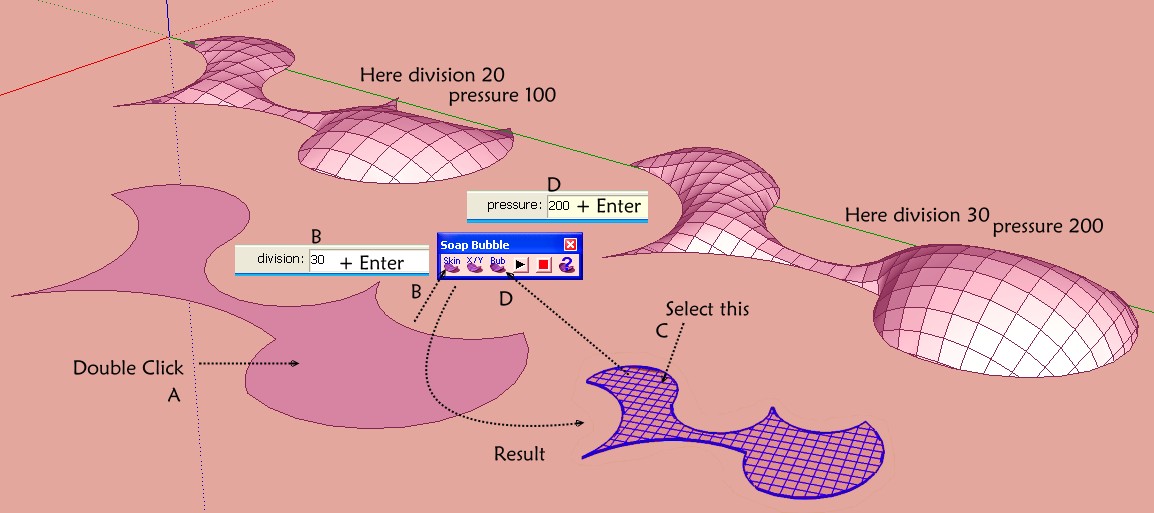
                                    A funny thing with soap skin Bubble! 💚

                                    you can copy / move, rotate even resize the result "C" before call the button Generate SoapBubble!! 😲

                                    for a collective Pressure on some objects from copy moved rotated even resized!
                                    But not from different objects Soap Skinned!
                                    It's not so bad! ☀

                                    Ps And you can of course stop the process make other things then retake them at any moments!
                                    Pressure is not additive just absolute! (can be negative or positive)
                                    dragon.jpg

                                    Frenchy Pilou
                                    Is beautiful that please without concept!
                                    My Little site :)

                                    1 條回覆 最後回覆 回覆 引用 0
                                    • R 離線
                                      rv1974
                                      最後由 編輯

                                      It's more effective to import DXF file generated from PLT (via Viewcompanion Premium)
                                      than original DWG one. No need to mess with Xref binding and parsecs from 0,0,0 👊 .

                                      1 條回覆 最後回覆 回覆 引用 0
                                      • Mike AmosM 離線
                                        Mike Amos
                                        最後由 編輯

                                        Another in the line of D'oh moments, I am trying to increase the accuracy that sketchup uses to place a point. I have scaled a group by x10 to see what I want to do but even now I find that trying to place a new line results in the start point NOT going where I want it to, rather the point goes only aproximately the same country as the location I want to start from. The start point WILL be another end point OR an intersection. Lovely this memory trick, learn something, leave it unused, forget it.........

                                        Absentia mortis praesentiam vitae probat, vita autem est argumentum constantiae.

                                        1 條回覆 最後回覆 回覆 引用 0
                                        • DanielD 離線
                                          Daniel
                                          最後由 編輯

                                          I had an embarrassing DOH! moment the other day...I just discovered the "make component" icon on the toolbar! When was that added? All those years going through the pull-down edit menu.

                                          My avatar is an anachronism.

                                          1 條回覆 最後回覆 回覆 引用 0
                                          • pilouP 離線
                                            pilou
                                            最後由 編輯

                                            In what number of version ?
                                            And what is the image of this icon ?

                                            @unknownuser said:

                                            All those years going through the pull-down edit menu.

                                            Seems you have also the Shortcut G on a selection ! 💚

                                            Frenchy Pilou
                                            Is beautiful that please without concept!
                                            My Little site :)

                                            1 條回覆 最後回覆 回覆 引用 0
                                            • 1
                                            • 2
                                            • 3
                                            • 4
                                            • 5
                                            • 34
                                            • 35
                                            • 2 / 35
                                            • 第一個貼文
                                              最後的貼文
                                            Buy SketchPlus
                                            Buy SUbD
                                            Buy WrapR
                                            Buy eBook
                                            Buy Modelur
                                            Buy Vertex Tools
                                            Buy SketchCuisine
                                            Buy FormFonts

                                            Advertisement