sketchucation logo sketchucation
    • Login
    1. Home
    2. tfdesign
    3. Posts
    Oops, your profile's looking a bit empty! To help us tailor your experience, please fill in key details like your SketchUp version, skill level, operating system, and more. Update and save your info on your profile page today!
    ⚠️ Important | Libfredo 15.6b introduces important bugfixes for Fredo's Extensions Update
    T
    Offline
    • Profile
    • Following 0
    • Followers 0
    • Topics 53
    • Posts 1,213
    • Groups 1

    Posts

    Recent Best Controversial
    • RE: Haiti Earthquake January 2010

      @mike lucey said:

      I'm always fascinated at what can be achieved with simple 40' shipping containers. It just goes to prove that we really don't need massive houses to get by.

      Unfortunately, I can also see these shipping containers lasting an awful long time, and then becoming a slum burden to the Haitian people (not to mention the searing heat within that steel container!). Haiti really needs proper investment. It's long overdue. We're already hearing awful stories about the place becoming an anarchy hell hole on the tv and radio. This shouldn't be happening, we shouldn't in the rich west, have this kind of vision of such a poor part of the world. I reckon that the quake's after effects would have been far less severe if Haiti wasn't already a third-world country. I mean California managed to get back on its feet pretty quickly after the last major earthquake, but then California is a rich part of the USA.

      I also agree, we don't need massive houses. I tend to go on holiday these days in a mobile home. These are great fun, and as long as there is space around you to grow, it's a nice way to live. But give me a decent and separate garden shed any day! πŸ˜‰

      PS, I've already donated.

      posted in Corner Bar
      T
      tfdesign
    • RE: 7.1 Performance

      @thomthom said:

      @tfdesign said:

      (One thing I love about OSX is the way you can sequentially toggle through all open windows of the current application by pressing the command key and the ` key together. I wish I knew how to achieve this in XP.

      If it's an MDI application, like Photoshop, then use Ctrl+Tab and Ctrl+Shift+Tab to toggle backwards and forwards between the windows.

      Thanks Thom. It worked! πŸ˜„

      Interesting though (and again sorry for the OT), this is not the standard Mac way of doing this, and Adobe really should stick to standards! It's nice to know that the SketchUp developers have done the right thing, and you can toggle windows how it should be done (for Mac that is, not PC) πŸ˜„

      Anyway, that's besides the point, if the Mac SU version is wireframing, and the PC version isn't, then could this be looked into? But I'm sure that this is not a graphic card issue, because I got the same problem with my HP workstation P4 running XP SP3. I swapped out the NVidia card for a more powerful one, but there was no difference. The Duo Core II in my Macbook Pro worked a lot better, as long as there wern't multiple windows open. And I should mention again, that i was dealing with models/files that were 14+ mb's in size. Smaller files didn't exhibit the same behaviour.

      posted in SketchUp Discussions
      T
      tfdesign
    • RE: 7.1 Performance

      @dale said:

      I actually think this is a mac thing Tom, as I don't seem to get it on the PC.

      It's interesting, because I've also noticed that the PC version won't let you open multiple windows (OSX does allow this), unless one double clicks on a file, instead of choosing a new file from the menu (and then it all gets really clunky). Perhaps this is just an XP thing? (One thing I love about OSX is the way you can sequentially toggle through all open windows of the current application by pressing the command key and the ` key together. I wish I knew how to achieve this in XP. Photoshop on OSX, won't let me do this- but then that's another story. (sorry for the OT!).

      posted in SketchUp Discussions
      T
      tfdesign
    • RE: Octane Renderer, baby!

      @khai said:

      @tfdesign said:

      Nice to see that this will also run on Linux and OSX too. But I must say that Octane also looks works remarkably like Cheetah3D, especially with its modular approach to adding texture to surfaces, via 'patchcords'. At least there will be an option for Windows users.

      erm you know this Node based approach is in Maya, Softimage, trueSpace, Poser, Darktree Symbiont, etc etc.....?

      No, I didn't, but then I've never tried any of these, because I've never had any use for them (apart from Maya, but I found Maya's interface so horrible, I gave up pretty quickly! πŸ˜† ). The work that I get paid to do, doesn't require fancy rendering. I like rendering when it is done well, as my own efforts are pretty crap!

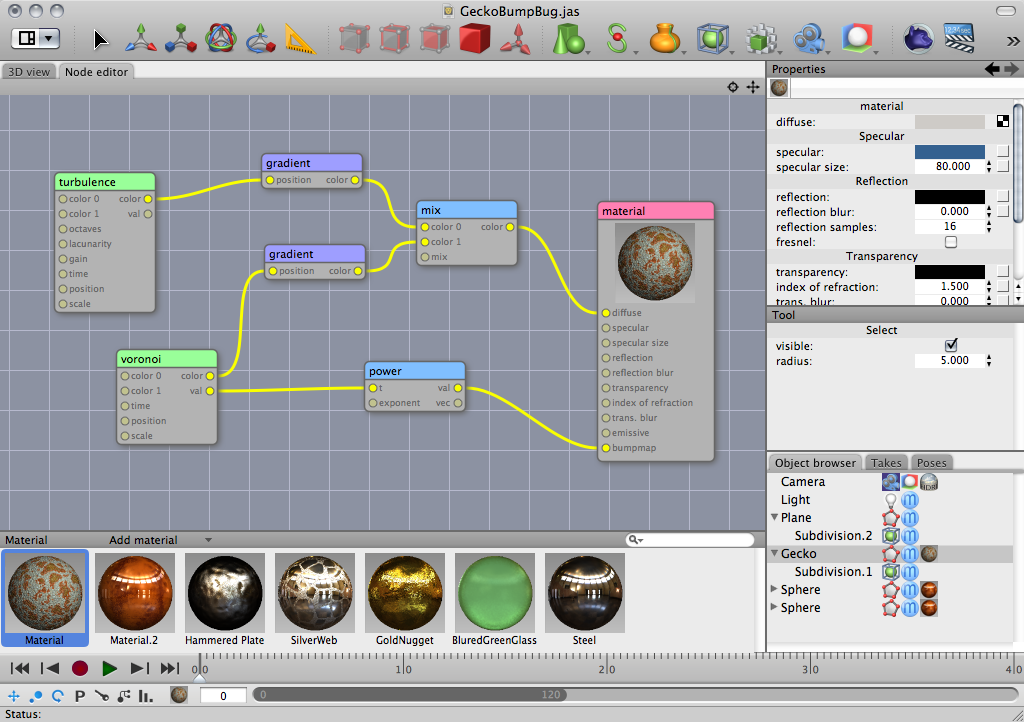
      Solo, I use the word "modular", because I used to build and play with analogue modular synthesisers, and these require patchcords to hook everything up together- hence "modular". It's just habit! 😳 πŸ˜„
      I'm sorry if I come across as being a little biased, but you know when people continually to post stuff about your chosen platform, that is, well not strictly speaking necessarily correct, it does send one a little loopy! πŸ˜‰ It's also somewhat irritating when people also post up direct links to exe file SU updates (rather than than a non-specific, all-inclusive page) , when others actually need the dmg equivalent. Then I go scrambling around to help post an update myself, and not concentrate on my own work- forgetting what to do next. "WWILF'ing", my wife calls it (Now, "What Was I Looking For"!!) πŸ˜„ I also live in England, where everything Microsoft is "forced" upon me. 😞

      Tom πŸ˜„

      posted in Extensions & Applications Discussions
      T
      tfdesign
    • RE: 7.1 Performance

      Hi Tyler.

      I'm finding that I am getting problems with models 'wireframing', if I have several models/ windows open at the same time, and the bigger the model size is the worse it gets, almost to a point that it is better to restart Sketchup in order to stop the effect. (It's useful having several windows open at a time, especially when copy/pasting between windows).

      FWIW, This Macbook Pro, although running Snow Leopard, isn't really geared up for a GPU speed bump, because the graphics card is the older ATI1600x type. I'm looking to buy a newer Mac Mini pretty soon. Perhaps I'll notice a difference?

      regards,

      Tom

      posted in SketchUp Discussions
      T
      tfdesign
    • RE: Sketchup Full Screen

      @kxi system said:

      So what do you think?

      I think it's a great idea, and have wanted it before, especially when doing live presentations. For example, one screen could be connected to a video projector, projecting the model (without all the frass around the screen), and you have the desktop visable on another screen- say your laptop. Toolbars could be placed in either screen, or hidden away.

      posted in SketchUp Feature Requests
      T
      tfdesign
    • RE: Octane Renderer, baby!

      Nice to see that this will also run on Linux and OSX too. But I must say that Octane also looks works remarkably like Cheetah3D, especially with its modular approach to adding texture to surfaces, via 'patchcords'. At least there will be an option for Windows users.


      Cheetah3D5Screen1.png

      posted in Extensions & Applications Discussions
      T
      tfdesign
    • RE: New Laptop?

      Forgot the screen shot 😳


      screenshot_02.jpg

      posted in Corner Bar
      T
      tfdesign
    • RE: New Laptop?

      @plot-paris said:

      for me Windows 7 makes the race. not by far. its just a matter of small things that add up, really, like that with Mac OS I can't delete a file by hitting the delete button (I either have to use context click or drag it into the bin) or I haven't got a proper task manager, where I can see how much memory or CPU a program is using... that sort of stuff.

      erm...

      By pressing the command and backspace keys, you delete a file. Simple.

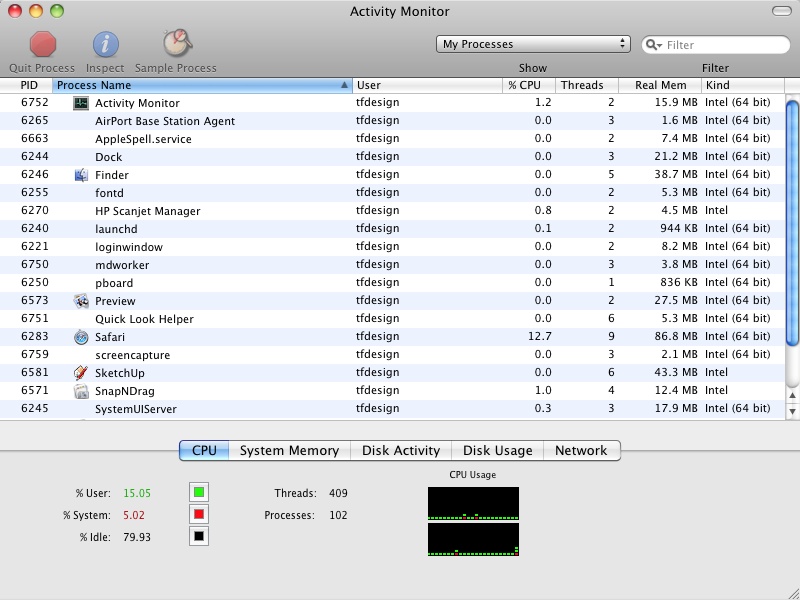
      If you need to keep an eye on memory or CPU cycles (or even how hot your CPU is getting), you open "Activity Monitor" in the utilities folder.

      @solo;

      It is simply untrue that the Mac puts everything on the desktop. YOU choose where files go- everytime. It's almost as if people say they have owned and used these brilliant machines, but actually have only played around with them in their local branch of PC World.

      I'm sorry this is turning into another I hate Mac debate. It really depresses me how much those who don't use the Macintosh system are prepared to say what they do and what they don't do.

      posted in Corner Bar
      T
      tfdesign
    • RE: New version

      Andrew, It's great to have the new languages included- especially Chinese! πŸ˜„ Perhaps you could include Urdo and Punjabi next?

      However it would be a lot more democratic if those posting the original links would include links to ALL OS's, and languages, and not just one! πŸ˜‰

      Error 404 (Not Found)!!1

      favicon

      (sketchup.google.com)

      posted in SketchUp Discussions
      T
      tfdesign
    • RE: New Laptop?

      Dave, unfortunately you can't run SU in Boxer, because SU doesn't run on DOS, but you can run Windows XP/Vista/7 on a Mac (as well as Boxer) either by means of virtualisation (Parallels or VMware, within Mac OS X), or by rebooting into Windows (via BootCamp). I had boxer installed so I could run some of the more ancient house design software. I believe that the original 3DS Max ran in DOS. I'd love to get a copy and see if it would work in Boxer. Because of the Core Duo 2 CPU speed, it runs like a cat off a hot tin roof- as they say.

      Macs are like Leica M rangefinders. You never realise how brilliant they are until you start working with them. I really badly want a Leica again. I used to have an M6 film Leica, and I could just work without any problems. These days, every camera I own, just gets in the way, and 99% of the time, I miss the shot. I have the same experience whenever I run Windows. I'm always updating this or that, mainly security updates- it just makes me want to shut the damn thing down. 😞

      But Mike is right. You'll quickly get used to the advantages of SU in Mac OS X, and you won't look back.

      posted in Corner Bar
      T
      tfdesign
    • RE: Who would you hire, what would you look for?

      Jeff, there is no real reason that you actually need an architect for the whole project (although you will need to understand building regulations as well as maximum and minimum sizes allowed, and to know your beam calculations (like I=bd2/6) etc etc). You will eventually have to have your plans passed by a qualified architect, but most of the stuff, with a good measure of common sense, you should be able to do most of it yourself.

      You could otoh, just emigrate to Canada (where there seems to be no building regulation law, or there didn't when I lived there?), and build your dream house out with the bears in the woods!! πŸ˜†

      I've got a brilliant little book which I always use called "The Architect's Pocket Book", by Charlotte Baden-Powell (RIBA). It's British, so therefore, everything is in millimetres and to BS, but it's an amazing little book, which has almost everything you need to know about practice. Recommended!!

      http://www.amazon.co.uk/Architects-Pocket-Book-Charlotte-Baden-Powell/dp/0750647647

      I hope that helps at least. πŸ˜„

      posted in Corner Bar
      T
      tfdesign
    • RE: New Laptop?

      @mike lucey said:

      No harm in asking your local Apple Dealers even if you had to hire a machine for a period.

      Funnily enough, I did just this before Christmas, as I am looking to purchase a Mac Mini next (Mac Minis are real bargains!!). The Apple shop were very happy to help out, even offering to download SketchUp and installing it for me!

      I started computing on MS-DOS (we also had access to an Apple IIe, via the university, running MS Basic!). The was on a 486DX machine, before I switched to Windows. But at that point I also had an Atari STFM (Mac on the cheap), and then picked up an ancient Apple SE30 which had a knackered HD. The SE30 just ran so much faster than the P1 windows machine, and of course was a lot more stable, as well as being portable, that I used it more often. I then bought secondhand Macs, until I could afford my first 'new' one, this one in fact, which is used 24/7 for the last 3 years- an absolute workhorse! I bought this Macbook Pro while a student, so I got the discount + 3 years worth of Applecare, free.

      Incidentally, I have MS-DOS running too, on this Mac, via Boxer! πŸ˜†

      best,

      Tom

      posted in Corner Bar
      T
      tfdesign
    • RE: SketchUp export to iMovie?

      @tfdesign said:

      This makes sense really- from an Apple perspective, because Apple would want their product to be seen in the best light?

      A shame that Google don't apply the same principle, as what SU spits out in export mode is pretty grubby. It looks like the screen resolution sits at 72 (or 96?) dpi, and there is no option to budge. That's a real shame Google. I really hope that you improve this in SU8.

      posted in SketchUp Discussions
      T
      tfdesign
    • RE: New Laptop?

      @chris fullmer said:

      But then you have to deal with your conscience because you purchased a Mac.

      LOL!!

      posted in Corner Bar
      T
      tfdesign
    • RE: New Laptop?

      PS, 64bit OS X home and/or professional, comes as no extra charge. πŸ˜„

      posted in Corner Bar
      T
      tfdesign
    • RE: New Laptop?

      Yes I didn't want to say, but this Macbook Pro is also this Windows XP computer! If you going to spend that kind of lolly, I recommend that you do give a Macbook Pro, a serious consideration too. Then you could also play both your WMV and Quicktime movies, without a hitch! πŸ˜‰ πŸ˜„

      posted in Corner Bar
      T
      tfdesign
    • RE: New Laptop?

      Looks good Dave. How much?

      posted in Corner Bar
      T
      tfdesign
    • RE: My First House Model in Sketchup

      Hi Manoj.

      I'm not going to beat about the bush, but this really is a case of 'could try harder'. At the moment, without sounding too harsh, your effort looks like the most basic thing you can create with the built-in tutorials.

      I highly recommend looking at some buildings in cities and towns around you, and seeing how they are held together. Are they made from wood? Are they made from concrete? How high are they? How wide are they? Many buildings in tropical Asia have no windows, because of the heat. You could maybe then, watch some of the free Aidan Chopra tutorials on YouTube, to work out how you can visualise these. It's worth also getting a good 2D CAD application too, to do floor layouts. Most people use AutoCAD, but this is very expensive, so you could look around for a cheaper alternative. FWIW, I use software made by a Swiss company called Ribbonsoft. They make an application called QCad, that integrates very well with SketchUp.

      Good luck!

      Tom πŸ˜„

      posted in Newbie Forum
      T
      tfdesign
    • RE: WMV to MOV?

      @gaieus said:

      @dave r said:

      Chris, what is a .ong file?

      I guess he meant png (o is next to p) πŸ˜’

      What? A pong file??! πŸ˜†

      John, I did what you suggested, in fact I had already tried that, but it seems that (or at least it looks like), SU exports at a screen resolution default of 72 (or 96) dpi. I don't know about Pro- but I'm guessing it's the same?

      I've been playing with Sketchers Studio, but it won't allow for QT exports in the demo version. So basically I'm at a crossroad. Either I get this (nice 'n' cheap), or splash serious cash on Cinema 4D 😲 ❓

      posted in Corner Bar
      T
      tfdesign
    • 1 / 1