I moved the floor group away from the wall group by 1/16" and that solved it for the time being. I didn't think that two separately grouped items would have z fighting issues.
Oops, your profile's looking a bit empty! To help us tailor your experience, please fill in key details like your SketchUp version, skill level, operating system, and more. Update and save your info on your profile page today!
Check out Febhouse | New extensions for Shadow Analysis in SketchUp Download
 S
Offline
S
Offline
Posts
-
RE: SU scene not matching LO scene
-
SU scene not matching LO scene
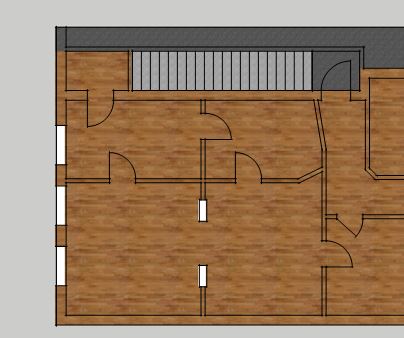
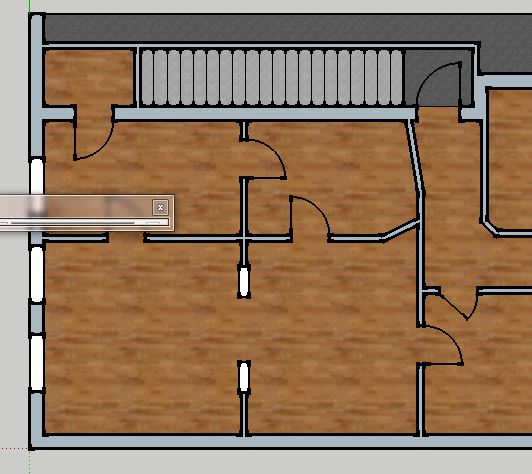
The scenes in Layout 2015 are not matching the scenes I see in Sketchup 2015. I applied a color to the reverse face in sketchup so when I do an ortho projection for a plan the walls are colored. When I get to LO, the floor which is in a group below my walls show up in the walls. See attached pictures.
Any idea of why?
-
RE: SketchUp 2015 is 64bit
I do not see a maintenance release at sketchup.com. Where did you see this?
-
RE: Installation of .rb plugins in 2014 and 2015
Thank you to all. Dave R helped get it straight.
-
RE: Installation of .rb plugins in 2014 and 2015
No luck, It's not that critical either. Thanks for the help.
-
RE: Installation of .rb plugins in 2014 and 2015
I pasted the .rb file in C:\Users\Dave\AppData\Roaming\SketchUp\SketchUp 2015\SketchUp\Plugins
-
Installation of .rb plugins in 2014 and 2015
I placed a .rb file in each of the appropriate plugin folders for each of the versions, and in either instance the plugin does not show up in any menu.
It is a scene rename plugin by Todd Burch
Thoughts?
-
RE: How do I add a texture in Sketchup?
@ely862me said:
Actually from step 3 you go like
3 Make sure the use as image option is checked.(import the image)
4 Explode the imported image
5 Press B to bring the Material window
6 Go to the newly created material(In model materials)
7 Right click/Save as Browse to the Sketchup Material library folder which is found in the Program Files/Sketchup/Sketchup20xx/Materials/(create new folder or choose category)
8 SaveTo add to library oops, I missed that part. Brain freeze here in Northern Wisconsin

-
RE: How do I add a texture in Sketchup?
-
Choose Import
-
Browse to the folder where your image is placed. Make sure the file extension is selected i.e. .jpg etc...
-
Make sure the "use as texture" option is checked
-
click open
-
Image is ready to be pasted onto surface
Note: If you plan on putting it on a surface in a group or component, make sure you open group or component to edit before you follow the steps above.
-
-
2015 Start Up Panel
To SU Development Team:
Please fix typo in start up panel.
Check our our blog.
-
RE: PointLight lumen power
@adamb said:
Sorry, why am I a Plebian for asking a question? And what the heck has being a common man got to do with it!
I simply asked a question on a forum. I understand you think it was some kind of cunning attack - but it really wasn't - just my not understanding the settings of other rendering software.
If it really is the case, you cannot ask question on this forum without getting an earful of vitriol, then what is the point of the forum?
Adam,
Asking a question is never a problem really, although, with as many users on the forum as there are, an occasional grump can pop up. However, being impartial, as I have no experience with any of these renderers, you have seemed unwilling to receive the answers provided. It seems that you are resistant to "seeing" that ISO, aperture, and f stop settings are all integral in capturing the light in any given scene.
The example that AcesHigh provided was a thoughtful and reasonable demonstration of the answers provided to your query. I'll bet that his natural eye perceived the lighting in the room exactly the same, but his camera captured the scene differently (based on different settings) Consider that no matter how well lit a room or box is, a blind person will never see the scene. In other words, the physics of the light source is independent of the instrument capturing the light.
Now please take to heart this is not an attack on you or your question, but it does come off as disingenuous when as a lighting program developer you will not accept basic photographic principles being an integral part of another developers lighting program. These principles are used to emulate the way cameras actually work in some of the rendering packages you have studied. It neither makes them inherently inferior or superior to LightUp. Simply put, LightUp uses a different instrument/method to capture the light in a scene. This IMHO really is a matter of apples and tomatoes as Frederick posted somewhere above.
When you asked what settings you might have missed when you got your results, you got answers.
Lastly, condescension and name calling are out of bounds
-
RE: Trimble not interested
Try saving your model that freezes in SU2014 as a SU8 version, load it into SU8 and see if you can work without interruption on it.
Also, are you getting any error messages, or just freezes? If you are getting error messages, post them. There are enough eyes on this forum to point you in the right direction.
Lastly, I am not familiar with Mac, but if you let the forum know what OS is on your Mac, you might get some more help. In this case TMI, or over communicatin is not a problem
-
RE: Skalp for SketchUp: Holiday Sale 25% off (until August 10)
Thanks for the reply. I will give it serious consideration.
-
RE: Skalp for SketchUp: Holiday Sale 25% off (until August 10)
Are you going to offer the first non-beta release to beta purchasers for no charge?
-
RE: Sketchup 2014 CAD cleanup plugins
I use the following Cad Cleanup type plugins in SU2014
Delete Coplanar Edges, I think by Chris Fullmer - not sure where I found it. I thought I downloaded it from Sketchucation Plugin Store, but I did not see it there today.
Edit: Delete Coplanar is by Rick Wilson - found at Smustard.comMake Faces by Todd Burch - found at Smustard.com
Stray Lines by Todd Burch - found at Smustard.com
The last two I manually placed in the plugin folder. I do not remember where it is located in SU2014 but there are other posts that deal with that issue.
Good Luck.
-
RE: TV Wall Concept
Dave R's next project is going to be writing a book titled
How To Make A Woman Transparent
I predict best seller

Nice sketch too
-
RE: Midway Gardens
Nice work.
How many hours do you have in so far?
Imagine drafting by hand

-
RE: Plugin Store not working in SU 2013 anymore
Wow
Thanks Box.I never knew about snipping tool.
Great feature