sketchucation logo sketchucation
    • Login
    1. Home
    2. plot-paris
    3. Posts
    Oops, your profile's looking a bit empty! To help us tailor your experience, please fill in key details like your SketchUp version, skill level, operating system, and more. Update and save your info on your profile page today!
    πŸ”Œ Easy Offset | Offset selected faces in SketchUp in positive and negative offsets. Download
    Offline
    • Profile
    • Following 0
    • Followers 0
    • Topics 67
    • Posts 1,477
    • Groups 1

    Posts

    Recent Best Controversial
    • RE: Context click for layer window

      thanks, Matt666.

      the layer selection works perfectly fine. but the layer lock affects more than the entities in one layer.

      however, what I ment, was to right click on a layer within the layer windowto get these options.
      thus the normal context menu is not extendet by even more entities and you have these options directly where you need it - right there, where you navigate through your layers...

      but I am afraid, ruby doesn't give you that kind, does it? πŸ˜•

      posted in SketchUp Feature Requests
      plot-parisP
      plot-paris
    • RE: Animated logo help...

      hope you'll get the jumping elements fixed.

      looking forward to see your first results! πŸ˜†

      posted in SketchUp Discussions
      plot-parisP
      plot-paris
    • RE: V-ray renders

      second one is my favourite - very nice indeed!

      posted in Gallery
      plot-parisP
      plot-paris
    • RE: Regular terrain

      oh dear, I am really looking forward to your plugin. the image looks very promising. πŸ˜•

      enjoy the 14th!

      posted in SketchUp Discussions
      plot-parisP
      plot-paris
    • RE: Are you ready for SketchUp 7 news?

      hi deathcloud,

      if I understood your whishes correctly there are some, that can be done already in SketchUp6

      • you can mirror geometry simply by using the scale tool and scaling it to -1 (that results a mirror operation)

      • to achieve true 2D elevations you have to switch your camera mode to Camera > Parallel projection. and then use the standart views. if your elevation is not in a right angle to the standart views, right click on one of the faces you want to look on from a right angle and choose "Align view"

      • for sections to show materials you can use TIG's SectionCutFace script. right click on the section plane and choose "add section cut face". this will create faces where your geometry is cut. needs post processing sometimes. but is a very useful tool!

      I definitely agree with you about improvements for animation. there have been nice ideas here in the forum. lets hope Google read these πŸ˜„
      and to be able to define the aspect ratio of image exports (like it is done with the skindigo plugin) is something they are bound to add.

      posted in Corner Bar
      plot-parisP
      plot-paris
    • RE: [Plugin][$] Tools On Surface - v2.6a - 01 Apr 24

      @unknownuser said:

      I promise not to touch the naming convention for these icons and cursors in future versions (but I may have to add new ones !)

      πŸ˜• something like a "Scale on surface"? πŸ˜†

      posted in Plugins
      plot-parisP
      plot-paris
    • RE: [REQ] Displacement ruby

      solo, let me tell you, that your illustrations are impressive. it makes perfectly clear, what you want to achieve with that script and what the benefits are.

      I would love to have such a ruby.
      like you said:

      @solo said:

      ...but for other purposes like if you remember Silvershadows method of doing a cobble stone sidewalk, this would be a snap.

      this would really help to push realism of SketchUp models much further (towards "Silvershadow-realism"... πŸ˜„ )

      posted in Plugins
      plot-parisP
      plot-paris
    • RE: [Plugin][$] Tools On Surface - v2.6a - 01 Apr 24

      fredo, I am simply blown away by your tools. they work so smooth (much smoother than before that is). really great! thank you so much. SketchUp is raised to another level!!! 😍

      CadFather, thanks for the icons. I really like them, very elegant. πŸ‘

      posted in Plugins
      plot-parisP
      plot-paris
    • RE: Lock toolbars

      it is indeed a pain in the a***! please do something about it, Google!

      posted in SketchUp Feature Requests
      plot-parisP
      plot-paris
    • RE: Tool Bars Question

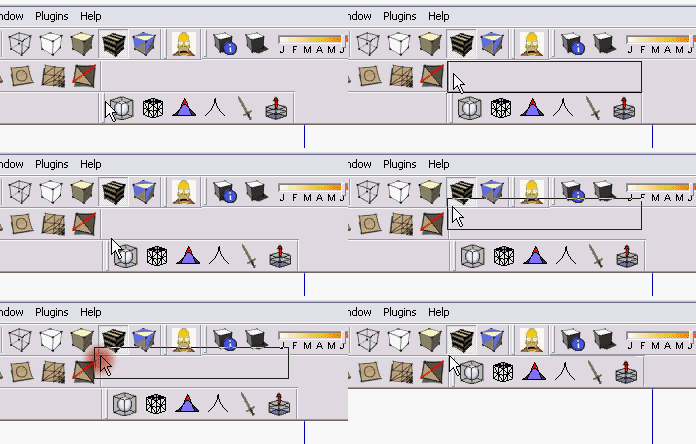
      what I found out what helps to place the toolbars, where you want them is this:

      if you drag and drop the tools you want to move, don't release them exactly at the point where they shall be positioned.
      instead release the mouse button, when the cursor hovers exactly on the top right corner of the toolbar that you want to see on the left of the toolset you are moving. (was that understandable πŸ˜• ? I attatched a short animation to demonstrate...)

      move_toolbars.gif
      [Edit] if the animation doesn't play, please click on it... []

      posted in Developers' Forum
      plot-parisP
      plot-paris
    • Exchange-Bin Icon

      I love applications with intuitive interfaces. thats why I love SketchUp so much.
      and thats why I love drag-and-drop operations (by the way, I recently found out, that you can drag and drop a SketchUp file into the stage of a model you are currently working with. the file is imported as a component...).

      some days ago there came this idea into my mind, when I was exporting images (File > Export > 2D Graphic)...

      wouldn't it be great to have an icon at the top right of your SketchUp window, a so called

      Exchange-Bin

      earth_rotating3.gif
      if you want to export a scene, you simply drag either the tab or the entity in the scene window into the Exchange-Bin to open up the image export window.

      if you drag multiple scenes into the bin, it will ask you, if you want to export images or an animation.

      in the same way you can export components, textures, styles... (simply drag and drop them into the Exchange-Bin)

      in addition to that we can think of an option window, that is opened, if you klick on the Exchange-Bin button (don't know what that is yet, but we will surely find some good features for that πŸ˜‰ ).

      ah, yes. the image of this icon will be static. when SketchUp is running an export however (it will do that invisibly in the background, because SU7 will have multi-core support πŸ˜† ) the globe rotates.
      when it finished, it will flash once and then stay highlighted to indicate, that results are available.

      what do you think? would that be too much of a fancy toy or would it be a valuable add on to SketchUp's intuitive worklfow?
      what other operations could be realised with the Exchange-Bin?

      posted in SketchUp Feature Requests sketchup
      plot-parisP
      plot-paris
    • RE: SketchUp in Cloverfield

      what a great movie that was, Cloverfield!

      I loved the fact, that it was about the people and not about the monster itself. really convincing actors. and wonderful special effects embedded in these unsteady camera shots.

      I have to see that movie again!

      in which scenes did this guy use SketchUp?

      posted in Corner Bar
      plot-parisP
      plot-paris
    • RE: Regular terrain

      that would be an awesome tool, because it really saves a lot of time and can help you to clean up your model considerably.

      I would definitely love such a script!!! 😍

      posted in SketchUp Discussions
      plot-parisP
      plot-paris
    • Context click for layer window

      if you right click an object in the outliner, you get loads of options of what to do with the model (lock, hide, copy... all sorts of things)

      but in the layer window, you can't even open a context menu.

      I would really love to see options like Select All Layer Content or Lock All Layer Content

      that would come in quite handy sometimes, don't you think?

      what else could be a useful funktion in the layer right click menu?

      posted in SketchUp Feature Requests sketchup
      plot-parisP
      plot-paris
    • RE: UV mapping request

      I am not sure, if I understand your request correctly.

      is it something like this?

      multi-pin mapping...

      posted in SketchUp Feature Requests
      plot-parisP
      plot-paris
    • RE: Regular terrain

      of course. there is no hurry for that tutorial, I think.

      enjoy your drinking!
      after months of cider and guinnes it will be Sambucca tonight for me (with big glasses, tissues and straw. I love hearing other people coughing while I keep the pleasantly burning vapours in my lungs until lack of oxygen forces me to breathe again 😍 )

      by the way, my monitor is completely exposed. and in addition to that everyone tries to get a glipse of my screen every now and then, because I am doing all the SketchUp work. πŸ˜’

      posted in SketchUp Discussions
      plot-parisP
      plot-paris
    • RE: Regular terrain

      now, that the method has been refined, it is ready for the tutorial section πŸ˜„

      I just tried to redo the tutorial. but my laptop is so old, that he crashes every other minute, when opening the file.

      therefore, Gaieus, feel free to write the tutorial (if you have got the time).
      [Edit] if you do, don't forget to include a link to the "drop" ruby into the description[]
      I will only be able to do it on monday in the office; and my boss surely doesn't like it, when I spend too much time doing stuff for SCF instead of for the office πŸ˜‰

      if you do, could you post the link to the tut in this thread? would be great.

      cheers, Jakob

      ps: this is an example why I like the SCF community so much. you have an idea, post it, and after a pleasant discussion a much faster and better way to solve the same problem is born!

      posted in SketchUp Discussions
      plot-parisP
      plot-paris
    • RE: Hardware recommendations

      just tried it out with the city-model, scene 6 (more than 400.000 polygons).

      the time-difference was 0,5 seconds at more than a minute duration.

      that means the time improvement when switching from 4x anti-aliasing to 0x was only 0,7%.
      the framerate was practically the same.

      so it doesn't seem to make much difference, if anti-aliasing is switched on or off (strange, I believe to remember having switched off aa with a particulaly big model and getting much better framerates some months ago... πŸ˜• )

      posted in SketchUp Discussions
      plot-parisP
      plot-paris
    • RE: Regular terrain

      Csaba, just found the cause for the first model not working.

      when setting up the different scenes and therefore copying the geometry several times, I must have worked inaccurately, what resulted in the vertical lines not being entirely vertical.
      therefore SketchUp did not, like we assumend, ignore the lower endpoints, but included them into it's terrain calculations.

      problem solved - at last we have peace of mind! 😍

      posted in SketchUp Discussions
      plot-parisP
      plot-paris
    • RE: Regular terrain

      Csaba, I am at a complete loss. just tried it with my tutorial model and got the same screwed up result like you do. 😲
      tried different things, like skaling or enhancing their length (a hundret times) did not work.

      anyway, I thought about your suggestion, TaffGoch, to use the "drop at intersection" ruby.
      and it is indeed a very elegant way to speed up the workflow considerably.

      here a short demo, how I used the script.
      regular_terrain2.skp

      posted in SketchUp Discussions
      plot-parisP
      plot-paris
    • 1
    • 2
    • 53
    • 54
    • 55
    • 56
    • 57
    • 73
    • 74
    • 55 / 74