Glad to know!
Sure I'll help find other bugs (if there are any!).
Coll new features you added! Can't wait to test them!
Glad to know!
Sure I'll help find other bugs (if there are any!).
Coll new features you added! Can't wait to test them!
AHAHAHAHAH
Thanks guys for the credits about my constant ranting ahahahahah
I know I can be a pain in the *ss.
You're great.
Thanks for the release!!! Works great!
Hi Hal!
In the latest updeates I did not see any changes in how the folders are displayed...did you guys forget me? 
I think this is a rather annoying issue, and could also lead to misunderstandings! I thought this would have been an easy fix to do, which seems not  BTW I don't want to bother you, only to remind you of this misbehaviour..
Take your time!
Hi Hal!
First of all thanks for your always timely replies!
...I prefer waiting a little longer and not fiddle with a bunch of miniprograms 
After all..it's minor bugs 
Thanks a lot!
Hi to the DEVs team! ..any news about the wrong display of files inside folders? I still get the same error I reported some months ago...
Another thing: would it be possible to change the order the numbers are put into? I have several releases of similar component (e.g. frame.skp) followed by a consequential number, as in frame1.skp, frame2.skp, and so on...At the moment I get frame1,frame11,2,21,3,4,5,51...
I think it may be more user friendly if it was frame1, frame2, frame3,..., frame10, frame11,...
Thanks in advance!
So cool! Thanks!
...did you guys had a look to the bug that I reported some time ago, about componentfinder including objects in folders different from the selected?
https://sketchucation.com/forums/viewtopic.php?f=403&t=71638
wonderful! Thanks!!
Thanks Kostiaarh!
Sadly this formula returns always the last 5 characters, while the number of letters I have to report varies from 5, 6 and 10 digits.
I have a new question for the community: I have an attribute which ALWAYS include alternatively the words "OPACO" "LUCIDO" or "SEMILUCIDO" (name of the material applied). The words are always at the end of the text string, but the number of digits before may change.
I want another attribute to report ONLY the occuring word from case to case.
EG: my material attribute returns "grey RAL7040 OPACO", I want another attribute to report only "OPACO".
Is there a way to do this?
Since it's a friends post, I'll translate for him from italian: he has issues after the installation of componentfinder. He gets the error message he attached in his post. After the installation, no toolbars or icons showing the gear show up, then - after the relaunch of SketchUp - this error pops up.
I tried helping him out uninstalling and installing again but didn't fix it. Any help would be greatly appreciated! Thanks in advance!
Thanks a lot pc!!! I'll have a look at it immediately!
EDIT
Everything is clear, I don't understand the syntax of these two formulas though:
=parete Arty!d_mod_num-1 +if(parete Arty!remain,1,0)
Here I don't understand the space between "-1" and "+if" and I don't know the meaning of the "parete Arty!remain" without any checks to perform.
=if(and(parete Arty!remain,copy=copies),parete Arty!remain,98)
Here I don't understand the meaning of "parete Arty!remain" without any checks: what will it solve into?
MANY MANY THANKS!
It's me again!
I'm struggling since a couple days about one thing I think should be doable but I can't get in any way
to work in my DC.
Basically I have a wall, made of two side pillars and a series of panels in the middle. My wall can be stretched to match some precise measures, which I set. The measures are exact multiples of the panels but may also admit an half-panel on the end, if needed.
When I stretch the wall, the start pillar must stay still (works now), the end pillar must reach the final point (works now) and in the middle I want the panel to copy a number of times. It works when I fix the length of the panels to a value, but I'm not able to tell SketchUp that it must stretch the last panel to half its dimension if needed.
Do you guys know a way to do that? Thanks in advance!!!
i was asking kind of the same thing
...sorry Samuel another question: when I try and import a model, the plugin asks me the "height" of the model, and scales it to that dimension. Problem is that most of the time I don't know the original height of the model and I just want to keep the original size. Is there a way to do this?
Thanks in advance!!!
 THAT WORKED..
Is there the hell of a way to tell sketchup to ALWAYS run as admin?
I thought I already did this but seems like I couldn't do it.....
Hi! First of all thanks for your wonderful plugin and great work!
I have issues trying to import objs....
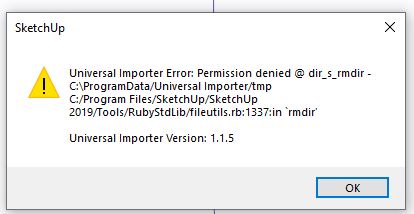
Hi Fredo!
What a wonderful set of plugins you have done! I am grateful to you, your work is sparing me loads of time!!!
I'd have a question: is there any chance your tool "area report by material" could take into account ALSO the faces which are painted from the outside of a group/component? Since I work a lot with DCs this would be a greatly useful add-on..
Thanks in advance!
This did not work to me. Tried everything, I can't get two toolbars to stick where the hell I put them....... 
Hi Hal! I didn't want to make another topic so I'll post in this one slightly changing the focus.
Is there any possibility we can visualiza the component's "Description" in the CF preview? Could be useful to give some preliminary info to the user without having to actually load the component in the current work file.
Just an idea!