sketchucation logo sketchucation
    • Login
    1. Home
    2. Jorgensen
    3. Posts
    Oops, your profile's looking a bit empty! To help us tailor your experience, please fill in key details like your SketchUp version, skill level, operating system, and more. Update and save your info on your profile page today!
    ⚠️ Important | Libfredo 15.6b introduces important bugfixes for Fredo's Extensions Update
    J
    Offline
    • Profile
    • Following 0
    • Followers 0
    • Topics 89
    • Posts 368
    • Groups 1

    Posts

    Recent Best Controversial
    • Scenes does not remember shadowsettings

      Hi

      I setup shadowsetings for a scene and then update the scene and save the file.

      Later, when I open the file again, the scene, seems complete dark, like night. I then have to change the shadowsettings one minutes forward and back again, update the scene, and then i works again. Does others have this problem and is the somekind of solution ?

      The problem does also exist in Layout - I have som views that I can't get any shadows on 😞

      Thanks
      Jorgensen

      posted in SketchUp Discussions sketchup
      J
      Jorgensen
    • RE: Update inserted files

      Hi Remus

      Thanks for your reply.

      It seems to work better, but Layout still looses 'contact' to the Sketchup file 😞 The only way to solve this, is to rename the Sketchup file and then relink. 😞(

      posted in LayOut Discussions
      J
      Jorgensen
    • Update inserted files

      How does one update inserted files ?

      I have tried almost everything. Save the SKP drawing, in layout, selected update nothing happens. It seems like Layout does'nt see that the files has been updated 😞

      Any help ?

      Thanks
      Jorgensen

      posted in LayOut Discussions layout
      J
      Jorgensen
    • RE: [Plugin] SketchyFFD (Classic)

      How does the "make Patch" work ?

      When I use the default setting a get a mesh that is 762mm x 762mm. What do I do when I want it to be 20000mm x 20000mm ?

      posted in Plugins
      J
      Jorgensen
    • RE: Component Spray Tool released

      @bibiel

      wooho, how did you create those trees ??

      posted in Plugins
      J
      Jorgensen
    • RE: Oh my - printing to scale

      Hi there

      I needed to print a facade that was not aligned to the axis. So I had to rotate the whole model. I find this quite annoying and see it as a missing function in Sketchup, even though it was the first time I needed it πŸ˜„

      Thanks
      Jorgensen

      posted in SketchUp Discussions
      J
      Jorgensen
    • RE: Oh my - printing to scale

      I don't really get it. If I turn off perspective mode, I should be able to print to scale ?

      Jorgensen

      posted in SketchUp Discussions
      J
      Jorgensen
    • RE: Oh my - printing to scale

      "Ensure perspective is disabled and you are using one of the Standard Views in the Camera > Standard submenu, to enable the scale option." 😞

      posted in SketchUp Discussions
      J
      Jorgensen
    • Oh my - printing to scale

      I just discoveret that it's only possible to print to scale when using one of the standard views - top down left right etc. If the view is rotated then it's not possible to print to scale 😞

      Is this really true ? or is there somekind of workround - other than rotate the complete model ?

      Thanks
      Jorgensen

      posted in SketchUp Discussions sketchup
      J
      Jorgensen
    • RE: Draworder

      Hi Anssi

      Jep, I knew that 'fix'. But it gives extra work, because one have to update both walls and floors 😞

      But it seems to be the only way

      posted in SketchUp Discussions
      J
      Jorgensen
    • RE: Draworder

      Hi SchreiberBike

      The walls are black inside, and also on the bottom.

      I can't just paint the top on the walls black, because I need to cut through the walls, in just about 1m above the floor, to show the doors.....

      Thanks

      posted in SketchUp Discussions
      J
      Jorgensen
    • Draworder

      Is there somekind of method to control 'draworder' ?

      I draw floorplans where I place walls on. I then use sectionplanes to view different levels of a building. The problem is, that I like the cutted walls to be drawn black, and the floor white, but the floorplan and the bottom of the walls shares the same level/place, sometimes it looks fine, and the walls shows up fine, but sometimes it's the floor that fills the walls.

      I know that I could cutout the walls in the floorplan, but this gives more work. I could also lift the walls 1mm above the floorplan, but this can result in some unaccurate drawings.

      Does anyone have a smart solution ?

      Thanks
      Jorgensen


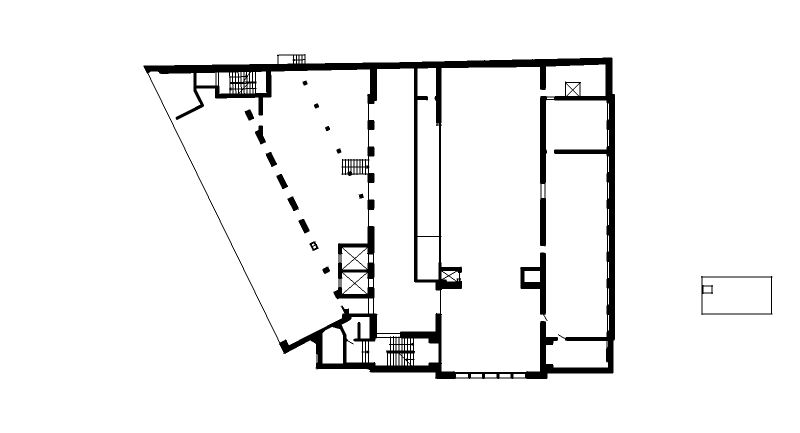
      This shows how it should look like


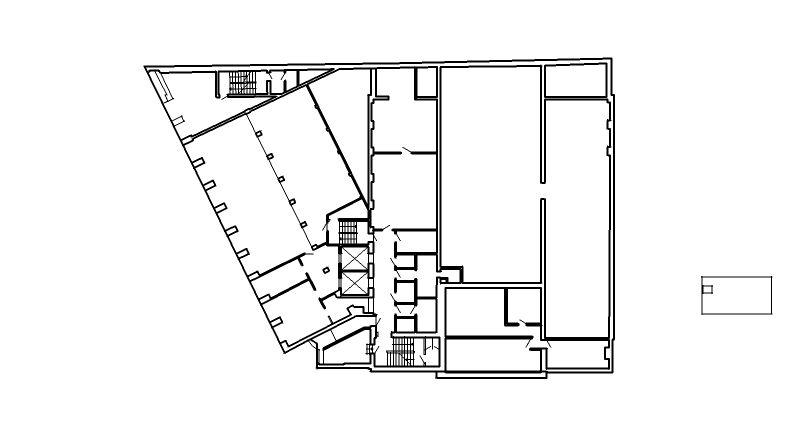
      This is how it shouldn't be


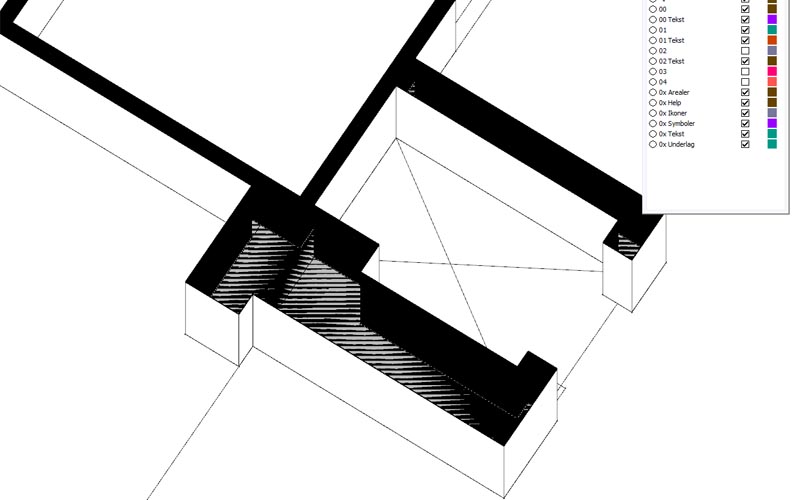
      This shows the problem

      posted in SketchUp Discussions sketchup
      J
      Jorgensen
    • RE: Demands for a laptop

      Doh, the manufacturers dosn't make it easy 😞

      Does anyone here have a link to a top10 chart for mobile GFX ?

      Thanks

      posted in Hardware
      J
      Jorgensen
    • RE: Useful win apps

      VSO Image Resizer

      Free supersmart imageresizer
      http://www.vso-software.fr/products/image_resizer/

      posted in Hardware
      J
      Jorgensen
    • RE: Demands for a laptop

      @pmiller

      So this is where the 'not' onboard gfx-card comes in ?

      posted in Hardware
      J
      Jorgensen
    • RE: Demands for a laptop

      Ok thanks. So look for a powerfull CPU, how about the GFX-card - how importent is this ?

      Thanks
      Jorgensen

      posted in Hardware
      J
      Jorgensen
    • Demands for a laptop

      Hi everyone.

      I'm been asked by my company to purchase an laptop for presentations, primary for walk-arounds and showing different views in Sketchup.

      Can anyone advise for what to look for. Within reasonably the price dons't matter - but what would one be looking for ? I think that Sketchup is extreme demanded on processor power - and the GFX-card comes in second - is this true ? if so - which processor should I look for ? does Sketchup use multicores ?

      Thanks
      jorgensen
      Denmark.

      posted in Hardware
      J
      Jorgensen
    • RE: [Plugin] SketchyFFD (Classic)

      Wow must say "an amazing tool" πŸ˜„

      One idea:
      Mayby somekind of autohide could be added ?

      If I rightclick the object (the deformed one)I could select to autohide or show the FFD object. Then, if hidded, the FFD object will become visible when I select or doubbleclick the deformed object.

      Just an idea πŸ˜„

      Thanks
      Jorgensen

      posted in Plugins
      J
      Jorgensen
    • RE: Moving an object by center point to an object.bounds.center

      Hi TIG and Fredo

      Thanks for your input.

      I'm thinking about to try and use 3dtext instead. But until further I'll have a workaround where I modify the position by x,y, z axis. This is not perfect, because the texts don't have the same width.

      Thanks
      Jorgensen

      posted in Developers' Forum
      J
      Jorgensen
    • Moving an object by center point to an object.bounds.center

      Hi

      I'm wondering if it's possible to move a "entity.add_text" object that I have added to the scene, to the center of a group in the scene, so that the center of the add_text object is in the center of the group ?

      Any hints are welcome. I can add the text object to the center of the group, but it is aligned to the top-left corner of the text object, not the center 😞

      Thanks
      Jorgensen

      posted in Developers' Forum
      J
      Jorgensen
    • 1 / 1