That should not be a problem, because I'm adding my own attribute:
entity.set_attribute ("TM_area", "TM_ID", "TM_ID " + target.entityID.to_s)
that I use to keep track of objects.
Thanks
Jorgensen
That should not be a problem, because I'm adding my own attribute:
entity.set_attribute ("TM_area", "TM_ID", "TM_ID " + target.entityID.to_s)
that I use to keep track of objects.
Thanks
Jorgensen
YES YES YES YES
I found the solution 
I add a entity.set_attribute ("TM_area", "TM_ID", "TM_ID " + target.entityID.to_s)
This is kept and can be used to recognise the objects - finally the script can be finshed 
I won't disturb anymore - I did that quite alot - sorry
Thanks Todd (thanks all)
Jorgensen
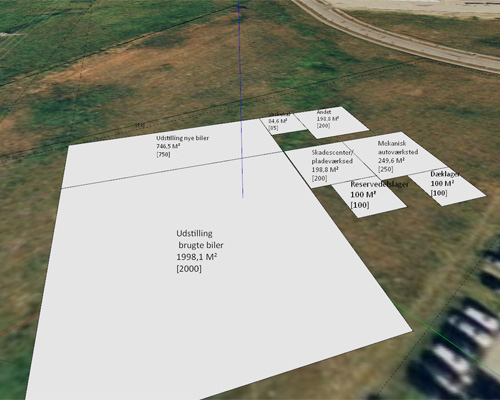
Here it is in action. This will be very useful for me when sketching projects with focus on areas
I guess this has something to do with it
"The entityID is not persistent between sessions."
But how can I then recognise objects when a file is reloaded ?
Thanks
Jorgensen
I have just tried to save
model.set_attribute("TM_area", "objects", data)
where data is an array - I can close sketchup and open gain, reload the file and the array can be read again as model.get_attribute("TM_area", "objects")
Works fine - BUT
why the #¤"#¤%¤%) have the entityID for the objects I created change when I reload the file ? now I can't keep track of them anymore 
a guite tired
Jorgensen
I guess it could be solved via delete_key - but how ?
Hi Todd
Thanks for your input - it works well 
I have one problem though:
I use the get_array to recive an array (logic )
I then run through this array - witch contains some entityIDs and if an object, with this ID exist, I delete it from the model and from the array. I then save the array again.
The problem is, that even if I delete some keys from the Array - so lets say the original array has an length of 10 and I then delete five objects, the length of the array is 5. I then save the array - from i=1 to i=6 - but the old ones from 6-11 still exits in the dictionaryname - how do I delete the var1 - var10 before updating the dictionaryname ?
Thanks
Jorgensen
Thanks Todd
Actualy, I need this to keep track of some add_text objects I create - so that I can run through the 'test' array and delete the objects that I have created, even if the file has been saved and Sketchup restarted. Will this be possible ?
Is this right ?
"rc = Sketchup.active_model.set_attribute("TM_area", "test", "false") ; "
do you save the test array ?
As you (and surely many others) can se, I'm not a programmer, just an architect, that have a need for a special function, and tries to create this by looking in others scripts and in this forum 
Maybe there should be two groups under Ruby, one for programming ruby/sketchup and one for using plugins ?
Thanks
Jorgensen
Thanks
oh - hmmmm sounds a bit boring - that might be the reason for the quite quick reply from you 
I'm trying to keep track of some objects via "set_attribute"
But when I retrive the objecs via "get_attribute" I get NIL
Is'nt possible to keep track of objects in set_attribute ?
Thanks
Jorgensen
This is muy short test script:
def tmTest
model = Sketchup.active_model
test = model.get_attribute "TM_area", "test", 'false'
if(test == "false")
test = Array.new
end
a = model.selection
for object in a
test.push object.typename
end
Sketchup.active_model.set_attribute "TM_area", "test", test
for object in test
puts object
end
end
Hi azuby
Any news on the development ?
It seems that I can use
model = Sketchup.active_model
data = model.get_attribute "TM_area", "textObjects", "default"
and
value = model.set_attribute "TM_area", "textObjects", objects
And a other problem:
The array $areaObjects, is not saved inside the file - so next time it is loaded - one have to manuel delete all the textobjects and add newones -
Is there a smart workaround here ?
Thanks
Jorgensen
Thanks TIG - I'll have a look at it...
Right now I have a problem, actual the last before I can use the script at work...
I use this to tjek and delete objects in the active group:
def tmAreaDelete
objects_active = Sketchup.active_model.active_entities
for object in objects_active
if($areaObjects.include?object)
object.erase! unless object.deleted?
$areaObjects.delete object
end
end
end
What teases me, is I have to run the tmAreaDelete tree times to delete all text objects - and I just can't se why It works if I skip the line '$areaObjects.delete object' but that can't be a good solution.
Jorgensen
Easy area = area.sub("eters ", "")
This is fun
Hi Didier
Thanks for your reply. Just the way I would do, I just could'nt find the settings in Ruby.
One problem however, the text now becomes 14 Meters2 - should be 14 M2 - I guess I'll have to do somekind ereg_replace....
Thanks for your help.
Jorgensen
Its now going the right way...
I have one question.
I have a group on each level of the building (the levelGroup). Each levelGroup contains a number of groups, that holds info for each room, the area and name. roomGroups.
I then doubbleclick, and get inside a levelgroup, and update the roomGroups.
To keep track of the roomGroups I use:
target = Sketchup.active_model.active_entities;
$areaObjects.push target.add_text text, coordinates
I then have an array $areaObjects, that cointain all the text added (roomGroups).
If I wan't to delete/update all the text, I can read the array again and then erase! them, but this will delete all the text on in all levelGroups.
Is there a way to tjek if the roomGroup is inside the active group ?
Thanks
Jorgensen
Hi
I have a question about the Sketchup.format_area utility.
My model is in mm, but I would like the result to be in m2 not as Sketchup.format_area shows mm2 - is this somehow possible ?
Thanks
Hi Didier
Thank - you have allready helped. I'll se what I can fix myself.
By the help from this forum, it might be possible
Jorgensen
Hi Didier
I will have a look at the script.
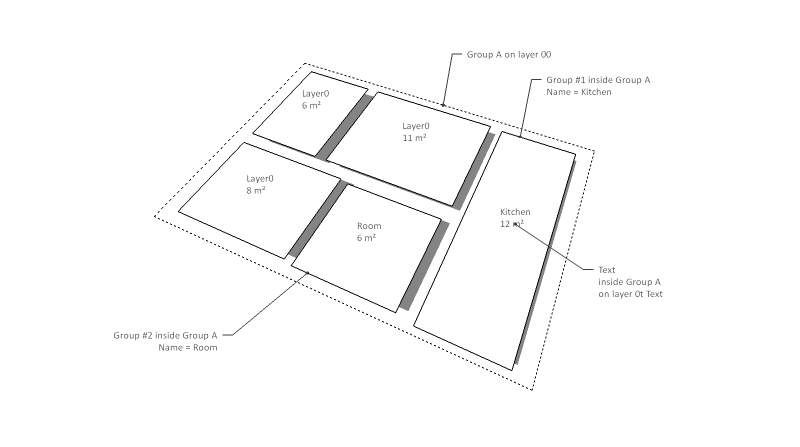
What I main by groups. Is, that I have:
On layer 00 (ground level), I would like a group that contains a 'area group' for each room, Kitchen, livingroom, and so on... .Each areagrop should have the name of the room, so that a script, can update the Text and area.
So, in the maingroup on layer 00, holds a text (on layer 0t Text) that says kitchen size ...., and a group named Kitchen (on layer 0A Area, so it can be turned off).
A bit dificult to explain
Jorgensen
Hi All
Thanks for your input.
@Didier
I have tried that - belive me - but I don't no why, but if I do an Object.area on a face that is 1000x1000mm I get an area of 1,550m2 ? And I have setup units in Model Info - strange ???
Another problem. If I doubbleclick the mouse I get a 'attaced' text, that keeps the position inside the face, even if I move the sides. This does not happen when using Object.add_text does any know if it is possible to achieve this by script ?
What I'm trying to create is a small script that has the function as I have tried to sketch on the attached image. This would be very useful for me when sketching plans
The next problem - how do I get group names, add listing them inside a group and adding text inside this group - a lot to learn.....