sketchucation logo sketchucation
    • Login
    1. Home
    2. john.warburton
    3. Posts
    Oops, your profile's looking a bit empty! To help us tailor your experience, please fill in key details like your SketchUp version, skill level, operating system, and more. Update and save your info on your profile page today!
    ⚠️ Important | Libfredo 15.8b introduces important bugfixes for Fredo's Extensions Update
    J
    Offline
    • Profile
    • Following 0
    • Followers 0
    • Topics 12
    • Posts 219
    • Groups 1

    Posts

    Recent Best Controversial
    • RE: Sketchup 7.1 Pro Upgrade Fails

      I came across a lot of posts on various forums that identified 80070057 as an HTTP proxy error. I'm assumming that this is the same as the code with the hex prefix and not a completely different decimal code.

      Common wisdom said that the first solution would be to try running proxycfg.exe from the console with admin privileges, running it twice, the second time with a '-d' switch.

      Of course I was one of the many who aren't running IIS and did not have proxycfg available. Just in case I did download it though, and ran it to no apparent effect.

      The second solution recommended is to do a clean reinstall of Vista, which is about where I am at anyway. By 'clean' it seems that I have to remove the current installation first, presumably to be absolutely sure that the new installation does not pick up any crud from the current installation.

      To be sure, I think a format of the HDD is in order. A job for the weekend, I guess. 😞

      posted in SketchUp Bug Reporting
      J
      john.warburton
    • RE: Sketchup 7.1 Pro Upgrade Fails

      Well, I managed to uninstall the MS Visual C++ 2005 Redistributable without encountering any errors.

      Installing the latest version failed, though, with an error suspicously similar to the SU installation error.

      Windows Update has ceased working too (with a useless generic error code 8000FFFF.) This may be due to my over aggressive use of a registry cleaner, though. Unfortunately restoring my registry backup did not fix this.

      I have a current backup and details of my software installations, so I am thinking that reinstalling the OS from scratch is my only solution at this point.

      posted in SketchUp Bug Reporting
      J
      john.warburton
    • RE: Sketchup 7.1 Pro Upgrade Fails

      @gaieus said:

      John, don't you have PM's disabled by any chance in your preferences?

      Oops! That would explain, that. 😳 Got the PM now!

      posted in SketchUp Bug Reporting
      J
      john.warburton
    • RE: Sketchup 7.1 Pro Upgrade Fails

      Just to be clear, by the way - I don't blame Sketchup for this problem. It seems to be a Microsoft issue.

      posted in SketchUp Bug Reporting
      J
      john.warburton
    • RE: Sketchup 7.1 Pro Upgrade Fails

      @andrews said:

      @john.warburton said:

      It looks like I'm heading towards a complete reinstall of Vista and my software. A couple of days at least that I can't afford.

      John:
      I sent you a PM yesterday with other suggestions, but have not heard back. Try those first...

      Thanks Andrew, but I have not received any PM's. Last one in my inbox was in February.

      posted in SketchUp Bug Reporting
      J
      john.warburton
    • RE: Sketchup 7.1 Pro Upgrade Fails

      Googling 0x80070057 pulls up a raft of issues with this error. Seems to be generic, and seems to indicate a corrupt entry in the registry.

      There is some suggestion that the fix is supposed to be easy and just needs RegCure.

      Well, I installed RegCure (paid for it too, dammit!) and ran the scan, and it made no difference.

      It looks like I'm heading towards a complete reinstall of Vista and my software. A couple of days at least that I can't afford.

      posted in SketchUp Bug Reporting
      J
      john.warburton
    • RE: Sketchup 7.1 Pro Upgrade Fails

      @andrews said:

      We'll put our heads together over this, but since it is in a component that we do not control, I do not expect we will find a quick resolution. If you decide to try anything else, please let us know how it turns out.

      Andrew

      I uninstalled version 7 and attempted to reinstall v 7.1.

      Exactly the same result.

      I no longer have the use of Sketchup. 😞

      posted in SketchUp Bug Reporting
      J
      john.warburton
    • RE: Sketchup 7.1 Pro Upgrade Fails

      @sketchup guide tommy said:

      Hi John,

      Does this help at all?

      http://groups.google.com/group/sketchupissues/browse_thread/thread/33e44fbfa97d7d88?pli=1

      Regards,
      SGT

      Thank you for the information. I tried it, but it made no difference, I am afraid.

      posted in SketchUp Bug Reporting
      J
      john.warburton
    • Sketchup 7.1 Pro Upgrade Fails

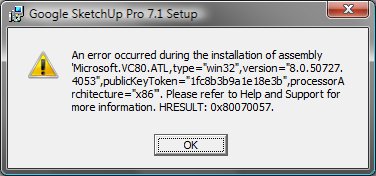
      I'm attempting to upgrade my copy of SU 7 Pro to 7.1 running on Vista Home Premium.

      I've tried upgrading from within Sketchup and by downloading the EXE, both produce the same error and the upgrade is rolled back.

      See screen shot. SU Upgrade Error Message

      posted in SketchUp Bug Reporting sketchup
      J
      john.warburton
    • RE: SketchUp 7.1?

      @sepo said:

      You can download dxf/dwg plugin from the Google site.

      I know, but this won't be available for the "next major upgrade", so keeping a copy of v6 for then may be wise.

      posted in SketchUp Discussions
      J
      john.warburton
    • RE: Load Errors - gettingstarted.rb

      @unknownuser said:

      use ProcMon to see what is the path that it checks for that file. you can than trace it back to see what script is called before.

      Thank you.

      Tried that and it showed me that gettingstarted.rb was being found in the Tools folder, not the Plugins folder (which was where I was trying to find the problem.)

      Renamed it and the error message has gone away.

      Thank you again!

      posted in Developers' Forum
      J
      john.warburton
    • RE: Load Errors - gettingstarted.rb

      @jim said:

      In 7.1, I don't even have a Ruby named gettingstarted.rb I would just rename that file for starters.

      Tried it, no joy I am afraid.

      I also tried moving the contents of my plugins folder so that none were loaded. Again no joy.

      I also deleted my old SU 6 installation. Still no effect.

      I tried disabling all the extension in Preferences. Again, no effect.

      Weird.

      posted in Developers' Forum
      J
      john.warburton
    • RE: SketchUp 7.1?

      SU Free users who want to retain DXF/DWG capabilities after the next major upgrade should probably just make sure that they keep a copy of version 6. A bit of a pain to load into 6, save a SU file, then open that in 8 (or 7.1) I know, but cheaper than upgrading to Pro.

      posted in SketchUp Discussions
      J
      john.warburton
    • Load Errors - gettingstarted.rb

      I've finally got fed up with the Load Errors message that I get when starting Sketchup Pro that I've lived with since upgrading to 7.

      "Error Loading File gettingstarted.rb
      No such file or directory -"

      Short of reinstalling all my plugins, does anyone have any ideas how to deal with this?

      posted in Developers' Forum
      J
      john.warburton
    • RE: SketchUp 7.1?

      @gaieus said:

      Did you try an automatic update from SU or a straight download of the exe file from the SU site first?

      I used the automatic update link, but this just downloaded the EXE any way. I used Run as Administrator on the downloaded file.

      posted in SketchUp Discussions
      J
      john.warburton
    • RE: SketchUp 7.1?

      Version 7.1 sounds worth the upgrade, and I did try to update my Pro on Vista this morning. But the update failed. I'll try again when I get back to my office this evening and post details of the error if it re-occurs, but has anyone else had problems with the upgrade?

      posted in SketchUp Discussions
      J
      john.warburton
    • Piranesi Plugin for Sketchup Free

      Informatix have announced the release of a new plugin that adds the ability to export Sketchup files for rendering in Piranesi. This was previously only possible in the Pro version.

      http://www.piranesi.co.uk/trial/trial_home.asp

      posted in Extensions & Applications Discussions extensions
      J
      john.warburton
    • RE: Photosynth to CSV to SketchUp - Now What?

      Illustration of Didier's plugin on pushpullbar

      http://www.pushpullbar.com/forums/ruby-scripts/9467-visual-index-ruby-scripts-4.html

      posted in Corner Bar
      J
      john.warburton
    • RE: Twilight Render is Out

      @fletch said:

      SketchUp's unique ability to show a section cut

      Not unique Fletch. MicroGDS has this, AND will preserve the cut when rendering (AND imports Sketchup SKP files.)

      posted in Extensions & Applications Discussions
      J
      john.warburton
    • RE: Image protect when emailing?

      The technology is coming ...

      Link Preview Image
      BBC NEWS | Technology | This website will self-destruct...

      New software using peer-to-peer networks will enable data to be permanently erased, developers from the University of Washington say.

      favicon

      (news.bbc.co.uk)

      Link Preview Image
      Vanish: Enhancing the Privacy of the Web with Self-Destructing Data

      favicon

      (vanish.cs.washington.edu)

      posted in Corner Bar
      J
      john.warburton
    • 1
    • 2
    • 7
    • 8
    • 9
    • 10
    • 11
    • 9 / 11