
a really cool (MIG ?) design!
If that thing ever goes out to the street, a parachute to slow down after the
finishline would be a cool gadget
Oops, your profile's looking a bit empty! To help us tailor your experience, please fill in key details like your SketchUp version, skill level, operating system, and more. Update and save your info on your profile page today!
Check out Febhouse | New extensions for Shadow Analysis in SketchUp Download
 H
Offline
H
Offline
Posts
-
RE: Red Bull soapbox racing.
-
RE: Can't See all of DXF File
@cotty said:
@beepee said:
OOps HornOxx, one more issue: I think your conversion may have used inches or some other large unit. These are harmonica reedplates, and the correct unit is millimetres.
Any chance you could give it to me again in mm?
Brendan
You can measure one known length and type in the right length to scale the model with the tape measure tool. (http://help.sketchup.com/de/article/95006 )
Thanks Cotty, for this reason I have added one unit in the current file
-
RE: Can't See all of DXF File
Sorry, I didn´t even think about dimensioning

have switched to mm - hopefully it fits now ...
-
RE: Can't See all of DXF File
Hi Brendan
I have no idea, why your dxf-import didn´t work correct.
Anyway, here is your imported dxf-file, saved as Skup 8-file...
(I hope this file is ok and in the way you expect?)Regards
-
RE: Simple mirroring
Hi Jojo9
using shortcuts also was my choice in the same matter.
I wanted to use "Alt + x", "Alt + y" and "Alt + z" because I was
used to these shortcuts by another software I use.
Forum member Cotty gave me this little help to do so:http://sketchucation.com/forums/viewtopic.php?f=10%26amp;t=60763
-
RE: Lake home npr
Congratulations
A fantastic, very detailed and accurate work - thanks for sharing this!
How did you get this watercolor (aquarell?) look, specifically from the first image, which you have posted here? Is it one of SkUp´s default styles? -
RE: Color Project
@deaneau said:
ok i could write
Reichs-Ausschuss für Lieferbedingungen
however outside of germany nobody know this word combination


That's right!!!!! even here nobody understands that anymore
(they should engage a good marketing agency) -
RE: Color Project
Hi Deaneau
What you're saying is right of course - and to "rebuild" and to use these colors is not the problem.
To be more precise, I would just avoid the label "RAL" (etc ...) for the naming of these color palettes... -
RE: Color Project
Roland Joseph is right
Color systems such as RAL, RAL Design, NCS, etc. are protected by copyrights and may not be distributed. For using these systems, there must be payed royalties to these authors.But there are also a lot of useful color systems from different companies which offer their systems to download as SKP-color palettes, free and legal. This is just one examle:
http://www.sto.de/de/service/farbkarten/stocolour_system.html -
RE: Great big baker's cabinet
A wonderful piece of furniture - and well done!
These cabinets could be found in many kitchens here and were then replaced by the upcoming '50s modernism. The one was lucky, who could find these cabinets again in the basement, where Grandpa kept his tools.
-
RE: Help with choice of setup (SU and render plugin)
Hi Jean-Louis
if you're looking for a cheap yet good render solution, I recommend you to buy a plug-in solution that works directly within SketchUp. All these plugin solutions are pretty easy to use and often quickly to learn as well. Some of the plug-in manufacturers also offer stand-alone solutions, which are often much more complex! So you should remain at a SketchUp plugin solution. These plugins (Shaderlight, Twilight Render, Maxwell Render, Podium, Thea Render etc ...) put you in a position to make very good renderings by yourselve. There are also plug-in solution, which are indeed very very good, but at the same time a little more complicated and often more expensive - for me one example is Vray.Please don´t be scared
 My recommendation for you is a combination of 2 tools: Shaderlight and Twilight Render. Shaderlight is extremely simple to use (just out of the box) and provides good renderings in a pretty fast render time.
Twilight Render is much better in material- and lighting qualities, but also requires substantially longer render times - especially when you're making interior renderings! That's not necessarily a disadvantage, but you need to know that.
So, if I want to make a good exterior or concept rendering very fast (which can also be any furniture or any different object), I use Shaderlight, if I want to focus on excellent material or lighting properties and it does not bother me to wait many hours, I use Twilight Render. Both tools have a pretty reasonable price and both tools are worth every dollar!
Together, they are the ONE render bundle which I need for my work...Both tools run on Make and Pro and both tools you can install as a full version for a certain period to make experiences with it, what I recommend you to do ...
-
RE: Rotring pens
Great - these Rotring pens are almost a devotional!

By the way - with these pens I've started sometime (long ago).
Before you start to draw, you have to shake them gently 3 to 4 times up and down.
(not over your pants, the tablecloth, any drawing or the carpet)
Then you can hear the faint clicking of the metal valves inside which is the
signal that everything is ok ...No, no waste of money at all!
PS: If you do not hear the clicking, you have to go to the sink and brush
-
RE: Photo Match Issues
hello Mbastian,
I hope that's what you are looking for. If I understand you correctly, you want to replace a PhotoMatch image with another image. That's an interesting question, which I was also busy with for some time...
To do this, you need to add a new scene, which is actually a copy of the first original PhotoMatch-scene.
This new scene can be edited by clicking on the "+"-icon within the Photo Match window.
I do not know why the green and red adjustment lines now are located at a different location in the new scene - but they still map exactly the given perspective and the perspective is exactly the same as in the original first scene...
In addition to my demo file (below) I made a quick video and posted it on YouTube ...Perhaps there is an easier or another way - I only know this one ...
PS: I would like to insert the video at this point, but I have no idea how this works
-
RE: The Martian
... the cinema release in Germany is on November 26th - I can´t wait!!!
-
RE: Technics Turntable
Hi all - yes it's been a while that this post was started.
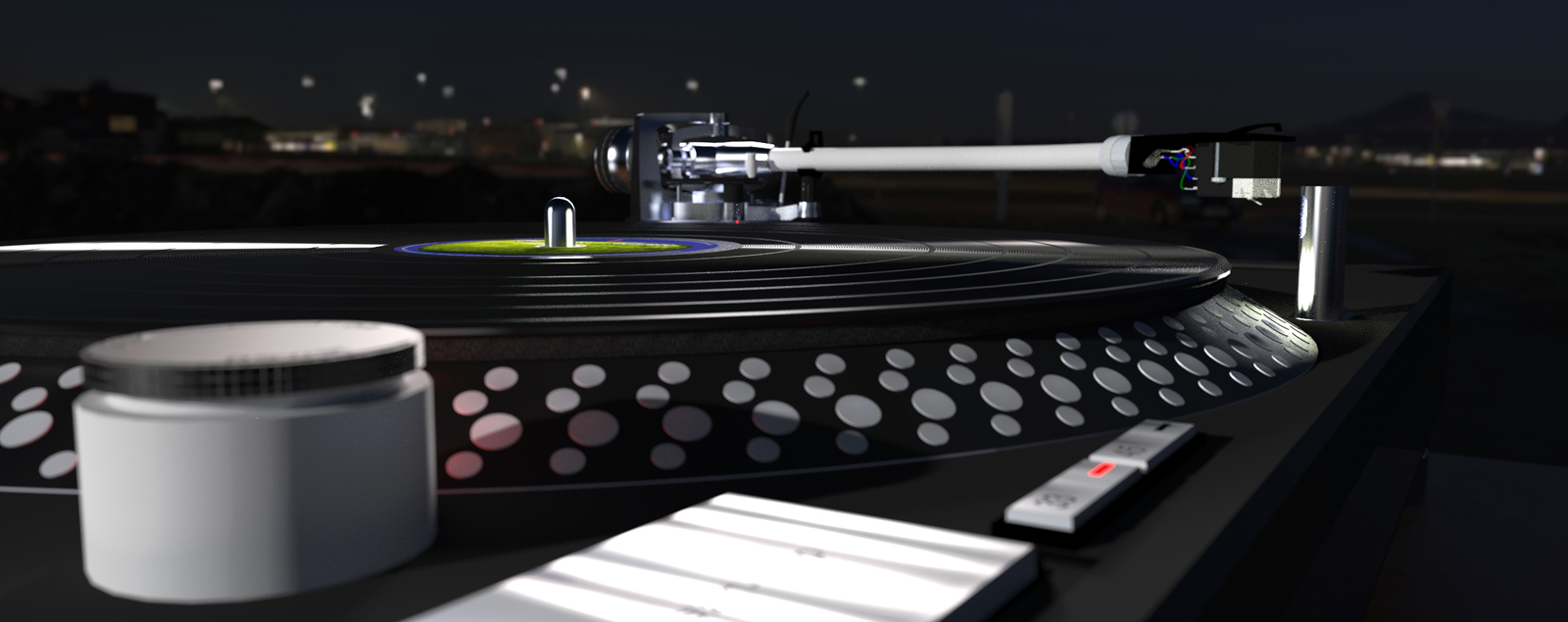
Since all the render results shown here are so fantastic, I had downloaded the turntable model for my own testing and playing. Finally I have also started a test render now and I´m linking this little experiment with my first testing of Twilight Render - I do not know what I'm doing exactly, but the result is encouraging me!
I didn´t find any suitable texture for a vinyl LP, so I made the LP - please do not laugh at me - as a model and I will post this LP-model (the Beatles Blue Album!) in the 3D-Warehouse - maybe someone can use it ...https://3dwarehouse.sketchup.com/model.html?id=ubfe5ee7e-365f-4409-a518-f5d4da4da70c
-
RE: 2400 year old tricycle
Great Work !
not only this great tricycle comes to life again - also great realized is how this poor guy
works like a horse - No idea how - but it looks so great !!!
-
RE: Modeling of a Chain by using Sketchy Physics
Thank you All for your comments
and Cotty,
thank you for that link - yes, that's what I was looking for
I have to get used to this many buttons and the order of pressing them - it works!! -
RE: Garden bench
... when I think of a garden bench - it has to be exactly like yours !
- and when you have built it, tell me where I can buy one

- and when you have built it, tell me where I can buy one