sketchucation logo sketchucation
    • Login
    1. Home
    2. glro
    3. Posts
    Oops, your profile's looking a bit empty! To help us tailor your experience, please fill in key details like your SketchUp version, skill level, operating system, and more. Update and save your info on your profile page today!
    🔌 Smart Spline | Fluid way to handle splines for furniture design and complex structures. Download
    G
    Offline
    • Profile
    • Following 0
    • Followers 0
    • Topics 29
    • Posts 403
    • Groups 1

    Posts

    Recent Best Controversial
    • RE: [Plugin] LaunchUp – A Quick Launcher for SketchUp

      @aerilius said:

      I found it and fixed it in 1.0.11.

      yes; it shows components now

      Some plugins still don't appear in the list, though

      It seems that the plugin name is not taken into account in the search; does the plugin need something special to be recognized?

      posted in Plugins
      G
      glro
    • RE: [Plugin] LaunchUp – A Quick Launcher for SketchUp

      @aerilius said:

      Please update LaunchUp as soon as possible!
      It contains fixes for menu gray-out avoidance.
      Thank you.

      version 10 only show native sketchup plugins on my computer; components (with CLibraries_Loader.rb) or added plugins are not proposed anymore in the launchup window

      maybe i missed sometinhing...

      posted in Plugins
      G
      glro
    • RE: [Plugin]Components Placer v1.2(Apr24,2013)

      @tak2hata said:

      I update this to version 1.2 in Apr24,2013.
      Bugfix:Bounding Box lines reminds when Undo.
      Improve:File selector by using html input type="file".
      So the path including special character will work fine.
      Improve:Select none in listbox when starting at first.

      Thanks.

      yes, special characters are not a problem anymore; thank you

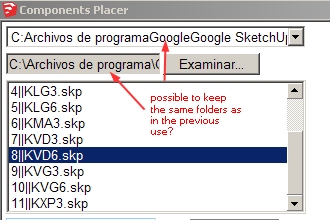
      the folder by default comes back to "Home" and the second folder direction is emptied each time you come back to using the plugin; the third window does contain the previous components; would it be possible to keep track also of the folders address and propose them by default?

      Where is "Home" on the hard drive?


      comp placer folders.jpg

      posted in Plugins
      G
      glro
    • RE: Batch Open-Process-Save

      @tig said:

      The issue is that
      model.save(name)
      will return ' true', BUT it doesn't actually save the model if that ' name' is an open SKP - either as another SKP or it's the current-model's SKP.
      To save a model you need to use
      Sketchup.send_action("saveDocument:")
      Then use other API methods to open other files etc...

      yes
      i modified the previous plugin, and now the file is saved
      thank you TIG

      still 2 problems i can't solve:

      disable perspective (Sketchup.send_action("viewPerspective:" puts it on and then off...)
      wait until the file is saved (i added a messagebox, you have to click between each file)

      TIG gave (again) a solution for the second problem
      http://sketchucation.com/forums/viewtopic.php?f=323&t=39304
      but i couldn't make it work on my computer


      front, purge and save skps in a folder

      posted in Plugins
      G
      glro
    • RE: Batch Open-Process-Save

      @cadfather said:

      thanks Giro, i know that one - this is to process sketchup files though and not images.

      it seems i am not the only one with this problem for saving a currently opened file with the same name

      http://www.smustard.com/forum/viewtopic.php?f=6&t=35

      maybe a sketchup bug...

      posted in Plugins
      G
      glro
    • RE: Batch Open-Process-Save

      skp modification and save copy
      @cadfather said:

      thanks Giro, i know that one - this is to process sketchup files though and not images.

      I have been trying for a while to write a plugin that would do what you say
      TIG's helped me with some code, and i wrote this plugin "skp_recap.rb"

      There is a problem, though: i don't find the way to overwrite the file with the modifications the plugin makes, so i have to save it with a different name: I added "bis" to the name of the file

      nom_model = model.title
      #constitue le nom du modele
      nom_model = rep_path + "/" + nom_model + "bis"+".skp"
      puts nom_model
      #sauve
      model.save nom_model
      

      maybe somebody will find a clever way to avoid the "bis" trick

      posted in Plugins
      G
      glro
    • RE: Batch Open-Process-Save

      @cadfather said:

      anyone up to make a script that opens sequentially all the skp files in a folder, sets a style, puts the model to front view, fits the model to screen, purges all unused and then saves until all files are done?

      what i'm trying to do is consolidate my components library and have the thumbnails work for all files.

      (i can make a reasonable paypal donation)

      This plugin might be helpful
      http://sketchucation.com/forums/viewtopic.php?t=48215

      posted in Plugins
      G
      glro
    • RE: [Plugin]Components Placer v1.2(Apr24,2013)

      @tak2hata said:

      Hi,Rich!
      The store is very helpfull for me.

      Hi,Glro!
      I think the folder path you select including special character like non-alphabetical.
      That is the very big problem of ruby in sketchup.

      thanks.

      you are right; it was a special character (è) problem... again

      suggestion... a file browser, with 2 interactive windows, so that when you click on the folder, all the components inside the folder appear below in the second window...

      only a suggestion, i don't even know if it possible to make it work this way

      posted in Plugins
      G
      glro
    • RE: [Plugin]Components Placer v1.2(Apr24,2013)

      great idea

      but choosing a skp file in a folder with "select folder" doesn't bring the content of the folder on my computer

      posted in Plugins
      G
      glro
    • RE: [Plugin] LaunchUp – A Quick Launcher for SketchUp

      @pete said:

      @glro said:

      could you developp the idea?

      You need to install this plugin:

      http://sketchucation.com/forums/viewtopic.php?f=323&t=36467&p=321094&hilit=mylibrary#p321041

      to have access to components in the components folder in your SketchUp install directory.

      OK

      i downloaded and installed "CLibraries_Loader.rb"

      and you are right: when i type the name of the component in the launchup windows, it appears magically at the cursor location

      great idea
      thank you!

      posted in Plugins
      G
      glro
    • RE: [Plugin] LaunchUp – A Quick Launcher for SketchUp

      @pete said:

      @aerilius said:

      Wouldn't you find the components also in the components browser? To what extent would it be different or better?

      The results are in the component browser, just like all the tools / functions are in the menus and toolbars. ...

      could you developp the idea?

      when i type the name of a component in the launchup window, it doesn''t bring the component on the cursor with my computer....

      posted in Plugins
      G
      glro
    • RE: Place component with left clicking?

      @miikka1978 said:

      Is there a script that would have the functionality of placing components by left clicking with mouse? Or is this already built in Sketchup in some way?

      I have a top view layout (2D) and I would need to place about 600-700 trees in the layout. The trees are just green circles (components) and I would need to place them in specific locations in the layout. This is maybe a stupid question but I just can't remember any easy way to do this quickly.

      maybe this plugin can help you
      http://sketchucation.com/forums/viewtopic.php?t=26117

      posted in Plugins
      G
      glro
    • RE: To detect if a component contains a component

      @dan rathbun said:

      Here's another edition (wrapped in method,) that only works upon the active editing context (to help prevent BugSplats!,) tests first for any definitions and lastly filters out images and groups.

      thank you for the code

      i tried it, but it doesn't work, at least on my computer

      posted in Developers' Forum
      G
      glro
    • RE: To detect if a component contains a component

      It works perfectly

      thank you!

      posted in Developers' Forum
      G
      glro
    • To detect if a component contains a component

      i am wondering if there is a way to detect if a component contains an embedded component
      the idea is:

      if it contains an embedded component, explode it
      if not, don't explode it

      There is a simple way: add some characters at the end of the component name, and check wether these characters exist

      model = Sketchup.active_model # Open model
      entities = model.entities # All entities in model
      	
      entities.to_a
      
      model.start_operation "explose_comp_imbriques"
      
      for e in entities.to_a
            if e.is_a? Sketchup;;ComponentInstance
                str= e.definition.name 
                e.explode if (str.include? "#i" )
            end
      end
      
      Sketchup.active_model.definitions.purge_unused
      	
      model.commit_operation
      

      but it would be better not to be obliged to add special characters

      posted in Developers' Forum
      G
      glro
    • RE: [Plugin] Angular Dimension

      plugin works fine on my computer (PC)

      thank you

      i especially like the message at the bottom of the screen, for each point to come; makes it very easy to use

      posted in Plugins
      G
      glro
    • RE: Minimizing SU moves toolbars...

      @krisidious said:

      I have saved and it continues... it's only these certain bars that do it. I have not looked at the registry keys but I recently used Thom's cleaner script on it. And it was doing this before that and now after. It's a minor inconvenience but I would like to do away with it none the less.

      if restauring the toolbars position doesn't work, you might have to erase and install sketchup again...

      i do it whenever i notice a strange behaviour of sketchup

      also, i put as many icons as possible on the left side of the screen, so that when the window is reduced, it doesn't have consequences on the icons

      finally, i try to use as many keyboard shortcuts as possible, instead of icons; icons occupy room on the screen, and i noticed that they are not managed efficiently by sketchup
      posted in Plugins
      G
      glro
    • RE: 3D cursor

      @rich o brien said:

      Windows > Preferences > Drawing > Display Crosshairs

      yes it helps, thank you

      posted in Plugins
      G
      glro
    • 3D cursor

      Is there a plugin that would turn the arrow type cursor into a 3D cursor, that is

      3 joining perpendicular lines
      red green blue to show where are the axes, and how they are oriented

      ?

      or a plugin that would draw these 3 lines in a corner of the screen, permanently, like autocad does

      I do use the feature that put colors on edges according to there orientation, but you have to deduce the position of the origin, and it changes the aspect of the model so much that you can't keep it on all the time...

      posted in Plugins
      G
      glro
    • RE: In need of help!

      @niclasbladh said:

      Hi,

      I'm trying to creat grass blades with Sketchup 8 together with Maxwell render plugin. Using this tutorial http://www.youtube.com/watch?v=UJ9CfuiuAiA, around 5 minutes in the guys hits "render" but when I do, Sketchup shuts down and a bugreport appears. Is there anyone that has experience creating grass that could help me? 😄

      // Nicolas

      don't know anything about rendering, but it seems that this plugin

      http://sketchucation.com/forums/viewtopic.php?t=28092

      makes grass also

      posted in Plugins
      G
      glro
    • 1
    • 2
    • 13
    • 14
    • 15
    • 16
    • 17
    • 20
    • 21
    • 15 / 21