sketchucation logo sketchucation
    • Login
    1. Home
    2. glro
    3. Posts
    Oops, your profile's looking a bit empty! To help us tailor your experience, please fill in key details like your SketchUp version, skill level, operating system, and more. Update and save your info on your profile page today!
    ๐Ÿ”Œ Smart Spline | Fluid way to handle splines for furniture design and complex structures. Download
    G
    Offline
    • Profile
    • Following 0
    • Followers 0
    • Topics 29
    • Posts 403
    • Groups 1

    Posts

    Recent Best Controversial
    • RE: Soften-Edges using by ruby

      @tig said:

      Assuming ss=Sketchup.active_model.selection...

      defns=[]
      > ss.grep(Sketchup;;ComponentInstance).each{|e|defns << e.definition}
      > defns.uniq!
      > defns.each{|defn|
      >   defn.entities.grep(Sketchup;;Edge).each{|e|
      >     if e.faces.length==2
      >       e.soft=true
      >       e.smooth=true
      >     end
      >   }
      > }
      

      or something similar...

      yes...it works

      this will save me time, since i noticed that some components edges come back visible in my models, for unknown reason...

      now with just one clic, the problem is solved

      thank you

      posted in Developers' Forum
      G
      glro
    • RE: Soften-Edges using by ruby

      @tig said:

      @thomthom said:

      @tig said:

      Make an array of the selected edges [or of the edges within selected groups etc].
      Iterate through those edges and test it they have >1 face.

      The native soft+smooth tool doesn't soft+smooth any edges that is connected to more or less than 2 faces.

      OK just adjust the code so that it's a edge.faces[1] and not edge.faces[2] test...***

      To work on a group's edges

      
      > ###... add this into the mix...
      > groups=[]
      > ss.to_a.each{|e|groups << e if e.class==Sketchup;;Group}
      > groups.each{|group|
      >   group.entities.to_a.each{|e|
      >     if e.class==Sketchup;;Edge and e.faces.length==2 ###***
      >       e.soft=true
      >       e.smooth=true
      >     end#if
      >   }
      > }
      > ### ???
      > 
      

      it works for groups, but not for components...
      is it possible?

      posted in Developers' Forum
      G
      glro
    • RE: [Plugin] "Drill" extension for making holes

      @dave r said:

      I'm curious about why hitting the Enter key seems to be a problem with this plugin when Enter is so frequently used with the default tools and there are many other plugins that have the same requirement. The fellow who posted immediately above the post with the most recent revision had the same problem which was solved by hitting Enter.

      which default tools?

      the VCB, Ruby console, ...?

      most plugins input are made through a dialog box, and in this case, it is obvious: you click "OK" on the button

      With the VCB, there is no button... you are just supposed to know it is necessary to hit "enter"

      posted in Plugins
      G
      glro
    • RE: [Plugin] "Drill" extension for making holes

      @tig said:

      You must press <enter> after typing the new size?

      Also that size is currently always defaulting to decimal inches.
      BUT if you edit the file at:
      @@drill_diameter = 0.875
      to read
      @@drill_diameter = 0.875**.inch*****
      then it'll work with any units you have setup or you input, taking unsuffixed values as 'current units' or those with suffixes alternatively: so if you are working in inches but want one hole at exactly 1cm type that +<enter>...
      ***If you normally work in say 'mm' change it to default to say '10mm' initially, if your model-units are mm then typing 12 + <enter> will make a 12mm hole...
      I.E. @@drill_diameter = 10.mm

      yes, it works now

      i usually use meter as default unit

      I changed "@@drill_diametre = 1" into " @@drill_diametre = 1.m" in the plugin, and typed "enter" after changing the diameter

      thank you

      posted in Plugins
      G
      glro
    • RE: [Plugin] "Drill" extension for making holes

      @pants said:

      Does this really work for others?

      I just installed the latest-gen plugin, and for me, it's got a drawback that makes it unusable: the diameter of the hole can't be changed. My various entries of different diameters do show up in the text-box, but I've been machine-gunning test-holes for a few minutes, and nothing about the diameter changes from one to the next, whether I've got "0.1" in the box or "11": all measure out at 0.875" (7/8"), which is the default hole-size.

      for me it is unstable

      sometimes it works

      most f the times it doesn't...

      posted in Plugins
      G
      glro
    • RE: [Plugin] LSS Zone

      congratulations... ๐Ÿ‘

      for the enormous amount of work needed to produce such plugin and the video; it is very nice to watch, explains everything

      i agree with the latest comment: would it be possible to retrieve the surface of each room from the trace of the walls on the floor?

      posted in Plugins
      G
      glro
    • RE: [Plugin] [Re]Scene v1.0.7

      I was looking for a plugin to NOT record the camera position in all scenes
      ...
      too little to match

      posted in Plugins
      G
      glro
    • RE: Installation.problems with parametric_grid.rb

      @atelierpaar said:

      Hello every Body,
      I downloaded "parametric_grid.rb" and "parametric.rb" from sketchucation Plugin Store
      When starting SU I get the following Error ๐Ÿ˜ฎ :

      Fehler beim Laden der Datei parametric_grid.rb
      no such file to load -- ./parametric.rb

      So far I cant get the script to work. Anybody any idea whats going on here?

      Thanks for your comments

      Uli

      did you check if "parametric.rb" is among your files in the plugins folder?

      posted in Plugins
      G
      glro
    • RE: [Plugin] 3D Text Editor

      @tt_su said:

      @glro said:

      i downloaded and installed you plugin an TT_Lib_v2.8.3.rbz
      but then, when sketchup was launched, a message said i have to download TT_Lib2-2.8.0.rbz
      so i uninstalled TT_Lib_v2.8.3.rbz and installed TT_Lib2-2.8.0.rbz

      Whaaat? ๐Ÿ˜•
      You shouldn't need to downgrade. Are you on Windows by any chance?
      Maybe you ended up with some files in VirtualStore...
      How did you install it?

      windows 7 64 bits

      installed using preferences > extensions

      downloaded vers 2.8.3 here
      http://sketchucation.com/resources/pluginstore?pln=TT_Lib

      but it didn't work so i downloaded the previous version using the link that appeared on my screen

      but it's OK now;works great

      posted in Plugins
      G
      glro
    • RE: [Plugin] 3D Text Editor

      @glro said:

      i downloaded and installed you plugin an TT_Lib_v2.8.3.rbz

      but then, when sketchup was launched, a message said i have to download TT_Lib2-2.8.0.rbz

      so i uninstalled TT_Lib_v2.8.3.rbz and installed TT_Lib2-2.8.0.rbz

      and then it worked

      you did a great job

      you managed to make a multilines editor...

      would it be possible to ...? ๐Ÿ˜›

      have the 3d text in a red/blue plan, instead of red/green?

      i would like to use your plugin to add comments to a scene, one comment per scene; usually, the camera is oriented so that vertical objects appear vertical

      So, it would be easier to read if the text was in the red/blue plan.

      no, i just realised that you can change the plan by writing on a face of the model; so to write vertically, you just have to find a vertical face in the model

      posted in Plugins
      G
      glro
    • RE: [Plugin] 3D Text Editor

      i downloaded and installed you plugin an TT_Lib_v2.8.3.rbz

      but then, when sketchup was launched, a message said i have to download TT_Lib2-2.8.0.rbz

      so i uninstalled TT_Lib_v2.8.3.rbz and installed TT_Lib2-2.8.0.rbz

      and then it worked

      you did a great job

      you managed to make a multilines editor...

      would it be possible to ...? ๐Ÿ˜›

      have the 3d text in a red/blue plan, instead of red/green?

      i would like to use your plugin to add comments to a scene, one comment per scene; usually, the camera is oriented so that vertical objects appear vertical

      So, it would be easier to read if the text was in the red/blue plan.

      posted in Plugins
      G
      glro
    • RE: [Plugin]T2H_Annotator v1.2.0(20130915)

      @tak2hata said:

      Hi,
      I update this to version 1.2.0
      New Option for changing Sketchup Scene Page by clicking Annotater TAB.

      Thanks.

      you did what you said you did... ๐Ÿ‘

      i tried
      i had problems until i understood that you are supposed to clic on the tab in the plugin html window to change scenes

      because if i clic on the tabs in the sketchup windows, the text remains the same, it doesn't change

      also, i understood later that the text tab is associated to the scene which is active when the text tab is created

      if i close the sketchup window, and open it again with the same model, the text which was on the screen before is the one that appears again

      Here are some comments:

      would it be possible to register the file with the text on each scene, so when the file is closed, and opened again, the right text goes to the right scene, even if the plugin annotator isn't switched on? use annotator as a word processor for sketchup?

      or at least make that no text appears until the text file is loaded through annotator

      would it be possible to change scene by clicking on the scene tab in the sketchup window, instead of clicking on the tab in annotator html window (i have to clic many times before it reacts)

      long texts don't fit to the screen; would it be possible to have a maximum number of characters per line, and then change line?

      i am going to try your plugin in real situation this week

      thank you

      posted in Plugins
      G
      glro
    • RE: Number of edges mystery

      remove lonely vertex
      @tig said:

      You can use Move to relocate a line's end/start vertex and snap it to another.

      Also see...
      http://sketchucation.com/resources/pluginstore?pln=FredoTools
      In that Fredo has a tool that remove unneeded [lonely] vertices in collections of selected edges.
      So if your tiny edges are co-linear with another longer edge then it will merge the two into one longer edge...

      yes

      remove lonely vertex solves the problem
      but only when i copy the rectangular surface apart and select it individually
      when it is side by side with others, it doesn't work

      but i think i understand now the source of the problem

      when i zoom, i notice that the rectangular surfaces are overlapped just a little
      so logically, sketchup cut the edge and made 2, one almost the side of the rectangle, and the other, a very short one...

      I checked my original dxf file, and yes, they overlap also...
      so Baz was right, sometimes, draftsmen may be sloppy, especially me...

      thank you for helping me out


      overlapping surfaces

      posted in Plugins
      G
      glro
    • RE: Number of edges mystery

      @baz said:

      Believe it or not autocad (and other cads) are very sloppy, or the draftsmen are.

      If you turn on 'endpoints' in 'styles', and zoom in you will see the 'other edges'

      If I need to use imported cads for anything accurate, I usually end up tracing over the whole thing to avoid just this sort of problem.
      Baz

      you are right

      the 'other edges' are short segments close to the corners

      if i select only the long edges, and extend them to the corners, the rectangular surface has only 4 edges and i can convert it to a component

      thank you for pointing this problem to me

      i shall have to find a way to pass this obstacle, because tracing over is not an option when i have hundreds of surfaces to convert


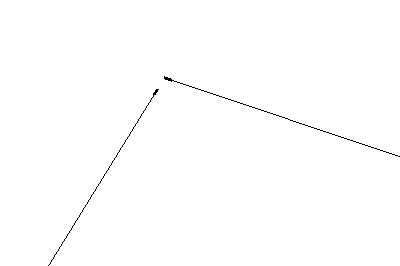
      trait interrompu a l'angle


      ensemble

      posted in Plugins
      G
      glro
    • Number of edges mystery

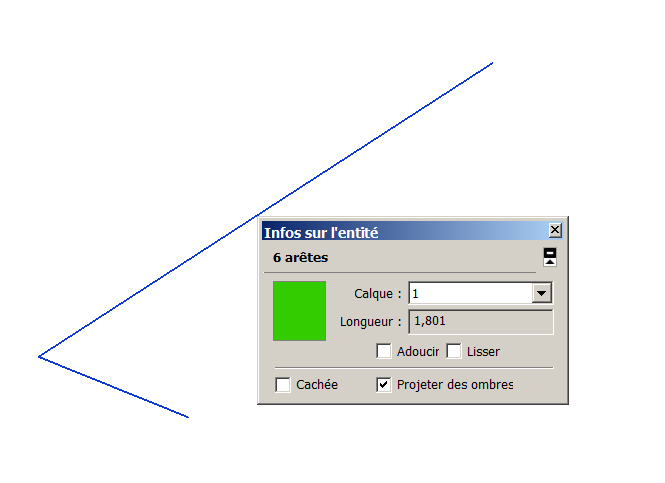
      2 lines 6 edges?2 lines 6 edges model

      does anyone have an explanation for that?

      i am writing a plugin that turns a rectangular face into a component, so i count the edges to check if there a 4

      But i realize today that some rectangular faces may have more that 4 edges?

      if ou click individually on each edge, entity info shows you: "one edge"

      but if you select them all, entity info shows you: 6 edges...

      these edges have been imported from a dxf file; maybe a problem while importing...

      posted in Plugins
      G
      glro
    • RE: [Plugin]T2H_Annotator v1.2.0(20130915)

      @glro said:

      i would like to use your plugin to add a comment on each scene of the model

      now, it is not possible because you can show any tab (comment) on any scene

      Would it be possible to link a tab to one scene, and one scene only?

      And to edit the tab name, so it matches the scene name?

      it would be great!

      i know how to add a single line comment in the upper corner of the screen, but what you do, multilines comment in a html window, is much much better

      i don't use the software that comes with sketchup, Layout, at all

      i prefer writing directly down on the model space, more interactive

      to add a multilines comment to a scene, i sometimes use gallery reference
      https://sites.google.com/site/morisdov/

      it only works if the plugin folder of the computer contains gallery_reference.rbs

      posted in Plugins
      G
      glro
    • RE: [Plugin]T2H_Annotator v1.2.0(20130915)

      i would like to use your plugin to add a comment on each scene of the model

      now, it is not possible because you can show any tab (comment) on any scene

      Would it be possible to link a tab to one scene, and one scene only?

      And to edit the tab name, so it matches the scene name?

      posted in Plugins
      G
      glro
    • RE: [Plugin] Layers Panel 1.2.1

      @utiler said:

      Hey JBB, one question before I try it out: when you add a layer is that layers' visibility only visible in the current scene? If not can it be???? So tedious when adding a layer to then have to go through all other scenes to turn it off it you only want
      it visible in one scene.

      Vismap does what you are asking for

      http://sketchucation.com/forums/viewtopic.php?t=23029

      posted in Plugins
      G
      glro
    • RE: [Plugin]T2H_Annotator v1.2.0(20130915)

      nice idea
      thank you

      i am sure there are plenty of cases where it will be useful

      association of tabs to scenes might enable to show a comment per scene

      posted in Plugins
      G
      glro
    • RE: Anyone familiar with Rescape?

      @pixero said:

      I stumbled upon this SU plugin called Rescape that looks interesting but havent got it to work.
      Is anyone familiar with it?

      https://sites.google.com/a/likuski.org/rescape/home

      i don't see any download link on the web page

      this seems to me more a PROJECT of plugin, than a real one

      posted in Plugins
      G
      glro
    • 1 / 1