Maybe a far from origin problem due to a Autocad import?
Oops, your profile's looking a bit empty! To help us tailor your experience, please fill in key details like your SketchUp version, skill level, operating system, and more. Update and save your info on your profile page today!
Urasik Extensions | Lots of new extensions to check out Learn More
 Offline
Posts
-
RE: Did a God or Gods create the universe? EDITED
-
RE: Need some horn help
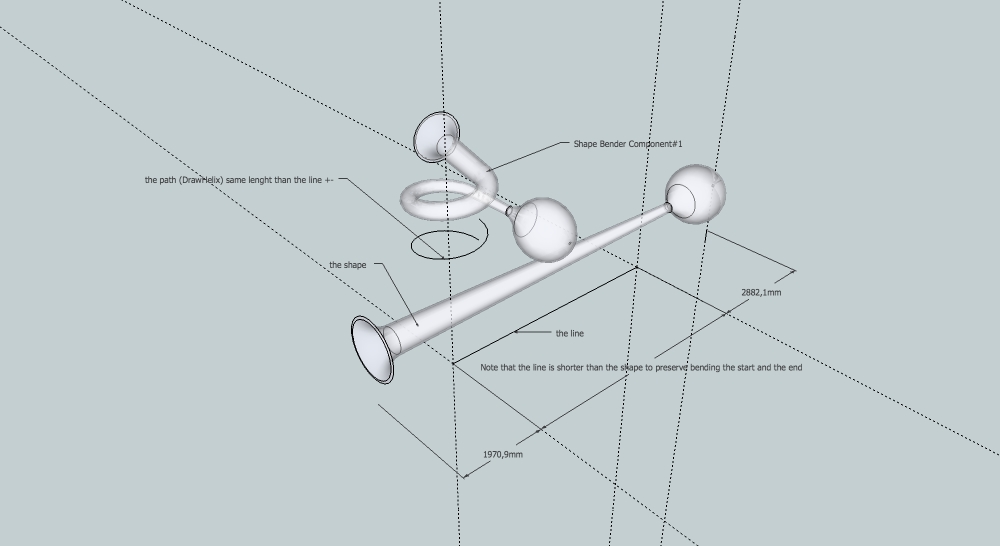
This my try with Shape bender and DrawHelix.
This way with the first shape you can try multiple attempts modifying the line or and the path.
-
RE: Did a God or Gods create the universe? EDITED
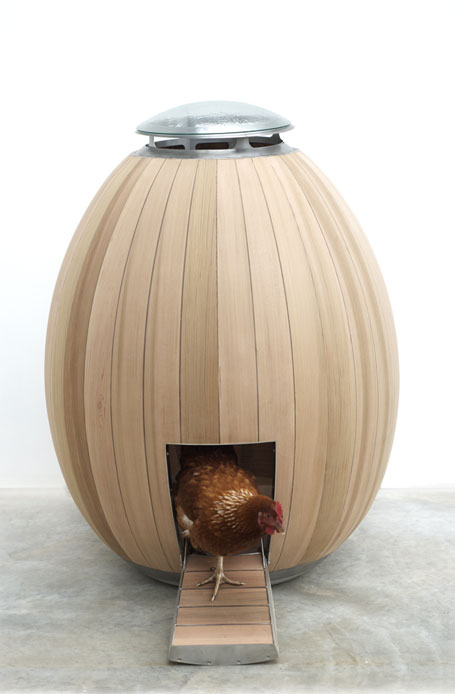
http://nogg.co/
And the merry go round... -
RE: Conic section - how?
Zorro2 is a very good an easy cutter.
http://forums.sketchucation.com/viewtopic.php?t=16038#p124862
And if you right-click a section plane you have the option to slice at section plane.
Also there is TIG's Workplane
http://forums.sketchucation.com/viewtopic.php?t=31204#p274345 -
RE: Working with wrought iron
@unknownuser said:
Dave R wrote:
Once you get that wrought iron work down you can work on something like this:
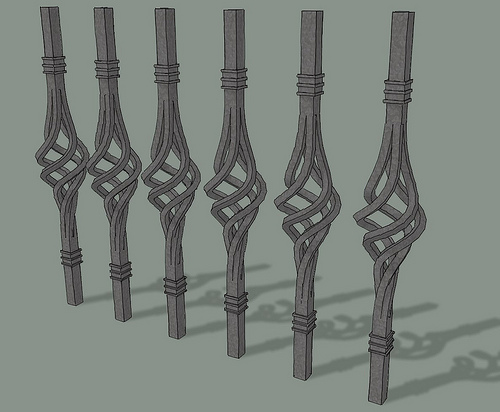
And the way to make it for real:
http://www.youtube.com/watch?feature=player_detailpage&v=l1_tF67B9CA -
RE: Prompt windows too small
It works fine.
Thank you Didier.

Edit: same issue with lines to tubes.

-
RE: Prompt windows too small
In this case, no chance to change anything the file is scrambled.
-
RE: Prompt windows too small
@ driven, thanks for clarification, I'll try this.
When you know why it's half of the problem to be solved.
As we say here " s'il n'y a pa de solution c'est qu'il n'y a pas de problème".
" If there is no solution , there is no problem." -
RE: Prompt windows too small
Dear Didier, don't be confuse I show one of your plugins but there are other from other coders with the same issue.
So I don't know where to dig.
It is not that important.
I use and try lots of plugins to work and I'm grateful to you all making such efforts.
" à cheval donné,on ne regarde pas les dents." -
RE: Prompt windows too small
@unknownuser said:
i'm not going to learn the stuff though! maybe you will?
I have tried ( a little) but it is really not for me.
May be I should make a request to mac coders. -
RE: Prompt windows too small
Thanks for trying to help. I wasn't complaining, in fact I had already this problem with OSX 4 and with SU7 and older versions.
It's just annoying, I though I could just change some lines in Ruby and tada! -
RE: Placing components in a room
Explose your component then type G (short key for component) then choose glue to horizontal, check the position of the axis and create. Done.
-
Prompt windows too small
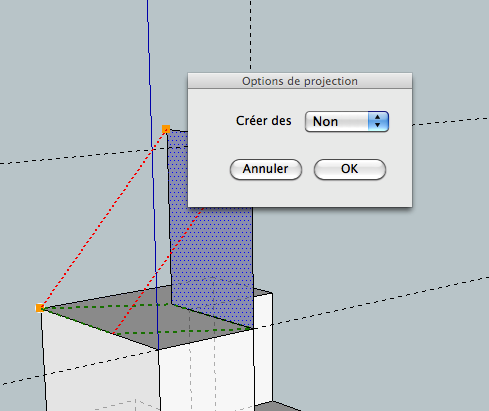
With lots of plugins using prompt windows I have this issue: I can't read the all text so I have to guess.
In this example "Créer des" (create) create what: faces, lines, group.....
So is this something relative with the plugin or with my OS?
Is there a way to fix it?
-
RE: Inner bevel
Make your shape a group.
draw the lines (a little longer than the perimeter).
convert line to tube (set precision to 4)http://forums.sketchucation.com/viewtopic.php?t=12354#p88592
then substract with solid tools or intersection. -
RE: Creating a straight box base contour around a 3d curved su
If you select only the outer edges and choose the last icon of the toolbar it project edges along a vector.
-
RE: Creating a straight box base contour around a 3d curved su
Projection Tools by Didier Bur, maybe this can help:http://forums.sketchucation.com/viewtopic.php?t=20140#p167471
-
RE: Shape bender
When you see the green preview shape press the down arrow key.
-
RE: [Plugin]Hole on Solid tool v1.6.3 upadate Jan 09, 2012
Playing with it I notice that it does not detect hole in face, this could be a great improvement.
