sketchucation logo sketchucation
    • Login
    1. Home
    2. GD3Design
    3. Posts
    Oops, your profile's looking a bit empty! To help us tailor your experience, please fill in key details like your SketchUp version, skill level, operating system, and more. Update and save your info on your profile page today!
    โš ๏ธ Important | Libfredo 15.6b introduces important bugfixes for Fredo's Extensions Update
    Offline
    • Profile
    • Following 0
    • Followers 0
    • Topics 1
    • Posts 87
    • Groups 1

    Posts

    Recent Best Controversial
    • RE: Change SketchUp UI from painful light to awesome dark

      Uuuuuggghhh....this just kills me. Why is Sketchup the only program I use that has this awful eye-killing white interface...? I search for this every couple months and always come across this thread. I know they can barely manage to eek out a few minor updates & bug fixes with each year's 'new' version...but come on? (but I still keep paying them every year because push pull is king) I know all of us Dark UI lovers have seen other people's screens that magically have a dark UI. I guess they are computer programmers...? If you're reading this....hook me up, I'll pay! ๐Ÿ˜„

       I'd hate to take resources away from SU fixing a bug that should have been fixed years ago,... but I'm a +1 for a dark UI option.
      
      posted in SketchUp Feature Requests
      GD3DesignG
      GD3Design
    • RE: Proxies from Maxtree are not loading

      Are you rendering on GPU? If so, does your GPU have enough RAM capacity handle the scene? (when you say 'load', do you mean importing them into the skp drawing or actually rendering?)

      posted in V-Ray
      GD3DesignG
      GD3Design
    • RE: Clipping Plane Plugin

      $50! ๐Ÿ˜ฎ

      Greedy much..?

      posted in SketchUp Discussions
      GD3DesignG
      GD3Design
    • RE: Sketchup Ram usage problem

      Try disabling displacement.

      posted in V-Ray
      GD3DesignG
      GD3Design
    • RE: IFC Files to "clean" SKP Files

      Here is my workflow:
      -turn off layers of roof, furniture, fixtures, etc
      -select all walls, group them, enter group, explode all
      -use Vray to select by material, and group parts of wall I want to keep (there is a plugin for this if you dont use Vray.)
      -select all, then isolate faces (selection toys) and set all materials to default (sometimes I just delete all materials from the start (quick and easy using vray)
      -run CleanUp3 to get rid of 'crap', switch to monochrome mode and run AutoReverseFaces
      -put walls on new wall layer, then turn them off and move on to next part of model to 'de-BIM'

      Of course, I play by ear on this depending on how much of the model I really need to use and how 'messed up' the model is when I get it. For smaller areas, I may just remodel the portion that i need - I find I have less crashes and things move faster that way.

      posted in SketchUp Discussions
      GD3DesignG
      GD3Design
    • RE: HELP Vray next SketchUp won't render, showing wrong argument

      I would do what it says: "if problem persists, submit log files to support@Vray."

      One workaround to try is to copy everything into a new, fresh sketchup file. Maybe only copy a few parts at a time, and test vray between each copy.

      posted in V-Ray
      GD3DesignG
      GD3Design
    • RE: VRAY SKETCHUP take too long time to render, please help

      A couple quick things you could try:

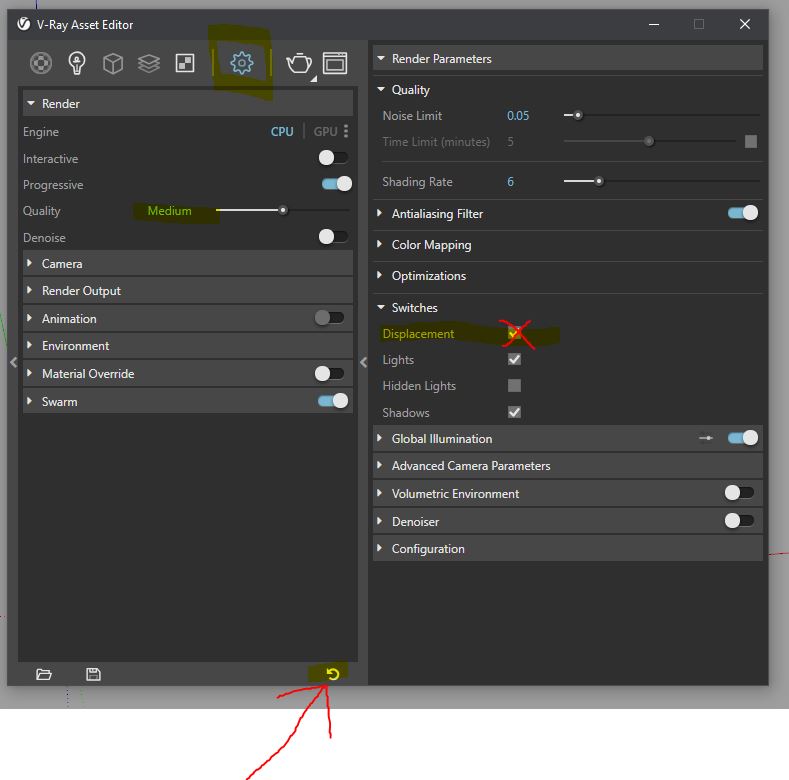
        First try disabling displacement.  Uncheck 'Displacement' under 'Switches' in the Asset Editor, then see if it renders any better.  If it does, then you have a material using displacement that is causing too much calculations.  (although, if this was the problem, it would probly get stuck on building light cache....)
      
         If it still isn't rendering, try resetting your vray settings to default (the little circle arrow at the bottom of asset editor) and try rendering on one of the default quality settings like, 'Medium'.  
      
        If neither of these work, you can try copying portions of your scene to a new file a couple pieces at a time and performing test renders until you find the culprit. 
      

      Good luck!

      (markup attached)
      vraymarkup.JPG

      posted in V-Ray
      GD3DesignG
      GD3Design
    • RE: SU 2019.2 released

      +1 for pissed off about 'subscription only' new features. Of course there are costs associated....that's why I pay my yearly 'upgrade, maintenance & support' fee. We all know where this is going...

      posted in SketchUp Discussions
      GD3DesignG
      GD3Design
    • RE: Modeling organic airport roof

      This is probably the funniest question I've ever seen posted on this forum... Shew...good luck with this one! ๐Ÿ˜„

      posted in SketchUp Discussions
      GD3DesignG
      GD3Design
    • RE: Why/what is this?

      Yes, that is what it looks like to me, too. If you download the 'solar north' plugin from the extension warehouse, then you can click the top button in the plugins's toolbar to toggle on and off.

      posted in SketchUp Discussions
      GD3DesignG
      GD3Design
    • RE: Groups into components

      I'm afraid TT's 'Groups to Components' plugin wont work for this application due to transformations made to the groups - windows rotated to each side of the house. You may have better luck with S4u's s4u_toComponents http://sketchucation.com/forums/viewtopic.php?p=484308#p484308 It is $20, but worth it if you're doing professional work...(if your working with archicad then you're doing professional work). I even use it in place of SU's native create component command...it's much faster, if you don't need the dialog...which you only generally need if you're making a cutting or follow me component. (I work with Archicad exports...so I feel your pain...)

      posted in SketchUp Discussions
      GD3DesignG
      GD3Design
    • RE: Twinmotion is now free

      I'm not really a fan of them giving Twinmotion away for free. Having a Lumion license, the thought of competing against others that are using free software is a bummer. Although, already competing against all the people that used cracked software, so I reckon it's not a big difference. Hoping that Lumion can stay ahead with features and assets. It should all even out once Unreal starts charging in November. But I'm sure they'll be more affordable to the common man and offer an affordable monthly subscription. It's hard for anyone to cough up what Lumion asks... It should light a fire under Lumion, though. I wouldn't be surprised if we saw them adding more features and lowering the cost soon.

      posted in Hardware
      GD3DesignG
      GD3Design
    • RE: 3D Scan of interiors

      Thanks for the link!

      posted in Hardware
      GD3DesignG
      GD3Design
    • RE: 3D Scan of interiors

      Hey, anybody try this yet? I'm thinking about pulling the trigger....

      posted in Hardware
      GD3DesignG
      GD3Design
    • RE: SketchUp 2019 release

      Two months in and they fixed a few bugs.... See folks, the subscription model really works for you! ๐Ÿ˜„
      https://help.sketchup.com/en/release-notes-0

      (I miss reading the daily rants on this thread...so felt I had to resurrect it) (also wanted to hear how all the new blender users were faring) ๐Ÿ˜‰ ๐Ÿ˜‰

      posted in SketchUp Discussions
      GD3DesignG
      GD3Design
    • RE: [Plugin] FloorGenerator ( Updated 6-Apr-2017)

      For those looking for an alternative - Chuck Vali's 'Instant cladding' is pretty powerful. I use the whole 'Instant Architecture' package that includes everything. If your modeling houses, the $120/yr subscription will pay for itself on the first project (once you get good at using it). He also adds to the package and includes all the new plugins for free. In the past couple of years he's added, 'instant door and windows', 'instant stairs', and 'instant cladding', automatically and hasn't upped the price at all. And they are all indispensable to my workflow now. I should note that you need an internet connection to use them, not sure if he has a work around for that or not. But, I highly recommend for professionals. (valiarchitects.com)

      posted in Plugins
      GD3DesignG
      GD3Design
    • RE: Export sketchup to 3ds max issue

      'Save as' sketchup file back to a version 8 file, then import to Max. In material editor, use eyedropper to bring up the multi-sub material in slate editor. you can then swap out/edit the materials. (I would recommend grouping your geometry in sketchup instead of loose geometry.)

      You can also export .3ds from sketchup and choose 'by material' under export options. Things with the same material will be grouped. You can follow same procedure and swap out materials.

      Of course in both cases you'll need to add a UVW modifier.

      posted in SketchUp Discussions
      GD3DesignG
      GD3Design
    • RE: VRay Next released!

      @rogalxxx said:

      Are there any plans for 3.6 compatible with SU2019?

      From Peter at Chaos Group:

      A V-Ray 3.6 update with SketchUp 2019 compatibility is being considered but it may take some time. Stay tuned.

      posted in V-Ray
      GD3DesignG
      GD3Design
    • RE: Water Walls render modelling

      I usually do a mix of modeled geometry and textures. For modeling there are a few different approaches. But generally after getting faces in the basic shape you want the water fall to take, then subividing to allow more detail - Artisan, Vertex Tools & SubD will get a nice shape going. Winning with Sketchup has a cool youtube tutorial on using Eneroth's Fractal Terrain Eroder to get water shapes, also.

      With Vray, I'll make a copy of the pool water, then change the uv tiling in the vray materal to be stretched in the direction the water is falling. This makes the water look as if it is falling. I use Interactive render with a small render region to help speed up previews.

      Also, tend to adjust the refraction intensity/IOR, as well as the reflection amount to get things looking right.

      And of course....always have a nice hi-resolution inspiration pic for reference! ๐Ÿ˜„

      posted in SketchUp Discussions
      GD3DesignG
      GD3Design
    • RE: Occlusion Map Location

      I like use a Mix Operator tex in the Diffuse slot with the Occlusion map on top set to Multiply, then of course you put the albedo map in the bottom slot.

      posted in V-Ray
      GD3DesignG
      GD3Design
    • 1 / 1