sketchucation logo sketchucation
    • Login
    1. Home
    2. GD3Design
    3. Posts
    Oops, your profile's looking a bit empty! To help us tailor your experience, please fill in key details like your SketchUp version, skill level, operating system, and more. Update and save your info on your profile page today!
    โš ๏ธ Important | Libfredo 15.6b introduces important bugfixes for Fredo's Extensions Update
    Offline
    • Profile
    • Following 0
    • Followers 0
    • Topics 1
    • Posts 87
    • Groups 1

    Posts

    Recent Best Controversial
    • RE: Some tips and tricks from out of the Box

      @box said:

      One of the many useful tools that people often miss amongst all of Fredo's wonders is the Convert to Arc/Circle (part of Curvisard) that puts arcs and circles back together so the Cardinal points function.
      Follow me explodes Arcs and Circles and if you weld them they become Curves, which don't have the special feature that is Cardinals.

      Every time I check this thread, I either learn something new or realize a different way to approach a problem. Thanks for sharing, Box!

      posted in SketchUp Tutorials
      GD3DesignG
      GD3Design
    • RE: How to make this (loft section along a helix)

      I honestly can't recommend any other plugin besides ThruPaint for this job, it is indispensable....I use it daily. Although, I remember ThomThom had a UV plugin that could get you there, but it wasn't as intuitive and always seemed a bit difficult to use for me. Also, Whaat has a UV plugin that can apply some different projection UV mapping that could possibly work here. I still prefer ThruPaint, it gives you much more power and control over your final product. But no matter how tired you are, you are still going to have to install a plugin and learn it to get this task finished.....so might as well use the best one. (ThruPaint) ๐Ÿ˜„

      posted in SketchUp Discussions
      GD3DesignG
      GD3Design
    • RE: How to make this (loft section along a helix)

      @l i am said:

      I just did a search in Sketchucation for "Thrupaint" ..............nothing, any ideas as to why?

      Cheers[/quote]

      It is actually found in a suite of Fredo's plugins called, 'FredoTools'. https://sketchucation.com/plugin/907-fredotools

      posted in SketchUp Discussions
      GD3DesignG
      GD3Design
    • RE: Holes in a cylinder

      @pbacot said:

      @box said:

      anything with 4000 holes can take time.
      And I'm off to bed.

      As they found out in Blackburn, Lancashire.
      ๐Ÿคฃ ๐Ÿคฃ ๐Ÿคฃ ๐Ÿคฃ ๐Ÿคฃ

      posted in SketchUp Discussions
      GD3DesignG
      GD3Design
    • RE: "<auto>" materials

      I use Vray and have the same problem....so I reckon its a sketchup thing...? Luckily the Vray asset editor makes it easy to do bulk material deletes. But, it is annoying to keep having all these 'auto' materials being made.

      posted in SketchUp Discussions
      GD3DesignG
      GD3Design
    • RE: SketchUp 2021 release

      CURIC 2021 compatible plugins were just released this morning. ๐ŸŽ‰
      (edit: nevermind - i just installed and they are not working....all kinds of load errors)
      (edited edit: I emailed Curic the errors and updated package was promptly uploaded. All good now. ๐Ÿ‘

      Tag folders - I have been dying for this feature for a while...now if they could just switch the name 'tag' back to 'layer'.... ๐Ÿ˜ž

      As far as the new logos.....see pic below... ๐Ÿคฃ


      c4d.jpg

      posted in SketchUp Discussions
      GD3DesignG
      GD3Design
    • RE: Reducing Rendering Times and Grainy Render

      Try this:

      Under 'Render' Tab, turn off 'Progressive'...(this will switch to bucket mode). (more efficient)
      Under 'Render Parameters', 'Quality', lower 'Noise Limit' to betweend .008 & .005. (generally, .01 is high for final renders. I start out at .008 for final renders and adjust from there if needed.
      Lower 'Min Subdivs' to 1, 'Max Subdivs' to 16 or 24. ( you can raise max subdivs if needed, but this will probably be good and save a lot of render time.)
      Under 'Optimizations' turn off 'adaptive lights' (or something similar sounding)
      Change 'Primary Rays' to Irradiance Map and crank up subdivs to 100ish.

      As for time, sorry but you are rendering on a i7 laptop... If you want quicker renders..it may be time to put together a Ryzen build. Best of luck!

      posted in V-Ray
      GD3DesignG
      GD3Design
    • RE: Drag and drop?

      I edited my post with 'bad info'. Glad you posted this...I had no idea connector worked with SU. Going to go give it a try now! cheers

      posted in SketchUp Discussions
      GD3DesignG
      GD3Design
    • RE: Drag and drop?

      Connector is a 3DS Max plugin. I believe it is now also compatible with Blender & Cinema4D, but not Sketchup.

      posted in SketchUp Discussions
      GD3DesignG
      GD3Design
    • RE: Drape Image Incomplete

      I use the 'Tools On Surface' (by Fredo6) plugin to reconnect lines. It will draw and constrain the new edges to the existing faces and make the task of cleaning this up pretty easy.

      posted in SketchUp Discussions
      GD3DesignG
      GD3Design
    • RE: TINY HOUSE ON 24FT TRAILER

      Very cool design. I have to close this window before my wife sees....I'm afraid if she sees she'll make me build it... ๐Ÿ˜†

      posted in WIP
      GD3DesignG
      GD3Design
    • RE: Many materials management

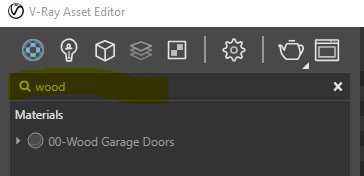
      They recently added the search function to top of asset editor for this reason. You can search both the preset material library and materials in scene. I would like to see more organization for materials, such as grouping. But until then, the search function makes life a lot easier.


      Annotation 2020-06-25 070126.jpg


      Annotation 2020-06-25 0701262.jpg

      posted in V-Ray
      GD3DesignG
      GD3Design
    • RE: Too many machines?

      What does it say when you click on 'Manage Activations'?

      posted in SketchUp Discussions
      GD3DesignG
      GD3Design
    • RE: [Request] - Waves - Longtime Lurker First Time Poster...

      Natale Zappia has a good start to what you are looking for here----> https://extensions.sketchup.com/extension/446917d2-d4fe-4622-817a-9fbe297f72bf/nz-ripple

      Maybe some functionality could be added...?

      good to hear you're on the mend, mate!

      posted in Plugins
      GD3DesignG
      GD3Design
    • RE: [Plugin][$] Vertex Tools

      @thomthom said:

      Yes - in fact, it's already added to the upcoming v2.
      Also coming in v2. ๐Ÿ˜„

      Any news on v2? ๐Ÿ˜„ ๐Ÿ˜„ ๐Ÿ˜„

      Maybe a pre-sale 'crowd-fundy' thing to help production...? ๐Ÿ˜„

      posted in Plugins
      GD3DesignG
      GD3Design
    • RE: Soften Style

      Have you tried using 'fog' in the sketchup scene? I like to add fog to give a sense of depth to drawings in layout. The fog also softens, just like adding a translucent white watermark, but you get the added bonus of being able tweak depth of field with fog settings.

      posted in SketchUp Discussions
      GD3DesignG
      GD3Design
    • RE: Ultimate Sketchup to 3ds Max bridge

      ๐Ÿ˜ฎ ๐Ÿ˜ฎ ๐Ÿ˜ฎ ๐Ÿ˜ฎ ๐Ÿ˜ฎ ๐Ÿ˜ฎ
      Thanks for the headsup! This looks fantastic....going to check it out now. ๐Ÿ˜„

      posted in SketchUp Discussions
      GD3DesignG
      GD3Design
    • RE: SkecthUp 2020.1 - anyone using it already?

      Yeah, everything still running fine for me. Except one small issue I'm having: When I right click on skp or layout files, Sketchup/Layout 2020 aren't showing as an openning option in the context menu...(all other installed versions show up still...(2017-2019). I've tried setting default through windows control panel/settings, and also through file properties, change default program. no luck... (yes, installed SU by right click install as admin...even tried a 'repair'.)

      posted in SketchUp Discussions
      GD3DesignG
      GD3Design
    • RE: SkecthUp 2020.1 - anyone using it already?

      Just installed today. Working on a 650mb model and really impressed with the increased performance, specially with Outliner open. This model had been killing me before...(I should note that I moved straight from 2019 to 2020.1) (I should also note that I haven't installed any plugins yet, the 5 bazillion plugins i use could have been slowing down 2019...so we'll see) But anyway, no problems so far. ๐Ÿ˜„

      posted in SketchUp Discussions
      GD3DesignG
      GD3Design
    • RE: VRAY Next: Add Dirt texture to a Material?

      Make a blend material with stucco as base and dirt material over top, set dirt to 'multiply' (blend or comptex...ahh, here it is------> https://docs.chaosgroup.com/display/VNFS/Mix+Operator

      posted in V-Ray
      GD3DesignG
      GD3Design
    • 1
    • 2
    • 3
    • 4
    • 5
    • 2 / 5