OK, we will deal with it tomorrow. Now I have other stufff to complete. Sorry.
Posts
-
RE: [Plugin] Shortcutter Beta
-
RE: [Plugin] Shortcutter Beta
@driven said:
getting there...
Thanks for the tests and advices. Now my only concern is: How does that
^Optgot there and what does it mean? Any clue? -
RE: [Plugin] Shortcutter Beta
Version 0.2.0 is out now in the pluginstore. It addresses the MAC issue. MAC users, please test.
-
RE: New scketchucation colour scheme.
Tested. And you're right, in IE9 it displays as your screenshot shows. Strange.... We will take a look into it and if possible will correct it ASAP.
-
RE: [Plugin] Shortcutter Beta
The main problem is that in case of Mac we do not have the menu name at the beginning of each action, so the Javascript and maybe also the HTML has to be prepared first to handle this situation. The javascript populates the paragraphs based on the menuname what is missing in case of MAC. More tomorrow.
-
RE: New scketchucation colour scheme.
Hmmm.... Interesting. For me the buttons have a dark-blue background. Will test in IE.
-
RE: New scketchucation colour scheme.
@mike amos said:
I have not changed any of the settings, this just appeared.
Could you please completely erase your browser's cache and re-load the page? It seems to me that you have a pevious version of some .css files cached and that is the cause of the strange coloring.
-
RE: [Plugin] Shortcutter Beta
Thank you John. We'll make the suggested corrections in v0.2.0. (On Monday)
-
RE: [Plugin] Shortcutter Beta
@driven said:
I think it might be the tabs
javascript isn't seeing '\t' for the split, it's a ' ' that's being sent
Well. IMO it is seeing the TAB as in the popup they are separated by a TAB.
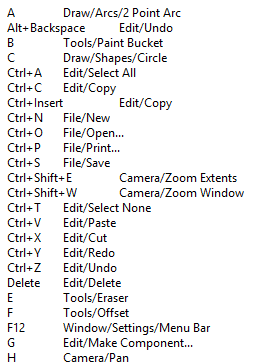
BUT! And I think we got the problem here. Your MAC SU is not sending the corresponding menu with the shortcuts. And that information used to place the data into the appropriate section of the webdialog. My PC popup looks like:
As you see every action begins with the menu name. Tomorrow or Monday I'll find out something how to handle this situation. Probably we have to give up the display by menu items layout in these cases.Thank you very much for your help.
EDIT: Now I see the information is there but just in an other format. Will do version 0.2.0 on Monday to handle this.
-
RE: [Plugin] Shortcutter Beta
@driven said:
so it is seeing them...
Thank you. So now we know that the .js side receives the shortcuts. Now we have to find out why it doesn't poulate the .html with them. I made shortcutter2.html what - after the initial popup - will pop up an alert for each individual shortcut with the HTML insert for that. If you could send the content of the first two or three of those popups that would help. (You need to click OK one by one on them to get the next)
-
RE: [Plugin] Shortcutter Beta
Until TIG arrives. If you have the time and you wish to....
I've made a debug version of the javascript. So if you edit the 41st line of the.../SketchUcation/SCF-myShortcuts.rbfile and change the filename in the URL fromshortcutter.htmltoshortcutter1.htmland after SU reload you run it, you'll get a popup what will show what is returned by the ruby side to the js.It would be useful to see a screenshot of that popup.
-
RE: [Plugin] Shortcutter Beta
TIG Tested it with MAC and it worked for him. My suspition - and that's why I asked for a re-load - is that we have again some problem with the asynchronous nature of MAC running javascript. Of course I'm not sure in it as I have no chance to test it on MAC but we have run into this async/sync problem several times with the SketchUcation tools during the dev.
Anyhow thank you for testing/noticing/explaining. Let's wait for TIG if he has any idea,
-
RE: [Plugin] Shortcutter Beta
@driven said:
it's nice and clean, almost minimalist...
Could you please try to cache-erase reload the contents of the webdialog? (Ctrl+F5 in Winows browsers, I do not know Mac) Does it help?
-
RE: New scketchucation colour scheme.
Exactly which text color do you refer to? There are several kinds of texts with several background colors on the site.
Which one is hard to read for you?
Could you post a screenshot? -
RE: [Concept]Shortcutter for SketchUp
So the ".....rather drab version...." is out, some more votes are needed for the cloud enabled version dev.
-
RE: [Plugin] Shortcutter Beta
@dave r said:
@gábor said:
@dave r said:
I tried right clicking on it but don't get a Save or Save as... option.
No, not in the current version. For what purpose would you use that? If for printing out maybe a .pdf would be better which might be in some of the next versions if needed. (Well, Ctrl+P does the printing job until it is implemented...)
Not specifically for printing but possibly for including in a tutorial or other web page about using SketchUp. It's too large to get into a single screen shot so I was thinking maybe I could work from the HTML page.
The problem with the HTML is: As this webdialog uses loads of .css stuff (created by Rich) you couldn't do anything with the .html even if you could download it without the corresponding .css files.
-
RE: [Plugin] Shortcutter Beta
@dave r said:
I tried right clicking on it but don't get a Save or Save as... option.
No, not in the current version. For what purpose would you use that? If for printing out maybe a .pdf would be better which might be in some of the next versions if needed. (Well, Ctrl+P does the printing job until it is implemented...)
-
RE: [Plugin] SketchUcation Tools
To me, it sounds similar to this solved issue: http://sketchucation.com/forums/viewtopic.php?p=519331#p519331
-
RE: Re: Some Funny Pics.
The seer said there will be a derailment.... They have prepared beforehand to help.