Reminds me of my stint as an Artlantis user... It was really cool to see the changes instantly without having to hit a "render" button.
Oops, your profile's looking a bit empty! To help us tailor your experience, please fill in key details like your SketchUp version, skill level, operating system, and more. Update and save your info on your profile page today!
Urasik Extensions | Lots of new extensions to check out Learn More
E
Offline
Posts
-
RE: Vray Realtime
-
RE: This is cool! SU render - yep SU!
My best guess now that he has given us some clues:
Perhaps he generated a depth map from SU using black fog with almost white edges in hidden line mode, then loaded that depth map in Photoshop, and used it as a mask for a couple of adjustment layers and for lens blur, and added a little grain texture to finish it.
Check the last tut in this page:
http://sketchup.google.com/training/videos/expert_to_gsu.html
In the video the narrator uses the trick to achieve lens blur, but you can use that same mask for other effects. If you apply it as a "Multiply" layer and modulate it a bit, you can give the impression of using a headlight.Another related trick: Place two cameras really close, export a JPG animation from them, average the result in VideoMach and voilá! Motion blur from SketchUp.
-
RE: SCF Toolbars Series
Ok, reading Chris Fullmer's explanation of the spirit behind Smustard's EULA, an idea came to me... Move all SCF Toolbars outta here, host them in Smustard and leave just a link to the specific Smustard page here. I'm sure they would welcome them in their site, as it would drive tons of visitors to their paid scripts, too.
Just an idea, please excuse my ignorance on these matters...
Smustard's EULA for free scripts reminds me of the Kerkythea license: It says you can distribute it personally, but not massively (on a website or a magazine CD, for example). Kerky is "copyrighted freeware", which I guess means you can use it without charge, but it's not open-source and you can't create your own "distribution" of it as if it were Linux. But of course the Kerkythea site welcomes user-created content, and actually has a "file repository" for it. That repository contains, among other things, free models adapted for Kerky from other sources. Perhaps Smustard could follow a similar line and make a place for SCF's Toolbars.
Again, just an idea... I'm an Iguana, not a lawyer.

-
RE: Face orthogonal to line?
You can do it manually if you plan ahead. Follow these steps before drawing your profile:
Grab the Protractor, click (and DO NOT release) on the end of your line where you want your profile and release the click on any other part of that same line segment. This will place your protractor in a plane orthogonal to your line. Hover your mouse until the protractor locks "on blue axis", click and release, move it 90 degrees from there, click and release again. Now you have a perfectly horizontal construction line perpendicular to your first segment. Repeat the process but this time start on the construction line and move 90 degrees from there. Now that you have these two construction lines, draw a line on one, copy it along the other line, complete the rectangle and draw your profile.
-
RE: Share your Digital Photography shots here
Thank you for your comments on my pics and your advice, Nomeradona. I am amazed by all the beauty everyone shares every time I come to this thread. Ok, here is another humble attemp I made at composing a significant image instead of just a snapshot. This is the dome of the National Library in Santiago de Chile, March 2006. While my brother and his girlfriend were amused by the echo of the place, I noticed these paper strips hanging from the inner metal ring of the glass dome (I think they were decoration for an event or something), so I decided to eyeball the center of the room, place my camera on the floor and shoot "blindly" (I could not see the LCD):
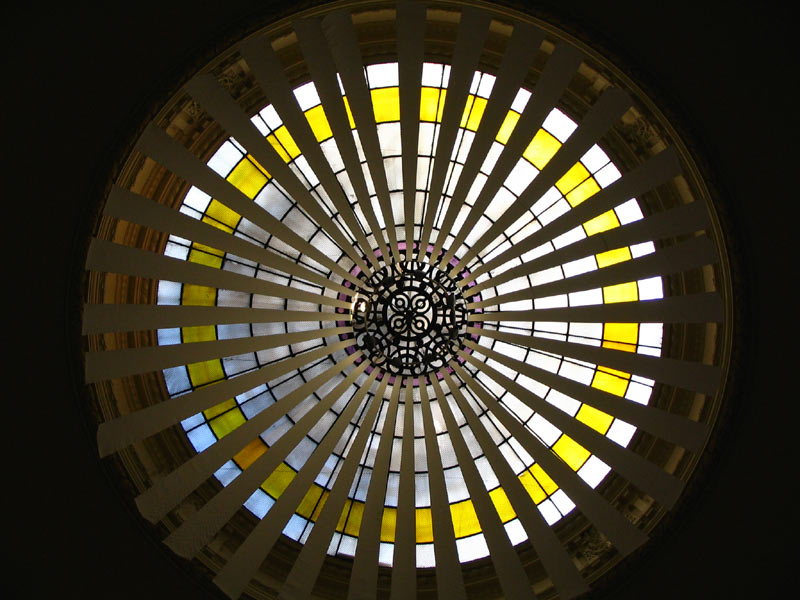
Canon A75, Program AE mode, 1/50sec, F/2.8, can't remember the ISO, but I almost always used ISO100 with that camera.
-
CAT experiment - Save your cables from being chewed away
Ok, I did this experiment for about two weeks:
I hung two cellphone charger cables from a desk, one of them covered with grey electrical tape.
After the two weeks, the cable covered with tape was not chewed at all, while the other one had several cat teeth marks.Try it at home with non-crucial cables, and let me know your results.
My CAT system is:
One unit
Female
White
Odd-eyed
Half-persian
8 months old.Please post yout CAT specs too together with your results of the experiment.
BTW, I posted this here because cables are hardware. -
RE: SCF Toolbars Series
Max, the world of Ruby scripts is pretty much like a card collecting game: The task of searching all over the place to find them and then keeping track of them in an ever-increasing "Plugins" menu can be overwhelming to a newcomer like me. If it were not for your PowerToolbar and your Archiland Toolbar, I would have never become aware that Didier Bur had written so many useful scripts for terrain manipulation, that TIG had a roof-making script, ot that Octavian Chis had done a Pathcopy script. These scripts have proven invaluable for my recent work, and they would have remained obscure for me, figuratively buried in lists and between threads, if not for your work of "digging" them. I, for one, could never find the Free Form Deformator script by Philips, no matter how much I searched the Plugins forum, so it was cool to see it included in the PowerToolbar. It was only when I followed a link in and old issue of CatchUp that I could finally locate the original FFD thread. And I consider myself to be a good "searcher". Condensing these jewels in toolbars brings them closer to newcomers, to students, to everyday professionals, and makes your Plugin menu less cluttered.
There's a big difference between written, inflexible policies and actual interactions between companies and individuals. Have you read "Terrie's take"? It's a free weekly newsletter written by an American in Japan. He includes snippets and commentary from several news sources. I once asked him how he managed to get permission to reproduce these stories from such important sources. It sure must have been a lot of paperwork to get a written agreement from the Asahi newspaper, for example... Well, he answered that he did try to get actual legal permission to do so, but both parties (he and the news sources) found out that it was too difficult to do(you know lawyers), so he instead had "Gentlemen's agreement" between his sources and himself: He didn't just copy and pasted parts of stories, but he instead paraphrased them for his readers, added a few comments and provided links to the original sources. So the result was a big win-win: He got content for his free newsletter, and his sources would get new subscribers. That's the spirit behind most of Google endeavours, too: To "dig" information and make it available to people. And when one of Google's services by chance indexes paid content and they receive a notice, they simply drop that content. That's it. Such ocassional gaffes were not, and will never be, the end of Google.
So thank you, Max, and thank you, Ruby writers.
-
RE: Garden collection
@troyhome said:
Second, Ecuadorian, can you give us a tut on how you achieved the watercolor effect in ps?
Sure, it's just a Photoshop "action" and some layer masking. I posted the info here:
http://www.sketchucation.com/forums/scf/viewtopic.php?f=81&t=4616&p=132172#p130045 -
RE: Garden collection
Thank you very much for releasing this wonderful collection, Master Solo. I put these plants to work immediately. Rendered in Kerkythea, post-processed in Photoshop. I hope my client likes it
 .
.

And I also hope the Washingtonia palm is high on your list for Vol. 2
 .
. -
RE: Share your Digital Photography shots here
Espresso, check the CHDK site to see if your camera can be updated to do bracketing. My current camera, a Canon A630 can´t do bracketing with the normal firmware, but after installing the CHDK, it can do anything.
-
RE: Looking for a good software for rendered animations
I used MAX for years, and I developed a deep love/hate relationship with its radiosity engine. And yes, stuff for MAX is almost always messed up and you have to correct scale/re-link textures, etc. Also, when you re-import your scene to MAX after making changes, you have to re-apply all materials again, or at least that was the way things worked with the last version I used. I made the link with my modeller via .3ds files. And don´t even get me started about how .max files would get bloated when working with radiosity, how your textures will look washed out when using Logarithmic exposure control (unless you edit the curve for every single texture), and how much of a memory hog radiosity is. That´s why some people ignore MAX´s scanline renderer and buy Vray for MAX, so you have to factor in that additional cost and training time.
So, if you don´t need moving cars and people, I highly recommend you try Kerkythea. Even if you finally decide for MAX, you´ll have some invaluable training on the basics of different rendering methods with Kerky. MAX is really THE standard for animation and you will find tons of MAX-specific help on the net, but it will take a long time to master.
-
RE: Looking for a good software for rendered animations
Good choice if you need animated cars and people.
Be sure to check Archvision's collection of plants, cars and people, they will save you a bunch of time.
-
RE: POST YOUR RENDERS NR.2: WAREHOUSE
Another little 15sec animation, done at the end of my first day playing with Kerkeythea. Of course not as nice as kwistenbiebel's beautiful animation. This took two hours and a half in my old PC, should take 40 minutes in the cheapest Core i7.
http://www.youtube.com/watch?v=MiS3l6otTQw
Now I've been two days playing with Kerky. I now agree with the KT team, frederik... Simply powerful. Projector lights, Spherical backgrounds, Blurred reflections, Customized render size, Brushed metals, Soft shadows for Omni lights,
Smooth transition between cameras in animation, Built-in Tone-mapping, Several render methods to choose from... And instead of a steep learning curve, I found an infinite plane... -
RE: [Tutorial] Merging terrain meshes from Google Earth
I knew it! A ruby Master has already automatized this process!
The results are indeed similar, although not identical:
Original overlapping meshes imported from Google Earth, perspective view and top view. It is about 8 Km wide.
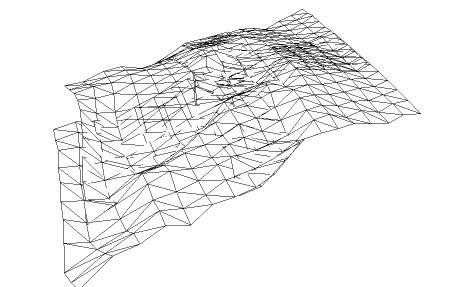
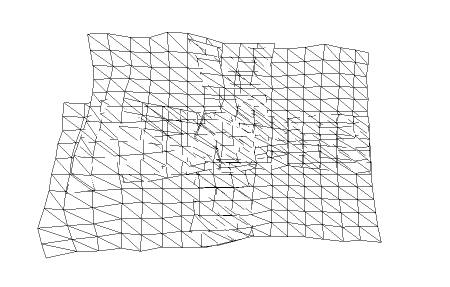
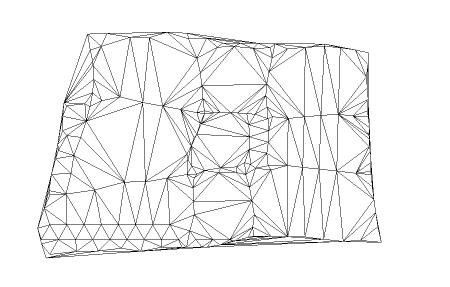
After applying "Terrain Reshaper" with a grid size of 450m, perspective and top view (no cleanup done):
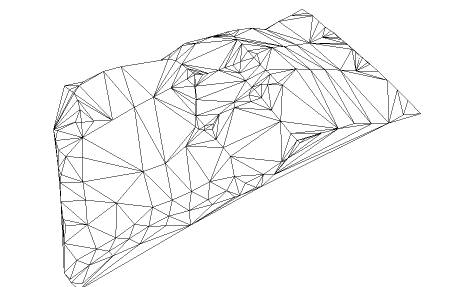
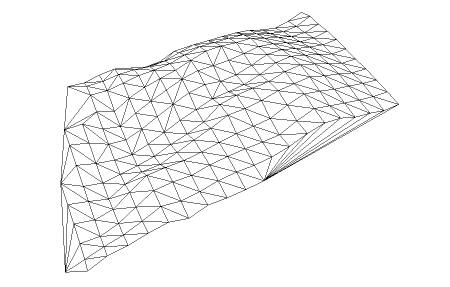
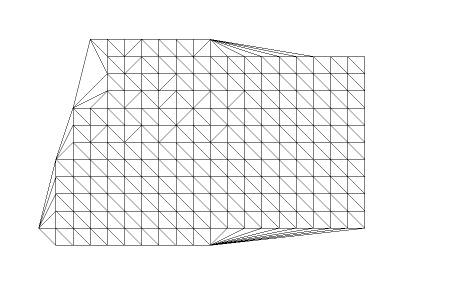
After following the "drop points" method with the same grid size. Perspective and top view, again with no cleanup:
So, unless you're a complete fanatic of regularity, "Terrain Reshaper" is the way to go for a quick solution... Thank you again, Gaieus!
BTW, after reviewing the link you gave me, it seems that Plot-Paris was the first to come up with an idea to regularize a terrain, and TaffGoch was the first to think about using "Drop" to do it. So I'm beating a dead horse here...
-
RE: [Plugin] FollowMe and keep (v0.04 update 20090210)
It's because the profile itself is kept vertical!
-
RE: Share your Digital Photography shots here
In April 2005, my brother convinced me to visit a zoo with some friends. I usually don't like zoos because I prefer to see the animals running free in Animal Planet, and find zoos depressing.
This monkey had the saddest expression I've ever seen in an animal. He seems to have lost all hope of escaping his cage. What is he thinking?

Canon A75, noisy because I used ISO 400 to avoid motion blur. 1/80 sec, F/4. -
RE: Share your Digital Photography shots here
This picture was taken in a park near the University where I had graduated, one year after graduation, in January 2005.
I tried to achieve a "soft water" effect by placing the camera on a minitripod in the border, and using a slow shutter. It was 7pm, so the sky is not completely black, but navy blue.
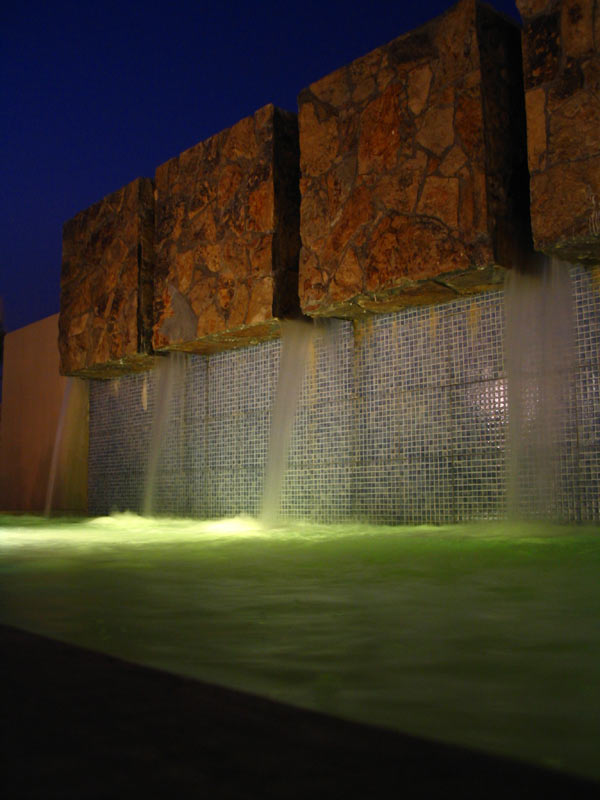
Canon A75, 0.5 seconds, F/2.8 -
RE: Share your Digital Photography shots here
Nomeradona, I take my hat off for you. You are the Master of Photography here.
I had to look really hard in my Images folder for something half-decent, but here come the first one:
I took this picture when traveling from Guayaquil to the Andean city of Ambato, in July, 2004. The road is windy and dangerous, in the middle of mountains and fog. I tried to took some sunset pictures, but sunset in the Equatorial region is pretty quick, so I soon found myself shooting in almost complete darkness. This photo turned out horribly blurred, but for some reason I really like the colors. When I saw the resulting image in the LCD, it reminded me of a William Turner painting, in which the light was far more important than the shapes. After I took this picture, the driver, a friend of mine, found himself in the middle of a dense fog, and with no sunlight, so he decided to follow the faint lights of a truck that was in front of us. I also think this photo has an emotional value to me because we were traveling to the funeral of my grandfather. I was not very close to him, however, since I lived in Guayaquil.
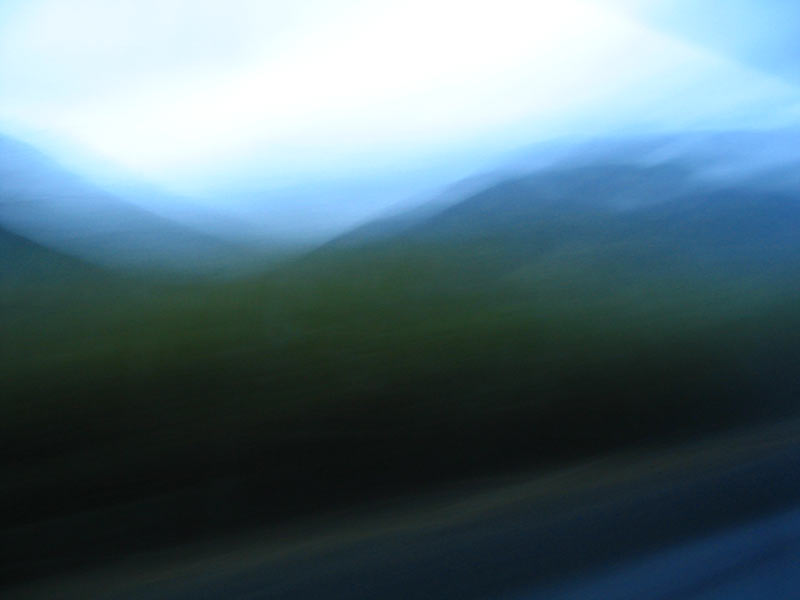
Canon A75, Program AE mode, 0.6 seg, F/2.8 -
RE: What's this? - a bit of light relief!
Isn't that Mrs. Puff, Spongebob's driving instructor?
http://images.google.com/images?um=1&hl=en&rlz=1C1GGLS_enEC299EC303&q=Mrs.+Puff&btnG=Search+Images -
[Tutorial] Merging terrain meshes from Google Earth
UPDATE: Unless you are a fanatic of squares, forget this method, and use Didier Bur's "Terrain Reshaper" instead. Just follow the link Gaieus posted. (Thanks for the heads up, Gaieus! I'm always looking for ways to make things in less time)
Most of you already know this trick, but I couldn't find it in the Tutorials section, so here we go...
To go from this mess of several overlapping terrain meshes imported from Google Earth (there are about 7-10 different meshes here)...
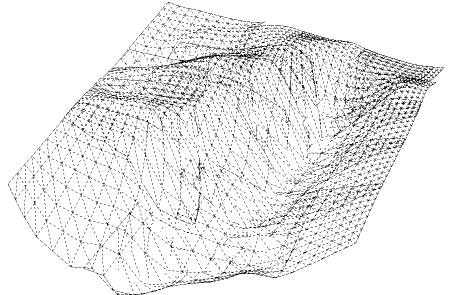
To this single, regular mesh:
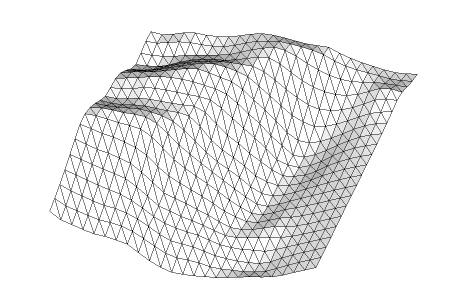
All you need is a construction point inside a component. Make an array of those points above the terrain, and "Drop" them.
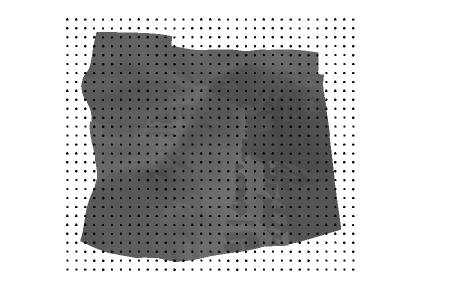
Explode the components to release the points...
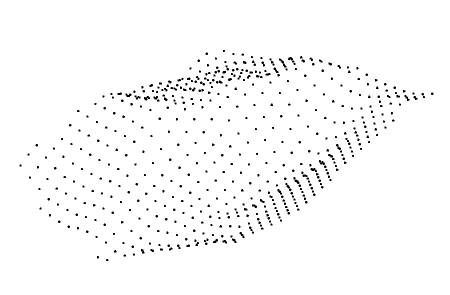
and use "Triangulate points" to make the new mesh. You can then trim the sides of the mesh as you wish, and end up with a clean, good-looking mesh you'll be proud to show .
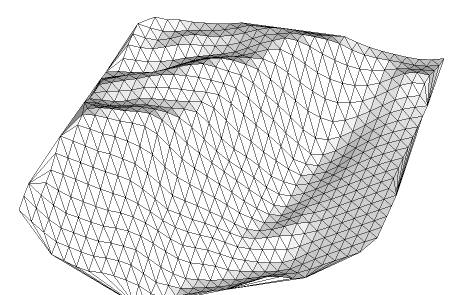
You can find both the "Drop to intersection" tool by Octavian 'TBD' Chis and the "Triangulate points" tool by Didier Bur and C. Fale, in CADFather's compillation, the SCF Power Toolbar, which hopefully is still online:
http://www.sketchucation.com/forums/scf/viewtopic.php?f=180&t=14770&st=0&sk=t&sd=a&hilit=powertoolbarFor the "Drop" tool to work, all the meshes need to be above the origin. If they refuse to move, just right click > unlock.
UPDATE: Ignore the following part of the original post, as "Terrain Reshaper" handles this two cases flawlessly.
This trick is also a "clean" way to reduce the poly count of any terrain mesh. With "clean" I mean that it looks regular from above.
If you created your terrain mesh from contour lines, you can also use this trick to eliminate elongated triangles, which can be problematic when rendering, particularly with a radiosity engine.This trick was inspired by Kwistenbiebel's surrealistic rows of bunnies:
http://www.sketchucation.com/forums/scf/viewtopic.php?f=81&t=6908&p=44716&hilit=bunnies#p44716If you don't have a construction point to work with, download this one: