No worries bro. Just a thought for the next update whenever you get around to it.
Oops, your profile's looking a bit empty! To help us tailor your experience, please fill in key details like your SketchUp version, skill level, operating system, and more. Update and save your info on your profile page today!
Check out Febhouse | New extensions for Shadow Analysis in SketchUp Download
 E
Offline
E
Offline
Posts
-
RE: [Plugin] Edge Tools
-
RE: Beyond the gates...
Great storytelling with the composition. It strikes me with a sense of curiosity and intrigue. One of my favorite architectural renders on this forum to date.
-
RE: [Plugin] Edge Tools
Thom, just finished a project where the Edge Tools came in so handy. What a time saver you've created. Thanks again.
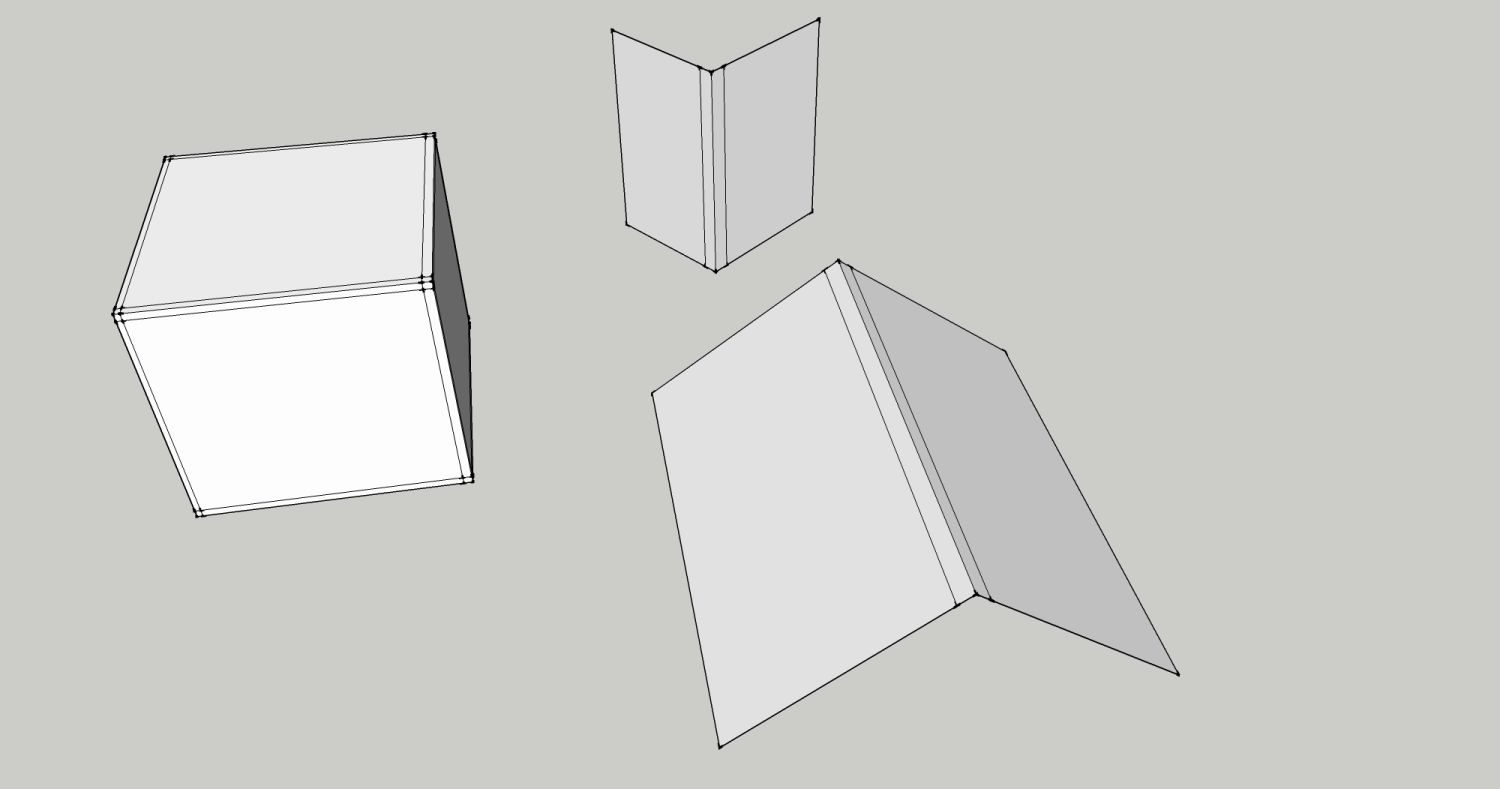
I was wondering if it would be possible to create an additional tool that acts like the Divide Face tool, but does it simultaneously on two opposing faces connected by a shared (corner) edge. I do a lot of corner trim and siding details that require this and do it manually at the moment. It would also be handy for subdividing purposes. Something simple that does like in the image in a single click with a distance input. I guess you could say it's an "offset corner". I figured I'd ask you first as it seems like a logical addition to this toolset.
-
RE: Hornbeam hedges - SketchUp 8 model
Been thinking about making more 3D plants. Thanks for the insight and sharing your model. Agreed on the best I've seen out of Sketchup.

-
RE: Multiple faces driving me crazy!
I'll get it running the Make faces plugin from time to time. I've had instances where I'll get 15 or more faces on top of each other. You can tell when you go to texture it and nothing shows up. Usually running and intersect followed by Thom's cleanup will sort most of it out. It is very frustrating sometimes. Sketchup and profanity seem to go hand in hand in my house.
-
RE: Avatar
Just the other day I was wondering why more woman weren't apart of this forum....
 In the US that's called Butter Face. Everything looks good butter face...
 -
RE: Surface fix? please help me
If they are just left over edges, then use the eraser tool while holding CTRL. If they are small holes, you may need to add some connecting edges to close it up. Maybe post the model?
-
RE: Vertex Tools [Artisan]
@xrok1 said:
thats great can't wait. but maybe we could call it sub-d tools so we don't step on thomthom's toes?

... and confuse people in the process.
When I first bought Artisan, I thought Dale had included something redundant to what I already had with Thom's plugin. However after using both for a while, I don't think this is the case. Artisan has vertex tools, but in a way that just seem to fit with organic modeling and that ties in well with the other tools in the set. Thom's vertex toolset is something I use for more polygonal modeling and manipulation of hard surface verticies. I will on occasion use Thom's with Artisan, just to take advantage of the stellar polygonal select tool. The other big advantage to Thom's plugin is that it is wrapped inside of a toolset action, so that you can assign contextual keyboard shortcuts for select and move, which are the same as your normal shortcuts. This is a big time saver as you don't have to keep going back to the toolbar, or learn a new set of shortcuts.
I think both however could use an addition of a Target Weld option.
Just my thoughts on the difference in the two toolsets in case someone reading was curious. (not to xrok1 specifically)
-
RE: GoDaddy.com Elephant Shooting
Wow, I have my Domain hosted with GoDaddy and I'm actually quite appalled by this. I do understand culling and reasoning behind it, but his act was brazen and for sport, IMO. I've always had a certain affinity with elephants and collect elephant statuary from around the world. Being a long time animal rights activist and non-consumer of animal meats and byproducts, I am happy to remove my business from GoDaddy.

 Any suggestions on alternative hosting companies? (BTW- Thanks Kris for bringing this to my attention)
 -
RE: [Plugin] (TIG) Rotate Plan View v1.1 20110316
Great idea and very useful. Thanks TIG!!
-
RE: Tgi3D SU Amorph now has a 30-Day Trial Edition
@gaieus said:
A question, Gulcan, if I may... What if I have SU installed on several computers? A typical example case would be to have a powerful desktop in office to work with and a laptop to go out to the site or field to (say) take measurements and quick drafts.
This would definitely be an issue for me also as I run on a laptop and a desktop depending on how noisy the kids are being in my house. I like to keep them both running with the same plugins to make it seamless. I wouldn't make the purchase without a dual license scenario.
Great idea with the demo though. Can't wait to try it at it's full potential. Especially the UV tools and Upsampling.
-
RE: VRay -Sketchup & 3ds Max - Various New Projects
Beautiful and inspiring. I really love the sculpture garden. Great work!
-
RE: [VIDEO] Realtime Mega Meshes
Incredible. Although my head hurts after reading through the .pdf!

-
RE: IRONMAN
Now that is some clean modeling. The beetle is especially awesome. I'm guess you have a background in another quad modeling program? Or else just naturally gifted. Two thumbs for you sir!
-
RE: Some Artisan video tutes..
Great tutorial Chipp. It's a shame that creating support edges ends up involving so much clean up. Would be nice if there were a type of "swift loop" plugin as Max has. Also Chipp, have you tried the Vertex tools from ThomThom? If you haven't, it definitely makes life easier and is the perfect supplement to Artisan.
Thanks again for the work you put into this tutorial. It was very informative.
-
RE: Will work free...for one of these.
Very true. Buying a computer is always like throwing money at not so distant obsolescence.
-
[Tutorial] Projected Texture Painting (Artisan)
A quick tutorial I put together on using the Planar Projection plugin and Artisan to texture semi organic shapes.
YouTube - Sketchup Projection Painting
[flash=480,385:1dw2xbzn]http://www.youtube.com/v/ZeL11ZNU_iU?fs=1&hl=en_US[/flash:1dw2xbzn] -
RE: Will work free...for one of these.
That thing is a beast. I just bought a new rig yesterday. Can't wait to get it. Hopefully it will help relieve some frustration.
Seems to me though, that regardless of hardware power, you will always be limited by Sketchup's archaic infrastructure. I think Sketchup is the most brilliant piece of design innovation software ever conceived by man....it just sucks it's so painful to use sometimes...regardless of system specs.

-
Great tutorial on Subdivision and Support Edges
This is a max tutorial, but applies to Artisan and helps explain how support edges work within subdivision surfaces. http://cg.tutsplus.com/tutorials/autodesk-3d-studio-max/3d_cg_vfx_modeling_autodesk_3dsmax_subdivision_smoothing/