sketchucation logo sketchucation
    • Login
    1. Home
    2. derei
    3. Posts
    Oops, your profile's looking a bit empty! To help us tailor your experience, please fill in key details like your SketchUp version, skill level, operating system, and more. Update and save your info on your profile page today!
    πŸ”Œ Smart Spline | Fluid way to handle splines for furniture design and complex structures. Download
    Offline
    • Profile
    • Following 0
    • Followers 0
    • Topics 147
    • Posts 828
    • Groups 1

    Posts

    Recent Best Controversial
    • RE: Transition from oval to round?

      @tig said:

      What was originally show isn't an 'oval', it's a 'lozenge' - a rectangle with rounded ends.
      This means that the suggested method of scaling a circular top of a cylinder into an 'oval' [ellipse] won't work.

      The lozenge has at least two extra segments around its perimeter compared to the simple circle [4 as drawn!], that is assuming that the two semi-circular ends have the same number of segments as half of the full-circle.

      Sorry for off-topic, as I'm not a native english speaker, I'm always interested in learning.

      I always thought that "lozenge" is something else, and Wikipedia says the same http://en.wikipedia.org/wiki/Lozenge

      Also, there seems to be a slight difference between oval and ellipse as they show it here http://en.wikipedia.org/wiki/Oval

      So, what's the name of this shape formed by two half of circle joined by segments?
      Thanks

      posted in Newbie Forum
      dereiD
      derei
    • RE: NEW Raylectron v2, a photorealistic SketchUp render plugin.

      @dtrarch said:

      Kerkythea 32 bit under 20 min to finish.

      Twilight same as Kerky.

      Try Kerkythea Echo Boost, it will go even faster than Twilight! And if you run on 64bit, you will get much more speed. Make a test and come with the results !

      posted in Extensions & Applications Discussions
      dereiD
      derei
    • RE: [solved] Material causes Bugsplat

      @burkhard said:

      A conflict between Maxwell attributes and SuPodium. Thanks all

      hmm, this should be reported... it needs a fix.

      posted in SketchUp Components
      dereiD
      derei
    • RE: Push Pull direction?

      Because you are trying to make comparisons between constants and variables that are not defined... first assign values to your constants/variables, then run the comparisons. Maybe some of them are defined in a part of code that you haven't shown to us, but it's certain that ruby tries to run " < " method against something that has no value, or you assigned NIL value (beware, NIL is not equal to 0(zero) !!, NIL means nothing!, zero is "something").

      posted in Developers' Forum
      dereiD
      derei
    • How to reference elements in a DC Component?

      I'm working on a DC component that have several elements which must interact. If I click one, it must rotate, but in the same time, other one must hide.
      How to reference them, to pass a variable value from one to another? from parent to child is easy, I just use =parent!attr_name, but how to pass a value up, from child to parent? Or between two components of same level?

      Thank you.

      EDIT
      I moved the variable in the top (parent) component and I referenced it down... but this seems to slow the rotating animation A LOT, it's a simple component that needs to be rotated, but it happens jerky, instead of smooth move! This is why I would like to pass the value upwards.
      Actually I could reference using component_name!parameter_name , but is not updating. Te parent's variable gets the initial value from the child, then it doesn't update anymore.
      Any thoughts?

      posted in Dynamic Components sketchup
      dereiD
      derei
    • RE: NEW Raylectron v2, a photorealistic SketchUp render plugin.

      I feel that I have to support Zoom123's opinion. Especially in Twilight Render aspect. From Twilight you can export XML for Kerkythea and use the BOOST version which have huge speed improvement, especially on x64 machines. Also, as I could see on your screenshots, the material editor doesn't have preview. Indeed, I haven't tried it yet, but to compete with the existing rendering engines is not enough just to have a "comparable result"... it needs to come up with something. Look at Maxwel Render, is by far the slowest unbiased rendering engine... but also, the most realistic one and the materials are created in a intuitive mode, that allows to copy almost anything you find around you. Also, there is that multilight editor which can produce astonishing effects with only one rendered image!

      I don't want to run down your rendering engine, far from me this thought. Actually I'm glad to see new software that come to compete the existing ones... but, as I said before, the software must come in front with something... let it be the price, the interface (Twilight Render conquered the market with a very simple yet powerful interface), let it be the speed, or the flexibility ... I don't know... as I can see now, I'm not very tempted. And for the same price, I can find another (better) one.

      I'm not sure where I could use a stereo rendered image, I never used such, please give me a hint.
      What I like, is the possibility to resume a render.

      Good luck !

      posted in Extensions & Applications Discussions
      dereiD
      derei
    • RE: SVG file Import (importing)

      Where I can find this SVG importer ? Is it possible to be posted here, on SketchUcation?
      Thank you.

      posted in Developers' Forum
      dereiD
      derei
    • RE: [Plugin] Mirror

      Ohh, sorry. I thought that Reglue is a SketchUp's default action.
      Thank you for clarifying.

      posted in Plugins
      dereiD
      derei
    • RE: [Plugin] Mirror

      Hmm, I can't see any "reglue" option in my context menu πŸ˜• where should it be?
      I also have Thomthom's Superglue... but it doesn't work for those particular components. I mirrored them one by one.
      Is it possible to make the plugin to mirror each element one by one, instead of grouping them prior mirroring? In this way, the "cut hole" property would still be present.

      posted in Plugins
      dereiD
      derei
    • RE: [Plugin] Mirror

      Bug or natural behavior?

      -when I mirror a component that cuts opening, it mirrors fine, the mirrored cuts its opening too. But, if I mirror two (or more) instances of that component, at the same time, the instances won't cut opening. Neither the mirrored ones, nor the original instances.

      Is it a bug, can be fixed, or is just how it works?

      posted in Plugins
      dereiD
      derei
    • RE: How to batch modify description of sketchup file?

      thank you very much, TIG ! I will look over your plugin!

      posted in Developers' Forum
      dereiD
      derei
    • How to batch modify description of sketchup file?

      I want to edit/change the Description in several SketchUp files... (the description I am talking about is in Model Info->File->Description). But, as I have several files where I need to write the same thing, I want to know if is any method to do it in batch, without opening each file.

      Thank you.

      posted in Developers' Forum
      dereiD
      derei
    • RE: [Plugin] FullScreen v5.1.3 (25 April 2024)

      What exactly this plugin does? From Rich O'Brien's post (http://forums.sketchucation.com/download/file.php?id=81834&mode=view) I understand that it doesn't work... so let me rephrase: what this plugin SHOULD do?
      Thank you very much.

      P.S. - when posting plugins, it would be nice to add a image/animated GIF/movie to visually exemplify what the plugin does, if possible. Some users are already doing this, but I think it should be implemented as a "must" rule, for everybody.

      posted in Plugins
      dereiD
      derei
    • Any plugin to draw clines of camera field of view?

      I need to include some elements inside camera's view area, but for that I need a visual clue of that field. Is any plugin that draws some sort of cone/pyramid like this
      http://www.gamasutra.com/features/20050411/Figure2.jpg
      ? Maybe clines?

      Thank you.

      posted in Plugins
      dereiD
      derei
    • RE: How to apply texture to follow the shape?

      Thanks a lot ! is much-much simpler than I imagined.

      posted in SketchUp Discussions
      dereiD
      derei
    • RE: How to apply texture to follow the shape?

      @thomthom said:

      QuadFace Tools worked well - as all the geometry is native quads.

      I had to triangulate the sides though to ensure that the UV mapping flowed seamlessly along the shape. (Distorted UV mapping doesn't line up well.)

      Can you write the steps for me? It seems that you were able to do that in a very short time...so I can assume that is a relative easy procedure.
      Thanks

      posted in SketchUp Discussions
      dereiD
      derei
    • How to apply texture to follow the shape?

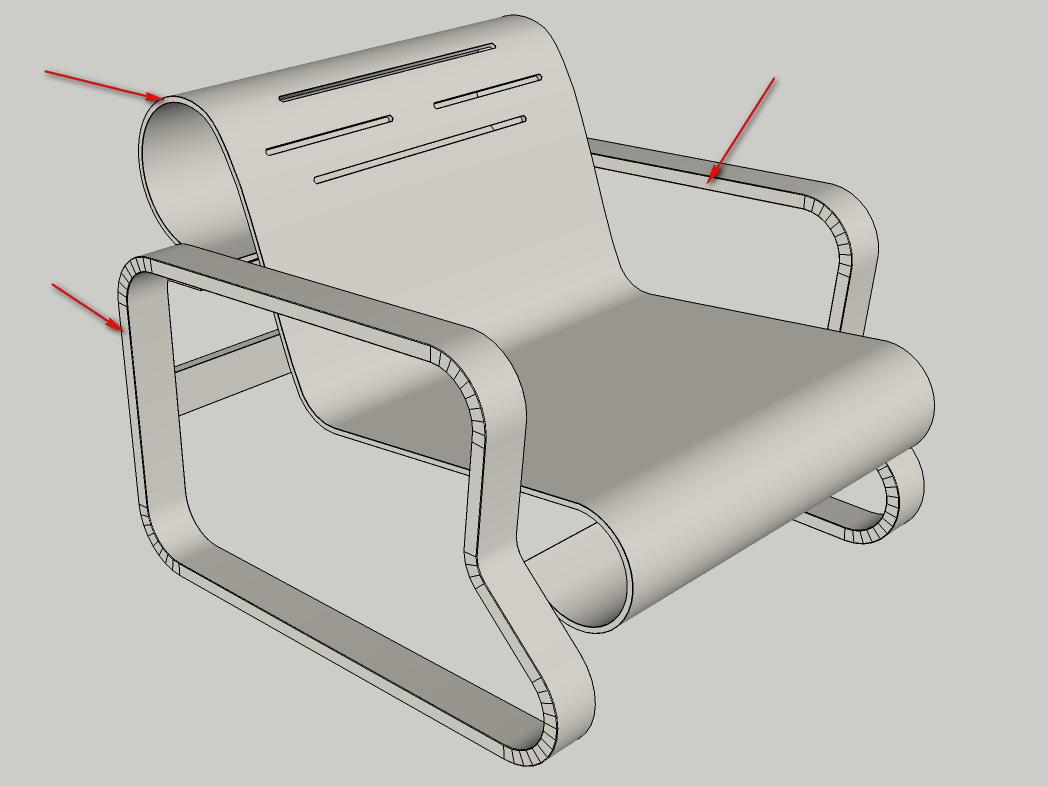
      I want to put "plywood edge" texture on this model, but the texture to follow the bending. Any idea how to do this?

      I attached the model and the texture.
      The model is from 3dwarehouse, a little tweaked.

      Thank you very much

      Armchair.png


      Armchair.skp


      wborder.jpg

      posted in SketchUp Discussions sketchup
      dereiD
      derei
    • RE: Toolbar icons position bug

      I have no idea why, but Restore Toolbar Icons doesn't work anymore 😞 Has this been happening to others, or is just me?
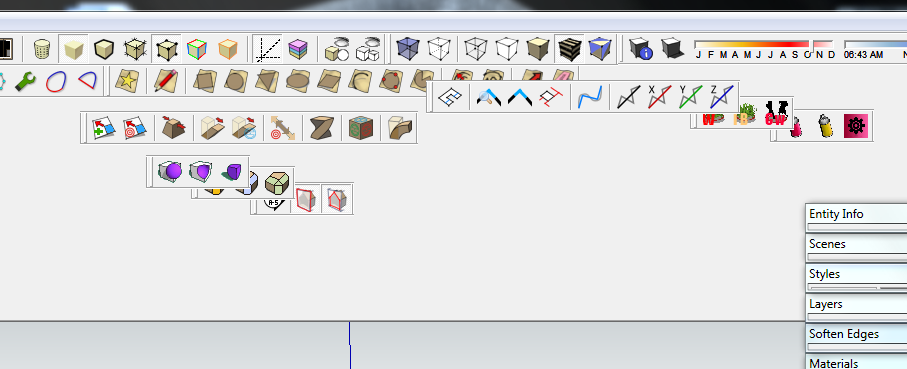
      Scenario: Twilight Render is working, by mistake I pressed the Maximize button and the toolbar was messed-up. I maximized the window back and tried to restore the toolbars from SketchUp menu(yes, I saved it when I arranged it first time). All I got was a useless "ding" made by my operating system πŸ˜• And this is happening since I updated SU8.

      Please tell me, is it just me, or last SU8 (M2) update is very unstable?

      posted in SketchUp Bug Reporting
      dereiD
      derei
    • SketchUp M2 - Browse for texture problem !!

      I just had a nasty problem with SU8 M2 .. I wanted to change the texture for a material, I clicked on Browse button (that little folder), but no window has opened, instead I heard that "ding" every time I was clicking anywhere on the screen, like it was telling me that I have a modal window opened.
      It happened once, I have no idea how to reproduce it, but is not the only strange thing that I encountered since that update... it looks like it became unstable.

      posted in SketchUp Bug Reporting sketchup
      dereiD
      derei
    • Toolbar icons position bug

      I encountered this after a friend played a game called Luxor on my PC. The game ran in Full-Screen mode and after it was closed, the icons on Skethcup (sketchup was running at that time) were messed up. I tried to use Restore Toolbar Icons command from menu, but nothing happened.
      What's worse, is from that time, I couldn't place the toolbars manually neither. You can see from the image what is happening.
      Can it be a Registry issue? If yes, can it be solved?


      2012-01-06_014524.png

      posted in SketchUp Bug Reporting sketchup
      dereiD
      derei
    • 1 / 1