SVG file Import (importing)
-
Now, a not importable svg opened with Inkscape and saved as "simple svg"
It rocks!
Xavier
-
Hm...
"Simple svg" is a french translation for "Plain svg"
So, in Inkscape, choose "Save as Plain svg" to have a file you can open in SU.
Xavier
-
Ah yes, it now works. I have Inskscape installed, but I missed the "Save as Plain SVG" Option.
Thank you, Xavier.
-
Has anyone experienced problems with the sandbox tool after installing SVG import ? I did : no more smoove...
-
yes the two don't work together
-
Thanks a lot CadFather, I'll deal with it

-
Hello. I am a newbie and I speak Russian. Translation of Google. I have a problem. When you import an SVG, I receive an error:
Error (in script) while reading “D:\Libelle_3-view-SIMPLE.svg”:
Exception parsingHow to solve this problem?
Regards Max. -
Hi -
Has anyone used this scrip in SU8 yet?
I get the following error when I try to import:
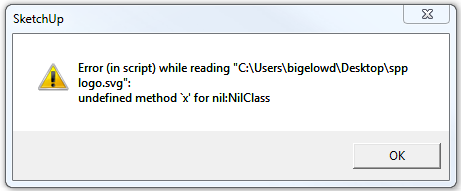
-
Hi danbig,
You need to open your SVG file with inkscape.- Go into Inskcape's preferences
- Under "Tools" select "SVG output"
- Under "Path data" - uncheck "Allow relative coordinates"
- Right below that - check "Force repeat commands"
Be sure to save the new preferences by hitting the little triangle-in-a-box button in the top right corner of the preferences window.
Once you do that, you can save Plain SVG files and import them successfully into Sketchup for further manipulation.
-
Where I can find this SVG importer ? Is it possible to be posted here, on SketchUcation?
Thank you. -
http://flightsofideas.net/ seems to be the source of many things SVG...
e.g http://code.google.com/p/sketchup-svg-outline-plugin/downloads/detail?name=sketchup-svg-outlines-plugin-0.99.zip
and for which http://www.sketchucation.com/forums/viewtopic.php?f=323&t=29481 also applies ?
BUT this http://rhin.crai.archi.fr/rld/plugin_details.php?id=435
etc etc... -
@catalyst said:
Hi danbig,
You need to open your SVG file with inkscape.- Go into Inskcape's preferences
- Under "Tools" select "SVG output"
- Under "Path data" - uncheck "Allow relative coordinates"
- Right below that - check "Force repeat commands"
Be sure to save the new preferences by hitting the little triangle-in-a-box button in the top right corner of the preferences window.
Once you do that, you can save Plain SVG files and import them successfully into Sketchup for further manipulation.
I HAVE NOT BEEN ABLE TO SUCCESSFULLY IMPORT A PLAIN SVG FILE INTO SKETCHUP MAKE 2014 USING THIS METHOD. IS THERE ANY ADDITIONAL STEPS I NEED? GOAL IS TO INPUT A SVG FILE (THE WORDS "PEACE" "ON" AND 'EARTH" WHICH HAVE BEEN TRACED AND WELDED TOGETHER IN TO THREE INDIVIDUAL SVGS.) OF A WELDED WORD INTO SKETCHUP AND EXTRUDE IT TO MAKE A 3D 'BOX' ABOUT 2" THICK.



Hello! It looks like you're interested in this conversation, but you don't have an account yet.
Getting fed up of having to scroll through the same posts each visit? When you register for an account, you'll always come back to exactly where you were before, and choose to be notified of new replies (either via email, or push notification). You'll also be able to save bookmarks and upvote posts to show your appreciation to other community members.
With your input, this post could be even better 💗
Register Login


Advertisement